Introduction
This manual provides comprehensive instructions for the safe and efficient operation of your Audiocrazy Shortwave Radio, Model AC-BT1702RUC. Please read this manual thoroughly before using the product and retain it for future reference.

Figure 1: Audiocrazy Shortwave Radio AC-BT1702RUC, front view with antenna extended.
Safety Information
To ensure safe operation and prevent damage, please observe the following precautions:
- Do not expose the radio to rain, moisture, or extreme temperatures.
- Avoid dropping or subjecting the radio to strong impacts.
- Do not disassemble or attempt to repair the radio yourself. Refer all servicing to qualified personnel.
- Keep the radio away from strong magnetic fields.
- When using AC power, ensure the voltage matches the radio's requirements (120V).
- Remove batteries if the radio will not be used for an extended period to prevent leakage.
Package Contents
Verify that all items are present in the package:
- 1 x Audiocrazy Shortwave Radio (Model AC-BT1702RUC)
- 1 x AC Power Cord
- 1 x User Manual (This document)

Figure 2: Included components: Radio, AC Power Cord, and User Manual.
Product Overview
Familiarize yourself with the various parts and controls of your radio.

Figure 3: Front and top view of the radio highlighting key controls and ports.
Controls and Ports:
- Function Knob: Selects between SW1-6, AM, FM, and BT/USB modes.
- Tuning Knob: Adjusts the frequency to tune into radio stations.
- Volume Knob: Controls the audio output level.
- 3.5mm Earphone Jack: For private listening with headphones.
- USB Port: For playing audio from USB flash drives.
- SD Card Slot: For playing audio from SD memory cards.
- Retractable Telescopic Antenna: Improves radio reception, especially for FM and SW bands.
- Carry Handle: For portable transport.
Setup
Powering the Radio:
Your Audiocrazy radio offers flexible power options:
- AC Power:
Insert the included AC power cord into the radio's AC input jack and then plug it into a standard 120V AC wall outlet. This is recommended for indoor use.
- D Size Batteries:
For portable use without a power outlet, the radio can be powered by 2 x D size batteries (not included). Open the battery compartment on the back of the radio and insert the batteries, ensuring correct polarity (+/-).
- Built-in Rechargeable Battery:
The radio features a built-in rechargeable battery for convenient portable use. When connected to AC power, the internal battery will charge automatically. The "CHARGE" indicator light will illuminate during charging.
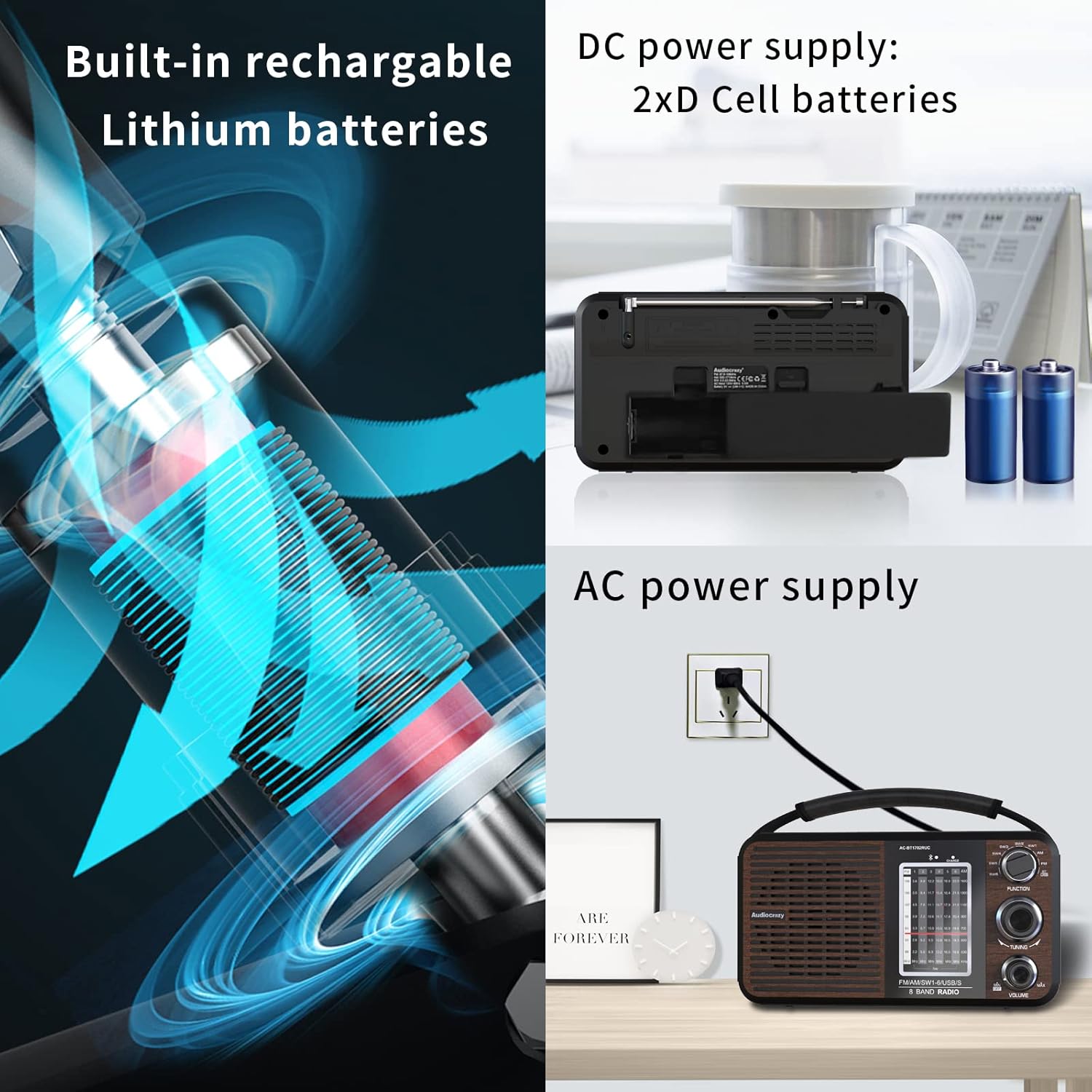
Figure 4: Illustration of the radio's multiple power supply options.
Antenna Setup:
For optimal radio reception, especially for FM and Shortwave bands, fully extend the telescopic antenna. For AM reception, the radio has a built-in AM antenna, and antenna extension is not typically required, but adjusting the radio's orientation may improve reception.

Figure 5: Extending the antenna for improved signal reception.
Operating Instructions
Turning On/Off and Volume Control:
Rotate the Volume Knob clockwise to turn on the radio and increase the volume. Rotate it counter-clockwise to decrease the volume and turn off the radio.

Figure 6: Detail of the tuning and volume control knobs.
Radio Tuning (AM/FM/SW):
- Rotate the Function Knob to select your desired band: AM, FM, or SW (SW1-6).
- Slowly rotate the Tuning Knob to scan for radio stations. The frequency display will indicate the current tuning position.
- Adjust the antenna position and length for optimal reception, especially for FM and Shortwave bands.
Bluetooth Playback:
- Rotate the Function Knob to the "BT/USB" position. The radio will enter Bluetooth pairing mode.
- On your Bluetooth-enabled device (e.g., smartphone, tablet), search for available Bluetooth devices and select "AC-BT1702RUC" to pair.
- Once paired, you can play audio from your device through the radio's speaker.
USB/SD Card Playback:
- Insert a USB flash drive into the USB port or an SD card into the SD card slot.
- Rotate the Function Knob to the "BT/USB" position. The radio will automatically detect and begin playing audio files (e.g., MP3) from the inserted storage device.
- Use the playback control buttons (if available, typically labeled Previous/Next/Play/Pause) near the USB/SD slots to navigate tracks.

Figure 7: Location of USB Disk Jack and SD Card slot.
Earphone Jack Usage:
To listen privately, plug any standard 3.5mm earphone or headphone into the 3.5mm Earphone Jack located on the side of the radio. The internal speaker will automatically mute when earphones are connected.

Figure 8: Using the 3.5mm earphone jack for private listening.
Maintenance
- Cleaning: Wipe the radio's exterior with a soft, dry cloth. Do not use abrasive cleaners, waxes, or solvents.
- Storage: Store the radio in a cool, dry place away from direct sunlight and extreme temperatures. If storing for an extended period, remove any D size batteries.
- Antenna Care: Handle the telescopic antenna gently to prevent bending or breaking. Retract it when not in use or during transport.
Troubleshooting
| Problem | Possible Cause | Solution |
|---|---|---|
| Radio does not turn on. | No power, batteries depleted or incorrectly inserted, AC cord not connected. | Check AC power connection. Replace D batteries or ensure they are inserted with correct polarity. Allow built-in battery to charge. |
| Poor radio reception. | Antenna not extended, weak signal, interference. | Fully extend the telescopic antenna. Rotate the radio for better AM reception. Try tuning to a stronger station. Move away from electronic devices causing interference. |
| No sound from speaker. | Volume too low, earphones connected, speaker malfunction. | Increase volume. Disconnect earphones. If problem persists, contact support. |
| Bluetooth not pairing. | Radio not in BT mode, device too far, device already paired. | Ensure Function Knob is set to "BT/USB". Move device closer to radio. Disconnect from other Bluetooth devices. |
| USB/SD playback not working. | Incorrect file format, corrupted files, card/drive not inserted correctly. | Ensure audio files are in a supported format (e.g., MP3). Reinsert USB drive/SD card. Try a different USB drive/SD card. |
Specifications
| Feature | Detail |
|---|---|
| Model Number | AC-BT1702RUC |
| Brand | Audiocrazy |
| Radio Bands Supported | AM, FM, SW1-6 |
| FM Frequency Range | 87.5-108 MHz |
| AM Frequency Range | 520-1710 KHz |
| SW Frequency Range | 3.5-23 MHz |
| Connectivity | Auxiliary (3.5mm), Bluetooth, USB |
| Power Source | AC 120V, 2x D Size Batteries (not included), Built-in Rechargeable Lithium Battery |
| Product Dimensions (L x W x H) | 23.88 x 11.94 x 11.94 cm (9.4 x 4.7 x 4.7 inches) |
| Weight | 750 g |
| Special Features | Built-In AM Antenna, Rechargeable Battery, USB/SD Playback |
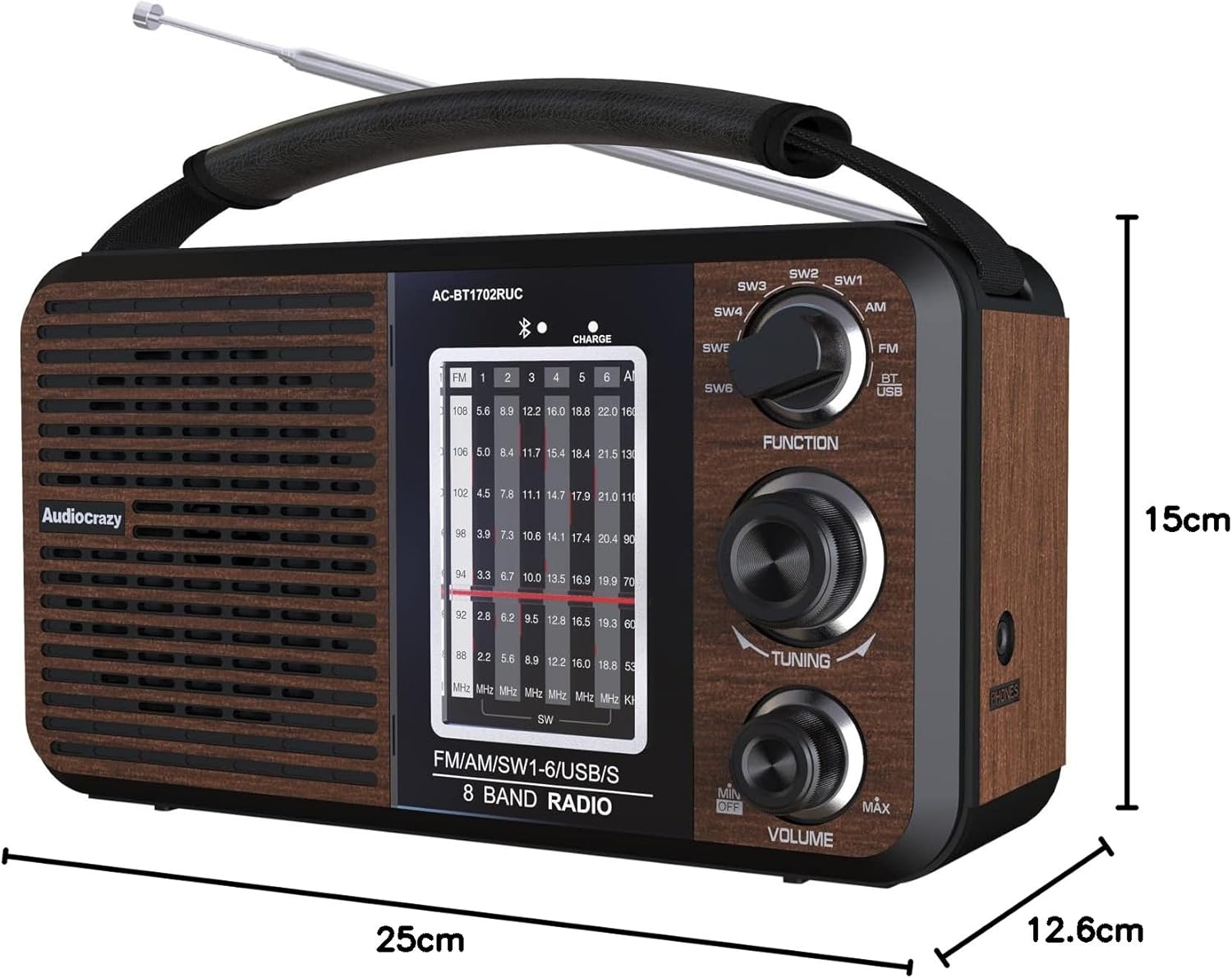
Figure 9: Product dimensions in centimeters.
Warranty and Support
For warranty information or technical support, please refer to the contact details provided with your purchase or visit the official Audiocrazy website. Keep your purchase receipt as proof of purchase.


