
NICREW B09KKRNR5Y
NICREW Automatic Pet Feeder Instruction Manual
Model: B09KKRNR5Y
Introduction
Thank you for choosing the NICREW Automatic Pet Feeder. This device is designed to provide convenient and consistent feeding for your pet, ensuring they receive their meals on schedule, even when you are away. Please read this manual thoroughly before operating the feeder to ensure proper use and maintenance.
Safety Information
- Always place the feeder on a stable, level surface to prevent tipping.
- Keep the feeder away from direct sunlight and heat sources.
- Do not immerse the main unit in water or any other liquid.
- This product is intended for indoor use only.
- Keep out of reach of children and pets to prevent tampering or injury.
- Use only the provided power adapter.
- If using batteries, ensure they are inserted with correct polarity. Remove batteries if the feeder will not be used for an extended period.
- Only use dry pet food with this feeder. Do not use wet food.
Package Contents
Please check the package to ensure all items are present and in good condition:
- NICREW Automatic Pet Feeder Main Unit
- Stainless Steel Food Bowl
- Power Adapter
- Desiccant Bag
- User Manual
Product Overview

Image: The NICREW Automatic Pet Feeder, a white cylindrical device with a transparent food reservoir at the top, a control panel on the front, and a stainless steel bowl at its base, filled with pet kibble.
The NICREW Automatic Pet Feeder is designed for ease of use and reliability. It features a large capacity food reservoir, a user-friendly control panel, and a durable stainless steel food bowl.
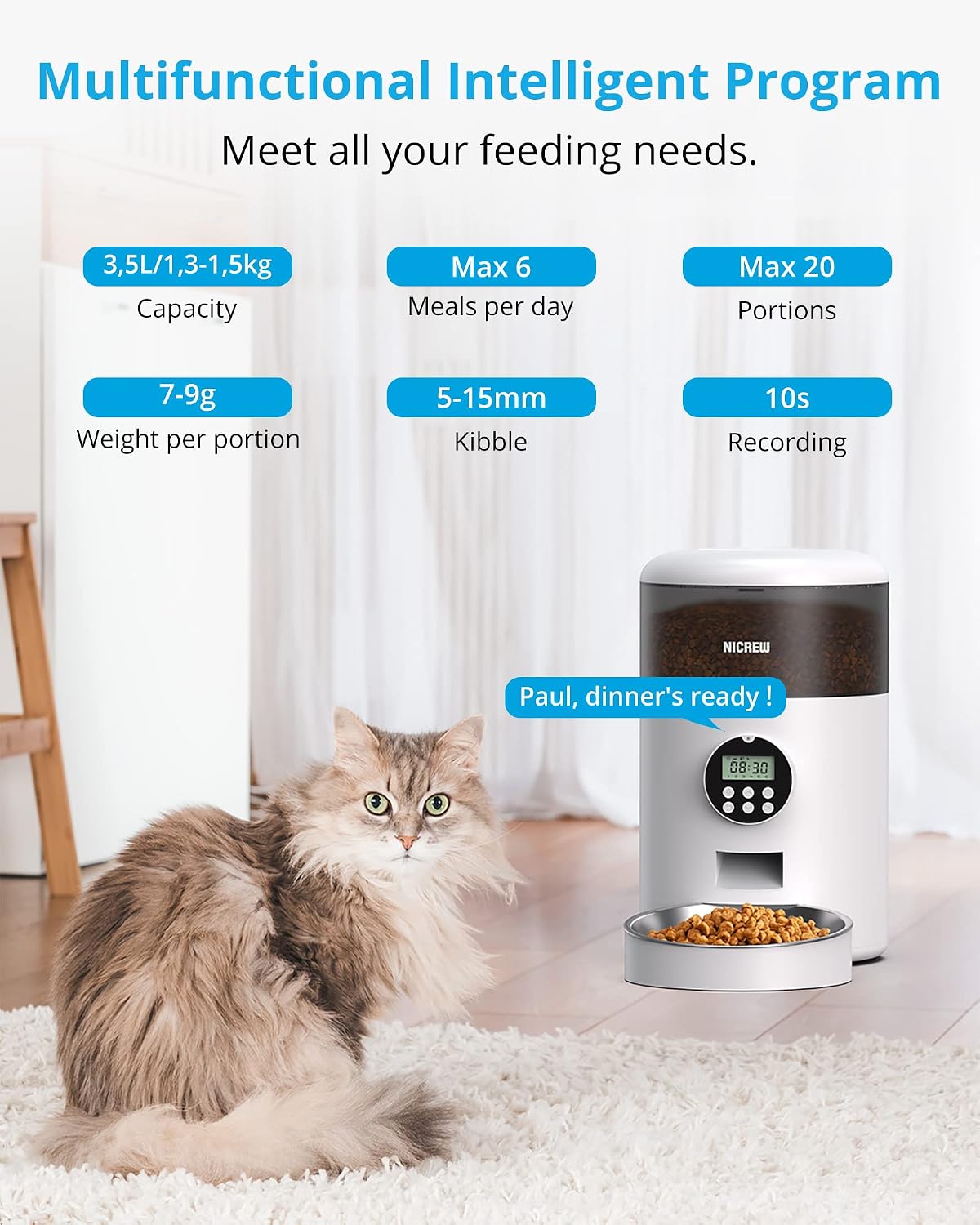
Image: An illustration highlighting the feeder's features: 3.5L capacity (1.3-1.5kg food), Max 6 meals per day, Max 20 portions per meal, 7-9g weight per portion, suitable for 5-15mm kibble, and 10s recording function. A cat sits next to the feeder, which displays "Paul, dinner's ready!"
Key features include a 3.5L capacity, support for up to 6 meals per day with up to 20 portions per meal (each portion 7-9g), and a 10-second voice recording function to call your pet.
Setup
1. Power Supply

Image: The bottom of the feeder showing the battery compartment for three D-type batteries (not included) and the port for the power adapter. Text indicates "Power supply + Battery supply" to prevent worries about power outages.
The feeder supports dual power supply options:
- Adapter Power: Connect the provided power adapter to the feeder's power port and plug it into a wall outlet.
- Battery Power: For backup or portable use, insert three D-type batteries (not included) into the battery compartment at the bottom of the feeder. It is recommended to use both power sources simultaneously to ensure continuous operation during power outages.
2. Assembly and Filling
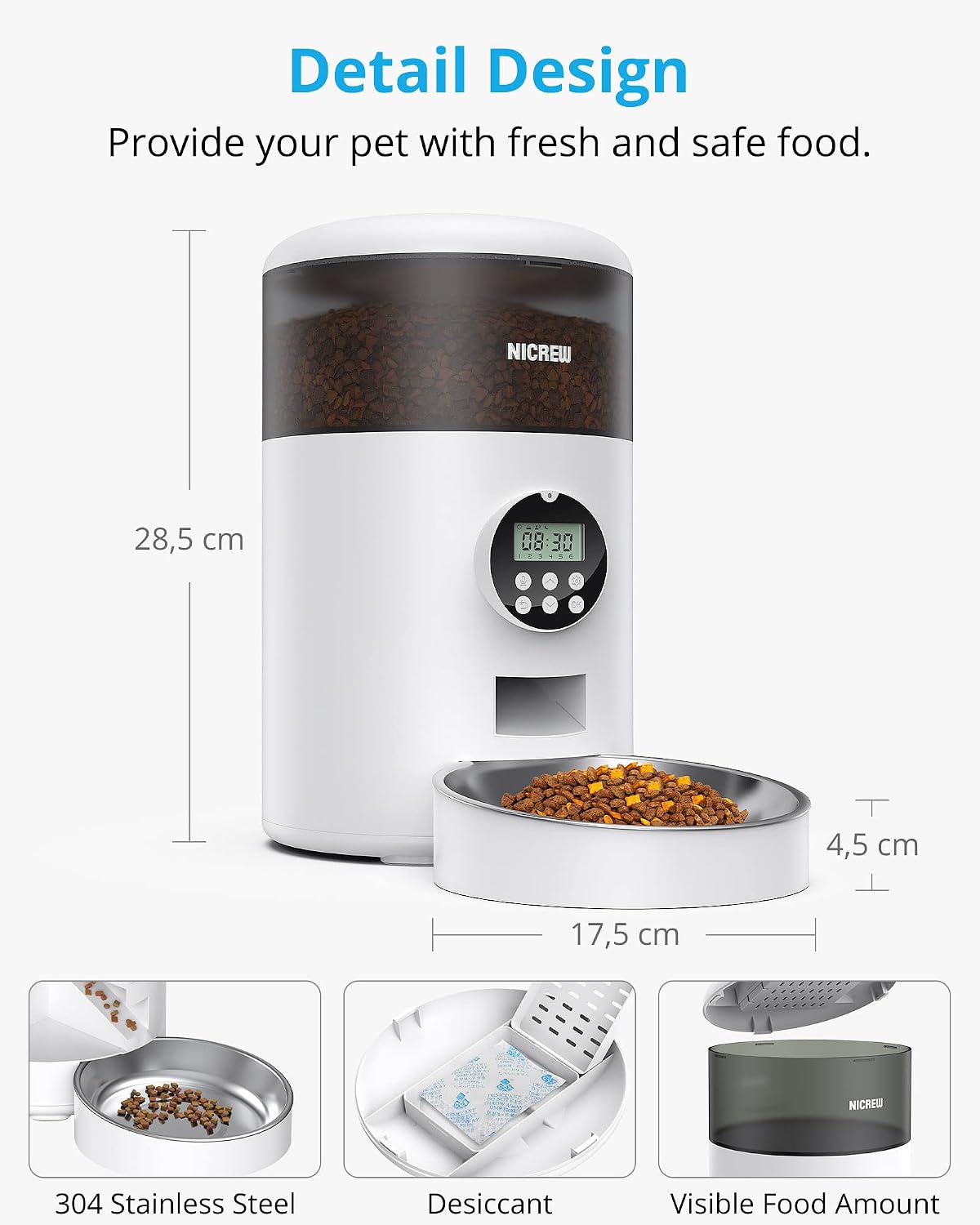
Image: A detailed view of the feeder showing its dimensions (28.5 cm height, 17.5 cm bowl diameter, 4.5 cm bowl height). Insets highlight the 304 Stainless Steel bowl, the desiccant compartment, and the visible food amount through the transparent reservoir.
- Place the stainless steel food bowl onto the feeder's base.
- Open the lid of the food reservoir.
- Insert the desiccant bag into its designated compartment under the lid to keep food fresh.
- Pour dry pet food into the reservoir. The transparent design allows you to monitor the food level.
- Close the lid securely.
Operating Instructions
1. Control Panel Overview

Image: A close-up of the feeder's control panel, labeling its components: Indicator light, Buzzer, Microphone, Low Battery icon, Insufficient Food icon, Up button, Recording button, Return/Cancel button, Setting button, Confirm (OK) button, and Down button. The display shows "08:30".
Familiarize yourself with the control panel buttons and indicators:
- Indicator: Status light.
- Buzzer: Audible alerts.
- Microphone: For voice recording.
- Low Battery Icon: Appears when battery power is low.
- Insufficient Food Icon: Appears when food level is low.
- Up/Down Buttons: Navigate menu options and adjust values.
- Recording Button: Initiate voice recording.
- Return/Cancel Button: Go back or cancel current setting.
- Setting Button: Enter programming mode.
- Confirm (OK) Button: Confirm selections.
2. Setting Current Time
- Press the Setting button. The hour digit will flash.
- Use the Up and Down buttons to adjust the hour.
- Press OK to confirm and move to the minute setting.
- Use the Up and Down buttons to adjust the minute.
- Press OK to save the time.
3. Programming Feeding Schedule
The feeder allows up to 6 meals per day, with adjustable portions for each meal.
- Press the Setting button repeatedly until "Meal 1" (or "F-01") appears on the display.
- Use Up and Down to select the meal number (F-01 to F-06).
- Press OK. The hour for the selected meal will flash.
- Adjust the hour using Up and Down, then press OK.
- Adjust the minute using Up and Down, then press OK.
- The portion number will flash (e.g., "01"). Use Up and Down to set the number of portions (1-20). Each portion is approximately 7-9g.
- Press OK to save the settings for this meal.
- Repeat for other meals as desired. To disable a meal, set its portion number to "0".
4. Voice Recording
You can record a 10-second message that will play during each feeding time.
- Press and hold the Recording button until the indicator light flashes.
- Speak your message clearly into the microphone. The recording will last up to 10 seconds.
- Release the Recording button to stop. The message will play back automatically.
- To delete the recording, press and hold the Recording button until the indicator light flashes, then release it immediately without speaking.
5. Manual Feeding
To dispense food manually, press the OK button once. One portion will be dispensed.
6. Feeder Alarms and Indicators
- Low Battery Reminder: The low battery icon will appear on the display when battery power is low. Replace batteries promptly.
- Food Shortage Reminder: The insufficient food icon will appear on the display when the food level in the reservoir is low. Refill the food reservoir.
Maintenance
1. Cleaning

Image: An exploded view of the feeder showing its components being separated for cleaning, including the food bucket, the stainless steel bowl, and the food tray. Water splashes indicate the parts are washable.
Regular cleaning is essential for your pet's health and the feeder's longevity.
- Unplug the feeder and remove any batteries before cleaning.
- The food bucket, food tray, and stainless steel bowl are removable and washable. Wash them with mild soap and water, then rinse thoroughly.
- Ensure all parts are completely dry before reassembling them.
- Wipe the main unit with a soft, damp cloth. Do not immerse the main unit in water.
2. Desiccant Replacement
The desiccant bag helps keep the food fresh. Replace it every 1-2 months, or as needed, depending on humidity levels.
Troubleshooting
| Problem | Possible Cause | Solution |
|---|---|---|
| Feeder not dispensing food. |
|
|
| Voice recording not playing or unclear. |
|
|
| Low battery indicator is on. |
|
|
| Insufficient food indicator is on. |
|
|
Specifications
- Model: B09KKRNR5Y
- Capacity: 3.5 Liters (approx. 1.3-1.5 kg dry food)
- Material: Stainless Steel (bowl), Plastic (main unit)
- Dimensions: Approximately 28.5 cm (Height) x 17.5 cm (Base Diameter)
- Portion Size: 7-9 grams per portion
- Max Meals: Up to 6 meals per day
- Max Portions per Meal: Up to 20 portions
- Voice Recording: 10 seconds
- Power Source: DC 5V/1A adapter (included) or 3 x D-type batteries (not included)
- Target Species: Cat, Dog
Warranty and Support
NICREW provides a 12-month worry-free warranty and 24-hour friendly customer service. For any questions or issues, please contact NICREW customer support through the retailer's platform or the official NICREW website. Please have your model number (B09KKRNR5Y) and purchase information ready when contacting support.
For more information and support, you can visit the NICREW Brand Store.
Ask a question about this manual
Ask about setup, troubleshooting, compatibility, parts, safety, or missing instructions. Manuals+ will review the question and use this page’s manual context to help answer it.