
Luminous Eco Watt+950 Inverter, RC25000 Tubular Battery
LUMINOUS Eco Watt+950 Inverter and RC25000 200 Ah Tubular Battery System User Manual
Model: Eco Watt+950 Inverter, RC25000 Tubular Battery
Introduction
This manual provides essential information for the safe and efficient operation, installation, and maintenance of your Luminous Eco Watt+950 Inverter and RC25000 200 Ah Tubular Battery system. Please read this manual thoroughly before using the product and keep it for future reference.
Product Overview
The Luminous Eco Watt+950 Inverter and RC25000 200 Ah Tubular Battery system is designed to provide reliable power backup for your home or commercial space, ensuring uninterrupted power supply during outages. This system includes an inverter unit, a high-capacity tubular battery, and a trolley for easy placement and mobility.
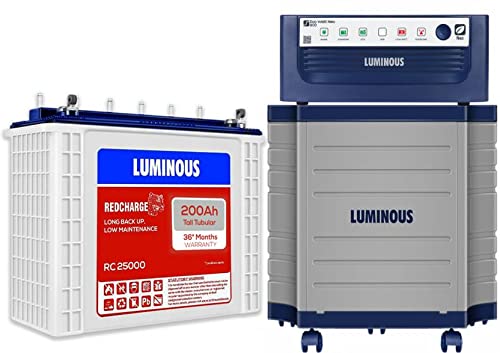
Figure 1: Luminous Eco Watt+950 Inverter, RC25000 200 Ah Tubular Battery, and TX100L Trolley. This image displays the Luminous Eco Watt+950 Inverter unit, a Luminous RC25000 200 Ah Tubular Battery, and the accompanying TX100L Trolley. The inverter is dark blue, positioned on top of a grey trolley, while the white and red battery is shown next to it.
Setup and Installation
Proper setup is crucial for the optimal performance and longevity of your inverter and battery system. It is highly recommended to have the installation performed by a qualified electrician or the seller's authorized service personnel, especially if this is your first time installing such a system, as additional electrical wiring or socket setup may be required.
1. Unpacking
- Carefully unpack all components: Inverter unit, Battery, and Trolley.
- Inspect for any visible damage. If any damage is found, contact your seller immediately.
- Retain original packaging for future transportation or service needs.
2. Placement
- Choose a well-ventilated area, away from direct sunlight, heat sources, and flammable materials.
- Ensure the surface is level and strong enough to support the combined weight of the inverter, battery, and trolley.
- Maintain adequate clearance around the inverter for proper airflow.
3. Battery Connection
- Place the RC25000 Tubular Battery securely onto the TX100L Trolley.
- Connect the red positive (+) cable from the inverter to the red positive (+) terminal of the battery. Ensure a tight connection.
- Connect the black negative (-) cable from the inverter to the black negative (-) terminal of the battery. Ensure a tight connection.
- Apply petroleum jelly or anti-corrosion grease to the battery terminals to prevent oxidation.
4. Inverter Connection
- Plug the inverter's AC input cord into a properly grounded wall socket.
- Connect your appliances or home wiring to the inverter's output sockets or terminals as per the wiring diagram provided by your installer.
5. Initial Charging
- After all connections are made, switch on the inverter.
- Allow the battery to charge fully before the first power outage. This initial charge can take several hours.
Operating Instructions
1. Turning On/Off
- To turn on the inverter, press the power button located on the front panel. The indicator lights will illuminate.
- To turn off the inverter, press and hold the power button until the unit shuts down.
2. Indicator Lights/Display
The Eco Watt+950 Inverter features various indicator lights or a display panel to show its operational status. Common indicators include:
- Mains On: Indicates that the inverter is receiving AC power from the grid.
- Battery Charging: Shows that the battery is currently being charged.
- Inverter On/Backup Mode: Indicates that the inverter is supplying power from the battery during a power cut.
- Low Battery: Warns that the battery charge is low and needs recharging.
- Overload: Indicates that the connected load exceeds the inverter's capacity.
- Fault/Error: Signals a system malfunction. Refer to the troubleshooting section.
3. Load Management
- Do not overload the inverter beyond its specified capacity. Overloading can cause the inverter to shut down or damage connected appliances.
- Prioritize essential appliances during power outages to maximize backup time.
Maintenance
Regular maintenance ensures the longevity and efficient performance of your Luminous inverter and battery system. The RC25000 Tubular Battery is designed for low maintenance due to its low antimony alloy composition.
1. Battery Maintenance (RC25000 Tubular Battery)
- Water Level Check: Periodically check the electrolyte level in the battery (typically every 2-3 months). Ensure the level is between the minimum and maximum marks. Use only distilled water to top up if necessary. Do not use tap water.
- Terminal Cleaning: Keep battery terminals clean and free from corrosion. If corrosion is present, clean with a mixture of baking soda and water, then rinse with clean water and dry thoroughly. Reapply petroleum jelly.
- Ventilation: Ensure the battery area is well-ventilated to dissipate gases produced during charging.
2. Inverter Maintenance (Eco Watt+950)
- Cleaning: Keep the inverter unit clean and free from dust. Use a soft, dry cloth. Ensure ventilation vents are not blocked.
- Connections: Periodically check all electrical connections for tightness and signs of wear.
3. General Tips
- Avoid deep discharge of the battery whenever possible.
- Ensure the battery is fully charged after every power outage.
- If the system is not used for an extended period, ensure the battery is fully charged and then disconnect it. Recharge periodically if stored.
Troubleshooting
This section provides solutions to common issues you might encounter. For problems not listed here or if solutions do not work, please contact customer support.
| Problem | Possible Cause | Solution |
|---|---|---|
| Inverter not turning on. | No AC input power; Battery discharged; Loose connections. | Check mains power supply; Ensure battery is charged; Verify all cable connections are secure. |
| Short backup time. | Battery not fully charged; Battery degradation; Overload. | Allow battery to fully charge; Check battery health (contact service); Reduce connected load. |
| Overload indicator on. | Too many appliances connected. | Disconnect some appliances; Restart the inverter. |
| Battery not charging. | Mains power off; Loose charging cable; Battery fault. | Check mains supply; Secure charging cable; Contact service if battery fault is suspected. |
Specifications
| Feature | Detail |
|---|---|
| Brand | Luminous |
| Inverter Model | Eco Watt+950 |
| Battery Model | RC25000 |
| Battery Type | Tubular Battery |
| Battery Capacity | 200 Ah (12V) |
| Recommended Use | Home Power Backup |
| Power Source | Battery Powered |
| Item Dimensions (LxWxH) | 20 x 19 x 44 Centimeters (for battery) |
| Included Components | Instruction Manual (this document) |
Warranty and Support
Warranty Information
The Luminous RC25000 Tubular Battery comes with a 36 Months Warranty from the date of purchase. Please retain your purchase invoice for warranty claims. The overall system warranty may vary; refer to your purchase documentation for details on the Eco Watt+950 Inverter and TX100L Trolley.
Note: The product does not require on-site installation or demo from the manufacturer. For installation assistance, please check with your seller during delivery.
Customer Support
For any technical assistance, service requests, or queries regarding your Luminous product, please contact Luminous customer support or your authorized dealer. You can find contact details on the Luminous official website or your product packaging.
For more information, you may visit the Luminous Store on Amazon.
Ask a question about this manual
Ask about setup, troubleshooting, compatibility, parts, safety, or missing instructions. Manuals+ will review the question and use this page’s manual context to help answer it.