
1. Important Safety Information
Please read all instructions carefully before assembly and use. Retain this manual for future reference.
- Ensure all components are present and undamaged before assembly. Do not use if any parts are missing or broken.
- Assemble the chair on a soft, clean surface to prevent scratches.
- Do not overtighten screws during assembly.
- Keep children and pets away from the assembly area.
- Do not stand on the chair or ottoman.
- Maximum weight capacity for the chair is 160 kg. Maximum weight capacity for the ottoman is 20 kg. Do not exceed these limits.
- Ensure the power cord for the massage function is not pinched or damaged. Unplug when not in use or before cleaning.
- Use only indoors.
2. Package Contents
Verify that all the following items are included in your package:
- Massage Recliner Chair (1 unit)
- Ottoman (1 unit)
- Power Adapter for Massage Function (1 unit)
- Remote Control for Massage Function (1 unit)
- Assembly Hardware Kit (screws, washers, Allen key)
- Instruction Manual (this document)
3. Assembly Instructions
Assembly is required for this product. Please follow these steps carefully:
- Unpack Components: Carefully remove all parts from the packaging. Lay them out on a soft, clean surface to prevent damage.
- Assemble the Chair Base: Attach the chair's main support frame to the swivel base using the provided screws and tools. Ensure all connections are secure.
- Attach the Backrest: Slide the backrest onto the seat frame. Secure it with the designated bolts and tighten them firmly.
- Connect Armrests: Attach the armrests to the sides of the chair frame, ensuring they are aligned correctly and securely fastened.
- Assemble the Ottoman: Connect the ottoman cushion to its base using the provided hardware.
- Connect Power: Locate the power input for the massage function, usually at the back or side of the chair. Connect the power adapter.
- Final Check: Before use, gently shake the assembled chair and ottoman to ensure all connections are stable and secure.

Figure 3.1: Overview of chair components, including headrest, armrests, side pocket, and ottoman.
4. Operating Instructions
4.1 Reclining Function
The chair features a reclining mechanism allowing adjustment up to 145 degrees for optimal comfort. It also swivels 360 degrees.
- To Recline: Lean back gently while pushing on the armrests. The chair will smoothly recline.
- To Adjust Recline Angle: Use the adjustment knob, typically located on the side or underneath the seat, to lock the desired recline position.
- To Return Upright: Lean forward slightly and push on the armrests. The chair will return to its upright position.

Figure 4.1: Illustration of the chair's tilt mechanism, allowing recline for reading, watching TV, or napping.
4.2 Massage Function
The chair is equipped with ten vibration massage points for targeted relaxation.
- Massage Zones: Six points in the back and lumbar area, two on the thighs, and two on the calves.
- Using the Remote Control: Connect the power adapter to a suitable electrical outlet. Use the provided remote control to activate and customize the massage settings.
- Settings: The remote allows you to select different massage zones, intensity levels, and massage modes. Refer to the remote control's specific buttons for detailed functions.
- Duration: Most massage programs have a default timer. Do not use the massage function for extended periods without breaks.
- Safety: Unplug the chair when the massage function is not in use.
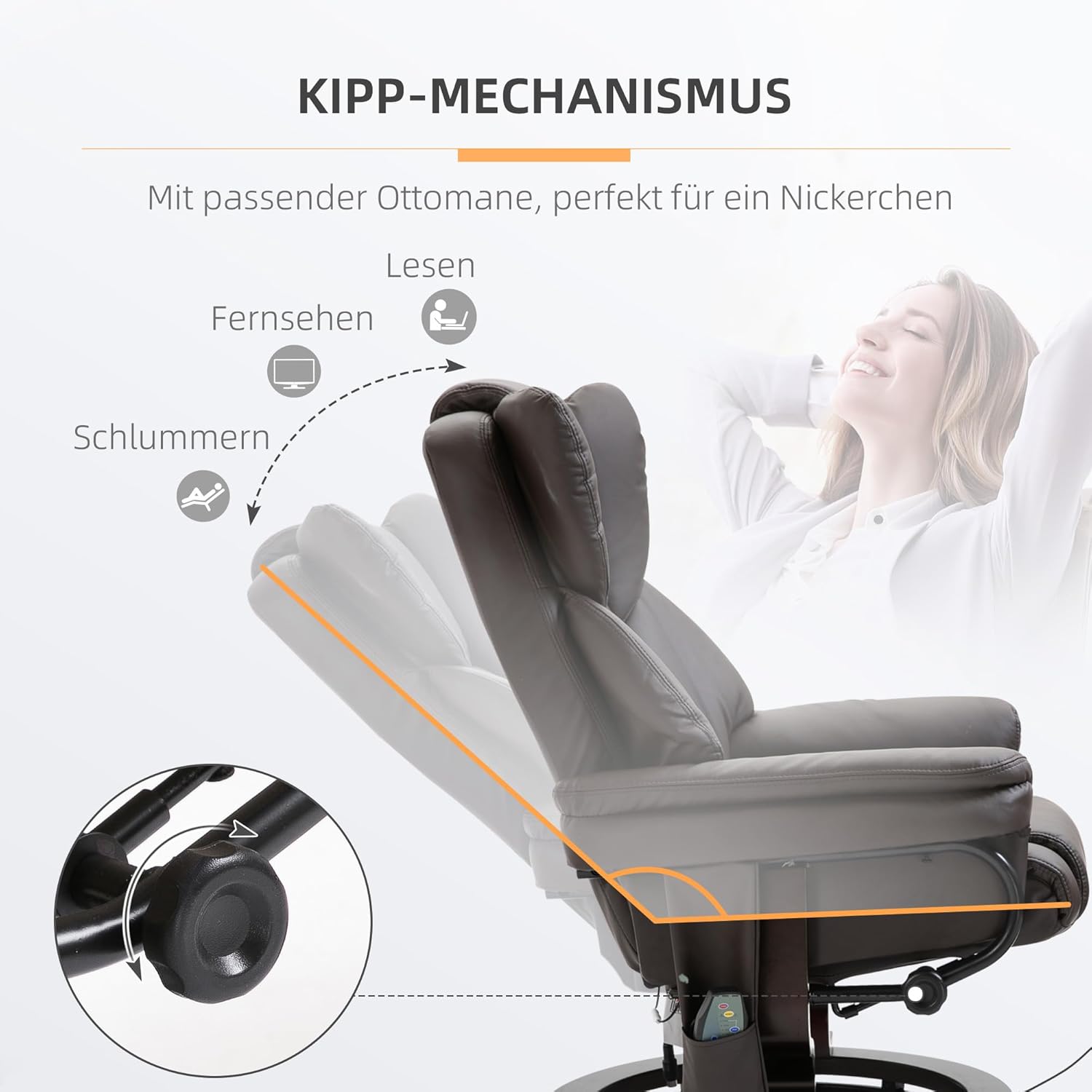
Figure 4.2: The 10-point vibration massage system and remote control for targeting neck, back, lumbar, thigh, and leg areas.
5. Maintenance and Care
Proper care will extend the life of your HOMCOM Massage Recliner.
- Cleaning: Wipe the artificial leather surface with a soft, damp cloth. For stubborn stains, use a mild soap solution and wipe dry immediately. Avoid harsh chemicals or abrasive cleaners.
- Spills: Blot spills immediately with a clean, dry cloth.
- Dusting: Regularly dust the chair and ottoman with a soft, dry cloth.
- Inspection: Periodically check all screws and bolts to ensure they remain tight. Retighten if necessary.
- Avoid Direct Sunlight: Prolonged exposure to direct sunlight can cause the artificial leather to fade or crack.
- Electrical Components: Keep the power adapter and remote control dry. Do not attempt to repair electrical components yourself.
6. Troubleshooting
If you encounter any issues, refer to the following common problems and solutions:
- Chair does not recline smoothly: Check for any obstructions around the reclining mechanism. Ensure all assembly bolts are securely tightened.
- Massage function not working:
- Ensure the power adapter is securely plugged into both the chair and a working electrical outlet.
- Check the remote control for battery issues (if applicable) or damage.
- Verify that the power switch on the chair (if present) is in the 'ON' position.
- Chair feels unstable: Recheck all assembly connections, especially the base and backrest. Ensure the chair is on a flat, even surface.
- Unusual noises during operation: Inspect for loose parts or friction points. Apply a small amount of silicone lubricant to moving metal parts if necessary, avoiding contact with upholstery.
If the problem persists after attempting these solutions, please contact customer support.
7. Product Specifications

Figure 7.1: Detailed dimensions of the recliner chair and ottoman.
| Feature | Detail |
|---|---|
| Brand | HOMCOM |
| Model Number | 700-116V91BN |
| Color | Brown |
| Material | Artificial Leather, Metal Frame, Foam Filling |
| Chair Dimensions (Upright) | 79W x 82D x 101H cm |
| Chair Dimensions (Reclined) | 80W x 112D x 95H cm |
| Ottoman Dimensions | 48W x 42D x 42.5H cm |
| Chair Weight | 20.1 kg |
| Max Chair Weight Capacity | 160 kg |
| Max Ottoman Weight Capacity | 20 kg |
| Recline Angle | Up to 145° |
| Swivel Function | 360° |
| Massage Points | 10 (Back, Lumbar, Thighs, Calves) |
| Power Source | Electric (Adapter included) |
| Assembly Required | Yes |
| Care Instructions | Wipe clean |
8. Warranty and Support
Specific warranty details may vary by region and retailer. Please refer to the warranty information provided at the time of purchase or contact your retailer directly for details regarding warranty coverage and support.
For technical assistance or inquiries about replacement parts, please contact HOMCOM customer service or your authorized dealer.


