
1. Important Safety Information
Read all safety warnings and instructions before using this product. Failure to follow the warnings and instructions may result in electric shock, fire, and/or serious injury.
- Do not operate the jump starter if it is damaged.
- Keep the jump starter away from water, moisture, and extreme temperatures.
- Do not attempt to jump start a frozen battery.
- Ensure proper polarity when connecting the clamps to the vehicle battery.
- Keep out of reach of children.
- Use only the provided smart jumper clamps.
- Do not short-circuit the clamps.
- Avoid prolonged exposure to direct sunlight.
2. Package Contents
Verify that all items are present in the package:
- FLYLINKTECH CF500 Car Jump Starter Battery Pack
- Smart Jumper Clamp
- Cigarette Lighter Adapter
- USB to Type C Cable
- USB to 3-in-1 Port Cable
- Storage Case
- User Manual (this document)
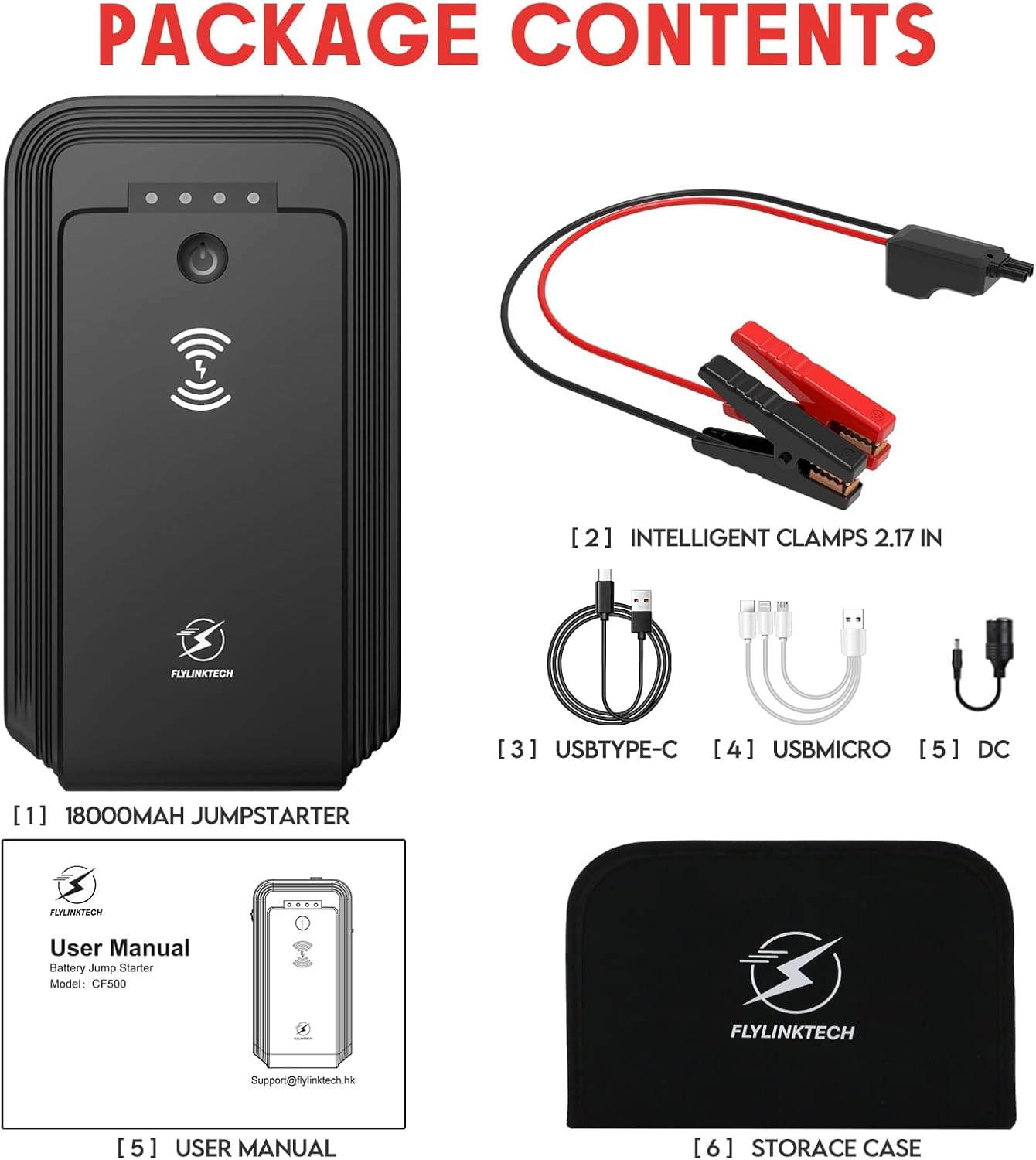
Image: The package contents include the jump starter unit, smart jumper clamps, various charging cables, a cigarette lighter adapter, and a storage case.
3. Product Overview
The FLYLINKTECH CF500 is a portable jump starter designed to provide emergency power for vehicles and charge electronic devices. It features a 3000A peak current for jump-starting, an 18000mAh power bank, wireless charging, and a multi-functional LED flashlight.

Image: The main unit of the FLYLINKTECH CF500 Portable Jump Starter, showing its compact design and power indicator lights.

Image: A detailed view of the various input and output ports on the jump starter, including USB and DC outputs.
Video: An overview of the FLYLINKTECH Car Jump Starter, demonstrating its features and usage scenarios.
4. Charging the Jump Starter
Before initial use, fully charge the jump starter. It is recommended to recharge the unit every 3-6 months to maintain optimal battery health, even when not in use.
Charging Steps:
- Connect the provided USB to Type C cable to the jump starter's Type-C input port.
- Connect the other end of the cable to a USB wall adapter (not included) or a car charger.
- The LED indicator lights will illuminate to show the charging progress. All four lights will be solid when fully charged.

Image: The LED indicator lights on the jump starter display the current battery charge level.
5. Operating Instructions: Jump Starting a Vehicle
The FLYLINKTECH CF500 can jump start 12V vehicles with up to 8.0L gas or 6.0L diesel engines.
Steps to Jump Start:
- Ensure Jump Starter is Charged: Check that the jump starter has sufficient charge (at least 50% recommended).
- Connect Clamps to Jump Starter: Insert the smart jumper clamp cable into the jump starter's 12V output port. Ensure it is fully seated.
- Connect Clamps to Battery: Attach the red (+) clamp to the positive (+) terminal of the vehicle battery and the black (-) clamp to the negative (-) terminal of the vehicle battery. The smart clamp will provide visual feedback (e.g., green light for correct connection).
- Start Vehicle: Once the smart clamp indicates a safe connection, start your vehicle's engine.
- Remove Clamps: After the engine starts, immediately remove the smart clamps from the vehicle battery, then disconnect the clamps from the jump starter.

Image: A visual guide illustrating the four steps for jump-starting a vehicle using the FLYLINKTECH CF500.
The smart jumper clamps feature 8 advanced safety protection technologies, including short circuit, reverse polarity, spark-proof, high-temperature, over-current, overcharge, over-voltage, and overload protection.

Image: An infographic detailing the eight upgraded safety protections integrated into the smart jumper clamps.
6. Other Functions
6.1 Power Bank Function
The 18000mAh capacity allows the jump starter to function as a portable power bank for your electronic devices. It includes USB Quick Charge 3.0 ports for faster charging.
- Connect your device to the USB output ports using the appropriate cable.
- The jump starter will automatically begin charging your device.

Image: The jump starter unit connected to and charging multiple electronic devices via its USB ports and wireless charging pad.
6.2 Wireless Charging
The jump starter features a 10W wireless charging pad for compatible devices.
- Place your wireless charging compatible device on the designated wireless charging area of the jump starter.
- Ensure the device is centered for optimal charging.

Image: A smartphone being charged wirelessly on the top surface of the FLYLINKTECH CF500 Jump Starter.
6.3 LED Flashlight
The built-in LED flashlight offers three modes: flashlight, SOS, and strobe. It also features a 180° rotatable design and a magnetic base for hands-free use.
- Press the flashlight button once for constant light.
- Press again for SOS mode (flashing S-O-S pattern).
- Press a third time for strobe mode (rapid flashing).
- Press a fourth time to turn off.

Image: The jump starter's magnetic base allows it to attach to a car hood, providing illumination for repairs with its adjustable LED light.

Image: A close-up illustrating the magnetic adsorption feature of the jump starter, allowing it to securely attach to metal surfaces.
7. Maintenance and Storage
Proper maintenance ensures the longevity and performance of your jump starter.
- Recharge Regularly: Recharge the unit every 3-6 months to prevent deep discharge, even if not used.
- Cleanliness: Keep the unit clean and free from dust and debris. Use a dry, soft cloth for cleaning.
- Storage Temperature: Store the jump starter in a cool, dry place within the recommended operating temperature range of -4°F to 140°F (-20°C to 60°C).
- Avoid Extreme Conditions: Do not expose the unit to direct sunlight for extended periods or store it in environments with high humidity.
- Power Switch: Ensure the main power switch is in the 'OFF' position when storing for extended periods to conserve battery life.

Image: A close-up of the jump starter showing its power switch, which should be turned off during storage.

Image: The jump starter is designed to operate effectively across a wide temperature range, from very cold to very hot conditions.
8. Troubleshooting
If you encounter issues with your FLYLINKTECH CF500, refer to the following common problems and solutions:
| Problem | Possible Cause | Solution |
|---|---|---|
| Vehicle does not start | Low charge on jump starter; incorrect clamp connection; vehicle battery severely damaged. | Recharge jump starter; ensure clamps are connected to correct terminals; consult a mechanic if battery is faulty. |
| Jump starter not charging | Charging cable or adapter faulty; charging port damaged. | Try a different cable/adapter; contact support if port is damaged. |
| LED flashlight not working | Unit is off; flashlight button not pressed correctly. | Ensure unit is on; press flashlight button multiple times to cycle modes. |
| Wireless charging not working | Device not compatible; device not placed correctly; foreign objects on charging pad. | Ensure device supports wireless charging; reposition device; remove any obstructions. |
9. Specifications
| Feature | Specification |
|---|---|
| Brand | FLYLINKTECH |
| Model Number | CF500 |
| Peak Output Current | 3000 Amps |
| Battery Capacity | 18000 Milliamp Hours (mAh) |
| Voltage | 12 Volts |
| Engine Compatibility | Up to 8.0L Gas, 6.0L Diesel Engines |
| Wireless Charging Output | 10W |
| USB Output 1 | 5V/2.4A |
| USB Output 2 (Quick Charge 3.0) | 5V/3A, 9V/2A, 12V/1.5A |
| Type-C Input | 5V/3A, 9V/2A |
| DC Output | 12-16V/8A |
| Operating Temperature | -4°F to 140°F (-20°C to 60°C) |
| Water Resistance | IP67 |
| Item Weight | 1.21 pounds (0.55 kg) |
| Product Dimensions | 6.88 x 1.49 x 3.74 inches |
10. Warranty and Support
FLYLINKTECH provides a 12-month hassle-free warranty for this product, along with lifetime technical support.
If you have any questions, concerns, or require assistance, please contact FLYLINKTECH customer support. Refer to the contact information provided in your product packaging or on the official FLYLINKTECH website.


