1. Introduction
This manual provides essential information for the safe and efficient operation, maintenance, and troubleshooting of your Samsung 4.5 cu. ft. High Efficiency Front Load Washer (Model: WF45T6000AV). Please read this manual thoroughly before using your appliance and keep it for future reference.
2. Safety Information
Always follow basic safety precautions when using this appliance to reduce the risk of fire, electric shock, or injury to persons. Keep children away from the appliance. Do not wash items that have been previously cleaned in, washed in, soaked in, or spotted with gasoline, dry-cleaning solvents, or other flammable or explosive substances as they give off vapors that could ignite or explode.
3. Setup
3.1 Unpacking and Placement
Carefully remove all packaging materials. Ensure the washer is placed on a solid, level floor. Adjust the leveling feet to prevent vibration and noise during operation.
3.2 Connecting Water and Drain Hoses
Connect the hot and cold water supply hoses to the corresponding inlets on the back of the washer. Ensure all connections are tight to prevent leaks. Securely attach the drain hose to a standpipe or laundry tub.
3.3 Electrical Connection
Plug the washer into a grounded 120V, 60Hz, 15 Amp electrical outlet. Do not use extension cords.
3.4 Dimensions
- Product Dimensions (D x W x H): 31"D x 27"W x 38.75"H
- Item Depth: 34 inches
- Depth With Door Open Maximum: 52.69 Inches


4. Operating Instructions
4.1 Control Panel Overview
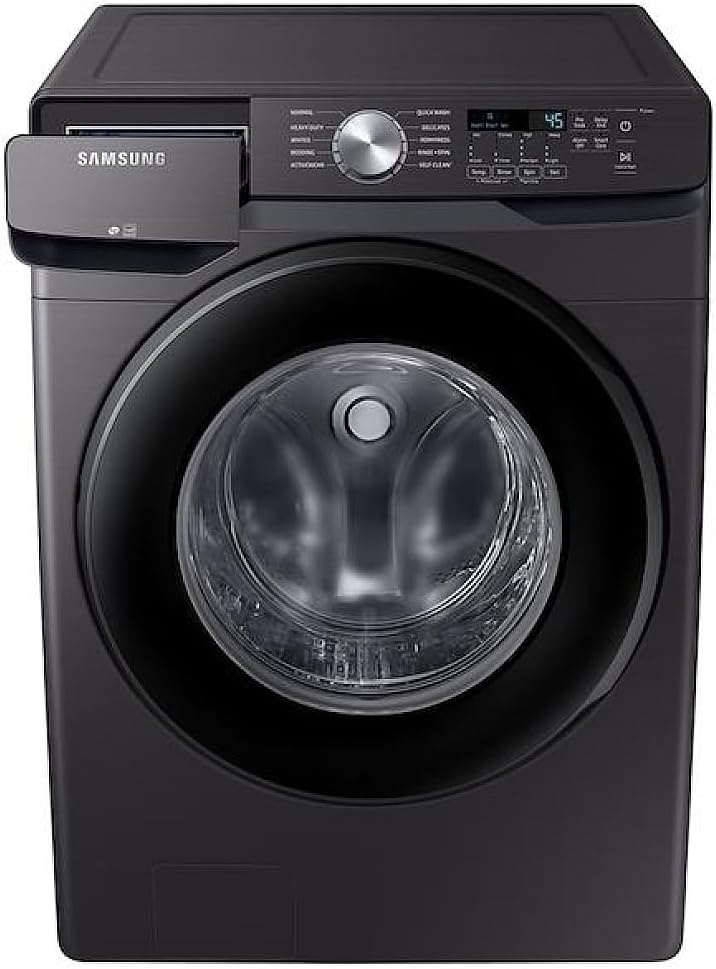
The control panel features a rotary dial for cycle selection and touch buttons for various options. The LED display shows cycle status and remaining time.

4.2 Loading Laundry
Open the washer door and load items loosely into the drum. Do not overload the washer to ensure optimal cleaning performance and prevent damage.

4.3 Adding Detergent and Additives
Pull out the dispenser drawer located on the top left of the control panel. Add liquid or powder detergent to the main wash compartment. Fabric softener and bleach can be added to their respective compartments.
4.4 Selecting a Wash Cycle
Turn the rotary dial to select the desired wash cycle. Available cycles include:
- Normal: For everyday cottons and linens.
- Heavy Duty: For heavily soiled items.
- Whites: For white fabrics.
- Bedding: Optimized for bed sheets and duvets.
- Activewear: For athletic clothing.
- Quick Wash: For lightly soiled items needing a fast wash.
- Delicates: For delicate fabrics, use delicate detergent.
- Perm Press: For permanent press items to reduce wrinkles.
- Rinse + Spin: To rinse and spin items without a full wash cycle.
- Self Clean+: For cleaning the washer drum.
4.5 Adjusting Cycle Options
After selecting a cycle, you can customize settings using the touch buttons:
- Temp: Adjust water temperature (Hot, Cold, etc.).
- Rinse: Select number of rinses.
- Spin: Adjust spin speed (High, No Spin, etc.).
- Soil: Set soil level (Heavy, Light, etc.).
- Pre Soak: Adds a pre-soak phase.
- Delay End: Delays the end of the cycle.
- Smart Care: For smart diagnostics via a smartphone app.
4.6 Starting a Cycle
Press and hold the Hold to Start button to begin the selected wash cycle.
5. Maintenance
5.1 Self Clean+ Cycle
The Self Clean+ cycle eliminates 99% of bacteria that can form in the drum. The washer will prompt you when it's time to run this cycle. Follow the instructions on the display.
5.2 Cleaning the Detergent Dispenser
Regularly clean the detergent dispenser drawer to prevent residue buildup. Remove the drawer, rinse it under warm water, and clean any stubborn residue with a brush. Dry thoroughly before reinserting.
5.3 Drain Filter Cleaning
Periodically check and clean the drain filter located at the bottom front of the washer. This helps prevent blockages and ensures efficient draining. Refer to the diagram below for location.

6. Troubleshooting
If you encounter any issues with your washer, please refer to the following common troubleshooting tips before contacting service:
- Washer not starting: Ensure the power cord is securely plugged in, the door is fully closed, and the 'Hold to Start' button has been pressed and held.
- Excessive vibration/noise: Check that the washer is level and all shipping bolts have been removed. Ensure the load is balanced inside the drum.
- Water not draining: Inspect the drain hose for kinks or blockages. Clean the drain filter as described in the Maintenance section.
- Error codes: Consult the full user manual (available online) for specific error code definitions and solutions.
7. Specifications
| Feature | Specification |
|---|---|
| Brand | Samsung |
| Model Name | WF45T6000AV |
| Capacity | 4.5 Cubic Feet |
| Product Dimensions (D x W x H) | 31"D x 27"W x 38.75"H |
| Access Location | Front Load |
| Finish Type | Stainless Steel |
| Color | Brushed Black |
| Material | Stainless Steel |
| Controls Type | Push Button, Knob |
| Operation Mode | Fully Automatic |
| Max Rotational Speed | 1300 RPM |
| Voltage | 120 Volts |
| Number of Standard Cycles | 10 |
| Noise Level | 55 Decibels |
| Installation Type | Freestanding |
| Special Features | High Efficiency, Large Capacity, Self Clean, Smart Connectivity, Vibration Reduction |
8. Warranty Information
Your Samsung WF45T6000AV Front Load Washer comes with the following warranty:
- One (1) Year: Parts and Labor
- Three (3) Years: Stainless Steel Drum (Part Only)
- Ten (10) Years: Direct Drive Motor (Part Only)
Please retain your proof of purchase for warranty claims. For detailed terms and conditions, refer to the warranty card included with your product or visit the official Samsung website.
9. Customer Support
For further assistance, technical support, or service requests, please contact Samsung Customer Support. You can find contact information on the official Samsung website or in the documentation provided with your appliance.