Introduction
This manual provides essential information for the setup, operation, and maintenance of your Bontempi KeyRhythm 15 3780 Digital Keyboard. Please read these instructions carefully to ensure proper use and to maximize your musical experience.
Safety Information
WARNING: Use under adult supervision.
- Keep the device away from water and moisture.
- Do not expose to extreme temperatures.
- Use only specified power sources (USB-C cable or AA batteries).
- Avoid dropping or subjecting the keyboard to strong impacts.
Package Contents
- Bontempi KeyRhythm 15 3780 37-Key Digital Keyboard
- USB Type-C Cable (for power)
- Instruction Manual (this document)
Note: 4 AA batteries are required for portable use and are not included. Headphones are not included.
Setup
Powering the Keyboard
The keyboard can be powered in two ways:
- USB-C Power: Connect the included USB Type-C cable to the keyboard's USB-C port and to a compatible USB power adapter (not included) or a computer USB port.
- Battery Power: Open the battery compartment on the underside of the keyboard. Insert 4 AA batteries, ensuring correct polarity. Close the compartment securely.
It is recommended to remove batteries if the keyboard will not be used for an extended period.
Connecting Headphones
To practice privately, connect standard 3.5mm headphones (not included) to the headphone jack located on the keyboard. This will mute the internal speakers.

Figure 1: Top view of the Bontempi KeyRhythm 15 3780 Digital Keyboard, showing the 37 keys and control panel. The control panel includes buttons for volume, tempo, sounds, rhythms, demo songs, and learning functions.
Operating Instructions
Basic Controls
- Power On/Off: Press the power button to turn the keyboard on or off.
- Volume Control: Use the VOLUME +/- buttons to adjust the overall sound level.
- Tempo Control: Use the TEMPO +/- buttons to adjust the speed of rhythms and demo songs.
Sound and Rhythm Selection
- Instrumental Sounds: Press the SOUNDS button and then use the number keys (1-8) to select from 8 different instrumental sounds (e.g., Piano, Organ, Guitar).
- Rhythms: Press the RHYTHMS button and then use the number keys (1-16) to select from 16 pre-programmed rhythms (e.g., Rock 1, Disco, Samba).
- Drum Sounds: The keyboard features 8 percussion sounds integrated into specific keys. Press these keys to activate the drum sounds.
Learning and Recording Functions
- Demo Songs: Press the DEMO button to play one of the 10 pre-recorded demo songs. Use the number keys to select a specific song.
- OKON Function (Learning): Activate the OKON function to assist with learning songs. This mode allows you to play along, guiding you through the melody.
- Record and Playback:
- Press REC to start recording your performance.
- Play your desired melody.
- Press PLAY to listen to your recorded performance.
- Metronome: Press the METRONOME button to activate a steady beat for practice.
Special Effects
- Eco (Echo): Adds an echo effect to the sound.
- Sustain: Lengthens the decay of notes, allowing them to ring out longer.
- Vibrato: Adds a slight, rapid fluctuation in pitch to the notes.
- Transposer: Allows you to shift the pitch of the keyboard up or down without changing the fingering.
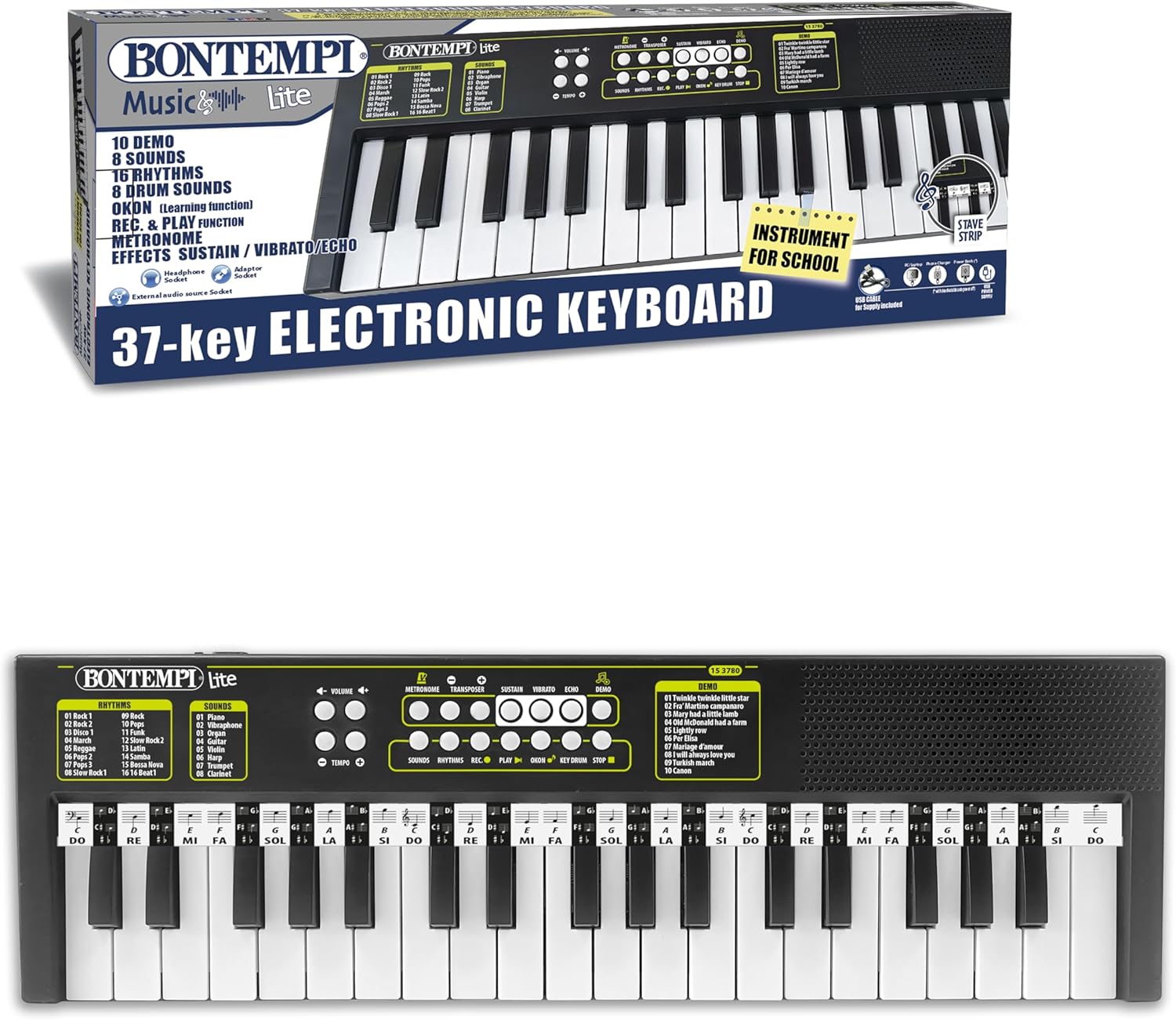
Figure 2: Packaging of the Bontempi KeyRhythm 15 3780, illustrating key features such as 10 demo songs, 8 sounds, 16 rhythms, OKON learning function, record & play, metronome, and various effects.
Maintenance
- Cleaning: Wipe the keyboard surface with a soft, dry cloth. Do not use abrasive cleaners or solvents.
- Storage: Store the keyboard in a dry place, away from direct sunlight and extreme temperatures.
- Battery Care: Remove batteries if the device will not be used for an extended period to prevent leakage.
Troubleshooting
- No Sound:
- Check if the keyboard is powered on.
- Ensure volume is not set to minimum.
- If headphones are connected, disconnect them to hear sound from the internal speakers.
- Check battery levels or USB-C connection.
- Keys Not Responding:
- Ensure the keyboard is powered on.
- If only some keys are not responding, contact customer support.
- Distorted Sound:
- Reduce the volume.
- Check battery levels.
Specifications
| Feature | Detail |
|---|---|
| Model Name | KeyRhythm 15 3780 |
| Number of Keys | 37 |
| Connectivity | USB Type-C |
| Power Source | USB Type-C (cable included) or 4 AA Batteries (not included) |
| Headphone Jack | 3.5 mm |
| Instrument Type | Electronic Keyboard |
| Dimensions | 480x150x40 mm (approx. 18.9 x 5.9 x 1.6 inches) |
| Weight | 500 grams (approx. 1.1 lbs) |
| Material | Plastic |
| Skill Level | Beginner |
Warranty and Support
For warranty information and customer support, please refer to the official Bontempi website or contact your retailer. Keep your proof of purchase for any warranty claims.
You can visit the official Bontempi store for more information: Bontempi Store


