1. Introduction
This manual provides comprehensive instructions for the UGREEN USB C to 3.5mm Headphone and Charger Adapter. It covers product features, setup, operation, maintenance, troubleshooting, and technical specifications to ensure optimal performance and user satisfaction. Please read this manual thoroughly before using the product.
2. Product Overview
2.1 Key Features
- Simultaneous Audio & Charging: Enables listening to audio via 3.5mm headphones while fast charging your Type-C device.
- Fast Charging Support: Compatible with PD3.0 and QC3.0 protocols, delivering up to 30W for efficient power delivery.
- Premium Sound Quality: Integrated DAC chip supports up to 24-bit/96KHz sampling rate for enhanced, lossless audio.
- Microphone & In-line Remote Control: Supports microphone input and remote functions (Volume+/-, Next/Previous Song) for calls and music management.
- Universal Compatibility: Works with a wide range of Type-C devices including smartphones, tablets, and laptops.
2.2 Product Components and Design
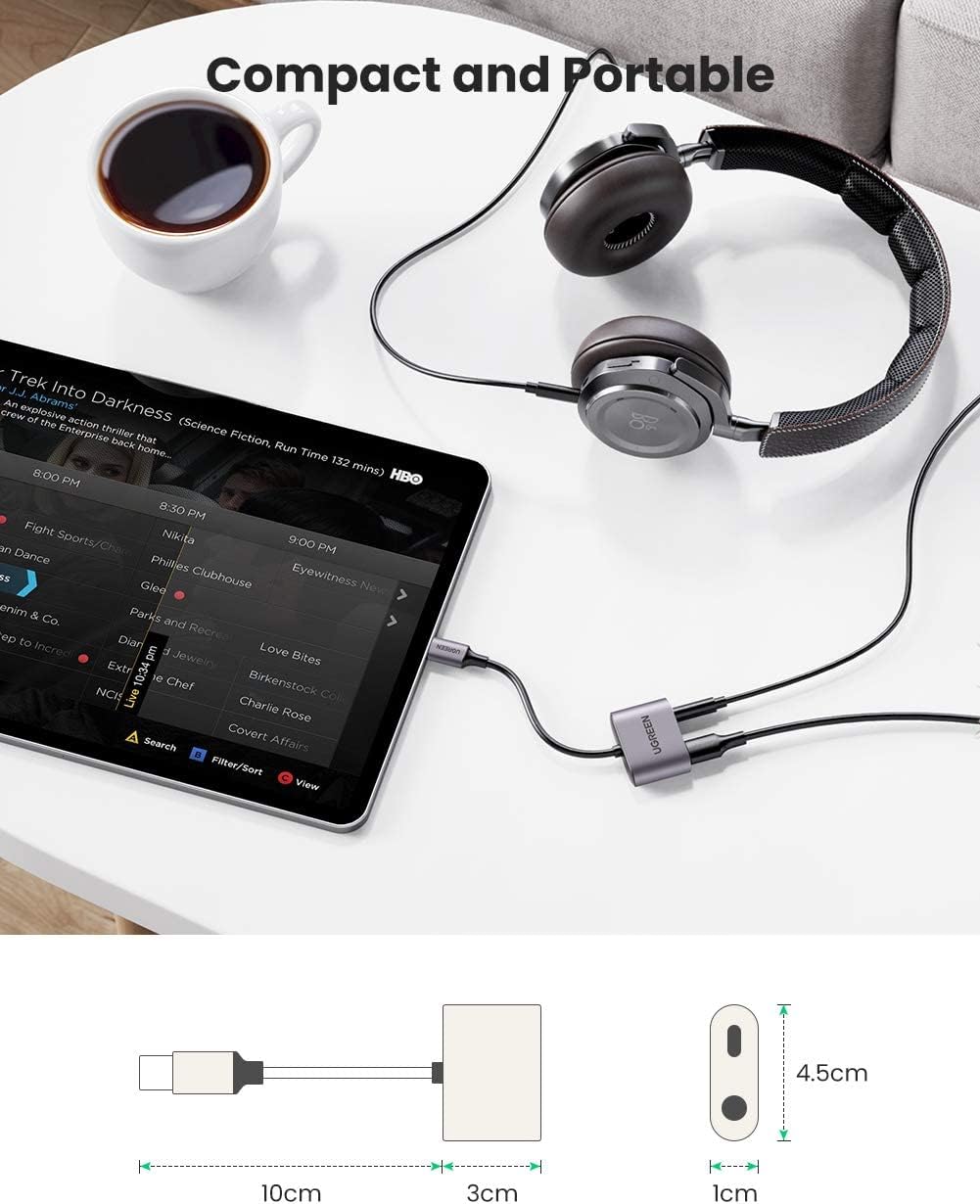
The UGREEN USB C adapter is available in two main designs: a 2-in-1 adapter with a short cable and a right-angle adapter. Both are designed for portability and functionality.


3. Setup Guide
Follow these steps to connect your UGREEN USB C adapter:
- Connect to Device: Insert the USB-C male connector of the adapter into the USB-C port of your smartphone, tablet, or laptop.
- Connect Headphones: Plug your 3.5mm headphones or auxiliary cable into the 3.5mm audio jack on the adapter.
- Connect Charger (Optional): If you wish to charge your device simultaneously, connect your USB-C charging cable to the USB-C charging port on the adapter.


4. Operating Instructions
4.1 Audio Playback
Once connected, your device will automatically recognize the adapter as an audio output device. Play music or any audio content from your device, and it will be routed through the 3.5mm port to your connected headphones or speakers.
4.2 Fast Charging
When a compatible USB-C charger is connected to the adapter's charging port, your device will begin to charge. The adapter supports PD3.0 and QC3.0 for fast and stable charging.
4.3 Microphone and In-line Remote Control
If your 3.5mm headphones include a microphone and in-line remote controls, these functions will be supported through the adapter. You can use the microphone for calls and voice commands, and the remote for volume adjustments, playing/pausing music, and skipping tracks.
5. Compatibility
The UGREEN USB C to 3.5mm Headphone Jack Adapter is designed for broad compatibility with various Type-C devices. Below is a general list of supported devices:

- Samsung Galaxy: S21 Ultra/S21+/S21/S20 FE/S20 Plus/S20 Ultra/S10 Lite/Note20/Note10/Z Flip 3/Fold 3/Tab S7 Plus S6 S5e
- Google Pixel: 5/4 XL
- iPad: iPad Air 6 2021, iPad Pro 2021/2020/2018, iPad Air 4
- MacBook: Various models
- Huawei: P30 Pro/P20
- OnePlus: Nord 2/9 Pro/8T/7
- Sony: Xperia 1/5/XZ3
Note: Compatibility may vary with specific device software versions. Ensure your device's USB-C port supports audio output.
6. Care and Maintenance
- Keep the adapter dry. Avoid exposure to moisture or liquids.
- Clean the adapter with a soft, dry cloth. Do not use harsh chemicals or abrasive materials.
- Store the adapter in a cool, dry place when not in use.
- Avoid bending or twisting the cable excessively, especially near the connectors, to prevent damage.
- Do not attempt to disassemble or repair the adapter yourself. This will void any potential warranty.
7. Troubleshooting
- No audio output:
- Ensure the adapter is fully plugged into your device's USB-C port.
- Verify that your 3.5mm headphones or speakers are correctly connected to the adapter.
- Check your device's audio settings to ensure the correct output device is selected.
- Confirm that your device's USB-C port supports audio output. Some older or budget devices may not.
- If using the 2-in-1 adapter, ensure a power source is connected to the charging port, as some devices may require power for audio passthrough.
- Test with another pair of headphones or another compatible device to isolate the issue.
- Device not charging:
- Ensure the USB-C charging cable and power adapter are functioning correctly.
- Verify that the charging cable is securely connected to both the adapter and the power source.
- Confirm that your device supports PD3.0 or QC3.0 fast charging for optimal performance.
- Microphone or in-line remote not working:
- Ensure your headphones have a built-in microphone and in-line remote.
- Check that the headphone jack is fully inserted into the adapter.
- Some devices or applications may require specific permissions for microphone access.
8. Technical Specifications
| Feature | Detail |
|---|---|
| Brand | UGREEN |
| Model | B09KBQJMQ1 |
| Connector Type | Auxiliary, USB Type C |
| Color | Silver |
| Compatible Devices | Cellular Phones, Laptop, Tablet |
| Specific Uses For Product | Speaker, Headphone, Charging |
| Charging Support | PD3.0, QC3.0 (up to 30W) |
| Audio Sampling Rate | Up to 24 bit/96KHz |
| DAC Chip | Built-in for premium sound quality |
9. Warranty and Support
UGREEN products are designed and manufactured to the highest quality standards. For information regarding warranty coverage, technical support, or customer service, please refer to the official UGREEN website or contact their customer support directly. Please retain your proof of purchase for warranty claims.
Official UGREEN Store: UGREEN Store on Amazon