1. Introduction
The ASUS ROG Maximus Z690 Apex(WiFi 6E) is a high-performance ATX gaming motherboard designed for extreme overclocking enthusiasts and PC builders. It is engineered to unlock the full potential of 12th generation Intel Core processors, offering enhanced power delivery, advanced cooling solutions, and extensive connectivity options. This manual will guide you through the installation, operation, and maintenance of your motherboard.
2. Package Contents
Before proceeding with the installation, please verify that all components listed below are present in your package. If any item is missing or damaged, contact your retailer immediately.
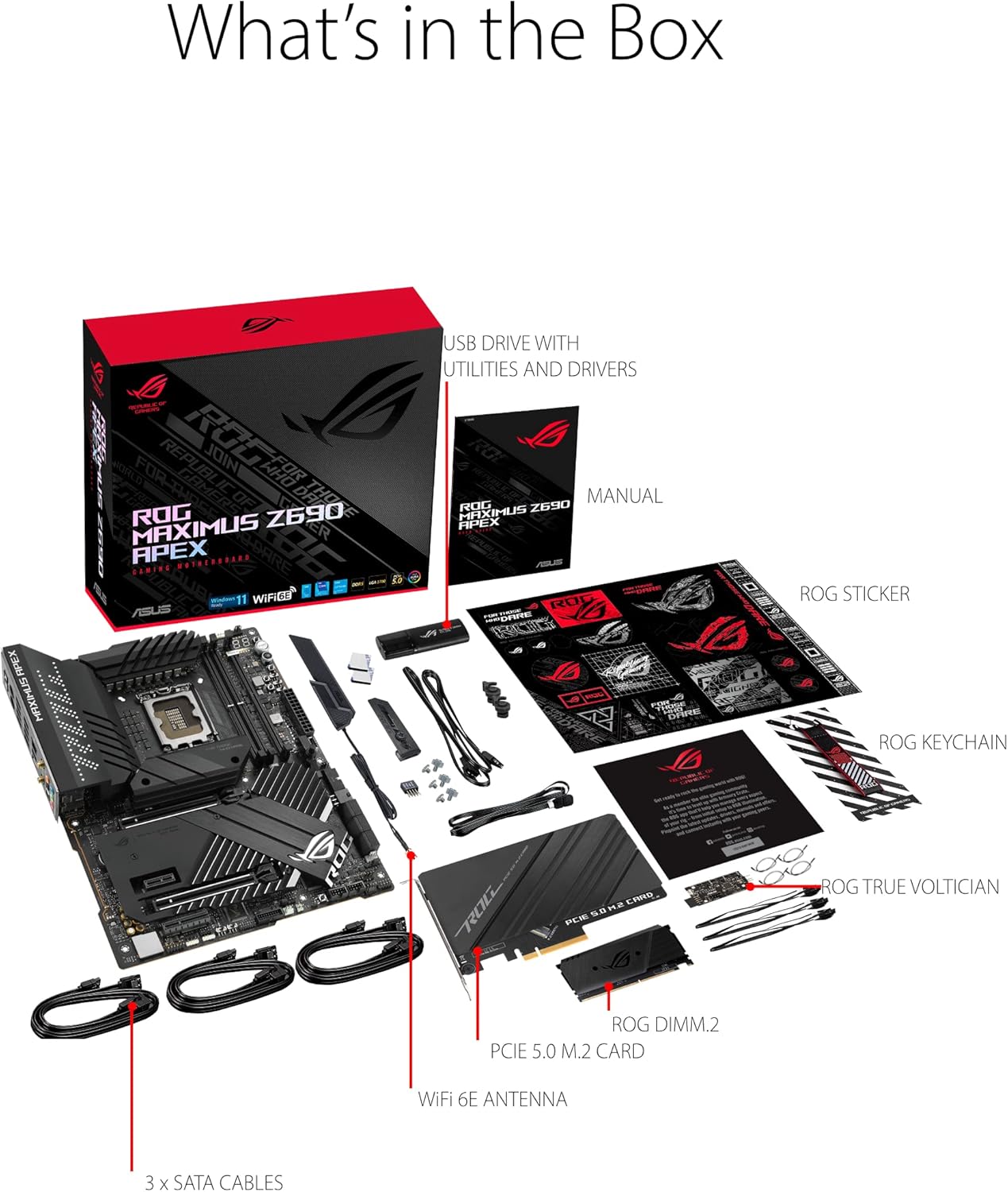
Image: ASUS ROG Maximus Z690 Apex Motherboard and Included Accessories.
- ASUS ROG Maximus Z690 Apex Motherboard
- WiFi 6E Antenna
- SATA Cables (3x)
- USB Drive with Utilities and Drivers
- User Manual
- ROG Sticker Sheet
- ROG Keychain
- ROG True Volitician
- Hyper M.2 Card
3. Setup Guide
Follow these steps for proper installation of your motherboard and its components.
3.1. Motherboard Overview
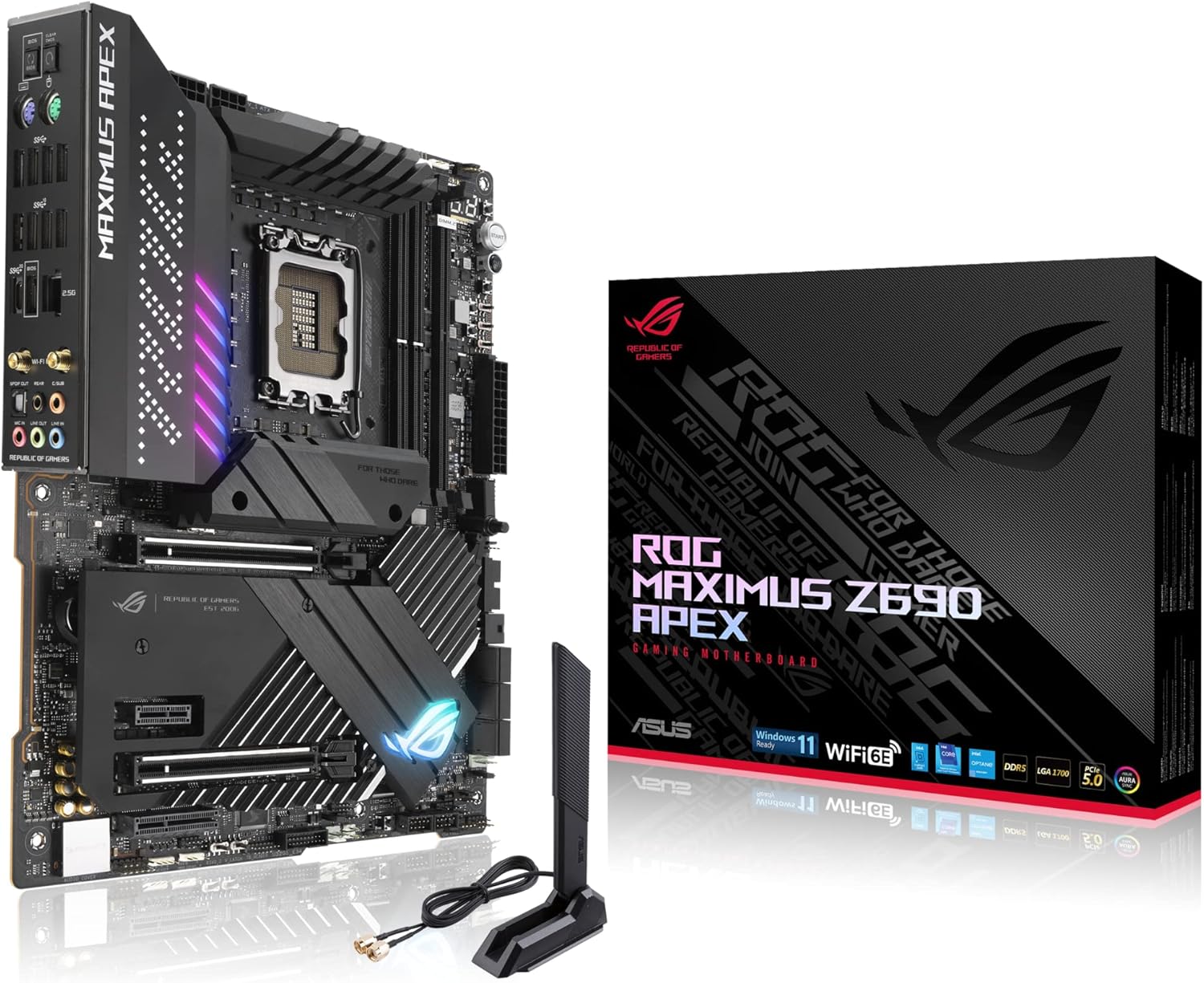
Image: ASUS ROG Maximus Z690 Apex Motherboard.
The ROG Maximus Z690 Apex features the Intel LGA 1700 socket, ready for 12th Gen Intel Core processors. It supports PCIe 5.0 and DDR5 memory, providing a robust foundation for high-performance computing.
3.2. Key Components and Features

Image: Motherboard Layout and Audio Features.
- VRM Heatsink (Aura Sync LED): Ensures stable power delivery by dissipating heat from the Voltage Regulator Modules.
- PCH Heatsink (Aura Sync LED): Cools the Platform Controller Hub for optimal chipset performance.
- SupremeFX ALC4080 Codec: Delivers high-fidelity audio with technologies like Sonic Studio III, Sonic Radar III, DTS Sound Unbound, and Two-Way AI Noise Cancellation.
- RGB Headers: Includes 4-pin RGB and 3-pin Addressable Gen2 headers for customizable lighting.
3.3. Cooling System

Image: Comprehensive Cooling Features.
The motherboard features an optimized thermal design to maintain stable temperatures during intense operations:
- Massive VRM Heatsink: Enlarged heatsinks with an integrated aluminum I/O cover and high-conductivity thermal pad.
- Dual M.2 Heatsinks with Backplates: Dedicated cooling for M.2 SSDs to prevent thermal throttling.
- ROG Water-Cooling Zone: Dedicated headers and monitoring points for custom liquid cooling setups.
- 4-Pin Onboard PWM Fan Headers: Multiple headers for connecting and controlling system fans.
3.4. Power and Performance

Image: Power Delivery and Expansion Slots.
This motherboard is built for extreme performance:
- Robust Power Solution: Features 24+0 teamed power stages rated for 105 A, ProCool II power connectors, MicroFine alloy chokes, and premium metallic capacitors.
- DDR5 Memory Support: Equipped with 2x DDR5 DIMM slots for next-generation memory.
- PCIe 5.0 Expansion: Includes 2x PCIe 5.0 x16 Safeslots for high-speed graphics cards.
- Multiple M.2 Slots: Features 2x onboard M.2 slots (1x M.2 2280 PCIe 4.0 x4, 1x M.2 2280 PCIe 4.0 x4 & SATA Mode) and a bundled ROG DIMM.2 card with 2x M.2 22110 PCIe 4.0 slots, plus a separate PCIe 5.0 M.2 Card.
3.5. Connectivity

Image: Full Gaming Connectivity.
The motherboard offers comprehensive connectivity options:
- USB Ports: Includes 4x USB 3.2 Gen 1, 5x USB 3.2 Gen 2, and 1x USB 3.2 Gen 2x2 Type-C front-panel connector with Quick Charge support.
- Networking: Onboard Wi-Fi 6E, Intel 2.5Gb Ethernet, and ASUS LANGuard for high-performance networking.
- Audio: SupremeFX 7.1-channel HD audio with S/PDIF Out.
- Storage: 6x SATA 6Gb/s ports.
- BIOS Features: Clear CMOS and BIOS Flashback buttons for easy system management.
- Bluetooth: Bluetooth v5.2 for wireless peripheral connectivity.
- Thunderbolt Header: For connecting Thunderbolt-compatible devices.
4. Operating Instructions
Once your hardware is assembled, follow these guidelines for operating your ASUS ROG Maximus Z690 Apex motherboard.
4.1. Initial Boot and BIOS Setup
- Connect your display, keyboard, and mouse.
- Power on your system.
- Press the designated key (usually DEL or F2) during startup to enter the BIOS/UEFI setup.
- Configure boot order, enable XMP for memory, and set up storage devices.
- Save changes and exit BIOS.
4.2. Driver Installation
Install the necessary drivers from the included USB drive or download the latest versions from the official ASUS support website. Key drivers include chipset, graphics, audio, and network drivers.
4.3. Intelligent Control Features
Leverage ASUS-exclusive tools for optimized performance:
- AI Overclocking: Intelligently profiles your CPU and cooling to predict optimal voltage and frequency settings.
- AI Cooling: Manages and controls connected fans to ensure optimal thermal performance and quiet operation.
- AI Networking: Optimizes network traffic for gaming and streaming.
- Two-Way AI Noise-Cancelation: Enhances audio clarity for communication by filtering out background noise from both incoming and outgoing audio streams.
5. Maintenance
Regular maintenance helps ensure the longevity and stable performance of your motherboard.
- Dust Removal: Periodically clean dust from the motherboard and components using compressed air. Ensure the system is powered off and unplugged.
- BIOS Updates: Check the ASUS support website for the latest BIOS updates. Updating the BIOS can improve compatibility, stability, and performance. Use the BIOS Flashback feature for convenient updates without a CPU or RAM installed.
- Driver Updates: Keep your drivers updated to ensure optimal performance and compatibility with new software and hardware.
- Thermal Management: Ensure proper airflow within your PC case. Monitor CPU and motherboard temperatures using monitoring software to prevent overheating.
6. Troubleshooting
If you encounter issues with your motherboard, refer to the following common troubleshooting steps:
- No Power/No POST:
- Check all power connections (24-pin ATX, 8-pin CPU, PCIe power).
- Ensure RAM modules are properly seated in the correct slots.
- Clear CMOS using the dedicated button on the rear I/O panel or by removing the CMOS battery for a few minutes.
- Test with minimal components (CPU, one RAM stick, GPU) to isolate the issue.
- System Instability/Crashes:
- Update BIOS and all drivers to the latest versions.
- Check CPU and GPU temperatures.
- Run memory diagnostic tools to check for RAM errors.
- Verify power supply unit (PSU) wattage is sufficient for all components.
- Network Connectivity Issues:
- Ensure Ethernet cable is securely connected or WiFi antenna is attached.
- Install or update LAN/WiFi drivers.
- Check network settings in your operating system.
7. Specifications
Key technical specifications for the ASUS ROG Maximus Z690 Apex(WiFi 6E) Motherboard:
| Feature | Specification |
|---|---|
| Model Name | ROG MAXIMUS Z690 APEX |
| CPU Socket | LGA 1700 |
| Compatible Processors | 12th Generation Intel Core |
| Chipset Type | Intel Z690 |
| RAM Memory Technology | DDR5 |
| Memory Speed | 2133 MHz (Base) |
| Wireless Type | Wi-Fi 6E, Bluetooth v5.2 |
| Ethernet | Intel 2.5Gb Ethernet |
| PCIe Support | PCIe 5.0 |
| Operating System Support | Windows 11 |
8. Warranty and Support
For detailed warranty information, please refer to the warranty card included with your product or visit the official ASUS support website. ASUS provides comprehensive support for its products, including drivers, FAQs, and troubleshooting guides.
You can find additional support and product information by visiting the ASUS Store on Amazon or the official ASUS global website.


