Introduction
This manual provides detailed instructions for the setup, operation, and maintenance of your SEDSEY K28 Smart Watch. Please read this guide thoroughly to ensure proper usage and to fully utilize all features of your device. The K28 Smart Watch is designed for daily wear and fitness tracking, offering a range of functions including health monitoring, sports modes, and Bluetooth calling.
1. Getting Started
1.1 Package Contents
- SEDSEY K28 Smart Watch
- Charging Cable
- User Manual
1.2 Charging the Device
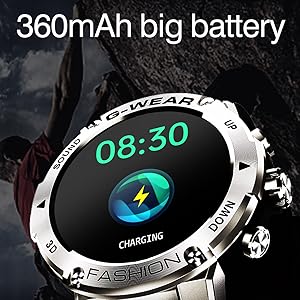
Before first use, fully charge your smart watch. Connect the magnetic charging cable to the charging contacts on the back of the watch and plug the USB end into a standard USB power adapter (not included). A full charge typically takes approximately 2 hours and provides up to 7 days of working time or 20 days of standby time.
1.3 App Download and Pairing
To unlock the full potential of your K28 Smart Watch, download the 'Da Fit' app on your smartphone. The app is compatible with Android 5.1 or above and iOS 8.0 or above.
- Scan the QR code provided in the manual or search for 'Da Fit' in your phone's app store. Alternatively, download directly from http://plus.crrepa.com/app-download/dafit.
- Enable Bluetooth on your smartphone.
- Open the 'Da Fit' app and follow the on-screen instructions to add a device.
- Select 'K28H' from the list of available devices to pair.

1.4 Setting Up Bluetooth Calling
The K28 Smart Watch supports Bluetooth calling, allowing you to answer, reject, or make calls directly from your wrist.
- On the watch homepage, swipe down to access the quick settings. Ensure the Bluetooth call function is turned ON.
- On your smartphone, go to Bluetooth settings and find the watch audio device named 'K28H'. Connect to it.
- Once connected, you can use your watch to make and receive calls. You can also synchronize your phone's contacts through the Da Fit app.

2. Basic Operation
2.1 Navigating the Watch Interface
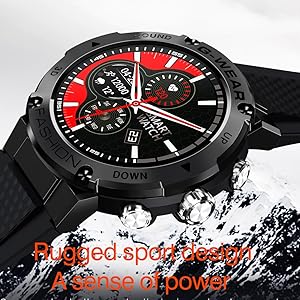
The K28 Smart Watch features a 1.32-inch IPS HD display with full touch panel control. Swipe across the screen to access different functions and menus. Use the physical buttons for quick access or to return to the home screen.
2.2 Health Monitoring Features
The watch is equipped with a VC31 dynamic detection sensor for accurate health tracking throughout the day.
- Heart Rate Monitoring: Provides real-time heart rate data.
- SpO2 Monitoring: Measures blood oxygen levels.
- Blood Pressure Monitoring: Offers blood pressure readings.
- Sleep Monitoring: Tracks sleep patterns (deep sleep, shallow sleep, awakening) from 8:00 PM to 10:00 AM.
- Activity Tracking: Records steps, exercise time, and calories burned.


2.3 Sports Modes
The K28 Smart Watch supports over 26 sports modes to accurately track your workouts. Select your desired activity to monitor steps, distance, and calories burned.
- Walking
- Running
- Cycling
- Badminton
- Basketball
- Football
- Skipping Rope
- And many more...


2.4 Call and Message Notifications
Once paired with your smartphone, the K28 Smart Watch will display incoming call alerts and message notifications from various apps (e.g., Mail, Text, Facebook, Twitter, Instagram). You can manage calls directly from your wrist.

2.5 Other Smart Functions
The K28 Smart Watch offers a variety of additional features:
- Customizable Watch Faces: Choose from multiple watch faces or create your own.
- Music Control: Control music playback on your smartphone.
- Weather Forecast: Get real-time weather updates.
- Stopwatch & Timer: Essential tools for timing activities.
- Alarm Clock: Set alarms directly from your watch.
- Remote Camera Control: Use your watch as a remote shutter for your phone's camera.
- Sedentary Reminder: Get alerts to move after periods of inactivity.
- Games: Enjoy simple games on your wrist.
3. Care and Maintenance
3.1 Water Resistance
The K28 Smart Watch has an IP67 waterproof rating, meaning it is resistant to splashes, rain, and brief immersion in water. It can be worn during daily activities like washing hands or showering. However, it is not recommended for use in hot baths, saunas, or sea water, as steam and salt water can damage the device.

3.2 Cleaning Your Smart Watch
To maintain the appearance and functionality of your watch, regularly clean the screen and strap with a soft, dry cloth. For stubborn dirt, a slightly damp cloth can be used. Avoid using harsh chemicals or abrasive materials.
3.3 Battery Life Optimization
To maximize battery life, consider the following:
- Reduce screen brightness.
- Disable unnecessary notifications.
- Limit continuous heart rate monitoring if not required.
- Turn off Bluetooth when not in use.
4. Troubleshooting
If you encounter issues with your SEDSEY K28 Smart Watch, refer to the following common solutions:
- Watch not turning on: Ensure the watch is fully charged. Connect it to the charger for at least 30 minutes.
- Unable to pair with phone: Make sure Bluetooth is enabled on both the watch and phone. Ensure the 'Da Fit' app is open and searching for devices. Try restarting both devices.
- Inaccurate health data: Ensure the watch is worn snugly on your wrist, about one finger's width from your wrist bone. Avoid excessive movement during measurements. Note that smartwatches are not medical devices and readings are for reference only.
- Notifications not appearing: Check app notification settings on your phone and within the 'Da Fit' app to ensure permissions are granted.
- Short battery life: Refer to Section 3.3 for battery optimization tips.
5. Product Specifications
Below are the technical specifications for the SEDSEY K28 Smart Watch:

| Feature | Specification |
|---|---|
| Model Number | K28 |
| Screen Size | 1.32 Inches IPS |
| Resolution | 360x360 px |
| CPU | Realtek8762DT |
| Touch | Full touch panel |
| Battery Capacity | 360mAh Lithium Polymer |
| Bluetooth Version | 5.0 |
| Sensor | VC31 |
| Operating System | Android 5.1 or above / iOS 8.0 or above |
| Water Resistance | IP67 |
| Item Weight | 6.7 ounces |
| Memory Storage Capacity | 128 MB |
| Special Features | Activity Tracker, Calendaring, Custom Activity Tracking |
6. Warranty and Customer Support
Your SEDSEY K28 Smart Watch comes with a standard manufacturer's warranty. For specific warranty details, please refer to the product packaging or contact the seller directly. If you experience any issues or have questions regarding your device, please reach out to SEDSEY customer support for assistance. They can provide guidance on troubleshooting, repairs, or replacements as needed.
7. Product Video
Watch this official product video for a visual overview of the SEDSEY K28 Smart Watch features and functionality.


