
1. Product Overview
This manual provides essential information for the safe and effective use of your Nerf F5487 LMTD Halo Needler Dart Blaster. This blaster is a replica of the iconic Needler from the Halo universe, designed for dart-blasting action.
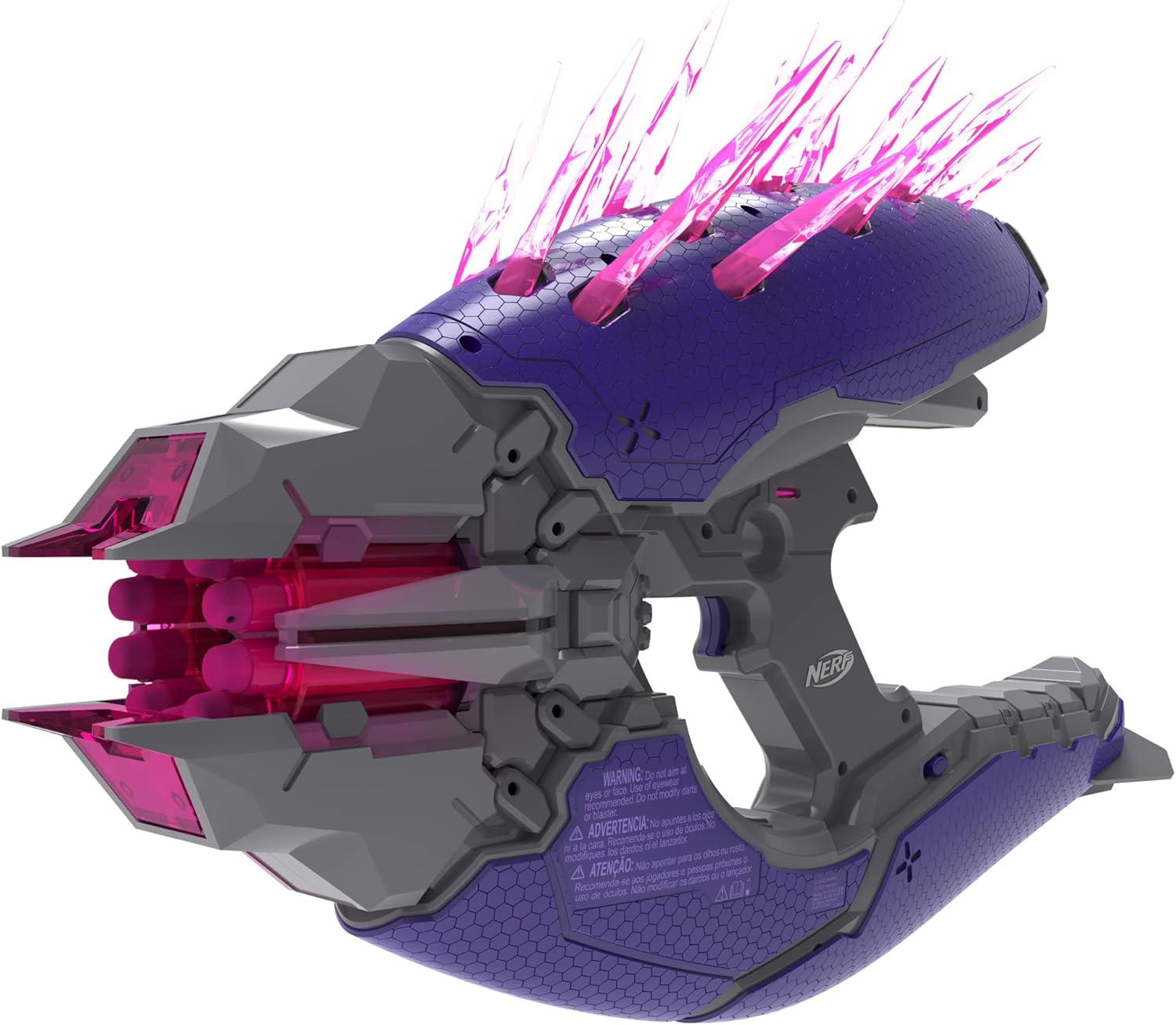
Image 1.1: Front-side view of the Nerf F5487 LMTD Halo Needler Dart Blaster, showcasing its purple and grey design with pink crystal-like needles.
2. What's in the Box
Carefully unpack all components and ensure the following items are present:
- Nerf F5487 LMTD Halo Needler Dart Blaster
- Official Nerf Darts (quantity as specified on packaging)
- Display Stand

Image 2.1: The product packaging for the Nerf F5487 LMTD Halo Needler Dart Blaster, featuring Halo branding.
3. Setup
3.1. Battery Installation
The Nerf F5487 LMTD Halo Needler Dart Blaster requires 6 AA batteries (not included) to power its light-up features. Follow these steps:
- Locate the battery compartment on the underside of the blaster handle.
- Using a Phillips head screwdriver, unscrew the battery compartment cover.
- Insert 6 fresh AA batteries, ensuring correct polarity (+/-) as indicated inside the compartment.
- Replace the cover and secure it with the screw.
3.2. Dart Loading
The blaster features a 10-dart rotating drum. Use only official Nerf darts for optimal performance and safety.
- Ensure the blaster is not aimed at anyone or anything.
- Insert one dart into each of the 10 openings in the rotating drum at the front of the blaster. Push darts in until they are fully seated.

Image 3.1: Front view of the blaster, showing the dart loading ports in the rotating drum.
4. Operating Instructions
The Nerf F5487 LMTD Halo Needler Dart Blaster operates manually. It features light-up needles that illuminate when the blaster is held and dim as darts are fired, simulating the in-game experience.
- Power On: Once batteries are installed, the blaster's grip sensor will activate the light-up needles when held.
- Firing Darts: Pull the trigger to fire a dart. The rotating drum will advance, and one of the light-up needles will dim with each shot, indicating remaining darts.
- Reloading: After all 10 darts are fired, reload the drum as described in Section 3.2. The needles will re-illuminate upon reloading.

Image 4.1: Top view of the blaster, highlighting the light-up crystal-like needles.
5. Maintenance
Proper maintenance ensures the longevity and performance of your blaster.
- Cleaning: Wipe the blaster with a clean, damp cloth. Do not submerge in water or use harsh chemicals.
- Dart Care: Store darts in a clean, dry place. Do not use damaged or modified darts, as this can affect performance and safety.
- Battery Care: Remove batteries if the blaster will not be used for an extended period to prevent leakage.
6. Troubleshooting
If you encounter issues with your blaster, refer to the following common solutions:
| Problem | Possible Cause | Solution |
|---|---|---|
| Darts not firing or firing weakly | Darts are damaged or not fully loaded. Blaster mechanism jammed. | Ensure darts are fully inserted and undamaged. Check for obstructions in the barrel. |
| Light-up needles not working | Batteries are dead or incorrectly installed. Grip sensor not activated. | Replace batteries with fresh AA batteries, ensuring correct polarity. Ensure a firm grip on the blaster handle. |
| Blaster makes unusual noises | Internal mechanism issue. | Discontinue use and contact customer support. Do not attempt to open or repair the blaster. |
7. Specifications
| Feature | Detail |
|---|---|
| Model Number | F5487 |
| Brand | Nerf |
| Manufacturer | Hasbro |
| Dart Capacity | 10 darts |
| Power Source | 6 AA batteries (not included) |
| Operation Mode | Manual |
| Material | Plastic |
| Item Weight | 3.2 pounds |
| Dimensions (L x W x H) | 5.98 x 22.52 x 16.14 inches |
| Recommended Age | Ages 8 and Up (as per feature bullets, manufacturer recommended age of 14 months - 6 years seems incorrect for a dart blaster) |
8. Safety Information
WARNING: To avoid injury:
- Do not aim at eyes or face.
- Use only official NERF darts. Other darts may not meet safety standards. Do not modify darts or blaster.
- Adult supervision is recommended for younger users.
- Keep away from small children due to small parts that may pose a choking hazard.
9. Warranty and Support
This product comes with a manufacturer's warranty. For detailed warranty information, please refer to the documentation included with your product or visit the official Nerf website. For technical support, replacement parts, or further inquiries, please contact Hasbro Consumer Care.
Hasbro Consumer Care: Please visit consumercare.hasbro.com for contact information and support resources.


