
Potensic A21
Contents
Potensic A21 Mini Drones User Manual
Model: A21 | Brand: Potensic
Introduction
This manual provides essential information for the safe operation and maintenance of your Potensic A21 Mini Drones. Please read it thoroughly before first use to ensure proper functionality and to maximize your flying experience. The Potensic A21 is a compact and versatile mini drone designed for recreational use, featuring IR battle mode, 3D flips, and multiple speed settings.
What's in the Box

The image displays the complete package contents of the Potensic A21 Mini Drones. It includes two mini drones (one red, one blue), two remote controllers, four rechargeable batteries, two sets of replacement propellers (red and blue), and two charging cables. Also visible are small tools for maintenance.
- 2 x Potensic A21 Mini Drones (Red and Blue)
- 2 x Remote Controllers
- 4 x Rechargeable Lithium Ion Batteries
- 2 x Sets of Replacement Propellers
- 2 x USB Charging Cables
- 1 x User Manual (this document)
Setup
1. Battery Installation and Charging
The Potensic A21 drones come with rechargeable Lithium Ion batteries. Ensure all batteries are fully charged before first use.
- Drone Battery: Insert the drone battery into the battery compartment on the underside of the drone. Connect it securely.
- Charging: Use the provided USB charging cable to connect the drone battery (or the drone itself if it has an integrated charging port) to a USB power source (e.g., computer, USB wall adapter). The indicator light will show charging status and turn off when fully charged.
- Remote Controller Batteries: The remote controllers require their own batteries (not specified in product data, assuming standard AA/AAA or integrated rechargeable). Install them according to the polarity markings.
2. Pairing the Drone and Remote Controller
Follow these steps to pair your drone with its remote controller:
- Place the drone on a flat, level surface.
- Turn on the drone. The LED lights on the drone will flash.
- Turn on the remote controller.
- Push the left joystick (throttle) all the way up, then all the way down. The drone's LED lights will stop flashing and become solid, indicating successful pairing.
Operating Instructions
Basic Flight Controls

This image shows the Potensic A21 mini drone alongside its remote controller, illustrating the compact size of both components. The remote controller features two joysticks and several buttons for various flight functions.
- One-Key Take-off/Landing: Press the dedicated button to automatically take off or land the drone. This feature simplifies operation for beginners.

Visual representation of the one-key take-off function, showing the drone ascending from a flat surface with an 'H' symbol, indicating a stable take-off point.
- Altitude Hold: The drone maintains a stable altitude automatically, allowing for easier control of horizontal movement.

This image illustrates the drone's hovering capability, showing it suspended stably in the air above an 'H' symbol, indicating its ability to hold position.
- Headless Mode: In Headless Mode, the drone's orientation is relative to the pilot, making it easier to control without worrying about the drone's front or back.
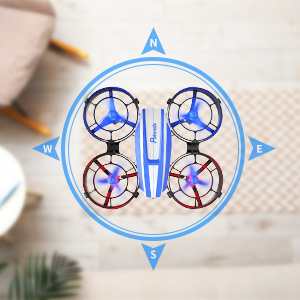
A compass-like diagram with the drone at the center, showing cardinal directions (N, S, E, W) around it. This visual explains how Headless Mode simplifies control by orienting the drone's movement relative to the pilot, regardless of the drone's actual front.
- Speed Adjustment: The drone offers 3 adjustable speed modes (low, medium, high) to suit different skill levels and environments.
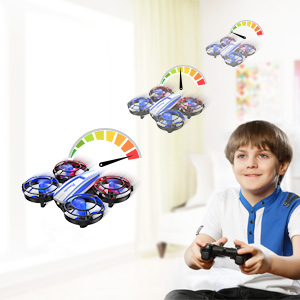
This image depicts a child controlling a drone with a remote, and a speed gauge showing three levels (low, medium, high), illustrating the drone's adjustable speed settings.
Special Features
- IR Battle Mode: Engage in exciting aerial battles with another A21 drone. Each drone is equipped with an infrared emitter and a 360° sensing infrared module. Shooting the opponent's drone 4 times will disable it.

Two children are shown on a couch, each controlling a Potensic A21 drone. One red drone and one blue drone are depicted in the air, with a blue laser beam extending from the blue drone towards the red drone, illustrating the infrared battle mode.
- 3D Flip: Perform impressive aerial acrobatics with a single button press. The drone will execute a 360-degree flip.

A boy is shown sitting on a bean bag chair, looking up excitedly while controlling a Potensic A21 drone. Two drones are depicted in the air, one performing a 3D flip maneuver, indicating the drone's acrobatic capability.
- Circle Fly (Surround Mode): The drone can automatically fly in a circular path around a central point.

A young boy in a superhero cape and mask stands next to a dog, also wearing a mask, in a living room. Two Potensic A21 drones are shown in the air, with circular arrows indicating their "Circle Fly" or "Surround Mode" flight path.
- Hurricane Rotating (Rotate while Taking off and Landing): A unique feature where the drone rotates during its ascent or descent.

A child dressed in a cardboard airplane costume stands next to a Potensic A21 drone. The drone is shown with circular arrows around it, illustrating its ability to rotate while taking off or landing, a feature referred to as "Hurricane Rotating."
Maintenance
- Cleaning: Use a soft, dry cloth to clean the drone and remote controller. Avoid using water or solvents.
- Propeller Replacement: If propellers are damaged, replace them with the provided spare parts. Ensure the correct propellers (A or B) are installed in the correct positions as indicated on the drone.
- Battery Care: Store batteries in a cool, dry place. Do not overcharge or over-discharge. If not used for a long period, charge them periodically.
Troubleshooting
| Problem | Possible Cause | Solution |
|---|---|---|
| Drone does not respond to controller. | Not paired; low battery; interference. | Re-pair the drone and controller; charge batteries; move to an area with less interference. |
| Drone drifts during flight. | Not calibrated; uneven surface at takeoff. | Calibrate the drone on a flat surface before flight. |
| Short flight time. | Battery not fully charged; old battery. | Ensure battery is fully charged; consider replacing old batteries. |
| Propellers not spinning. | Obstruction; damaged motor/propeller. | Check for obstructions; replace damaged propellers; contact support if motor is faulty. |
Specifications
- Brand: Potensic
- Model Name: A21-2Pack-US
- Product Dimensions: 3.2"L x 3.1"W x 1.2"H
- Item Weight: 1.04 pounds (for the package, not individual drone)
- Color: Red, Blue
- Connectivity Technology: Infrared
- Battery Type: Lithium Ion (4 included)
- Flight Time: Up to 7 minutes per battery (28 minutes total with 4 batteries)
- Control Type: Remote Control
- Skill Level: Beginner
- Recommended Age: 14 years and up (Manufacturer recommended)
- Features: 3D Flip, Circle Fly, 3 Speeds, Headless Mode, Altitude Hold, IR Battle Mode, One-Key Take-off/Landing.
Safety Guidelines
Adhere to the following safety guidelines to prevent injury or damage:
- Always operate the drone in open, clear areas, away from people, animals, and obstacles.
- Do not fly near water, heat sources, or electrical wires.
- Supervise children during operation. The manufacturer recommends age 14 and up.
- Do not modify or disassemble the drone or its components.
- Use only original Potensic parts and accessories.
- Avoid flying in strong winds.
- Do not touch the propellers when they are spinning.
- If the drone crashes, immediately turn off the power.
- Do not expose batteries to extreme temperatures or direct sunlight.
Warranty and Support
Potensic offers customer support for their products. For warranty information, technical assistance, or replacement parts, please visit the official Potensic website or contact their customer service directly.
Visit the Potensic Store on Amazon for more information and product updates.
Documents and downloads
Ask a question about this manual
Ask about setup, troubleshooting, compatibility, parts, safety, or missing instructions. Manuals+ will review the question and use this page’s manual context to help answer it.