
1. Introduction
This manual provides essential information for setting up, operating, and maintaining your Samsung Galaxy Watch 4 (SM-R870). The Galaxy Watch 4 combines advanced health monitoring features with a sleek design, offering a comprehensive smartwatch experience. Please read this manual thoroughly to ensure proper use and to maximize the benefits of your device.
2. Product Overview
The Samsung Galaxy Watch 4 (44mm, SM-R870) is a water-resistant wireless smartwatch designed for fitness tracking and seamless smartphone integration. It features a durable aluminum case and a comfortable sport band.

Figure 1: Front view of the Samsung Galaxy Watch 4 (SM-R870) in black.
Key Features:
- Operating System: Wear OS Powered by Samsung (Android)
- Display: Super AMOLED, 360 x 360 resolution (44mm model)
- Connectivity: Wi-Fi, Bluetooth
- Memory: 16 GB Storage, 1.5 GB RAM
- Sensors: Accelerometer, Optical Heart Rate Sensor, ECG Sensor, SpO2 Sensor, Built-in GPS
- Health Monitoring: Blood Pressure Monitor, Heart Rate Monitor, Sleep Monitor (with continuous SpO2), Auto Workout Tracking, Body Composition Analysis (Body Fat Percentage, Skeletal Muscle Mass, Body Water)
- Durability: Water Resistant (IPX4 rating), Gorilla Glass DX+
- Battery: 361 mAh (44mm model), up to 40 hours average life
- Design: Round shape, Aluminum case, Silicone band
3. What's in the Box
Upon opening your Samsung Galaxy Watch 4 package, you should find the following items:
- Samsung Galaxy Watch 4 (SM-R870)
- Wireless Charger
- Sport Band (pre-attached or separate, depending on packaging)

Figure 2: Samsung Galaxy Watch 4 and its charging cable.
4. Setup
4.1 Initial Power On
- Press and hold the Power/Home button (top right button) until the Samsung logo appears.
- Follow the on-screen prompts to select your language.
4.2 Pairing with Your Smartphone
- Ensure your smartphone is running Android 6.0 or later with at least 1.5GB RAM.
- Download and install the Galaxy Wearable app from the Google Play Store on your smartphone.
- Open the Galaxy Wearable app and follow the instructions to connect your watch.
- Confirm the pairing code displayed on both your watch and smartphone.
- Complete the setup process within the app, including granting necessary permissions and signing into your Samsung account.
5. Operating Instructions
5.1 Navigating the Watch
- Touchscreen: Swipe left/right to navigate through tiles, swipe up/down to access apps or quick settings.
- Power/Home Button (Top Right): Press to go to the Home screen or open the Apps screen. Press and hold for power options or to activate Bixby.
- Back Button (Bottom Right): Press to return to the previous screen.

Figure 3: Side view of the Galaxy Watch 4 showing the Power/Home and Back buttons.
5.2 Basic Functions
- Notifications: Swipe right from the watch face to view notifications.
- Quick Settings: Swipe down from the watch face to access quick settings like Wi-Fi, Bluetooth, brightness, and sound modes.
- Apps Screen: Press the Home button to view all installed applications.
6. Health and Fitness Tracking
The Galaxy Watch 4 offers comprehensive health and fitness tracking capabilities.
6.1 Auto Workout Tracking
The watch automatically detects and tracks various workouts, including walking, running, and cycling. It helps you stay motivated by connecting to live coaching sessions via your smartphone or dynamic group challenges.

Figure 4: Running and cycling insights on the Galaxy Watch 4.
6.2 Advanced Sleep Tracking & SpO2
Wear your watch at night to monitor your sleep patterns, including REM phases, deep sleep, and blood oxygen (SpO2) levels. This data, combined with snoring assessments from your smartphone, provides insights to improve your overall sleep quality.
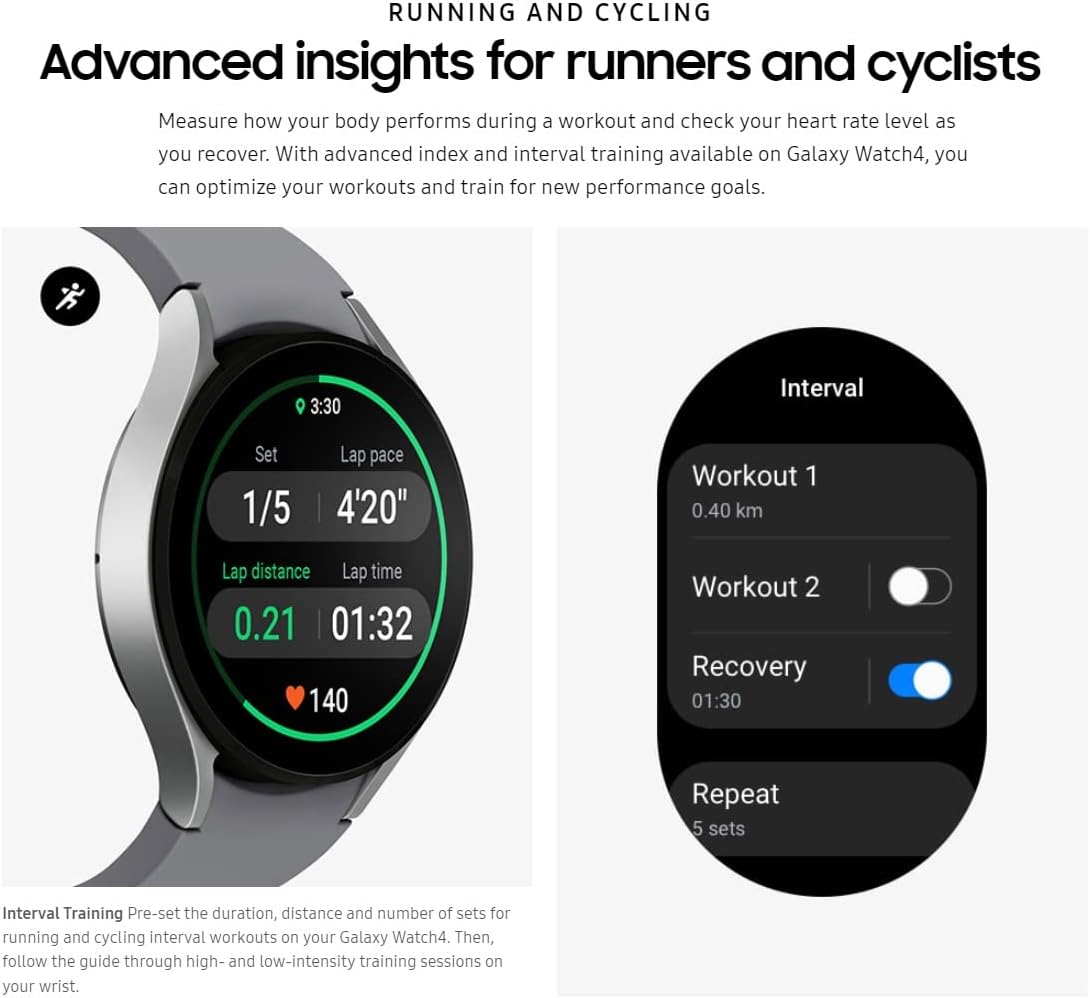
Figure 5: Sleep coaching feature on the Galaxy Watch 4.

Figure 6: Blood oxygen level measurement on the Galaxy Watch 4.
6.3 Body Composition Analysis
The innovative BioActive Sensor allows you to measure body composition, including body fat percentage, skeletal muscle mass, and body water, in about 15 seconds using just two fingers. This provides valuable insights for managing your health and fitness goals.
7. Customization
Personalize your Galaxy Watch 4 to match your style and needs.
7.1 Watch Faces
Customize your watch face by pressing and holding the current watch face, then swiping left or right to choose from various pre-installed or downloaded options. You can further customize complications and colors.

Figure 7: Watch face customization options.
7.2 App Tiles
Add or rearrange app tiles on your watch for quick access to your most used features. Swipe left from the watch face until you see the '+' icon to add new tiles.
8. Charging
To charge your Galaxy Watch 4:
- Connect the USB end of the wireless charger to a compatible power adapter (not included) or a USB port.
- Place the back of your Galaxy Watch 4 onto the wireless charging pad. The watch will magnetically align and begin charging.
- The watch display will show the charging status.
A full charge can last up to 40 hours with typical usage.
9. Maintenance
To ensure the longevity and optimal performance of your Galaxy Watch 4:
- Cleaning: Regularly clean your watch and band with a soft, dry cloth. If necessary, use a slightly damp cloth and mild soap, then rinse and dry thoroughly.
- Water Resistance: The watch is water-resistant (IPX4). Avoid exposing it to high-pressure water, extreme temperatures, or chemicals. Dry the watch thoroughly after exposure to water.
- Avoid Impacts: Protect the watch from strong impacts or drops, which can damage the device.
- Software Updates: Keep your watch software updated through the Galaxy Wearable app to ensure the best performance and latest features.
10. Troubleshooting
10.1 Watch Not Turning On
- Ensure the watch is fully charged. Place it on the wireless charger for at least 30 minutes.
- Press and hold the Power/Home button for at least 10 seconds to force a restart.
10.2 Connectivity Issues
- Check that Bluetooth is enabled on your smartphone and the watch.
- Ensure the Galaxy Wearable app is open and running in the background on your smartphone.
- Restart both your watch and smartphone.
- If issues persist, try unpairing and re-pairing the watch through the Galaxy Wearable app.
10.3 Inaccurate Health Data
- Ensure the watch is worn snugly on your wrist, but not too tight.
- Clean the sensors on the back of the watch regularly.
- For best results, ensure your personal profile information (height, weight, age) is accurate in the Samsung Health app.
11. Specifications
| Feature | Specification |
|---|---|
| Model Name | Galaxy Watch 4 |
| Model Number | SM-R870 |
| Screen Size | 44 Millimeters |
| Display Type | Super AMOLED |
| Resolution | 360 x 360 |
| Operating System | Wear OS Powered by Samsung (Android) |
| Memory Storage Capacity | 16 GB |
| RAM Memory Installed | 1.5 GB |
| Connectivity Technology | Bluetooth, Wi-Fi |
| Battery Capacity | 361 mAh |
| Battery Average Life | 40 Hours |
| Water Resistance Level | Water Resistant (IPX4) |
| Case Material Type | Aluminum |
| Band Material Type | Silicone |
| GPS | Built-in GPS |
| Metrics Measured | Accelerometers, Optical Heart Rate Sensors, ECG Sensors, SpO2 Sensors |
12. Warranty and Support
This renewed Samsung Galaxy Watch 4 (SM-R870) is covered by a 90-day Amazon Renewed Guarantee. For warranty claims or technical support, please refer to the Amazon Renewed program details or contact Amazon customer service.
For additional support and resources, visit the official Samsung support website: Samsung Support


