Product Overview
The PUSOKEI Bluetooth 5.0 Transmitter Receiver is a versatile 2-in-1 audio adapter designed to add Bluetooth capabilities to a wide range of devices. It can function as a Bluetooth transmitter (TX mode) to stream audio from non-Bluetooth devices like TVs or computers to Bluetooth headphones or speakers. Alternatively, it can act as a Bluetooth receiver (RX mode) to enable non-Bluetooth audio systems, such as home stereos or car audio systems, to receive audio wirelessly from Bluetooth-enabled devices like smartphones or tablets.

Image: Front and side view of the PUSOKEI Bluetooth 5.0 Transmitter Receiver, showcasing its compact design and ports.

Image: Diagram illustrating the versatility of the Bluetooth adapter, connecting to devices such as desktop computers, TVs, home audio systems, mobile phones, and car audio systems.
Package Contents
Please verify that all items are present in the package:
- 1 x PUSOKEI Bluetooth Adapter
- 1 x 3.5mm Audio Cable
- 1 x USB Charging Cable
- 1 x User Manual

Image: The PUSOKEI Bluetooth adapter shown alongside its included 3.5mm audio cable and USB charging cable.
Setup and Operation
Charging the Device
Before first use, ensure the device is fully charged. Connect the provided USB charging cable to the micro USB port on the adapter and the other end to a 5V DC power source (e.g., USB wall adapter, computer USB port). The charging indicator will show the charging status.

Image: Close-up side view of the PUSOKEI Bluetooth adapter, highlighting the 3.5mm audio output and the micro USB charging port.
Selecting Operating Mode (TX/RX)
The device features a switch to select between Transmit (TX) and Receive (RX) modes. Ensure the switch is set to the desired mode before powering on the device.
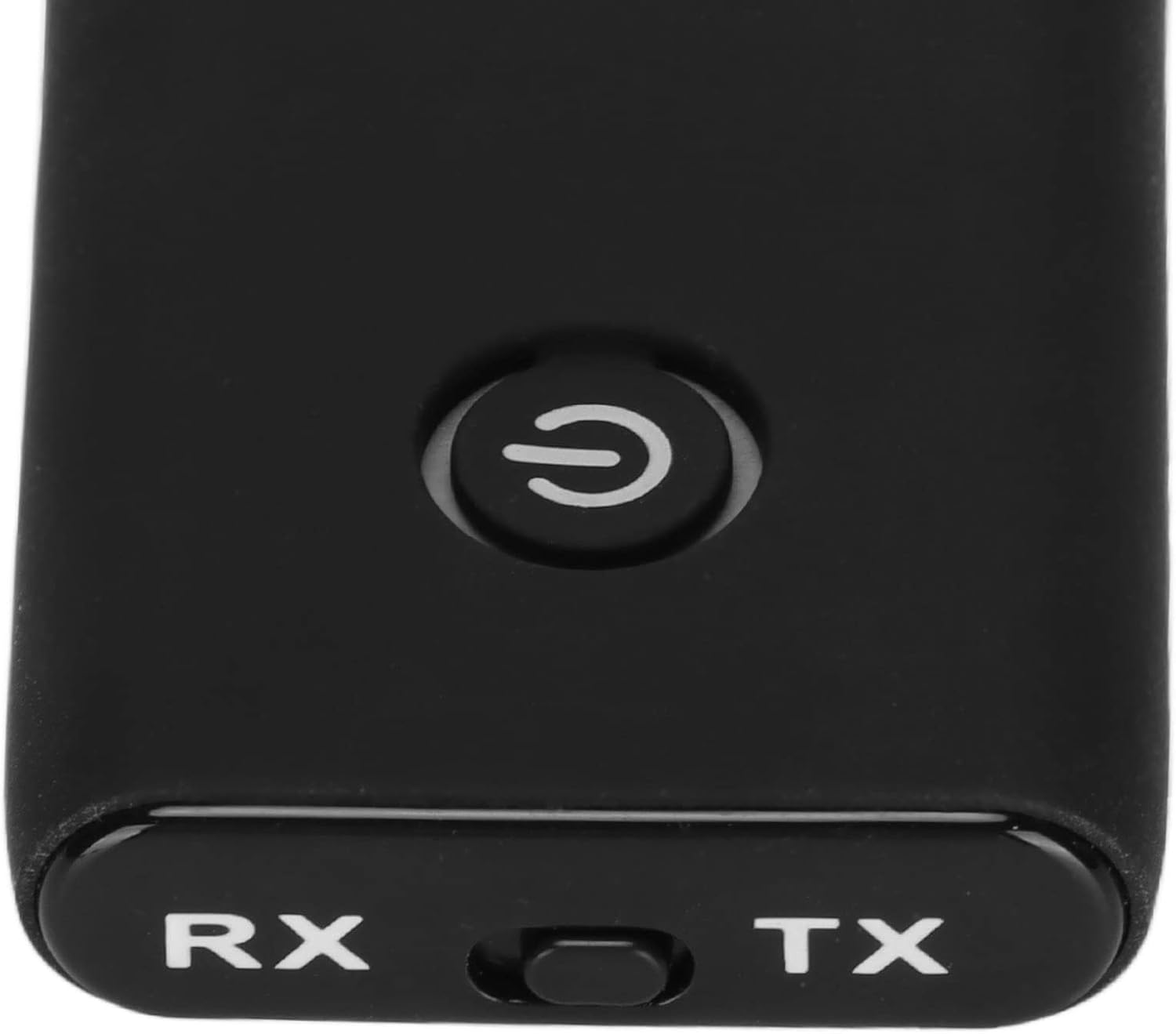
Image: Detailed view of the PUSOKEI Bluetooth adapter's top surface, showing the RX/TX mode selection switch and the power button.
Powering On/Off
Press and hold the power switch for 3 seconds to turn the device on or off. The blue light will flash quickly upon powering on, indicating it's ready for pairing.
Transmit Mode (TX) - Connecting to Bluetooth Headphones/Speakers
- Connect the PUSOKEI adapter to your non-Bluetooth audio source (e.g., TV, computer, MP3 player) using the 3.5mm audio cable.
- Set the mode switch on the adapter to TX.
- Press and hold the power button for 3 seconds to turn on the device. The blue indicator light will flash rapidly, indicating it is in pairing mode.
- Turn on your Bluetooth headphones or speaker and put them into pairing mode.
- The PUSOKEI adapter will automatically search for and connect to your Bluetooth audio device.
- Once connected, the blue light will flash twice every 4 seconds, indicating a successful connection.
Receive Mode (RX) - Connecting to Mobile Phone/Tablet
- Connect the PUSOKEI adapter to your non-Bluetooth audio receiver (e.g., home stereo, car audio system, wired speaker) using the 3.5mm audio cable.
- Set the mode switch on the adapter to RX.
- Press and hold the power button for 3 seconds to turn on the device. The blue indicator light will flash rapidly, indicating it is in pairing mode.
- On your mobile phone or tablet, enable Bluetooth and search for "B-10S" in the list of available devices.
- Select "B-10S" to connect.
- Once connected, the blue light will flash twice every 4 seconds, indicating a successful connection.
Maintenance
To ensure the longevity and optimal performance of your PUSOKEI Bluetooth adapter, please follow these maintenance guidelines:
- Cleaning: Use a soft, dry cloth to wipe the device. Avoid using liquid cleaners or abrasive materials.
- Storage: Store the device in a cool, dry place away from direct sunlight and extreme temperatures.
- Battery Care: To preserve battery life, avoid fully discharging the battery frequently. Charge the device regularly, even if not in use for extended periods.
- Handling: Do not drop, disassemble, or attempt to repair the device yourself. This may void the warranty and cause damage.
Troubleshooting
| Problem | Possible Cause | Solution |
|---|---|---|
| Device does not power on. | Low battery. | Charge the device using the provided USB cable. |
| Cannot pair with another device. | Incorrect mode selected (TX/RX). Device not in pairing mode. Other device not in pairing mode. Too far from the device. | Ensure the correct mode is selected. Press and hold the power button for 3 seconds until the blue light flashes rapidly. Ensure the other Bluetooth device is in pairing mode. Move devices closer together (within 10 meters). |
| No audio output/input. | Audio cable not properly connected. Volume too low on connected devices. Incorrect audio source/output selected on connected device. | Check 3.5mm audio cable connections. Increase volume on the PUSOKEI adapter and connected audio devices. Verify the correct audio input/output is selected on your TV, stereo, or computer. |
| Intermittent audio or poor sound quality. | Interference from other wireless devices. Distance between devices too great. Obstructions between devices. | Move away from other wireless devices (Wi-Fi routers, microwaves). Reduce the distance between the adapter and the connected Bluetooth device. Ensure there are no significant obstructions (walls, large metal objects) between devices. |
Specifications
| Item Type | Bluetooth Adapter |
| Material | Acrylonitrile Butadiene Styrene (ABS) |
| Bluetooth Version | 5.0 |
| Charging Input | DC 5V |
| Built-in Lithium Battery | 300mAh |
| Working Time | Approximately 6 hours |
| Charging Time | Approximately 2 hours |
| Audio Output | 3.5mm Audio Interface |
| Package Dimensions | 5.12 x 3.15 x 0.79 inches |
| Item Weight | 2.22 ounces |
| Manufacturer | PUSOKEI |
| Country of Origin | China |
| Special Feature | Noise Cancellation |
| Connectivity Technology | Bluetooth |
| Power Source | Battery Powered |
Warranty and Support
Limited Warranty
This PUSOKEI product comes with a limited warranty against defects in materials and workmanship under normal use. The warranty period begins from the date of purchase. Please retain your proof of purchase for warranty claims. This warranty does not cover damage caused by accident, misuse, abuse, improper installation or operation, or unauthorized repairs.
Customer Support
For technical assistance, troubleshooting, or warranty inquiries, please contact PUSOKEI customer support. Refer to the contact information provided on the product packaging or the official PUSOKEI website.
Note: Product specifications and appearance are subject to change without prior notice.


