Introduction
This document provides essential information and instructions for the XSPANDER replacement shaver head and blade set, model GD-094-3. This product is designed to replace worn or damaged foil screens and cutter blades in compatible Remington electric shavers, ensuring continued optimal shaving performance. Please read this manual thoroughly before installation and use.

Image: The XSPANDER replacement shaver head and blade set, showing two foil screens and two cutter blades.
Compatibility
This replacement shaver head and blade set is compatible with specific Remington electric shaver models. Verify your shaver model number against the lists below to ensure proper fitment.
Fits for MS2 (TCT2) Models:
- MS2-90
- MS2-100
- MS2-150
- MS2-200
- MS2-250
- MS2-260
- MS2-270
- MS2-280
- MS2-290
- MS2-300
- MS2-370
- MS2-390
- MS2-400
- MS240
- RS4400
- RS4623
- RS4843
- MS2390
- MS2391
- MS2392
Fits for MS2 (TCT2) and RS4 Models (including SP-67 MS2 Series):
- MS2-90
- MS2-100
- MS2-150
- MS2-190
- MS2-200
- MS2-250
- MS2-260
- MS2-270
- MS2-280
- MS2-290
- MS2-390
- MS2-300
- MS2-370
- MS2-400
- MS2-432
- MS240
- RS4400
- RS4623
- RS4843
- MS2-390
- MS2-391
- MS2-392
- MS-280
- MS-290
- MS-680
This set is also compatible with SP-69 Foils & Cutters for models MS2-280, MS2-290, MS2-390, MS2-150.
Product Features
Waterproof and Washable Design

The shaver foils are designed to be waterproof and fully washable. This feature allows for easy cleaning under running water after each use, which helps prevent the accumulation of hair and debris, thereby inhibiting bacterial growth and maintaining hygiene.
Precision Veneer Knife Net

Equipped with a precision ultra-thin veneer knife net made from wear-resistant stainless steel. This design facilitates the efficient capture of beard hairs, allowing for quick and clean cutting from the roots. It is engineered to provide a smooth shaving surface, effectively managing even rough beard types.
Wet and Dry Shave Capability

The replacement foils support both wet and dry shaving methods. Users can choose their preferred shaving style:
- Wet Shave: Use with shaving gel or foam for a comfortable experience.
- Dry Shave: Use directly on dry skin for a quick and convenient shave.
Floating Double Head Design

The double-mesh design of the shaver head increases the contact area with the skin, which contributes to a more efficient shave. This design minimizes missed hairs and features a 360° flexible blade surface, allowing it to adapt to facial contours and effectively shave hard-to-reach areas.
U-shaped Knife Net
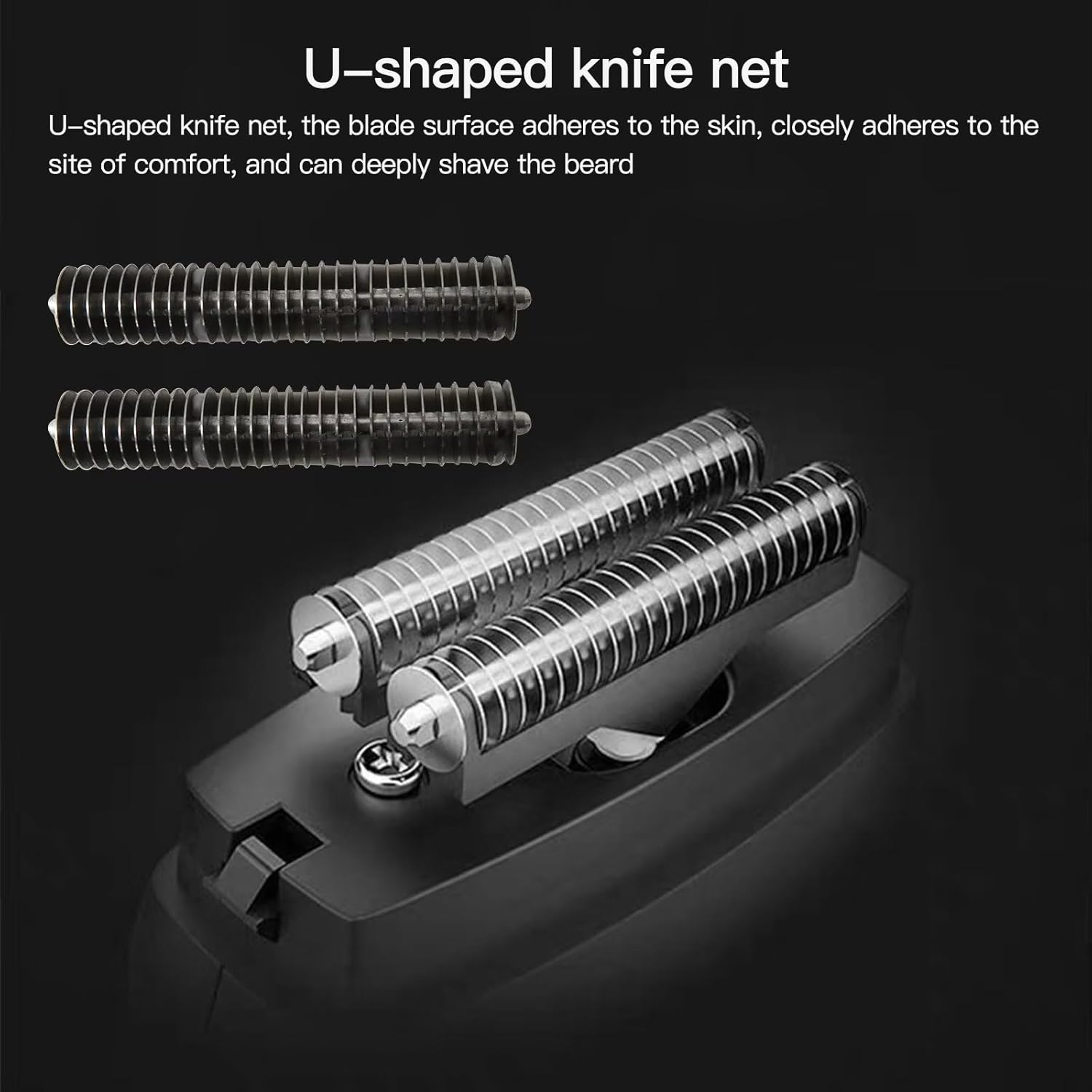
The U-shaped knife net, referring to the cutter blades, is designed to ensure the blade surface adheres closely to the skin. This close adherence enhances comfort during shaving and allows for a deep shave of the beard.
Installation Instructions
Follow these steps to replace the shaver head and cutter blades on your compatible Remington electric shaver. Ensure the shaver is turned off and unplugged before beginning the replacement process.

Image: Individual components of the replacement set, including foil screens and cutter blades, ready for installation.
- Remove the Old Shaver Head: Gently press the release buttons (if present) or twist the existing shaver head to detach it from the shaver body. Refer to your shaver's original manual for specific removal instructions.
- Remove Old Cutter Blades: Carefully lift out the old cutter blades from their positions within the shaver head assembly. Dispose of old components responsibly.
- Install New Cutter Blades: Place the new U-shaped cutter blades into the designated slots in the shaver head assembly. Ensure they are seated correctly and securely.
- Install New Foil Screens: Align the new foil screens with the shaver head assembly. Gently press them into place until they click or lock securely. Ensure the foils are not bent or damaged during installation.
- Attach New Shaver Head: Reattach the complete new shaver head assembly to the shaver body. Ensure it is firmly locked into place.
- Test Functionality: Turn on the shaver briefly to ensure all components are correctly installed and functioning smoothly.
For detailed visual guidance, consult your original Remington shaver manual or manufacturer's instructions for head replacement.
Maintenance
Proper maintenance extends the life of your shaver head and ensures optimal performance.
Cleaning the Shaver Head:
- After each use, turn off and unplug the shaver.
- Remove the shaver head from the shaver body.
- Rinse the foil screens and cutter blades thoroughly under warm running water. The waterproof design allows for direct rinsing.
- Gently tap the shaver head to remove excess water. Do not wipe the foils with a towel as this can damage them.
- Allow the shaver head components to air dry completely before reattaching them to the shaver body or storing the shaver.
- Periodically, a small brush (often included with shavers) can be used to remove stubborn hair particles from the cutter blades, ensuring not to damage the delicate foils.
Regular cleaning prevents hair buildup and maintains the sharpness and efficiency of the blades.
Specifications
| Feature | Detail |
|---|
| Item Model Number | GD-094-3 |
| Package Dimensions | 5.16 x 3.27 x 0.98 inches |
| Item Weight | 0.32 ounces |
| Material | Wear-resistant stainless steel (for knife net) |
| Compatibility | Remington MS2 (TCT2) and RS4 series shavers (see full list in Compatibility section) |
Troubleshooting
If you encounter issues after replacing your shaver head, consider the following common troubleshooting steps:
- Poor Shaving Performance:
- Ensure the shaver head is securely attached and locked into place.
- Verify that the cutter blades are correctly seated within the foil screens.
- Clean the shaver head thoroughly to remove any trapped hairs or debris.
- Confirm that the replacement part is compatible with your specific shaver model.
- Shaver Not Turning On:
- Check if the shaver head is properly installed. Some shavers have safety mechanisms that prevent operation if the head is not correctly attached.
- Ensure the shaver is charged or plugged into a power source.
- Irritation or Discomfort:
- Ensure your skin is clean before shaving.
- If wet shaving, use an adequate amount of shaving gel or foam.
- Allow a few shaves for your skin to adjust to the new blades.
- If irritation persists, discontinue use and consult a professional.
If problems persist after attempting these steps, please refer to the Warranty & Support section for further assistance.
Warranty & Support
XSPANDER is committed to providing satisfactory service to all customers. All products undergo strict quality inspections prior to shipment.
If you have any questions, concerns, or require further assistance regarding this product, please do not hesitate to contact us. We are dedicated to providing the best possible solution.
For support, please refer to the contact information provided with your purchase or visit the XSPANDER store page on Amazon.


