
Product Overview
The Fastrack Streetwear Digital Watch NS38068PP04 is designed for durability and functionality, featuring a large digital display and a robust silicone strap. This watch is equipped with multiple functions to support an active lifestyle.
- Large Digital Display: Provides clear and bold time readability.
- 100M Water Resistance: Suitable for swimming and water sports, but not deep-sea diving.
- Chronograph & Timer: Includes stopwatch and countdown timer functions for precise time tracking.
- Chime & Alarm Features: Offers alert functionality for daily reminders.
- Durable Silicone Strap: Flexible, comfortable, and designed for daily wear.
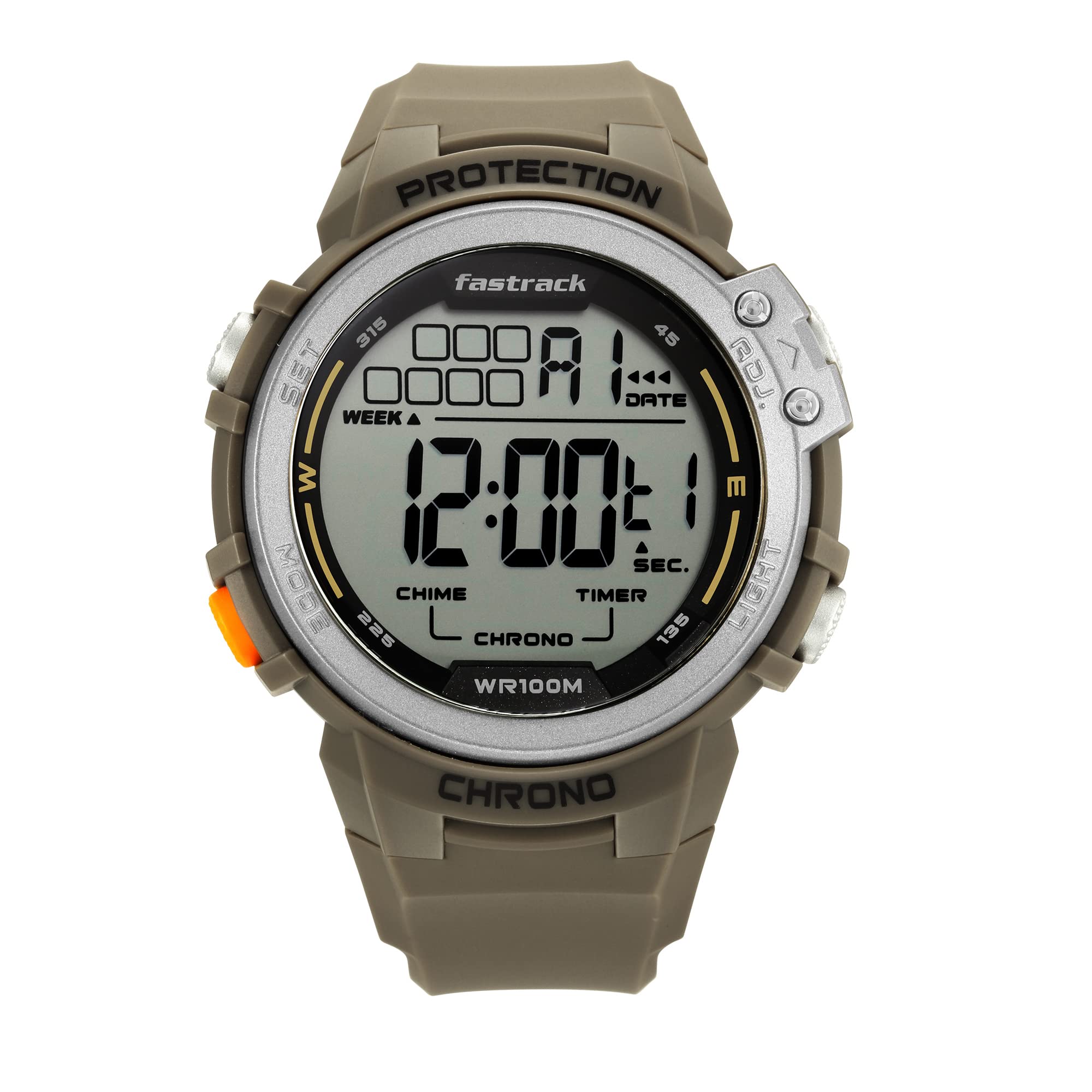
Front view of the Fastrack Streetwear Digital Watch NS38068PP04, showcasing its large digital display and green silicone strap.
Setup Guide
Before initial use, ensure the watch is powered on. The watch features four primary buttons: SET (top left), MODE (bottom left), ADJ (top right), and LIGHT (bottom right).

Front view of the watch, highlighting the SET, MODE, ADJ, and LIGHT buttons for operation.
Initial Time and Date Setting
- Press the MODE button repeatedly until the time setting mode is displayed (usually indicated by flashing digits).
- Use the SET button to select the digit or setting you wish to adjust (e.g., seconds, hours, minutes, 12/24-hour format).
- Use the ADJ button to increase the value or cycle through options.
- Continue pressing SET to move to the next setting (year, month, day). Adjust each using the ADJ button.
- Once all settings are correct, press the MODE button to exit the setting mode and return to normal time display.
Operating Instructions
Chronograph (Stopwatch) Function
- From the normal time display, press the MODE button until 'CHRONO' or 'STW' appears on the display.
- Press the ADJ button to start the stopwatch.
- Press the ADJ button again to pause/resume the stopwatch.
- To record a lap time, press the SET button while the stopwatch is running. The lap time will display briefly.
- To reset the stopwatch, ensure it is paused, then press the SET button.
Timer Function
- Press the MODE button repeatedly until 'TIMER' or 'TMR' appears.
- Press the SET button to enter timer setting mode. Digits will flash.
- Use the SET button to select hours, minutes, or seconds. Use the ADJ button to adjust the values.
- Once the desired countdown time is set, press MODE to exit setting mode.
- Press the ADJ button to start the countdown.
- When the timer reaches zero, an alarm will sound. Press any button to stop the alarm.
Alarm Setting
- Press the MODE button repeatedly until 'ALARM' or 'ALM' appears.
- Press the SET button to enter alarm setting mode. Digits will flash.
- Use the SET button to select hours or minutes. Use the ADJ button to adjust the values.
- Press MODE to exit setting mode.
- To activate/deactivate the alarm, press the ADJ button while in the alarm display mode. An alarm icon will appear/disappear.
Hourly Chime
To activate or deactivate the hourly chime, navigate to the alarm display mode using the MODE button. While in this mode, press the SET button to toggle the hourly chime on or off. A chime icon will indicate its status.
Backlight Function
Press the LIGHT button (bottom right) to illuminate the display for a few seconds, improving visibility in low-light conditions.

Side view of the watch, illustrating the placement of the control buttons.
Maintenance
Water Resistance (100 Metres)
This watch is water-resistant up to 100 meters (10 ATM), making it suitable for showering, swimming, and snorkeling. Do not operate any buttons while the watch is submerged in water, as this can compromise the water resistance seal. Avoid exposure to hot water or steam, which can also affect the seals.
Cleaning
To clean your watch, wipe the case and strap with a soft, damp cloth. For stubborn dirt, a mild soap solution can be used, followed by rinsing with clean water and drying thoroughly. Avoid using harsh chemicals or abrasive materials.
Battery Replacement
The watch is powered by a battery. When the display becomes dim or functions become erratic, it may be time for a battery replacement. It is recommended to have the battery replaced by an authorized service center to ensure proper sealing and maintain water resistance.
Troubleshooting
- Display is blank: The battery may be depleted. Replace the battery at an authorized service center.
- Incorrect time/date: Refer to the "Initial Time and Date Setting" section to reset the time and date.
- Buttons not responding: Ensure the watch is not in a locked mode (if applicable, though this model does not feature a lock). If the issue persists, a battery replacement or professional inspection may be required.
- Water inside the watch: Immediately take the watch to an authorized service center. Do not attempt to open it yourself.
Specifications
| Model Name | Streetwear |
| Model Number | NS38068PP04 |
| Brand | Fastrack |
| Display Type | Digital |
| Movement Type | Digital |
| Water Resistance Depth | 100 Metres |
| Band Material | Silicone |
| Case Material | Plastic |
| Crystal Material | Acrylic |
| Case Diameter | 48 Millimetres |
| Case Thickness | 14 Millimetres |
| Band Width | 20 Millimetres |
| Item Weight | 147.98 Grams |
Warranty and Support
Warranty Policy
This product comes with a 12-month manufacturer warranty covering manufacturing defects. To avail warranty services, present your original invoice at any authorized Titan Service Center. No separate warranty card is required.
Contact Information
For further details or service-related inquiries, please contact Titan India:
- Toll-Free Number: 1800-266-0123 (Available 10 AM to 7 PM, all days of the week)
- Email: customercare@titan.co.in
- Manufacturer Address: Titan Company Limited, Sipcot Industrial Complex, Hosur, Tamil Nadu - 635129