
GYMAX B09JSFW5KP
GYMAX Indoor Stationary Bike User Manual
Model: B09JSFW5KP
1. Introduction
Thank you for choosing the GYMAX Indoor Stationary Bike. This manual provides essential information for the safe assembly, operation, and maintenance of your new exercise equipment. Please read this manual thoroughly before use and retain it for future reference.
The GYMAX Indoor Stationary Bike is designed for cardio cycling workouts in a home gym environment. It features a belt-driven system for smooth and quiet operation, an adjustable resistance level, and an LCD monitor to track your workout progress. The bike is built with a solid steel frame and aluminum alloy cage pedals for durability and safety.

Image: A woman actively cycling on the GYMAX Indoor Stationary Bike, demonstrating its intended use.
2. Safety Information
- Consult your physician before starting any exercise program.
- Ensure all parts are securely assembled before each use.
- Keep children and pets away from the equipment during operation.
- Wear appropriate athletic footwear and clothing.
- Stop exercising immediately if you feel faint, dizzy, or experience pain.
- Place the bike on a flat, stable surface.
- The emergency brake/resistance knob should be easily accessible.
- Maximum user weight: 330 lbs (150 kg).
3. Package Contents
Please check that all components are present and undamaged before assembly:
- 1 x Spinning Bike (main frame and pre-assembled components)
- 1 x Instruction Manual
- Necessary assembly tools (usually included in a small bag)
- Additional components such as pedals, seat, handlebars, and base stabilizers.
4. Setup and Assembly
Follow these general steps for assembling your GYMAX Indoor Stationary Bike. Refer to the included assembly diagram for specific part identification.
- Unpack Components: Carefully remove all parts from the packaging and lay them out on a clean, flat surface.
- Attach Stabilizers: Secure the front and rear stabilizer bars to the main frame using the provided bolts and washers. Ensure they are tight and stable.
- Install Pedals: Identify the left (L) and right (R) pedals. Thread the left pedal counter-clockwise and the right pedal clockwise into the crank arms. Tighten securely with a wrench.
- Mount Seat Post: Insert the seat post into the main frame and adjust to your desired height. Secure with the adjustment knob.
- Attach Seat: Mount the seat onto the seat post and tighten the fasteners.
- Install Handlebar Post: Insert the handlebar post into the main frame and adjust to your desired height. Secure with the adjustment knob.
- Attach Handlebars: Mount the handlebars onto the handlebar post and tighten the fasteners.
- Connect LCD Monitor: Connect the sensor wires from the bike to the back of the LCD monitor. Mount the monitor onto the handlebar assembly.
- Final Check: Verify all bolts and nuts are securely tightened before first use.

Image: A composite image showing key components of the bike, including thickened steel pipes for durability, adjustable anti-skid foot pads for stability, adjustable aluminum cage foot pedals for secure footing, and a uniformed soft cushion for comfort.
5. Operating Instructions
5.1 Adjusting Seat and Handlebar
The GYMAX Indoor Stationary Bike offers full customization for various user heights (4.9 feet to 6.5 feet).
- Seat Height: Adjust the seat height between 32"-39.5" by loosening the adjustment knob on the seat post, sliding the seat to the desired position, and re-tightening the knob.
- Handlebar Height: Adjust the handlebar height between 43.5"-48" by loosening the adjustment knob on the handlebar post, sliding the handlebars to the desired position, and re-tightening the knob.
- Seat Fore/Aft: The seat can also be adjusted horizontally (3" range) to find your optimal riding position.

Image: A visual representation highlighting the adjustable features of the bike, including the seat height (32"-39.5"), seat fore/aft position (3"), and handlebar height (43.5"-48"), accommodating users from 4.9 to 6.5 feet tall.
5.2 Adjusting Resistance and Emergency Brake
The bike features a friction-based resistance system controlled by a single knob.
- Increase Resistance: Turn the knob clockwise to increase the resistance level for a more challenging workout.
- Decrease Resistance: Turn the knob anti-clockwise to decrease the resistance level.
- Emergency Brake: Press the knob down firmly to engage the emergency brake and quickly stop the flywheel.
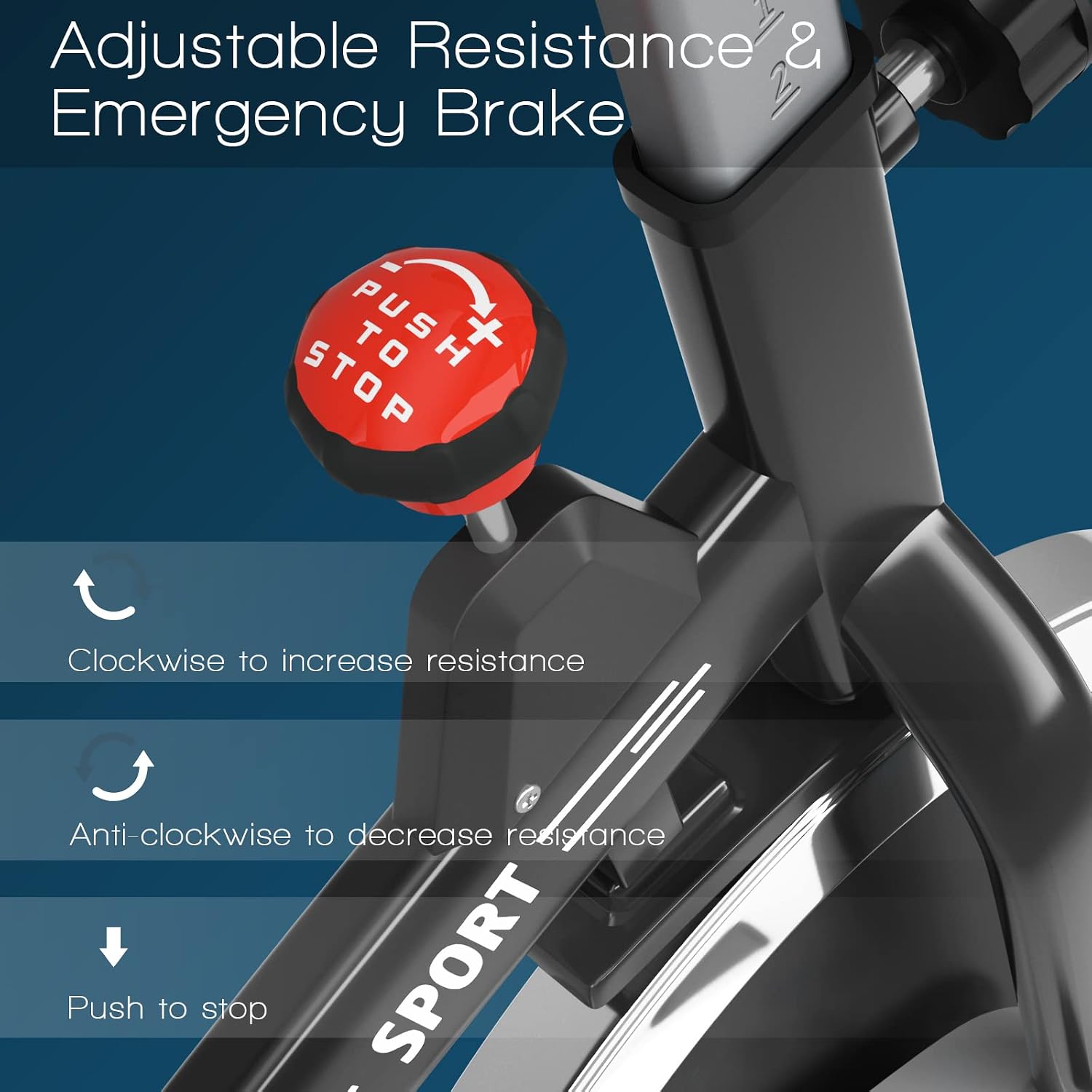
Image: A close-up view of the red resistance and emergency brake knob, illustrating how to turn it clockwise to increase resistance, anti-clockwise to decrease resistance, and push down to stop the flywheel.
5.3 Using the LCD Monitor
The LCD monitor tracks your workout data to help you manage your exercise effectively.
- Display Functions: The monitor displays Time, Distance, Calories, Speed, and Heart Rate.
- Heart Rate Sensor: Grip the handlebar sensors to measure your heart rate.
- Scan Mode: The monitor will cycle through all display functions automatically.

Image: A detailed view of the LCD digital screen on the bike's console, showing its user-friendly design and ability to display scan, time, speed, distance, calories, and pulse (heart rate) data.
6. Maintenance
Regular maintenance ensures the longevity and safe operation of your stationary bike.
- Cleaning: Wipe down the bike with a damp cloth after each use to remove sweat and dust. Avoid abrasive cleaners.
- Inspection: Periodically check all bolts, nuts, and moving parts for tightness and wear. Tighten any loose fasteners.
- Lubrication: The belt-driven system is generally low maintenance. If any squeaking occurs, consult a professional or the manufacturer for guidance on lubrication.
- Storage: Store the bike in a dry, cool place away from direct sunlight and extreme temperatures. The integrated transport wheels allow for easy relocation.

Image: A woman demonstrating the ease of moving the stationary bike across a room using its integrated transport wheels, highlighting its portability for storage or repositioning.
7. Troubleshooting
If you encounter any issues, refer to the following common troubleshooting tips:
| Problem | Possible Cause | Solution |
|---|---|---|
| Bike is unstable/wobbles | Uneven floor or loose stabilizer feet | Adjust the leveling feet on the stabilizer bars. Ensure all assembly bolts are tight. |
| Squeaking noise during use | Loose parts or friction pad wear | Check and tighten all bolts. If the noise persists, contact customer support. |
| LCD monitor not displaying | Loose connection or dead battery | Check the sensor wire connections. Replace the battery in the LCD monitor. |
| Resistance not changing | Resistance knob mechanism issue | Ensure the resistance knob is properly engaged. If not, contact customer support. |
8. Specifications
| Feature | Detail |
|---|---|
| Brand | GYMAX |
| Model Name | 38048c74-ef7d-4320-a3da-14494c23f68c |
| Color | Silver |
| Material | Alloy Steel, Aluminum |
| Product Dimensions (L x W x H) | 41"D x 21"W x 48"H |
| Seat Height Adjustment | 32" - 39.5" |
| Handlebar Height Adjustment | 43.5" - 48" |
| Maximum Weight Recommendation | 330 Pounds |
| Resistance Mechanism | Friction |
| Power Source | Pedal-powered (non-electric) |
| Special Feature | Distance Travelled Monitor, Heavy Duty |

Image: A side profile of the stationary bike with key dimensions labeled, including height (43.5"-48"), seat height (32"-39.5"), length (38.5"), and width (21"), along with an icon indicating a maximum weight capacity of 330 lbs.
9. Warranty and Support
For any product-related inquiries, support, or warranty information, please refer to the following:
- Returns: This product is eligible for 30-day easy returns. Please check the retailer's return policy for details.
- Customer Support: For assistance with assembly, operation, or troubleshooting, please contact GYMAX customer support. Refer to the contact information provided with your purchase or on the official GYMAX website.
Ask a question about this manual
Ask about setup, troubleshooting, compatibility, parts, safety, or missing instructions. Manuals+ will review the question and use this page’s manual context to help answer it.