
Introduction
Thank you for purchasing the FEDOUR 100W Mini Aquarium Heater. This heater is designed to maintain a stable water temperature in your aquarium, ensuring a healthy environment for your aquatic pets. It features a digital temperature display, external temperature control, and multiple safety mechanisms. Please read this manual thoroughly before use to ensure proper operation and safety.
Product Features
- Compact Design: Small size (11.5 x 7.5 x 3.5 cm) suitable for various mini aquariums.
- Digital Temperature Display: Real-time water temperature and set temperature are displayed digitally, eliminating the need for an additional thermometer.
- External Temperature Control: Easily adjust the temperature from 20°C to 34°C using the external button on the power cord.
- Dual Safety Protection: Equipped with a water level sensor for automatic shut-off if the heater is out of water, and overheat protection that stops heating if the water temperature exceeds 34°C.
- Durable Construction: Features a thick plastic protective cover that is shock-resistant and corrosion-resistant, suitable for both freshwater and saltwater environments.
- Fish-Safe Design: Small heat dissipation holes prevent fish from getting stuck.
Package Contents
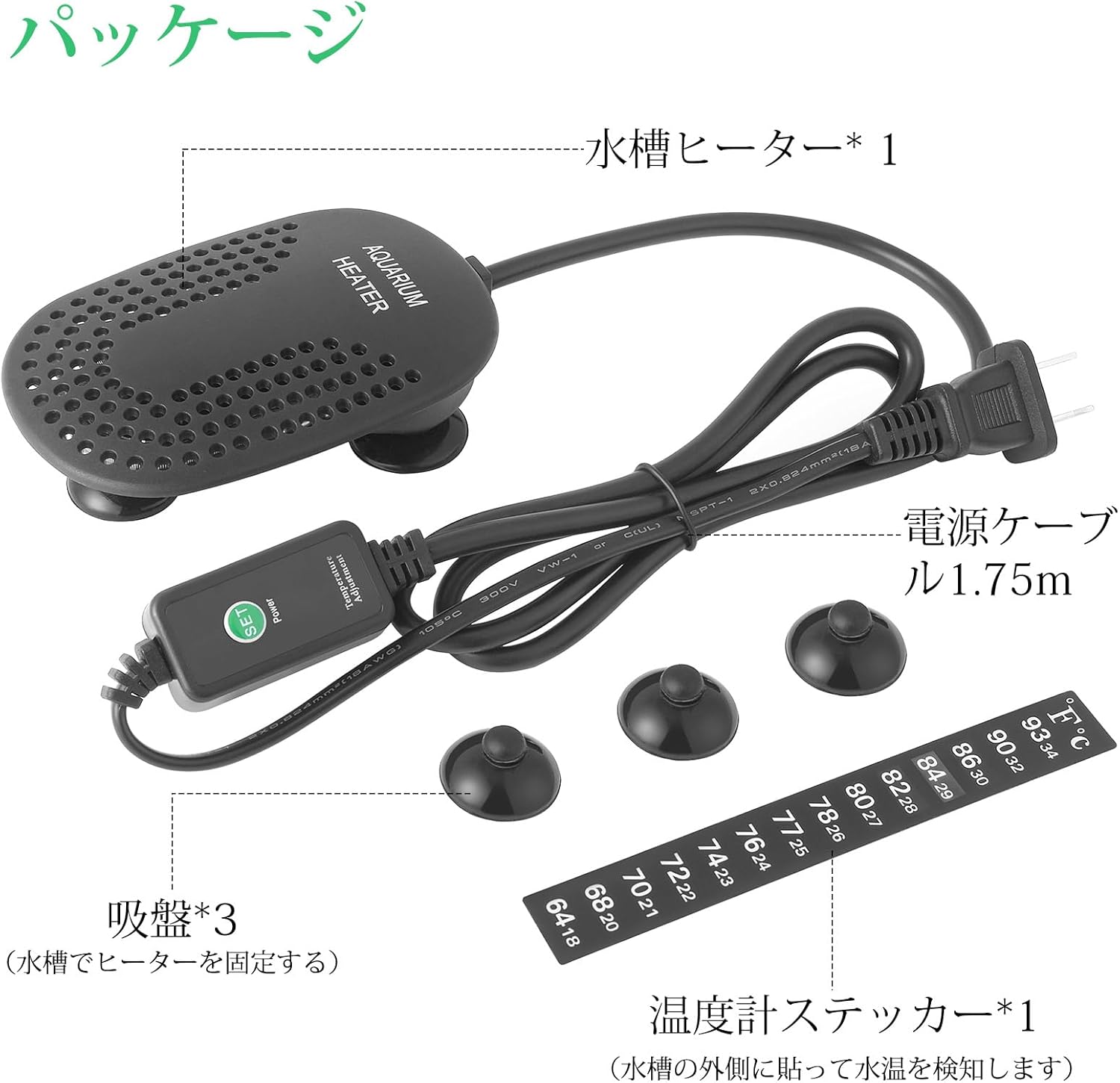
- 1 x FEDOUR 100W Mini Aquarium Heater (with 1.75m power cable)
- 3 x Suction Cups
- 1 x Thermometer Sticker
Specifications
| Parameter | Value |
|---|---|
| Model Number | Q5 |
| Power | 100W |
| Voltage | 100V/50-60Hz |
| Adjustment Range | 20-34°C |
| Applicable Tank Size (100W) | 50-120L (Recommended 90-120L for winter) |
| Heater Dimensions | 11.5 x 7.5 x 3.5 cm (approx. 4.5 x 3 x 1.2 inches) |
| Power Cable Length | 1.75 m |
| Material | Plastic |
| Compatibility | Freshwater and Saltwater aquariums |

Setup Instructions
- Unpack: Carefully remove the heater and all accessories from the packaging. Inspect for any damage.
- Attach Suction Cups: Securely attach the three suction cups to the back of the heater unit.
- Position Heater: Place the heater fully submerged in your aquarium. Ensure it is positioned vertically or horizontally in an area with good water circulation. Avoid placing it directly in the substrate or near strong currents that could expose it to air.
- Install Thermometer Sticker: Affix the thermometer sticker to the outside of the aquarium glass, away from direct sunlight, for an additional reference of water temperature.
- Ensure Water Circulation: For optimal performance and even heating, ensure adequate water circulation in your tank. This can be achieved by using a water pump or filter.
- Connect Power: Once the heater is fully submerged and positioned, plug the power cord into a suitable electrical outlet.

Operating Instructions
- Power On: After plugging in the heater, the digital display on the heater unit will show the current water temperature. The power indicator light on the external controller will illuminate.
- View Set Temperature: Press the 'SET' button on the external controller once. The digital display on the heater will flash, showing the currently set temperature.
- Set Desired Temperature: While the set temperature is flashing, press the 'SET' button repeatedly to cycle through the available temperature settings (20°C to 34°C). Stop pressing when your desired temperature is displayed. The heater will automatically save the setting after a few seconds of inactivity.
- Heating Indication: When the heater is actively heating, a red heating indicator light will be visible on the heater unit. Once the set temperature is reached, the heater will automatically stop heating, and the indicator light will turn off. It will resume heating if the water temperature drops below the set point.


Safety Precautions
- Always ensure the heater is fully submerged in water before plugging it in and during operation.
- Do not operate the heater if the power cord or plug is damaged.
- Before performing any maintenance on the aquarium (e.g., water changes, cleaning), always unplug the heater and allow it to cool for at least 15 minutes.
- The heater is equipped with an automatic shut-off feature if it detects being out of water or if the temperature exceeds 34°C. However, continuous monitoring is recommended.
- Keep out of reach of children and pets.
- This heater is suitable for both freshwater and saltwater aquariums.


Maintenance
- Cleaning: Periodically clean the heater unit to remove algae or mineral buildup. Always unplug the heater and let it cool completely before cleaning. Use a soft brush or cloth and aquarium-safe cleaning solutions if necessary. Do not use abrasive cleaners.
- Inspection: Regularly inspect the power cord and heater unit for any signs of wear, cracks, or damage. If any damage is found, discontinue use immediately.
- Water Changes: Always unplug the heater before performing water changes to prevent it from operating out of water.
Troubleshooting
| Problem | Possible Cause | Solution |
|---|---|---|
| Heater not heating | Not plugged in; Power outage; Set temperature too low; Heater out of water; Overheat protection activated. | Check power connection; Verify power supply; Increase set temperature; Ensure heater is fully submerged; Allow heater to cool if overheated. |
| Temperature display inaccurate | Heater not in an area with good water circulation; Sensor malfunction. | Relocate heater to an area with better water flow; Compare with an external thermometer. If consistently inaccurate, contact support. |
| Heater constantly on/off | Tank size too large for heater wattage; Poor water circulation. | Ensure heater wattage matches tank volume (100W for 50-120L); Improve water circulation with a pump or filter. |
Warranty and Support
This product comes with a standard manufacturer's warranty. For specific warranty details, please refer to the product packaging or contact your retailer. If you encounter any issues or have questions regarding the FEDOUR 100W Mini Aquarium Heater, please contact FEDOUR customer support through the retailer's platform or the official FEDOUR website.
