
1. Product Overview
The INFITARY TPMS (Tire Pressure Monitoring System) is designed to provide real-time monitoring of tire pressure and temperature for various vehicles, including motorcycles, buses, RVs, trailers, and trucks. This system helps enhance driving safety by alerting the user to abnormal tire conditions.
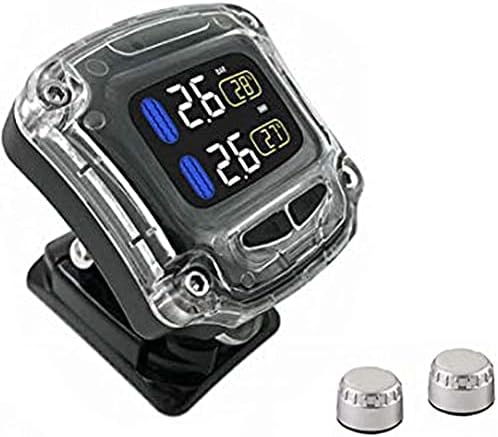
The INFITARY TPMS monitor displays tire pressure and temperature, accompanied by two external sensors.
2. Safety Information
- Always ensure proper installation of sensors to prevent air leakage.
- Do not attempt to disassemble or modify the product.
- Keep the monitor away from direct sunlight for prolonged periods to prevent overheating.
- Regularly check tire pressure with a calibrated gauge, as the TPMS is a monitoring aid, not a substitute for manual checks.
- If an alarm sounds, safely pull over and inspect your tires immediately.
3. Package Contents
The INFITARY TPMS package typically includes the main display monitor, external tire pressure sensors, a USB charging cable, and a wrench for sensor installation.

This image shows the INFITARY TPMS monitor from a side angle, illustrating its mounting bracket suitable for handlebars.
4. Setup and Installation
4.1 External Sensor Installation

A visual guide detailing the four steps for installing the external tire pressure sensors.
- Screw nuts into the valve: Thread the anti-theft nuts onto the tire valve stem.
- Tighten the sensor: Screw the external sensor onto the valve stem until it is snug.
- Tighten the nut to hold on sensor with anticlockwise: Push the anti-theft nut towards the sensor and tighten it anticlockwise using your fingers.
- Use spanner to fix nut with anticlockwise: Use the provided spanner to firmly tighten the anti-theft nut against the sensor in an anticlockwise direction to secure it.
4.2 Monitor Placement
Mount the display monitor in a location that is easily visible to the driver but does not obstruct the view of the road. Use the provided bracket to secure it firmly to a suitable surface, such as a motorcycle handlebar or dashboard.

Front view of the wireless receiver unit, indicating its dimensions (48mm width, 48mm height, 27mm depth) and showing the display for tire temperature and monitor power.
5. Operation
5.1 Automatic Start
The INFITARY TPMS monitor is designed for convenience. It automatically starts up when the vehicle is in motion. The sensors will then automatically transmit real-time tire pressure and temperature data to the display.

Illustration demonstrating the automatic start feature of the TPMS monitor, where it powers on and receives data from sensors once the vehicle starts, adapting to pressure changes.
5.2 Charging the Monitor
The monitor features a built-in explosion-proof aluminum battery and supports USB fast charging. Connect the provided USB cable to the monitor's charging port and a suitable USB power source.

This image highlights the built-in explosion-proof aluminum battery and USB fast charging capability. It also shows temperature thresholds for charging and operation, indicating automatic protection mechanisms.
The system incorporates temperature protection: if the display senses the temperature reaching 70°C, it will automatically stop charging. If the temperature reaches 80°C, the display will pause operation and protect itself. When the temperature drops back to normal, the display automatically resumes monitoring.
6. Features
- Real-Time Monitoring: Continuously displays tire pressure and temperature.
- External Sensors: Easy to install and replace.
- Automatic Start/Stop: Powers on and off with vehicle movement.
- Temperature Protection: Built-in safeguards against overheating during charging and operation.
- Wide Compatibility: Suitable for motorcycles, buses, RVs, trailers, and trucks.

A close-up showing the dimensions (13mm height, 18mm diameter) of an external sensor and an exploded view of its internal structure.
7. Troubleshooting
If you encounter issues with your INFITARY TPMS, please refer to the following common problems and solutions:
| Problem | Possible Cause | Solution |
|---|---|---|
| No display/Monitor off | Low battery; Monitor not activated by movement. | Charge the monitor; Ensure vehicle is moving to activate automatic start. |
| Sensor data not showing | Sensor not installed correctly; Sensor battery low; Interference. | Re-install sensor firmly; Replace sensor battery (if applicable); Move away from strong electromagnetic fields. |
| Inaccurate readings | Sensor not calibrated; Extreme temperature changes. | Ensure sensors are correctly paired; Allow time for readings to stabilize in new environments. |
| Alarm sounds frequently | Tire pressure/temperature outside set limits; Loose sensor. | Check tire pressure manually and adjust; Re-tighten sensors. |
8. Specifications
| Specification | Value |
|---|---|
| Brand | INFITARY |
| Model Number | U901 |
| Item Weight | 12.6 ounces |
| Package Dimensions | 7.36 x 5.16 x 2.09 inches |
| ASIN | B09JNX7RTN |
| Date First Available | November 23, 2021 |
9. Warranty and Support
For warranty information and technical support, please refer to the product packaging or contact INFITARY customer service directly. Keep your purchase receipt as proof of purchase for any warranty claims.