1. Introduction
This manual provides essential instructions for the safe and effective use of your Zenander 25.2V XBAT200/XBAT200EU replacement battery. This battery is designed to provide reliable power for compatible Shark IONFlex vacuum cleaner models. Please read this manual thoroughly before installation and use, and retain it for future reference.
1.1 Compatible Vacuum Models
- IC205, IF130, IF285, IC205CCO, IR141, IF203Q, IF251C, IF205, IF202
- IONFlex IF201, IF280, IONFlex 2X DuoClean, IONFlex 2X DuoClean Ultra-Ligh
- UF280, IF203
1.2 Compatible Battery Part Numbers
- XBAT200
- XBAT200EU
2. Safety Information
Lithium-ion batteries require careful handling. Adhere to the following safety guidelines to prevent injury or damage:
- Read all instructions: Before using the battery, read all instructions and cautionary markings on the battery, the vacuum cleaner, and the product using the battery.
- Use only specified charger: To reduce the risk of injury, charge only with the charger specified by the manufacturer. A charger that is suitable for one type of battery pack may create a risk of fire when used with another battery pack.
- Do not disassemble: Do not disassemble, open, or shred the battery pack.
- Avoid short-circuiting: Do not short-circuit a battery pack. Do not store battery packs haphazardly in a box or drawer where they may short-circuit each other or be short-circuited by conductive materials.
- Protect from heat and fire: Do not expose the battery pack to heat or fire. Avoid storage in direct sunlight.
- Avoid mechanical shock: Do not subject the battery pack to mechanical shock.
- Keep clean and dry: In the event of a battery leaking, do not allow the liquid to come into contact with the skin or eyes. If contact has been made, wash the affected area with copious amounts of water and seek medical advice.
- Proper disposal: Dispose of the battery pack properly. Follow local regulations for battery disposal.
- Keep away from children: Keep battery packs out of the reach of children.
- Use only with specified products: Use the battery pack only in the equipment for which it was specified.
3. Product Overview
The Zenander 25.2V XBAT200/XBAT200EU is a high-performance Lithium-ion replacement battery designed for seamless integration with compatible Shark IONFlex vacuum cleaners. It features a robust design and provides consistent power for extended cleaning sessions.
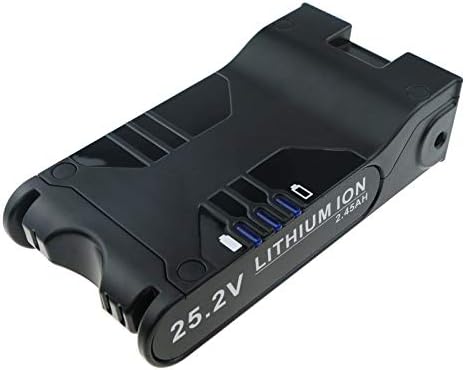
Figure 1: Top-front view of the Zenander 25.2V XBAT200 replacement battery.

Figure 2: Bottom-rear view of the Zenander 25.2V XBAT200 replacement battery, highlighting the release mechanism.
4. Setup and Installation
Follow these general steps to install the replacement battery into your Shark IONFlex vacuum cleaner. Refer to your vacuum cleaner's original manual for specific instructions if available.
- Power Off: Ensure your vacuum cleaner is completely powered off and unplugged from any charging source.
- Locate Battery Compartment: Identify the battery compartment on your Shark IONFlex vacuum. This is typically located on the main body or handle.
- Remove Old Battery: Press the battery release button (if present) and carefully slide out the old battery.
- Insert New Battery: Align the Zenander replacement battery with the battery slot. Slide the new battery into place until it clicks securely. Ensure it is fully seated.
- Verify Installation: Once installed, you may attempt to power on the vacuum briefly to confirm the battery is recognized.
5. Operating Instructions
Proper charging and usage are crucial for optimal battery performance and longevity.
5.1 Initial Charge
For the first use, it is recommended to fully charge the battery before operating your vacuum cleaner. This helps to calibrate the battery's charge indicator.
5.2 Charging
- Connect your Shark IONFlex vacuum cleaner to its original charging adapter.
- The battery indicator lights on the vacuum or battery itself will typically show the charging status.
- Charge the battery in a well-ventilated area, away from flammable materials.
- Do not leave the battery on charge indefinitely after it has reached full capacity.
5.3 Usage
- Operate your vacuum cleaner as per its original instructions.
- Avoid completely draining the battery to 0% frequently, as this can reduce its overall lifespan.
- If the vacuum's performance noticeably decreases, it's time to recharge the battery.
6. Maintenance
Proper maintenance helps extend the life of your battery.
- Cleaning: Keep the battery contacts clean and free from dust or debris. Use a dry cloth to wipe them if necessary.
- Storage: If storing the battery for an extended period, charge it to approximately 50-70% capacity. Store it in a cool, dry place, away from direct sunlight and extreme temperatures.
- Avoid Extreme Temperatures: Do not expose the battery to temperatures below 0°C (32°F) or above 45°C (113°F) for prolonged periods.
- Regular Use: For optimal performance, use and recharge the battery regularly, even if your vacuum is not used daily.
7. Troubleshooting
If you encounter issues with your replacement battery, consider the following common troubleshooting steps:
- Battery Not Charging:
- Ensure the charger is properly connected to both the wall outlet and the vacuum.
- Verify that the wall outlet is functional.
- Check for any visible damage to the charger or battery.
- Ensure the battery is fully seated in the vacuum's compartment.
- Short Run Time:
- Ensure the battery is fully charged before use.
- Check if the vacuum's filters are clean, as clogged filters can increase power consumption.
- Confirm that the vacuum is not operating in a high-power mode unnecessarily.
- Vacuum Not Powering On:
- Confirm the battery is fully charged.
- Ensure the battery is correctly installed and securely clicked into place.
- If possible, test with another compatible battery or charger to isolate the issue.
If these steps do not resolve the issue, please contact customer support.
8. Specifications
| Feature | Detail |
|---|---|
| Battery Type | Lithium-ion |
| Voltage | 25.2V |
| Capacity | 2400mAh (60.48Wh) |
| Model Number | CS-SHC200VX |
| Dimensions (L x W x H) | 3.64 x 6.79 x 1.81 inches |
| Weight | 1.56 pounds |
| Certifications | ISO9001, RoHS, CE, UN38.3, MSDS |
| Cycle Life | Approximately 500 discharge cycles |
9. Warranty and Support
Zenander provides a commitment to quality for its products.
9.1 Warranty Information
This product is covered by a 60-day full refund or free replacement policy from the date of purchase, without requiring a specific reason. This warranty covers manufacturing defects and performance issues under normal use.
9.2 Customer Support
For any questions, concerns, or warranty claims, please contact Zenander customer support through the retailer's platform where the product was purchased. Please have your purchase details and product model number (CS-SHC200VX) ready when contacting support.


