
1. Introduction
This manual provides detailed instructions for the installation, operation, maintenance, and troubleshooting of your new FITHOOD replacement battery, specifically designed for Garmin Vivoactive smartwatches. Please read this manual thoroughly before attempting any installation or use to ensure safe and proper functionality.
2. Safety Information and Warnings
Your safety is paramount. Please observe the following warnings and precautions:
- Warranty Void: The warranty is void if the battery label is removed.
- No Disassembly: Do not attempt to disassemble, open, or service the battery pack.
- Correct Replacement: Replace only with the battery pack designated for your specific device model.
- Physical Damage: Do not crush, puncture, short external contacts, or dispose of the battery in fire or water.
- Temperature: Do not store the battery above 60°C (140°F).
- Charging: The limited charge voltage is 4.2V ± 0.05V. Use only compatible charging equipment.
- Professional Installation Recommended: Battery replacement in smartwatches often requires specialized tools and technical knowledge. If you are not confident in your ability to perform the replacement, seek assistance from a qualified technician.
The FITHOOD replacement battery meets safety standards including ISO9001, RoHS, CE, UN38.3, and MSDS.
3. Setup and Installation
This section outlines the general steps for replacing the battery in your Garmin Vivoactive smartwatch. Specific disassembly procedures may vary by device model. Refer to a device-specific repair guide if available.
Required Tools (Not Included):
- Small Phillips head screwdriver
- Prying tools (plastic spudger or opening picks)
- Tweezers (optional, for delicate connectors)
- Adhesive strips (if original battery was glued in place)
Installation Steps:
- Power Off Device: Ensure your Garmin Vivoactive smartwatch is completely powered off before beginning.
- Disassemble Watch Casing: Carefully use appropriate tools to open the watch casing. This typically involves removing screws and gently prying open the back cover. Be cautious of any ribbon cables connecting the back cover to the main board.
- Locate and Disconnect Old Battery: Identify the existing battery. It will be connected to the main board via a small connector. Gently disconnect this connector using tweezers or a plastic spudger.
- Remove Old Battery: The old battery may be secured with adhesive. Carefully pry it out, taking care not to damage other internal components.
- Prepare New Battery: Inspect the new FITHOOD battery for any visible damage.
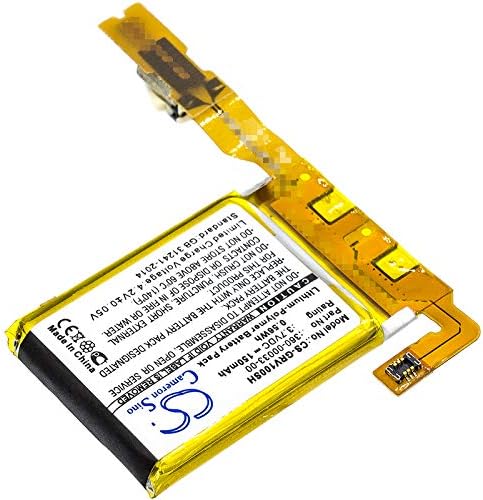
Image 1: FITHOOD replacement battery, front view, highlighting the battery cell and flexible connector.
- Install New Battery: Place the new FITHOOD battery into the battery compartment. If necessary, use new adhesive strips to secure it. Ensure the battery is oriented correctly.
- Connect New Battery: Carefully connect the new battery's flexible connector to the corresponding port on the smartwatch's main board. Ensure a secure and proper connection.

Image 2: Reverse side of the FITHOOD replacement battery, displaying model number, part number, voltage, capacity, and safety warnings.
- Reassemble Watch Casing: Carefully close the watch casing, ensuring all cables are properly seated and not pinched. Secure the casing with screws.
- Initial Charge: After reassembly, connect your smartwatch to its charger. Allow it to charge fully before its first use.
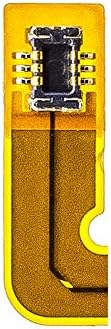
Image 3: Detailed view of the battery connector, crucial for proper installation.
4. Operating Instructions
Once the new battery is installed and fully charged, your Garmin Vivoactive smartwatch should operate as expected.
- First Use: For optimal performance, it is recommended to fully charge the battery before its first use and then allow it to discharge completely before recharging again for the first few cycles.
- Charging: Use only the original Garmin charger or a certified compatible charger for your smartwatch.
- Normal Operation: The battery will power your smartwatch for its intended functions, including tracking, notifications, and display.
5. Maintenance
Proper maintenance can extend the lifespan of your battery:
- Avoid Extreme Temperatures: Do not expose your smartwatch to extreme heat or cold, as this can degrade battery performance and lifespan.
- Regular Charging: Avoid letting the battery completely drain for extended periods. Charge it regularly.
- Storage: If storing the smartwatch for a long time, charge the battery to about 50% before storage. Recharge it every few months to prevent deep discharge.
- Cleaning: Keep the charging contacts on your smartwatch and charger clean and free of debris.
6. Troubleshooting
If you encounter issues after replacing the battery, consider the following:
- Watch Not Powering On:
- Ensure the battery connector is securely attached to the main board.
- Verify the battery is charged. Connect to the charger for at least 30 minutes.
- Confirm the battery is correctly installed and not damaged.
- Battery Not Charging:
- Check the charging cable and adapter for damage.
- Clean the charging contacts on both the watch and the charger.
- Ensure the battery is properly connected internally.
- Short Battery Life:
- Ensure the battery has completed a few full charge/discharge cycles to calibrate.
- Check for excessive background app usage or high brightness settings on your smartwatch.
- Verify the battery is the correct model for your device.
If problems persist, contact customer support for further assistance.
7. Specifications
| Model Number | 360-00033-00 (Internal Model: CS-GRV100SH) |
| Compatible Device | Garmin Vivoactive Smartwatch |
| Battery Type | Li-Polymer |
| Capacity | 150mAh |
| Watt-Hours (WH) | 0.56Wh |
| Voltage | 3.7V |
| Limited Charge Voltage | 4.2V ± 0.05V |
| Dimensions | 32.4 x 20.14 x 3.56mm (1.28 x 0.79 x 0.14 inches) |
| Weight | 29.0g (1.02 ounces) |
| Certifications | ISO9001, RoHS, CE, UN38.3, MSDS |
8. Warranty and Support
FITHOOD provides high-quality replacement batteries. While specific warranty periods are not detailed in this manual, please retain your proof of purchase for any warranty claims.
For technical assistance, troubleshooting, or any questions regarding your FITHOOD replacement battery, please contact our customer support. When contacting support, please provide your battery details or pictures of the battery and your device model for professional suggestions.