
1. Introduction
This manual provides essential information for the proper setup, operation, and maintenance of your Manley VOXBOX Tube Channel Strip and Manley Reference Tube Condenser Microphone. Please read this manual thoroughly before using the equipment to ensure optimal performance and longevity.
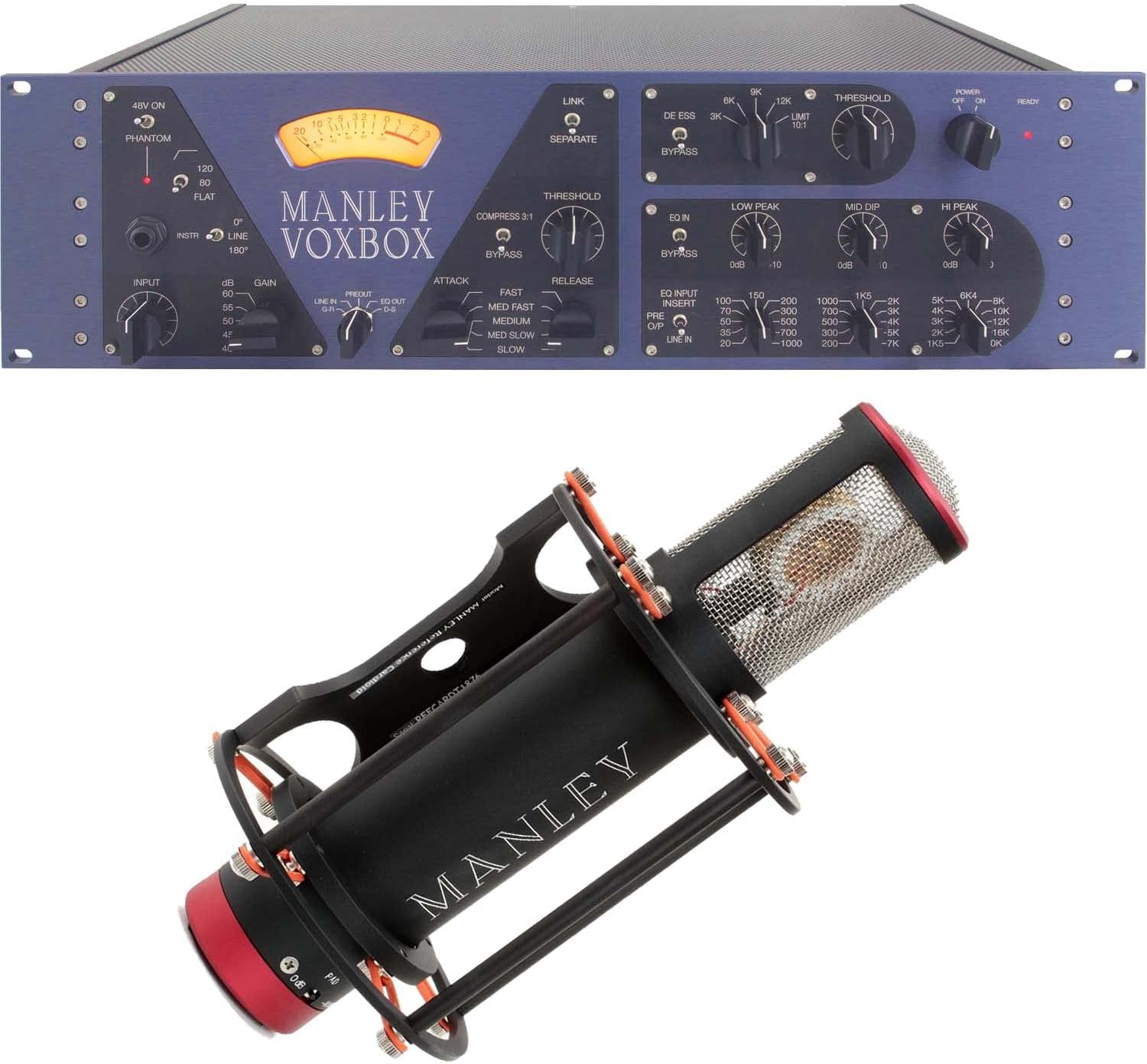
Figure 1: Manley VOXBOX Tube Channel Strip and Manley Reference Tube Condenser Microphone.
The Manley VOXBOX is a comprehensive tube channel strip designed for professional audio recording, featuring a microphone preamplifier, optical compressor, Pultec-style equalizer, and de-esser/limiter. The Manley Reference Tube Condenser Microphone is a high-quality omnidirectional microphone, known for its detailed and natural sound reproduction.
2. Setup
2.1 Manley VOXBOX Connections
Before connecting any cables, ensure the VOXBOX power switch is in the OFF position.
- Power Connection: Connect the supplied AC power cord to the IEC inlet on the rear panel of the VOXBOX and then to a grounded AC outlet.
- Audio Inputs:
- Microphone Input: Connect your Manley Reference Tube Condenser Microphone (or other microphone) to the XLR MIC INPUT on the rear panel.
- Line Input: For line-level signals, use the XLR LINE INPUT on the rear panel.
- Instrument Input: For instruments, use the 1/4" INSTRUMENT INPUT on the front panel.
- Audio Outputs:
- Main Output: Connect the XLR PREAMP OUT or EQ OUT to your audio interface, mixer, or recording device. The EQ OUT includes the equalizer processing, while the PREAMP OUT bypasses it.
- Insert Send/Return: Use the 1/4" INSERT SEND and RETURN jacks for connecting external signal processors.
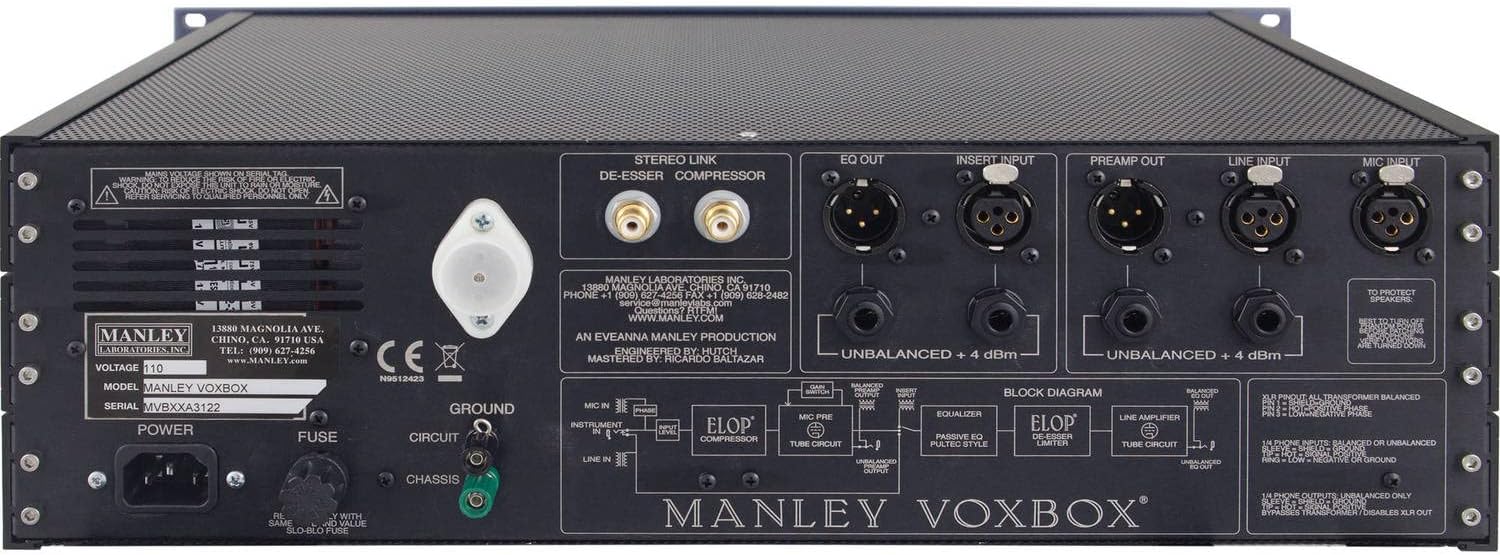
Figure 2: Rear panel connections of the Manley VOXBOX.
2.2 Manley Reference Tube Condenser Microphone Setup
The Manley Reference Tube Condenser Microphone requires phantom power, which is supplied by the Manley VOXBOX when connected to its XLR MIC INPUT and the 48V ON switch is engaged.

Figure 3: Manley Reference Tube Condenser Microphone.
- Secure the microphone to a sturdy microphone stand using the provided shock mount.
- Connect a high-quality XLR cable from the microphone to the MIC INPUT on the rear panel of the Manley VOXBOX.
3. Operating Instructions
3.1 Manley VOXBOX Front Panel Controls
Familiarize yourself with the front panel controls for optimal sound shaping.

Figure 4: Front panel of the Manley VOXBOX.
- INPUT Section:
- GAIN: Adjusts the input gain for the microphone or line input.
- 48V ON: Engages +48V phantom power for condenser microphones.
- 120/80 FLAT: Selects the high-pass filter frequency or bypasses it.
- 0°/180°: Inverts the phase of the input signal.
- INSTR: Selects the front panel instrument input.
- COMPRESSOR Section:
- THRESHOLD: Sets the level at which compression begins.
- COMPRESS 3:1: Engages a fixed 3:1 compression ratio.
- ATTACK/RELEASE: Controls how quickly the compressor reacts to and recovers from signals above the threshold.
- BYPASS: Bypasses the compressor section.
- EQ Section:
- LOW PEAK: Boosts or cuts low frequencies with a selectable frequency.
- MID DIP: Cuts mid-range frequencies with a selectable frequency.
- HI PEAK: Boosts or cuts high frequencies with a selectable frequency.
- BYPASS: Bypasses the EQ section.
- DE-ESSER/LIMITER Section:
- THRESHOLD: Sets the level for de-essing or limiting.
- BYPASS: Bypasses the de-esser/limiter section.
- OUTPUT Section:
- OUTPUT: Adjusts the overall output level of the unit.
- METERING: The large VU meter displays either input level, gain reduction, or output level, selectable via the switch below the meter.
3.2 General Operation Tips
- Always start with all gain and output controls at their minimum settings before powering on.
- Engage 48V phantom power only when using condenser microphones.
- Adjust the GAIN control to achieve a healthy signal level on the VU meter without clipping.
- Experiment with compressor and EQ settings to achieve the desired sonic characteristics for your source material.
- Use the DE-ESSER to control harsh sibilance in vocals or other instruments.
4. Maintenance
Proper maintenance ensures the longevity and optimal performance of your Manley equipment.
- Cleaning: Use a soft, dry cloth to clean the exterior surfaces. Avoid abrasive cleaners or solvents. Ensure the unit is powered off and unplugged before cleaning.
- Ventilation: Ensure adequate ventilation around the unit. Do not block the ventilation holes on the top or sides.
- Tube Replacement: The Manley VOXBOX and Reference Tube Condenser Microphone utilize vacuum tubes. Tubes have a finite lifespan and may need replacement over time. If you notice a degradation in sound quality or unusual noise, consult a qualified technician for tube inspection and replacement. Always use genuine Manley replacement tubes or approved equivalents.
- Storage: When not in use for extended periods, store the units in a cool, dry environment, protected from dust and extreme temperatures.
5. Troubleshooting
This section addresses common issues you might encounter. If the problem persists, contact Manley Laboratories support.
| Problem | Possible Cause | Solution |
|---|---|---|
| No power to VOXBOX | Power cord disconnected, power switch off, blown fuse. | Check power cord connection. Ensure power switch is ON. Check and replace fuse if necessary (refer to rear panel for fuse type). |
| No sound output | Incorrect cable connections, input gain too low, output level too low, phantom power off for condenser mic, bypass engaged. | Verify all audio cable connections. Increase GAIN and OUTPUT levels. Ensure 48V is ON for condenser mics. Check if any BYPASS switches are engaged. |
| Distorted sound | Input signal too hot, output signal too hot, faulty cable, aging tubes. | Reduce input GAIN. Reduce OUTPUT level. Try different cables. If distortion persists, tubes may need replacement. |
| Hum or noise | Ground loop, faulty cable, proximity to interference sources. | Ensure all equipment is properly grounded. Try different cables. Move unit away from power supplies, monitors, or other electronic devices. |
6. Specifications
| Feature | Detail |
|---|---|
| Product Type | Tube Channel Strip & Condenser Microphone Bundle |
| Brand | Manley |
| Recommended Uses | Studio Recordings |
| Microphone Form Factor | Large Diaphragm |
| Microphone Polar Pattern | Omnidirectional |
| Connector Type | XLR (VOXBOX inputs/outputs) |
| Number of Channels (VOXBOX) | 1 |
| UPC | 723592886691 |
7. Warranty and Support
For detailed warranty information, please refer to the warranty card included with your product or visit the official Manley Laboratories website. Manley Laboratories provides technical support for their products.
If you require assistance beyond the scope of this manual, or for service inquiries, please contact Manley Laboratories directly through their official website or contact information provided with your purchase documentation.
Always ensure that any service or repair work is performed by authorized Manley service centers or qualified technicians to maintain product integrity and warranty validity.


