
Introduction
This manual provides detailed instructions for the proper use and maintenance of your Sena 10C EVO Motorcycle Bluetooth Camera & Communication System. The 10C EVO integrates a Bluetooth communication platform with a 4K camera, designed for seamless rider communication and high-quality video recording. Please read this manual thoroughly before operating the device to ensure optimal performance and safety.
Product Overview
The Sena 10C EVO is a compact and aerodynamic device that combines a Bluetooth intercom system with an integrated 4K camera. It is designed to attach to motorcycle helmets, offering both communication and recording capabilities.

Image: Front view of the Sena 10C EVO device, showcasing its sleek design and central control dial.
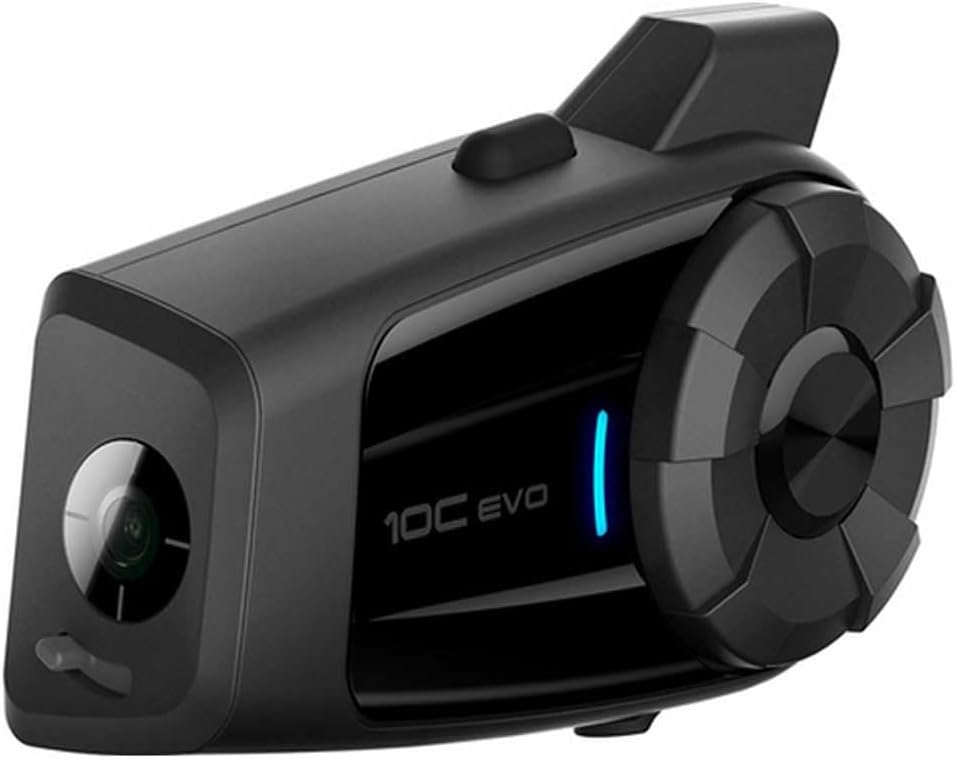
Image: The Sena 10C EVO device, angled to show the integrated camera lens on the left side.

Image: Side view of the Sena 10C EVO, highlighting the various ports and buttons for connectivity and control.

Image: The Sena 10C EVO unit displayed with its accompanying HD speakers and boom microphone, ready for helmet installation.
Package Contents
The Sena 10C EVO Single Pack includes the following items:
- Sena 10C EVO Headset Unit
- HD Speakers
- Boom Microphone
- Wired Microphone
- Mounting Hardware (Clamps, Adhesives)
- USB Charging & Data Cable
Setup
1. Installation
The 10C EVO is designed for easy installation on most motorcycle helmets. Refer to the detailed installation guide provided in the box for specific steps on mounting the unit, speakers, and microphone within your helmet. Ensure all components are securely fastened and cables are routed to avoid interference with helmet operation.

Image: A close-up view of the Sena 10C EVO unit securely mounted on the side of a motorcycle helmet.
2. Charging the Device
Before initial use, fully charge the 10C EVO. Connect the provided USB cable to the device's charging port and a USB power source. The LED indicator will show charging status. A full charge typically takes approximately 2.5 hours. The device can also be charged while in use, for example, by connecting to a portable battery pack or the motorcycle's power hub.
3. Pairing with your Smartphone
To access features like calls, music, and GPS directions, pair your 10C EVO with your smartphone via Bluetooth. Follow the pairing instructions in the quick start guide. Once paired, the device will remember your phone for future connections.
4. Intercom Pairing
The 10C EVO supports four-way Bluetooth Intercom. To communicate with other riders, initiate intercom pairing mode on your device and follow the instructions to connect with up to three other Sena intercom units. Ensure other units are compatible for pairing.
Operating the Device
1. Basic Controls
The 10C EVO features intuitive controls, primarily through a jog dial and various buttons. Consult the quick start guide for a detailed diagram of button functions for power, volume, and mode selection.
2. Camera Operation
The integrated camera can capture video in up to 4K/30FPS quality or take photos in still shot, burst, or time-lapse mode. A MicroSD card (up to 32GB, not included) is required for recording. Ensure the card is formatted correctly before use. The camera features an adjustable lens for optimal angle. The camera will auto-shut off after a few minutes of inactivity; press the camera button to reactivate it before recording.
3. Intercom Usage
Once paired, the Group Intercom allows communication with up to three other riders within a range of 1.6 km (1 mile). Activate the intercom function via the device controls. The system provides clear audio for conversations.
4. Phone Connectivity
With your smartphone connected, you can take calls, listen to music, and receive turn-by-turn GPS directions directly through your helmet speakers. Use the device controls to manage these functions.
5. Smart Audio Mix
The Smart Audio Mix feature allows you to narrate your footage on-the-go, integrating your voice with the recorded video without the need for post-production audio editing. This provides a dynamic way to capture your riding experience.
Maintenance
1. Cleaning
Regularly clean the exterior of the 10C EVO with a soft, damp cloth. Avoid using harsh chemicals or abrasive cleaners. Ensure the camera lens is kept clean for optimal video quality.
2. Storage
When not in use, store the device in a cool, dry place away from direct sunlight and extreme temperatures. For long-term storage, ensure the battery is partially charged (around 50%) to preserve battery health.
3. Firmware Updates
Sena periodically releases firmware updates to improve performance and add new features. Connect your device to a computer and use the Sena Device Manager software to check for and install the latest firmware. This ensures your device operates with the most current capabilities.
Troubleshooting
1. Video Recording Issues
If the camera is not recording or showing errors, ensure a compatible MicroSD card is inserted and properly formatted. Check that the battery level is sufficient, as low battery can prevent recording. If issues persist, try resetting the device or updating the firmware.
2. Intercom or Bluetooth Connectivity Problems
If you experience difficulty pairing or maintaining connection with other devices or your smartphone, ensure both devices are within range and in pairing mode. Try unpairing and re-pairing the devices. Verify that the 10C EVO's Bluetooth is enabled and not in another mode.
3. Audio Quality Concerns
For issues with sound quality, check the speaker and microphone placement within the helmet. Ensure connections are secure. Adjust volume settings on both the 10C EVO and your connected smartphone. Firmware updates can sometimes address audio performance improvements.
Specifications
| Model Name | 10C EVO |
| Connectivity Technology | Bluetooth |
| Wireless Communication Technology | Bluetooth |
| Age Range (Description) | Adult |
| Material | Plastic |
| Specific Uses For Product | Motorcycle Bluetooth communication |
| Charging Time | 2.5 Hour |
| Recommended Uses For Product | Motorcycle |
| Compatible Devices | Sena, Smartphone |
| Control Type | Media Control |
| Water Resistance Level | Not Water Resistant |
| Frequency Range | Up to 14.99 MHz |
| Style | 10C EVO |
| Control Method | App |
| Number of Items | 1 |
| Controller Type | Bluetooth |
| Battery Life | 20 Hour (Intercom), Shorter with Camera Use |
| Audio Driver Type | Dynamic Driver |
| Bluetooth Version | 4.1 |
| Item Weight | 1.17 pounds |
| Batteries | 1 Lithium Polymer battery required (included) |
| Ear Placement | In Ear |
| Form Factor | On Ear |
| Noise Control | Active Noise Cancellation |
Warranty and Support
For warranty information and technical support, please refer to the official Sena website or contact Sena customer service directly. Details regarding product registration, warranty claims, and service centers can be found on their support pages. Keep your proof of purchase for warranty validation.


