
1. Introduction
This manual provides detailed instructions for the installation, operation, and maintenance of the WARN 107525 Trans4mer Gen III Bracket Kit. This kit is designed to integrate a winch into the front of your GMC Sierra HD 2500/3500 model years 2020-2021, providing a robust mounting solution for recovery operations.
2. Safety Information
- Always read and understand all instructions before beginning installation.
- Wear appropriate personal protective equipment, including safety glasses and gloves, during installation.
- Ensure the vehicle is parked on a level surface, the parking brake is engaged, and the engine is off before starting work.
- Disconnect the vehicle's battery before performing any electrical work.
- Do not exceed the rated capacity of the bracket kit or the winch.
- Seek professional assistance if you are unsure about any part of the installation process.
- Keep all fasteners tightened to the specified torque values. Regularly inspect for loose hardware.
3. Package Contents
Verify that all components are present before beginning installation. The WARN 107525 Trans4mer Gen III Bracket Kit typically includes:
- Mounting Brackets (Left and Right)
- Mid-Frame Winch Carrier
- Hardware Kit (bolts, nuts, washers, etc.)
- Installation Guide (this document or similar)
Note:
While the product description indicates the inclusion of a mid-frame winch carrier, some users have reported receiving only the mounting brackets under this product number. Please verify your package contents upon receipt and contact WARN customer support if any discrepancies are found.
4. Setup and Installation
The WARN 107525 Trans4mer Gen III Bracket Kit is designed for straightforward installation on GMC Sierra HD 2500/3500 (2020-2021) models. The design aims to minimize modifications to the vehicle.
4.1 Pre-Installation Steps
- Review all instructions and diagrams thoroughly.
- Gather all necessary tools (e.g., wrenches, sockets, torque wrench).
- Ensure the vehicle is clean and free of debris in the installation area.
- Disconnect the negative terminal of the vehicle's battery.
4.2 Mounting Bracket Installation
The bracket kit is engineered for installation with no welding, drilling, and minimal cutting. It includes provisions for mounting lights and allows for easy winch installation without the need to relocate the control pack.
- Position the mounting brackets according to the vehicle-specific instructions provided with the kit.
- Secure the brackets using the supplied hardware. Ensure all bolts are tightened to the manufacturer's specified torque.
- The winch carrier, if included, will integrate with these brackets to form a fortified cross beam.

Image 1: WARN Trans4mer Gen III Bracket Kit installed on a GMC Sierra HD. This image shows the integrated winch and protective bar, demonstrating the final appearance after installation.
4.3 Winch Installation
This kit is compatible with foot-down mounted winches up to 12,000 lb. pulling capacity. Follow the winch manufacturer's instructions for mounting the winch onto the Trans4mer Gen III carrier.
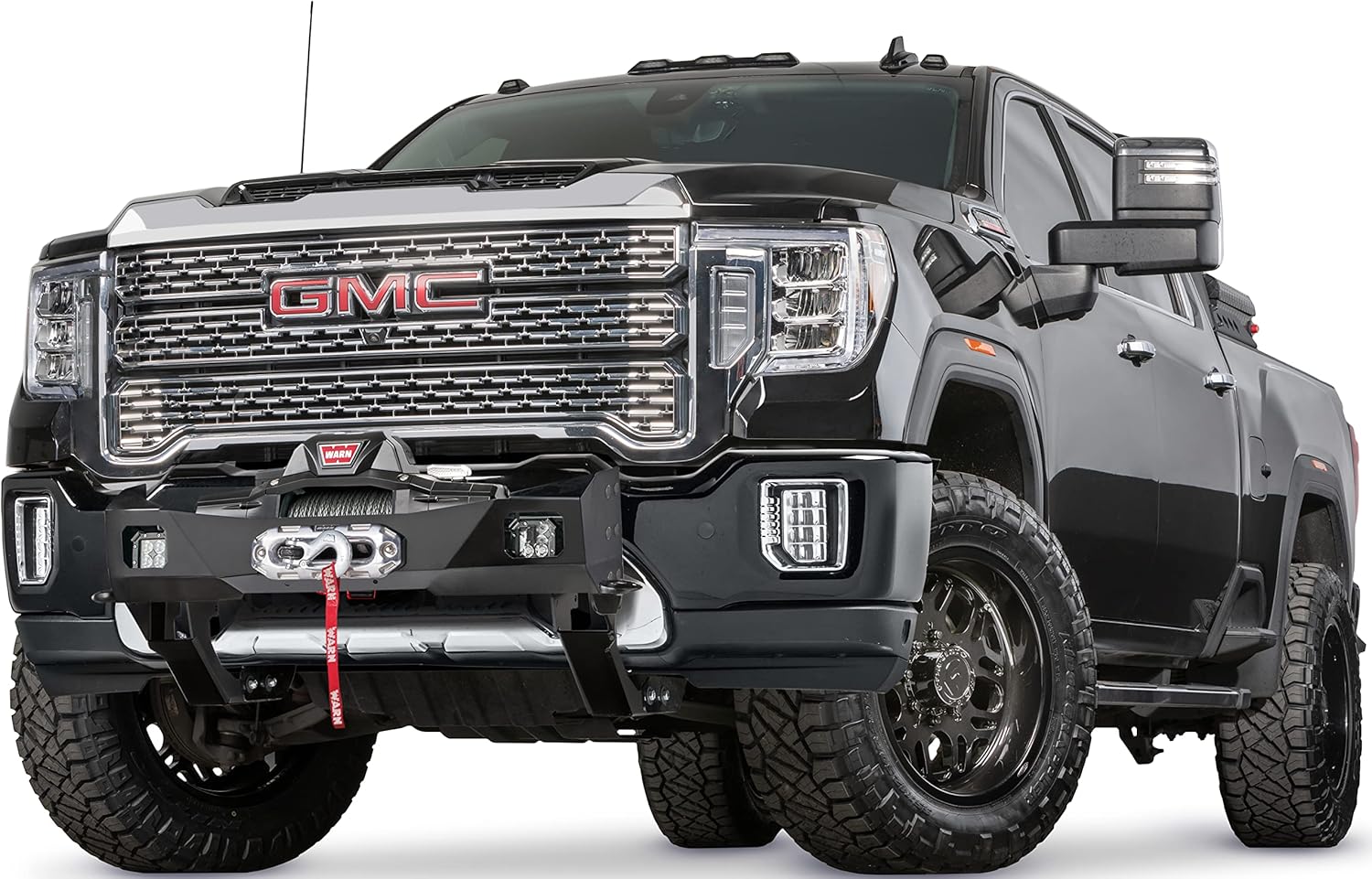
Image 2: A closer view of the WARN winch securely mounted within the Trans4mer Gen III Bracket Kit on the front of a GMC Sierra HD. This illustrates the integration of the winch with the bracket system.
4.4 Important Installation Considerations
- While WARN states minimal cutting, some users have reported that minor cutting may be involved during the installation of the brackets. Carefully assess the installation area and consult the specific instructions provided with your kit.
- Be aware of potential interference with vehicle sensors during installation. Ensure all sensors remain unobstructed and functional after the kit is installed.
5. Operating Instructions
The WARN Trans4mer Gen III Bracket Kit itself does not have operational controls. Its function is to provide a secure and integrated mounting platform for a winch. Refer to your winch's instruction manual for proper operating procedures and safety guidelines.
- Ensure the winch is properly secured to the bracket kit before any winching operation.
- Always follow safe winching practices, including using appropriate recovery gear and maintaining a safe distance.
- Regularly inspect the bracket kit for any signs of damage or wear before and after winching.
6. Maintenance
Proper maintenance ensures the longevity and reliability of your WARN Trans4mer Gen III Bracket Kit.
- Regular Inspection: Periodically inspect all mounting points, bolts, and the structure of the bracket kit for any signs of corrosion, cracks, or damage.
- Cleaning: Clean the bracket kit regularly with mild soap and water to remove dirt, salt, and other contaminants. Rinse thoroughly.
- Finish Protection: The kit features a durable black powder-coated finish designed to protect against corrosion. Avoid using abrasive cleaners or tools that could damage this finish. Touch up any chips or scratches promptly to prevent rust.
- Fastener Torque: Re-check the torque of all fasteners after the first 500 miles of driving and periodically thereafter, especially after heavy use or off-road excursions.
7. Troubleshooting
If you encounter issues during or after installation, consider the following:
- Fitment Issues: Double-check that the bracket kit is specifically designed for your vehicle's make, model, and year (GMC Sierra HD 2500/3500, 2020-2021). Incorrect application can lead to fitment problems.
- Missing Components: Refer to the 'Package Contents' section. If any parts are missing, contact WARN customer support immediately.
- Loose Components: Ensure all bolts and fasteners are tightened to the recommended torque specifications. Loose components can cause rattling or structural instability.
- Sensor Interference: If vehicle sensors (e.g., parking sensors, adaptive cruise control sensors) are affected, re-examine the installation to ensure no part of the bracket kit is obstructing their view or function. Adjustments may be necessary.
8. Specifications
| Model Number | 107525 |
| Compatibility | GMC Sierra HD 2500/3500 (2020-2021) |
| Material | Heavy-gauge steel |
| Finish | Black powder-coated |
| Winch Capacity | Up to 12,000 lb. pulling capacity (foot-down mounted winches) |
| Item Weight | 51.9 pounds |
| Product Dimensions | 0.2 x 0.2 x 0.2 inches (Note: These dimensions may refer to packaging or internal components, not the overall installed size.) |
9. Warranty and Support
For information regarding product warranty, please refer to the official WARN website or contact WARN customer support directly. Keep your proof of purchase for any warranty claims.
If you require technical assistance or have questions not covered in this manual, please contact WARN customer service through their official channels.


