
1. Introduction
Thank you for choosing the FBT X-Lite 115A Professional Active Speaker. This manual provides essential information for the safe and efficient use of your new audio system. Please read these instructions carefully before operating the device and retain them for future reference.
The FBT X-Lite 115A is a bi-amplified, 2-way active speaker system featuring a 15-inch woofer and a 1-inch HF compression driver. It includes an integrated 3-channel mixer, Bluetooth 5.0 connectivity, and 4 DSP presets, making it suitable for various sound reinforcement applications.
2. Important Safety Instructions
- Power Supply: Connect the speaker only to a power source with the voltage specified on the unit. Ensure the power cord is not damaged or pinched.
- Ventilation: Do not block any ventilation openings. Maintain adequate space around the unit for proper airflow to prevent overheating.
- Moisture: Do not expose the speaker to rain or moisture. Avoid placing objects filled with liquids, such as vases, on the apparatus.
- Heat Sources: Keep the speaker away from heat sources such as radiators, heat registers, stoves, or other apparatus (including amplifiers) that produce heat.
- Cleaning: Unplug the apparatus before cleaning. Use only a dry cloth.
- Servicing: Do not attempt to service this product yourself. Refer all servicing to qualified service personnel. Servicing is required when the apparatus has been damaged in any way, such as power-supply cord or plug is damaged, liquid has been spilled or objects have fallen into the apparatus, the apparatus has been exposed to rain or moisture, does not operate normally, or has been dropped.
- Mounting: If mounting the speaker, ensure it is securely installed using appropriate hardware and techniques to prevent injury or damage.
3. Package Contents
Upon unpacking, please verify that the following items are included:
- FBT X-Lite 115A 15-inch Active Speaker with Integrated 3-Channels Mixer
- Power Cord
- This Instruction Manual
If any items are missing or damaged, please contact your dealer immediately.
4. Product Overview
The FBT X-Lite 115A is designed for professional audio applications, offering robust sound reproduction and versatile connectivity. Its lightweight, gas-injected molded polypropylene cabinet ensures durability and portability.
4.1 Front View

Figure 4.1: Front view of the FBT X-Lite 115A speaker, showcasing the protective grille and FBT logo.
The front of the speaker features a durable metal grille protecting the 15-inch woofer and the high-frequency compression driver. The FBT logo is prominently displayed at the bottom.
4.2 Side View

Figure 4.2: Side view of the FBT X-Lite 115A speaker, showing the integrated handle for transport.
The side of the speaker includes an integrated handle for easy transportation. The cabinet's asymmetrical design allows it to be used as a floor monitor.
4.3 Rear Panel and Control Interface

Figure 4.3: Detailed view of the FBT X-Lite 115A rear panel, showing the mixer controls, inputs, outputs, and power connections.
The rear panel houses the integrated 3-channel mixer and various connectivity options:
- Channel 1 & 2 Inputs: Two combo XLR/TRS inputs for microphones or line-level sources, each with a dedicated level control and mic/line selector.
- Channel 3 Input: Stereo input (RCA or 3.5mm jack) for external audio devices, with a dedicated level control.
- Bluetooth 5.0: Dedicated channel for wireless audio streaming, with a pairing button and LED indicator.
- XLR Output: Allows linking to another speaker or sending the mixed signal to an external device. Features a CH1 or MIX link selector.
- DSP Presets: Selector for 4 different Digital Signal Processing presets (Original/Live, Vocal, Floor/Vocal, Club) to optimize sound for various applications.
- HP Filter: High-pass filter switch.
- Power Input: Universal switching mode power supply (100-240Vac) with power switch and fuse holder.
5. Setup
5.1 Placement Options
- Floor Standing: Place the speaker on a stable, flat surface.
- Speaker Stand: The FBT X-Lite 115A features a standard 1.38-inch (35mm) speaker stand socket for pole mounting. Ensure the stand is rated for the speaker's weight (approximately 55 lbs / 25 kg).
- Floor Monitor: Due to its asymmetrical cabinet design, the speaker can be positioned on its side for use as a stage monitor.
- Rigging: The cabinet includes 4 x M10 rigging points for permanent installations. Consult a qualified professional for safe rigging procedures.
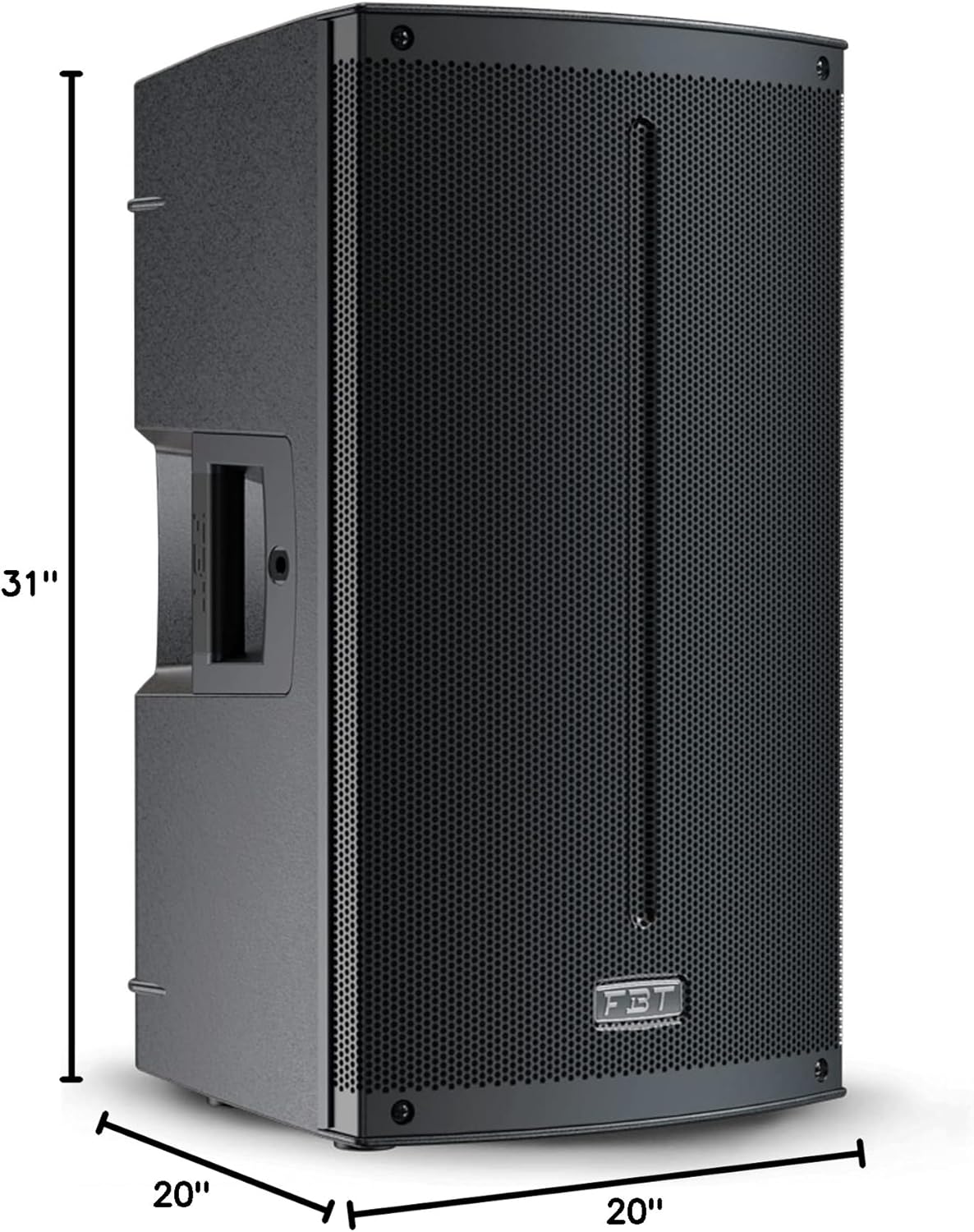
Figure 5.1: Dimensions of the FBT X-Lite 115A speaker: 20"D x 20"W x 31"H.
5.2 Power Connection
- Ensure the speaker's power switch is in the "OFF" position.
- Connect the supplied power cord to the AC inlet on the rear panel of the speaker.
- Plug the other end of the power cord into a suitable electrical outlet (100-240Vac, 50/60Hz).
5.3 Audio Connections
Connect your audio sources to the appropriate input channels on the rear panel:
- Microphones/Line Sources (Channels 1 & 2): Use XLR or 1/4-inch TRS cables. Set the MIC/LINE selector switch according to your source type.
- Stereo Devices (Channel 3): Use RCA cables or a 3.5mm jack cable for devices like smartphones, tablets, or MP3 players.
- Linking Speakers: To connect multiple FBT X-Lite 115A speakers, use an XLR cable from the "OUT" port of the first speaker to the "IN" port of the next. Use the CH1 or MIX link selector to determine the signal sent out.
6. Operating Instructions
6.1 Powering On/Off
- Before powering on, ensure all channel level controls are set to minimum.
- Flip the power switch on the rear panel to the "ON" position. The power indicator LED will illuminate.
- To power off, set all channel level controls to minimum, then flip the power switch to "OFF".
6.2 Adjusting Input Levels
Each input channel (1, 2, and 3) has an independent LEVEL control knob. Gradually increase the level for each connected source until the desired volume is achieved. Monitor the signal presence LEDs to avoid clipping (distortion).
6.3 Bluetooth 5.0 Pairing
- Ensure the Bluetooth channel level is at minimum.
- Press the "PAIR" button on the rear panel. The Bluetooth LED will flash, indicating pairing mode.
- On your Bluetooth-enabled device (smartphone, tablet), search for available devices and select "FBT X-Lite 115A".
- Once connected, the Bluetooth LED will glow solid. You can now stream audio wirelessly.
- Adjust the Bluetooth channel level control to set the volume.
6.4 DSP Presets
The FBT X-Lite 115A offers 4 Digital Signal Processing (DSP) presets to optimize the speaker's sound for different applications. Use the "PRESET" selector button to cycle through the options:
- ORIGINAL/LIVE: Standard flat response, suitable for live music and general sound reinforcement.
- VOCAL: Optimized for speech and vocals, enhancing clarity in the mid-range.
- FLOOR/VOCAL: Designed for use as a floor monitor, with specific EQ adjustments to reduce feedback and enhance vocal presence.
- CLUB: Enhanced bass and treble response, ideal for DJ sets and music playback in club environments.
6.5 HP Filter
The High-Pass (HP) Filter switch cuts low frequencies below a certain point. This can be useful when using the speaker with a subwoofer, or to reduce unwanted low-frequency rumble from microphones.
7. Maintenance
- Cleaning: Disconnect the power before cleaning. Use a soft, dry cloth to wipe the cabinet. Do not use abrasive cleaners, solvents, or waxes.
- Storage: When not in use for extended periods, store the speaker in a dry, dust-free environment.
- Inspection: Periodically check the power cord and all cables for signs of wear or damage.
8. Troubleshooting
| Problem | Possible Cause | Solution |
|---|---|---|
| No power | Power cord disconnected; power outlet faulty; fuse blown. | Check power cord connection; try a different outlet; replace fuse (refer to safety instructions). |
| No sound output | Input levels too low; source device not playing; incorrect input selected; faulty cable. | Increase channel level; ensure source is playing; check input connections; try a different cable. |
| Distorted sound | Input levels too high (clipping); faulty cable; speaker overloaded. | Reduce input levels; check cables; ensure speaker is not overdriven. |
| Bluetooth not pairing | Speaker not in pairing mode; device too far; interference. | Press "PAIR" button; move device closer; restart speaker and device. |
9. Technical Specifications
| Model Name | X-Lite 115A |
| Speaker Type | 2-Way Bi-Amplified Active Speaker |
| Woofer Diameter | 15 Inches (LF) |
| HF Compression Driver | 1-inch throat / 1.4-inch voice coil |
| Amplifier Power (LF/HF) | 1200W / 300W |
| Frequency Response | 42Hz - 20kHz |
| Maximum SPL | 130dB |
| Bluetooth Version | 5.0 |
| Mixer Channels | 3 (2x Mic/Line, 1x Stereo/Bluetooth) |
| DSP Presets | 4 |
| Input Voltage | 100-240Vac, 50/60Hz |
| Mounting Options | Floor Standing, 1.38" Speaker Stand Socket, M10 Rigging Points |
| Product Dimensions (D x W x H) | 20" x 20" x 31" (50.8cm x 50.8cm x 78.7cm) |
| Item Weight | 55 Pounds (24.9 kg) |
| Enclosure Material | Polypropylene molded |
| Color | Black |
| Connectivity Technology | Bluetooth, XLR |
| Recommended Uses | Public Address Systems, Stage Monitoring, Events |
10. Warranty and Support
10.1 Warranty Information
The FBT X-Lite 115A speaker comes with a Limited Warranty. Please refer to the warranty card included with your product or contact your local FBT distributor for specific terms and conditions applicable to your region. Keep your proof of purchase for warranty claims.
10.2 Customer Support
For technical assistance, troubleshooting beyond this manual, or service inquiries, please contact your authorized FBT dealer or visit the official FBT website for support resources and contact information.


