
1. Introduction
This manual provides essential information for the safe and efficient operation, maintenance, and troubleshooting of your Profile GE Automatic Espresso Machine + Milk Frother. Please read these instructions thoroughly before first use and retain for future reference.

Image 1.1: The Profile GE Automatic Espresso Machine with a prepared espresso and a latte.
2. Safety Information
Always follow basic safety precautions when using electrical appliances to reduce the risk of fire, electric shock, and injury to persons.
- Ensure the appliance is connected to a grounded outlet.
- Do not immerse the machine, cord, or plug in water or other liquids.
- Unplug from the outlet when not in use and before cleaning.
- Do not operate any appliance with a damaged cord or plug.
- Keep hands and cords away from hot surfaces.
- Use only manufacturer-recommended attachments.
3. Product Overview
The Profile GE Automatic Espresso Machine is designed for convenience and quality, featuring an integrated grinder, milk frother, and smart connectivity.
3.1 Components
- Control Panel: Touch-sensitive buttons for various drink selections and functions.
- Bean Hopper: Stores whole coffee beans for grinding.
- Water Reservoir: Removable tank for water supply.
- Coffee Spout: Dispenses brewed coffee.
- Steam Wand: For frothing milk.
- Drip Tray: Collects excess liquids.
- Grounds Container: Collects used coffee grounds.

Image 3.1: The top control panel with buttons for Espresso, Americano, My Brew, Steam, and Hot Water.

Image 3.2: The integrated bean hopper with whole coffee beans and grind size adjustment knob.

Image 3.3: The removable water reservoir being lifted from the machine.
4. Setup
4.1 Unpacking and Initial Placement
- Carefully remove all packaging materials.
- Place the machine on a stable, level surface away from heat sources and direct sunlight.
- Ensure adequate space around the machine for ventilation and access to components.
4.2 Initial Cleaning
Before first use, clean all removable parts with warm water and mild detergent. Rinse thoroughly and dry. Wipe the exterior of the machine with a damp cloth.
4.3 Filling the Water Reservoir
- Remove the water reservoir from the machine (refer to Image 3.3).
- Fill with fresh, cold drinking water up to the MAX line.
- Replace the reservoir securely into the machine.
4.4 Adding Coffee Beans
- Open the lid of the bean hopper (refer to Image 3.2).
- Pour whole coffee beans into the hopper. Do not overfill.
- Close the lid securely.
4.5 Powering On and Initial Rinse
- Plug the power cord into a grounded electrical outlet.
- Press the power button on the control panel. The machine will perform an initial rinse cycle.
- Place a container under the coffee spout to collect the rinse water.
4.6 SmartHQ App Connection
For enhanced customization and software updates, connect your espresso machine to the SmartHQ app.
- Download the SmartHQ app from your device's app store.
- Follow the in-app instructions to pair your espresso machine.
- Customize drink preferences, volume, and strength through the app.

Image 4.1: Using the SmartHQ app to control and customize the espresso machine.
5. Operating Instructions
5.1 Brewing Coffee
The machine offers Espresso, Americano, Lungo, and Hot Water options. The 'My Cup' setting is pre-set to Ristretto and can be adjusted via the SmartHQ app.
- Ensure the water reservoir is filled and the bean hopper contains coffee beans.
- Place a cup under the coffee spout.
- Select your desired drink (Espresso, Americano, Lungo, My Cup) from the control panel.
- The machine will automatically grind the beans, brew, and dispense your coffee.

Image 5.1: The espresso machine dispensing a fresh shot of espresso.
5.2 Adjusting Grind Size
The integrated conical burr grinder allows for 5 levels of grind size adjustment, from coarsest to finest, to optimize flavor extraction.
- Locate the grind size adjustment knob inside the bean hopper (refer to Image 3.2).
- Turn the knob to select your desired grind setting. Finer grinds are suitable for espresso, while coarser grinds are better for longer coffee types.
5.3 Using the Steam Frother
The steam frother creates various milk textures for cappuccinos, lattes, and more.
- Fill the included stainless steel frothing pitcher with cold milk.
- Position the steam wand into the milk.
- Press the 'Steam' button on the control panel.
- Move the pitcher to achieve desired foam texture.
- Once finished, press the 'Steam' button again to stop.
- Immediately clean the steam wand after each use to prevent milk residue buildup.
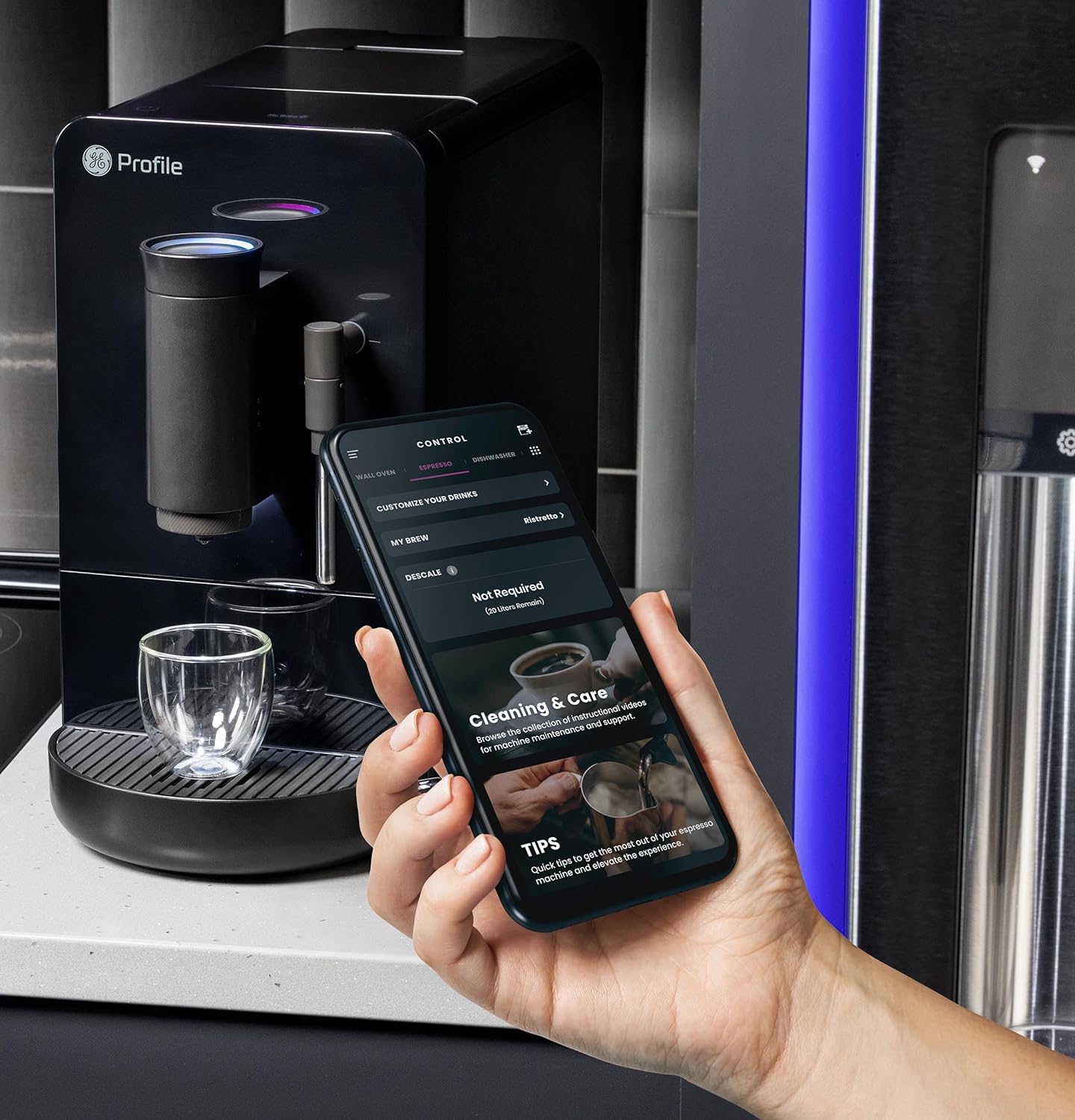
Image 5.2: A hand using the steam wand to froth milk in a stainless steel pitcher.
6. Maintenance
Regular cleaning and maintenance ensure optimal performance and longevity of your espresso machine.
6.1 Daily Cleaning
- Steam Wand: After each use, wipe the steam wand with a damp cloth. Purge steam briefly to clear any milk residue from the nozzle.
- Drip Tray and Grounds Container: Empty and rinse daily. The machine will indicate when the grounds container needs emptying.
- Water Reservoir: Rinse daily and refill with fresh water.
6.2 Weekly Cleaning
- Brew Unit: The brew unit is typically removable for rinsing under running water. Refer to the included cleaning kit instructions for detailed steps.
- Bean Hopper: Periodically clean out any oil residue or old beans.
6.3 Descaling
The machine will prompt you when descaling is required. Use a descaling solution specifically designed for espresso machines and follow the instructions provided with the descaling agent or in the SmartHQ app.
7. Troubleshooting
This section addresses common issues you might encounter with your espresso machine.
| Problem | Possible Cause | Solution |
|---|---|---|
| No coffee dispensed / "Add Beans" message | Bean hopper empty or beans not feeding correctly. | Refill bean hopper. Gently stir beans to ensure they feed into the grinder. |
| Coffee is too weak or watery | Grind size too coarse, insufficient coffee dose, or descaling needed. | Adjust grind size to a finer setting. Check SmartHQ app for strength settings. Perform descaling if prompted. |
| Milk not frothing properly | Steam wand clogged, milk type unsuitable, or insufficient steam pressure. | Clean steam wand thoroughly. Use fresh, cold milk. Ensure machine is heated to steam temperature. |
| Machine not turning on | Not plugged in, power outage, or circuit breaker tripped. | Check power connection. Verify power outlet functionality. Reset circuit breaker if necessary. |
| SmartHQ app connectivity issues | Incorrect Wi-Fi password, network interference, or app bug. | Verify Wi-Fi credentials. Ensure machine is within Wi-Fi range. Restart app and machine. Check for app updates. |
8. Specifications
- Brand: Profile
- Model Name: GE Profile Automatic Espresso Machine + Frother
- Item Model Number: P7CEBBS6RBB
- Color: Black
- Product Dimensions: 7"D x 16"W x 12.5"H
- Item Weight: 16 pounds
- Voltage: 120V
- Operation Mode: Fully Automatic
- Special Features: Built-In Bean Hopper, Built-In Conical Burr Grinder & Adjustable Grind Size, Programmable My Brew Setting, Steam Frother & Frothing Pitcher, WiFi Connected
- Included Components: Cleaning Kit, Coffee Bean Container, Espresso Machine, Steam Wand, Milk Pitcher, Water Tank
- Coffee Input Type: Whole Beans
- Human Interface Input: Touchscreen

Image 8.1: Product dimensions of the espresso machine.
9. Warranty and Support
This product is covered by a manufacturer's warranty. For specific warranty details, registration, or technical support, please refer to the warranty card included with your product or visit the official GE Profile website. You may also contact customer service through the SmartHQ app for assistance.


