1. Introduction
The Avalla X-125 Smart Dehumidifier is designed to efficiently remove excess moisture from your home or office environment, preventing issues such as mould, dampness, and condensation. Featuring Aero-Dynamic™ Technology, it offers a low running cost and includes specialized modes for various needs, such as clothes drying. This manual provides essential information for the safe and effective operation and maintenance of your dehumidifier.

Figure 1: Avalla X-125 Smart Dehumidifier. A sleek, white rectangular unit with a circular control panel on the front, equipped with wheels for easy mobility.

Figure 2: The Avalla X-125 operating in a room, illustrating its effectiveness in preventing mould, damp, fungus, and condensation, leading to improved indoor air quality.
Important Safety Information
Please read all instructions carefully before using the appliance. Retain this manual for future reference.
- Ensure the appliance is placed on a stable, level surface.
- Do not block air inlets or outlets. Maintain at least 20cm clearance from walls and furniture.
- Do not operate the dehumidifier near water or in excessively wet environments (e.g., directly in a shower).
- Unplug the appliance before cleaning or performing any maintenance.
- Keep out of reach of children and pets.
- Use only the power adapter supplied with the unit.
- If the power cord is damaged, it must be replaced by the manufacturer, its service agent, or similarly qualified persons to avoid a hazard.
2. Setup
Unboxing
Carefully remove the dehumidifier and all packaging materials from the box. Inspect the unit for any signs of damage. Keep packaging for future storage or transport if needed.
Placement
For optimal performance, place the dehumidifier in the centre of the room where humidity is highest. Ensure there is adequate space around the unit for proper airflow. Avoid placing it directly against walls, furniture, or curtains.

Figure 3: Illustration of the dehumidifier's effective coverage across multiple rooms, highlighting optimal central placement for maximum moisture removal.
Power Connection
Plug the power cord into a grounded electrical outlet. The unit is now ready for operation.
3. Operating Instructions
Control Panel Overview
The Avalla X-125 features an intuitive touch control panel. The central display shows current humidity levels or timer settings, surrounded by touch-sensitive buttons for various functions.
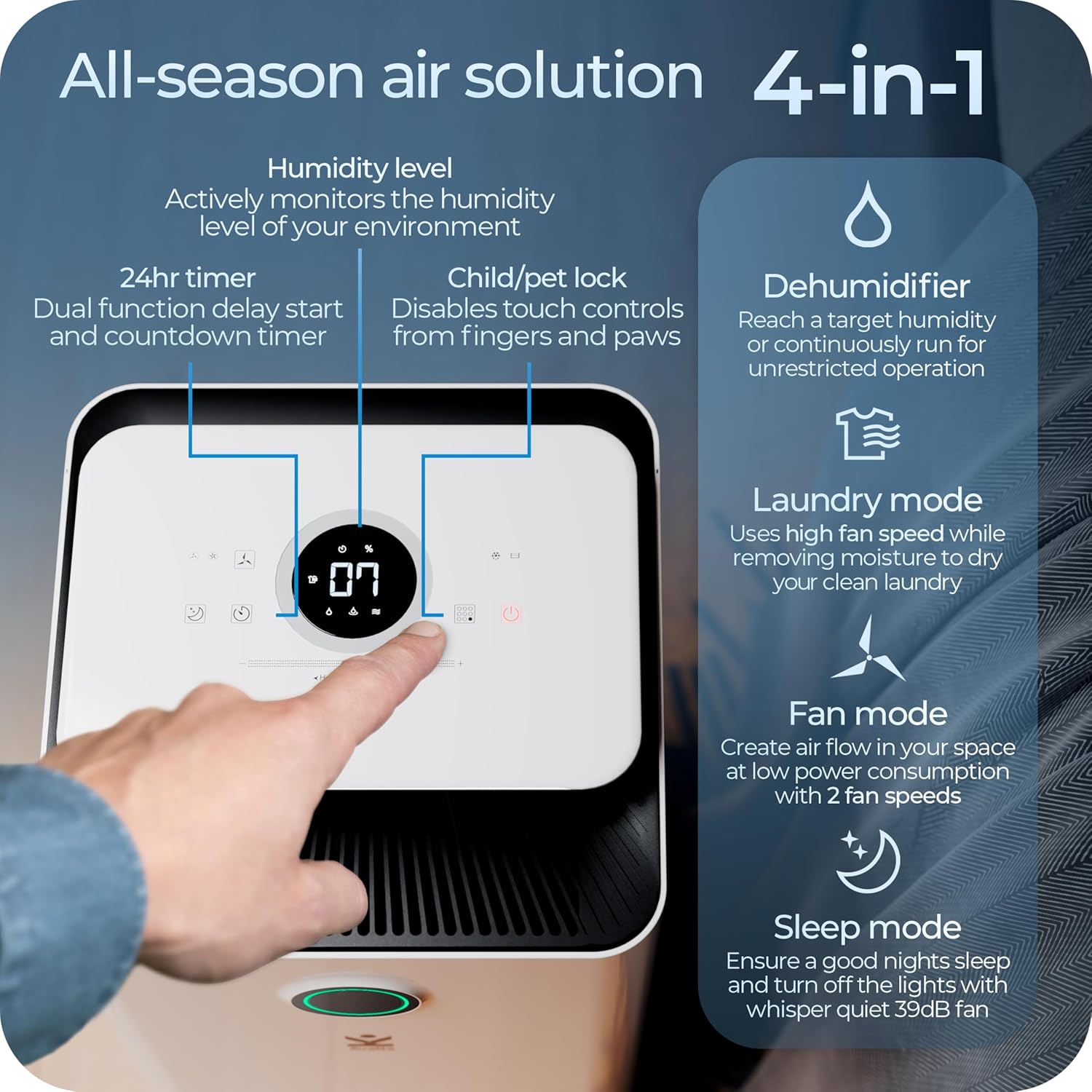
Figure 4: Detailed view of the touch control panel, showing humidity level display, timer, fan speed, and mode selection icons.
Operating Modes
- Dehumidify Mode: This is the primary mode for moisture removal.
- Press the "Mode" button until the Dehumidify icon is selected.
- Use the humidity slider on the control panel to set your desired humidity level (e.g., 50% - 60% is generally recommended). The unit will automatically operate to maintain this level.
- The colour LED around the control panel provides a visual guide to current air quality/humidity:
- Green: Optimal humidity
- Blue: Moderate humidity
- Red: High humidity
- Laundry Mode: Designed to accelerate the drying of clothes indoors.
- Select "Laundry Mode" from the control panel.
- This mode uses a high fan speed to efficiently remove moisture from laundry, preventing musty smells and excessive dampness.

Figure 5: The Avalla X-125 positioned near a clothes drying rack, demonstrating its effectiveness in drying laundry indoors without creating excessive moisture.
- Fan Mode: Operates as an air circulator.
- Choose "Fan Mode" to circulate air without dehumidification.
- Adjust between 2 fan speeds as desired.
- Sleep Mode: For quiet operation during rest periods.
- Activate "Sleep Mode" to dim display lights and reduce fan noise to a whisper-quiet 39dB.
Timer Function
The 24-hour timer allows for delay start or countdown operation.
- Press the "Timer" button to set the desired operating duration or delay.
- The unit will automatically turn on/off according to the set time.
Child/Pet Lock
To prevent accidental changes to settings, activate the child/pet lock.
- Press and hold the designated lock button (refer to control panel diagram) for a few seconds until the lock indicator appears.
- Repeat the process to deactivate the lock.
4. Maintenance
Regular maintenance ensures the longevity and efficiency of your Avalla X-125 dehumidifier.
Emptying the Water Tank
The dehumidifier has a 2.5-litre removable water tank. When the tank is full, the unit will automatically stop operation and an indicator light will illuminate.
- Gently pull out the water tank from the front of the unit.
- Carefully empty the collected water into a sink or drain.
- Slide the empty tank back into the unit until it clicks into place. The dehumidifier will resume operation.

Figure 6: The 2.5-litre removable water tank being pulled out for emptying, and an inset showing the continuous drainage hose connection point.
Continuous Drainage
For continuous operation without needing to empty the tank, you can set up continuous drainage.
- Locate the continuous drainage outlet on the back or side of the unit (refer to Figure 6).
- Securely attach a suitable drainage hose (not always included, check packaging) to this outlet.
- Ensure the other end of the hose is placed in a drain or a larger container, positioned lower than the dehumidifier's outlet to allow gravity drainage.
Filter Cleaning
The Avalla X-125 is equipped with a washable filter to maintain air quality and unit efficiency.
- Periodically check the air filter, located at the air intake.
- Gently remove the filter.
- Wash the filter under running water. For stubborn dirt, a mild detergent can be used.
- Allow the filter to air dry completely before reinserting it into the unit. Do not use a dryer or direct heat.
5. Troubleshooting
If you encounter issues with your dehumidifier, please refer to the following common problems and solutions before contacting support.
| Problem | Possible Cause | Solution |
|---|---|---|
| Unit does not turn on. | No power supply; power cord loose; power outage. | Check power connection; ensure outlet is working; check circuit breaker. |
| No water collected. | Humidity level too low; room temperature too low; water tank full or incorrectly inserted; air filter blocked. | Increase target humidity; ensure room temperature is above 16°C; empty and reinsert water tank correctly; clean air filter. |
| Unit is noisy. | Unit not on a level surface; air filter dirty; internal components vibrating. | Place on a flat, stable surface; clean air filter; if noise persists, contact support. |
| Airflow is weak. | Air inlets/outlets blocked; air filter dirty. | Ensure clear space around unit; clean air filter. |
6. Specifications
Technical specifications for the Avalla X-125 Smart Dehumidifier:
- Model Number: AVX-125
- Brand: Avalla
- Capacity: 12 Litres/day
- Power / Wattage: 210 watts
- Noise Level: 39 dB
- Product Dimensions (D x W x H): 24.5 x 24.5 x 50 cm
- Item Weight: 9.9 kg
- Water Tank Volume: 2.5 Litres
- Floor Area Coverage: Up to 30m² (323 Square Feet)
- Special Features: Continuous Draining, Portable, Timer, Removable Tank, Washable Filter
- Refrigerant: R290 (CFC-free, environmentally safe)
- Minimum Operating Temperature: 16°C
7. Warranty and Support
The Avalla X-125 Smart Dehumidifier comes with a 2-year guarantee, providing peace of mind regarding its quality and performance.
For any questions, technical assistance, or warranty claims, please refer to the contact information provided on your purchase receipt or visit the official Avalla website for support details.


