
Important Safety Instructions
Before using this treadmill, please read all instructions carefully. Keep this manual for future reference.
- Always consult your physician before starting any exercise program.
- Keep children and pets away from the treadmill during operation.
- Place the treadmill on a level surface with at least 2 meters (6.5 feet) of clear space behind it and 0.6 meters (2 feet) on each side.
- Ensure the safety key is properly attached to your clothing during use.
- Do not operate the treadmill if it has a damaged cord or plug, or if it is not working properly.
- Wear appropriate exercise clothing and athletic shoes.
- Maximum user weight capacity is 125 kg (275 lbs).
Setup and Assembly
The NordicTrack S 40 Treadmill requires assembly. It is recommended that two people assemble this product. Refer to the separate assembly guide for detailed step-by-step instructions.
Unpacking
- Carefully remove all components from the packaging.
- Place all parts on a clear, level surface.
- Verify all parts are present according to the parts list in the assembly guide.
Placement
Ensure the treadmill is placed on a stable, level surface. Maintain adequate clearance around the machine for safe operation and maintenance.

Image: The main console of the NordicTrack S 40 Treadmill, showing the touchscreen display, control buttons, and handlebars.
Operating Instructions
Powering On
- Plug the power cord into a grounded outlet.
- Attach the safety key to the console and clip the other end to your clothing.
- The console display will illuminate.
Starting a Workout
- Manual Mode: Press the "Start" button to begin a workout. Adjust speed and incline manually using the console controls.
- Pre-set Programs: Select from 20 built-in workout programs via the 7-inch touchscreen.
- iFit Integration: Connect to the iFit app for unlimited interactive workouts.
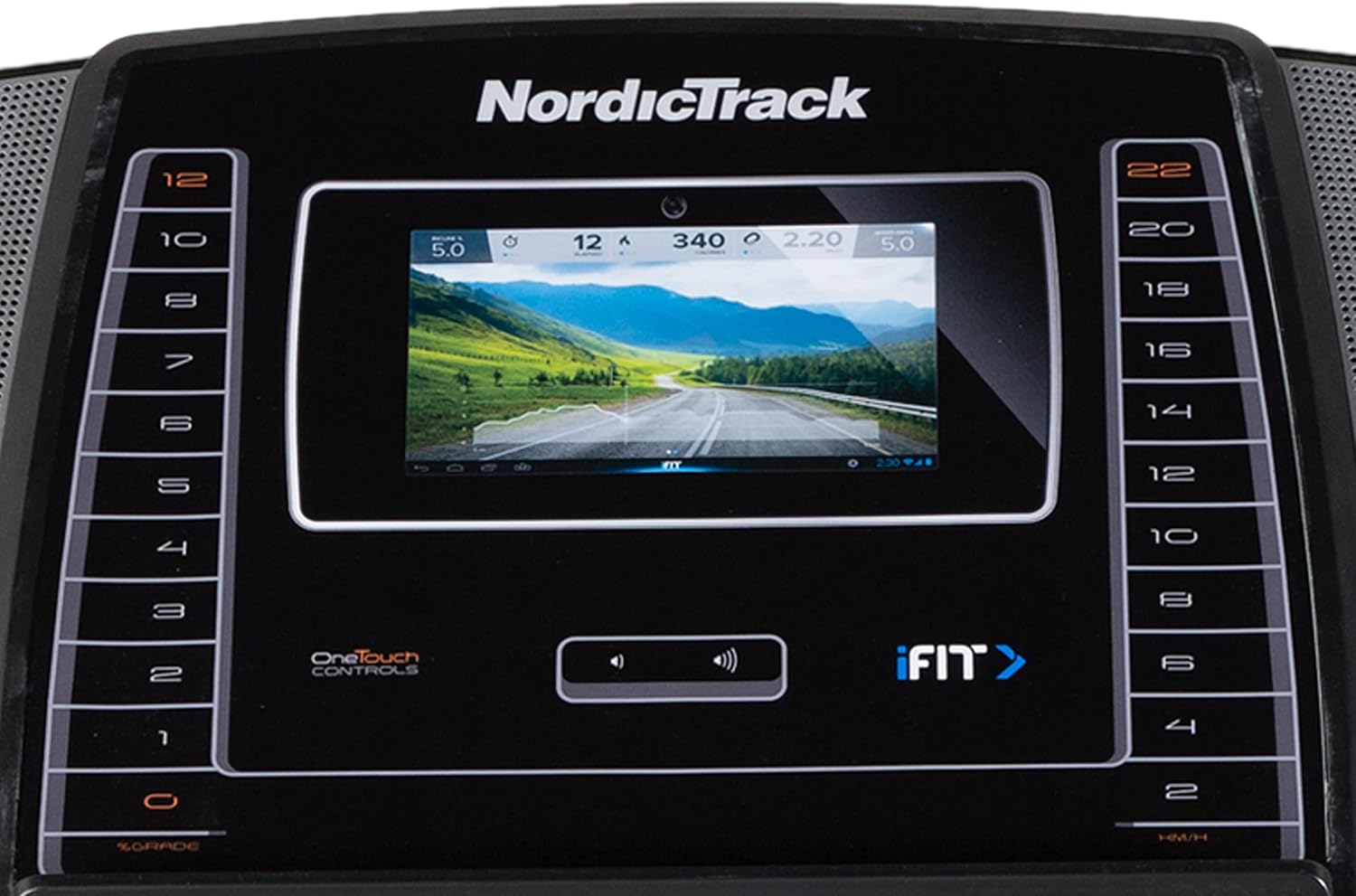
Image: A detailed view of the 7-inch touchscreen display and the quick-access speed and incline buttons on the NordicTrack S 40 Treadmill console.
Adjusting Speed and Incline
- Speed: Use the "Speed +" and "Speed -" buttons, or the quick-speed buttons (0-22 km/h) on the console.
- Incline: Use the "Incline +" and "Incline -" buttons, or the quick-incline buttons (0-12%) on the console.
Stopping the Treadmill
- Press the "Stop" button to pause or end your workout.
- To stop immediately, pull the safety key from the console. The treadmill will come to a controlled stop.
Maintenance
Regular maintenance ensures optimal performance and extends the life of your treadmill. Always unplug the treadmill before cleaning or performing any maintenance.
Cleaning
- Wipe down the console and exterior surfaces with a damp cloth after each use. Avoid abrasive cleaners.
- Periodically vacuum underneath the treadmill to prevent dust buildup.
Running Belt Maintenance
- Lubrication: The running belt is pre-lubricated. Check your assembly guide for specific lubrication intervals, typically every few months depending on usage. Use only approved silicone lubricant.
- Tension: The running belt should be properly tensioned. If it slips or feels loose, refer to the assembly guide for instructions on adjusting belt tension.
- Alignment: If the belt drifts to one side, it may need alignment. Consult the assembly guide for adjustment procedures.

Image: A close-up view of the running deck and the FlexSelect cushioning system of the NordicTrack S 40 Treadmill.
Motor Maintenance

Image: Diagram illustrating the internal components of the 3.0 CHP DurX Commercial Plus Motor, highlighting its reduced vibration and self-cooling features.
The treadmill features a 3.0 CHP DurX Commercial Plus Motor designed for durability. Keep the motor area free of dust and debris. Do not attempt to open the motor cover unless instructed by a qualified service technician.
Troubleshooting
If you encounter issues with your treadmill, refer to the following common problems and solutions.
| Problem | Possible Cause | Solution |
|---|---|---|
| Treadmill does not power on. | Power cord not plugged in; safety key not inserted; circuit breaker tripped. | Ensure power cord is securely plugged in. Insert safety key fully. Check household circuit breaker. |
| Running belt slips. | Belt tension too loose. | Adjust running belt tension according to the assembly guide. |
| Treadmill makes unusual noise. | Loose parts; belt misalignment; motor issue. | Check for and tighten any loose parts. Adjust belt alignment. If noise persists, contact customer support. |
| Console display is not working. | Loose cable connection; power issue. | Ensure all console cables are securely connected. Verify power supply. |
For issues not listed here, or if solutions do not resolve the problem, please contact NordicTrack customer support.
Specifications
| Feature | Detail |
|---|---|
| Brand | NordicTrack |
| Model | S 40 |
| Motor | 3.0 CHP DurX Commercial Plus Motor |
| Running Belt Size | 51 cm x 152 cm (20 in x 60 in) |
| Speed Range | 0 - 22 km/h (0 - 13.7 mph) |
| Incline Range | 0% - 12% Digital Quick Incline |
| Cushioning | FlexSelect Cushioning |
| Display | 7-inch Full Color Touchscreen |
| Workouts | 20 On-board workouts, iFit compatible |
| Speakers | Dual 2-inch Speakers |
| Rollers | 9-inch Precision Balanced Rollers |
| Heart Rate Monitoring | Pulse Grip Sensors |
| Weight Capacity | 125 kg (275 lbs) |
| Product Weight | Approx. 110 kg (242 lbs) |
| Folded Dimensions (L x W x H) | 103 cm x 90 cm x 180 cm (40.5 in x 35.4 in x 70.8 in) |
| Frame Material | Stainless Steel Alloy |
| Assembly Required | Yes |
| Power Source | Corded Electric |
Warranty and Support
The NordicTrack S 40 Treadmill comes with a 1-year warranty. For warranty claims or technical support, please contact NordicTrack customer service.
Keep your proof of purchase and model number (S 40) readily available when contacting support.
Online Support: Visit the official NordicTrack website for FAQs, troubleshooting guides, and contact information.


