
Introduction
The Demonfx Dual Gun DG1 is a versatile two-channel overdrive pedal designed to deliver a wide range of blues and rock guitar tones. It features two independent overdrive channels, 'String-Singer' (Channel A) and 'Heavy-Hand' (Channel B), each with dedicated controls for Drive, Volume, and Tone, as well as a three-way toggle switch for Fat, Stock, and Glass clipping options. This pedal offers extensive tonal shaping capabilities, from subtle boosts to aggressive distortion, making it suitable for various musical styles and setups.
Safety Information
- Use only a 9V DC power supply with a center-negative polarity. Using an incorrect power supply can damage the unit and void the warranty.
- Do not expose the pedal to water, moisture, or extreme temperatures.
- Avoid dropping the pedal or subjecting it to strong impacts.
- Do not attempt to disassemble or modify the pedal beyond accessing the internal DIP switches as described in this manual. Refer all other servicing to qualified personnel.
- Keep out of reach of children.
Product Overview
The Demonfx Dual Gun DG1 features a robust metal casing and intuitive controls. Below is an overview of its main components and controls.

Image: Top view of the Demonfx Dual Gun DG1 overdrive pedal, showing all controls and footswitches.
Front Panel Controls:
- DRIVE A (String-Singer): Controls the amount of gain for Channel A.
- VOLUME A (String-Singer): Adjusts the output level for Channel A.
- TONE A (String-Singer): Shapes the treble response for Channel A.
- DRIVE B (Heavy-Hand): Controls the amount of gain for Channel B.
- VOLUME B (Heavy-Hand): Adjusts the output level for Channel B.
- TONE B (Heavy-Hand): Shapes the treble response for Channel B.
- FAT/STOCK/GLASS Switches: Three-way toggle switches for each channel, altering the pre-clipping EQ and clipping characteristics.
- BYPASS Footswitches: Engages or bypasses each respective channel. An LED indicator above each footswitch illuminates when the channel is active.
Side Panel Connections:
- INPUT Jack: Connect your guitar or preceding effects pedal here.
- OUTPUT Jack: Connect to your amplifier or subsequent effects pedal here.
- DC 9V Input: Connect a 9V DC center-negative power adapter.

Image: Angled view of the Demonfx Dual Gun DG1, highlighting the control knobs and toggle switches.
Setup
- Ensure your amplifier is turned off or set to a clean channel with low volume.
- Connect your guitar to the INPUT jack of the Dual Gun DG1 using a standard 1/4-inch instrument cable.
- Connect the OUTPUT jack of the Dual Gun DG1 to your amplifier's input using another 1/4-inch instrument cable.
- Connect a 9V DC center-negative power adapter (not included) to the DC 9V Input jack on the pedal.
- Turn on your amplifier and gradually increase the volume to a desired listening level.
Operating Instructions
Engaging/Bypassing Channels:
Press the respective BYPASS footswitch to engage or bypass Channel A (String-Singer) or Channel B (Heavy-Hand). The LED above the footswitch will illuminate when the channel is active.
Adjusting Overdrive Tones:
- DRIVE: Rotate the DRIVE knob clockwise for more gain and distortion, or counter-clockwise for a cleaner, more subtle overdrive.
- VOLUME: Adjust the VOLUME knob to set the overall output level of the engaged channel. This can be used to achieve a boost for solos or to match the bypassed signal level.
- TONE: The TONE knob allows you to brighten or darken the sound. Turn it clockwise for more treble and cut, or counter-clockwise for a warmer, smoother tone.
- FAT/STOCK/GLASS Switches: These three-way switches modify the pre-clipping EQ and clipping characteristics:
- FAT: Adds low-end warmth and a fuller sound.
- STOCK: Provides a balanced, classic overdrive tone.
- GLASS: Offers a brighter, more articulate tone with enhanced high-end clarity.
Stacking Channels:
The Dual Gun DG1 allows you to use both channels simultaneously for increased gain and complex tonal textures. Experiment with different settings on each channel to find unique stacked overdrive sounds.
Internal DIP Switches
The Demonfx Dual Gun DG1 features internal DIP switches that allow for further customization of the pedal's clipping characteristics. These switches are located on the circuit board inside the pedal.
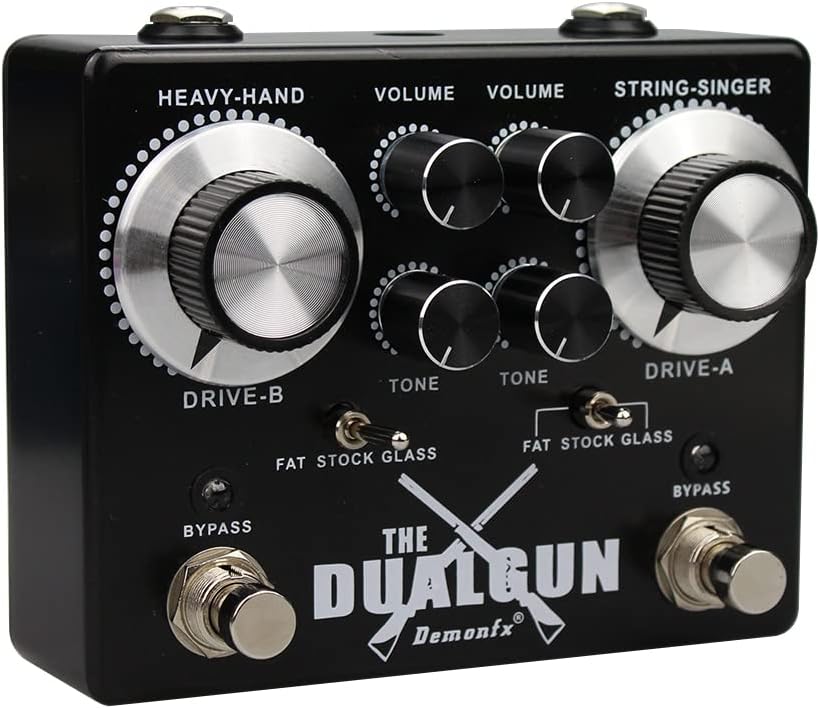
Image: Internal view of the Demonfx Dual Gun DG1 circuit board, showing the red DIP switch bank.
Accessing and Adjusting DIP Switches:
- Disconnect Power: Ensure the pedal is disconnected from its power supply and all cables before opening.
- Open Casing: Carefully remove the screws on the back plate of the pedal to access the internal circuit board.
- Locate DIP Switches: Identify the small red DIP switch bank on the circuit board.
- Adjust Switches: Use a small tool (e.g., a toothpick or small screwdriver) to carefully flip the switches to your desired positions. Refer to the diagram below for switch functions.
- Reassemble: Once adjustments are made, carefully replace the back plate and secure the screws. Reconnect power and test the pedal.

Image: Diagram illustrating the functions of the internal DIP switches on the Demonfx Dual Gun DG1.
DIP Switch Functions:
- Switch 1: Adds warmth and symmetrical clipping.
- Switch 2: Engages symmetrical clipping.
- Switch 3: Adds distortion and symmetrical clipping.
- Switch 4: Engages symmetrical clipping.
Experiment with different combinations of these switches to achieve a wider range of clipping characteristics, from brutal distortion to open, gritty low-gain tones, or even germanium fuzz-like sounds.
Maintenance
- Cleaning: Use a soft, dry cloth to clean the pedal's exterior. Do not use abrasive cleaners or solvents.
- Storage: Store the pedal in a dry, cool place away from direct sunlight when not in use.
- Cable Connections: Periodically check all cable connections for wear and tear. Replace damaged cables to ensure optimal performance.
Troubleshooting
| Problem | Possible Cause | Solution |
|---|---|---|
| No sound when pedal is engaged. | Incorrect power supply, loose cables, pedal not engaged, amplifier settings. |
|
| Unexpected noise or hum. | Faulty cables, ground loop, interference from other electronics, power supply noise. |
|
| LED not lighting up. | No power, faulty LED. |
|
Specifications
| Model Number: | DG1 |
| Input/Output: | 1/4-inch Audio Jacks |
| Power Requirement: | 9V DC, Center Negative |
| Current Draw: | 12 Milliamps |
| Material: | Plastic, Metal |
| Color: | Black, Silver |
| Item Weight: | 1.2 pounds |
| Dimensions (approx.): | 10 x 4 x 2 inches (Package Dimensions) |
Warranty and Support
For warranty information or technical support, please refer to the retailer where you purchased the Demonfx Dual Gun DG1 pedal or contact the manufacturer directly through their official channels. Keep your proof of purchase for warranty claims.