
1. Introduction
Thank you for choosing the Champion Power Equipment 82001I-E-DF-EU 2000 Watt Dual Fuel Inverter Generator. This manual provides essential information for the safe operation, maintenance, and troubleshooting of your generator. Please read this manual thoroughly before operating the unit and keep it for future reference.
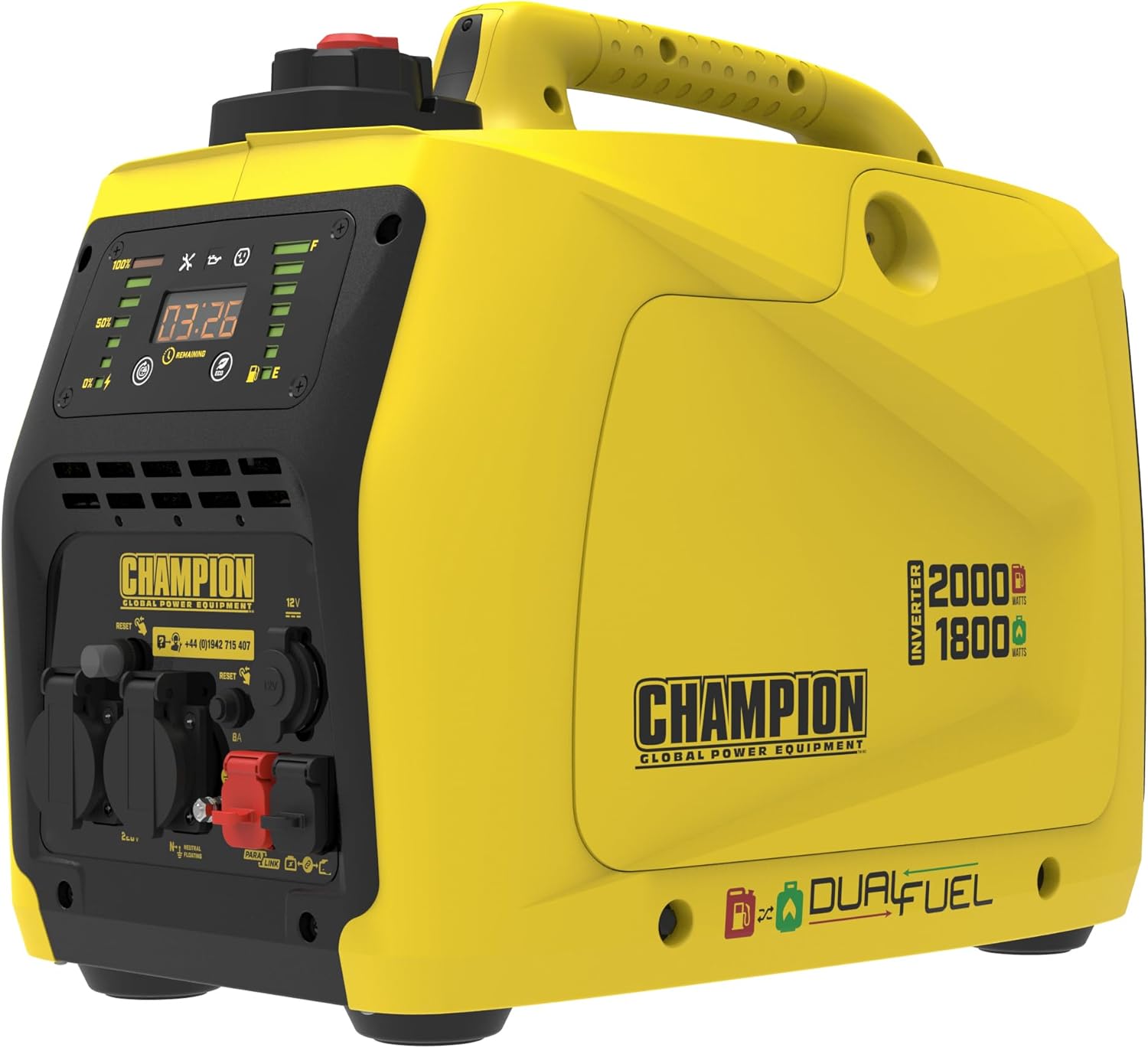
This inverter generator is designed to provide clean, stable power for various applications, including camping, outdoor events, and as a reliable backup power source during outages. Its dual-fuel capability allows it to run on either gasoline or propane (LPG), offering flexibility and extended run times.
2. Safety Information
WARNING: Failure to follow these safety instructions could result in serious injury or death.
- Carbon Monoxide Hazard: Generators produce carbon monoxide, a colorless, odorless, poisonous gas. Operate the generator outdoors only, far away from windows, doors, and vents. Never operate in an enclosed area, even if doors and windows are open.
- Fire Hazard: Gasoline and propane are highly flammable. Store fuel in approved containers in a well-ventilated area. Do not refuel while the engine is running or hot. Keep all ignition sources away from the generator and fuel.
- Electrical Shock Hazard: Never operate the generator in wet conditions. Ensure the generator is properly grounded. Do not connect the generator to a building's electrical system unless a qualified electrician has installed a transfer switch.
- Hot Surfaces: The generator's engine and muffler become very hot during operation and remain hot for some time after shutdown. Avoid contact with hot surfaces to prevent burns.
- Children and Pets: Keep children and pets away from the generator at all times.
3. Product Overview
3.1 Key Features
- Dual Fuel Capability: Operates on either gasoline or propane (LPG) for increased versatility and extended run times.
- Quiet Operation: Produces only 53 dB(A) at 7 meters, making it suitable for noise-sensitive environments.
- Clean Power: Inverter technology provides stable, clean power (less than 3% THD), safe for sensitive electronics.
- Low Oil Shutdown: Automatically protects the engine by shutting down when oil levels are too low.
- LED Display: Monitors total runtime and fuel life for convenient operation.
- Parallel Ready: Allows connection of two units for increased power output (parallel kit sold separately).
3.2 Modes of Use
The Champion 82001I-E-DF-EU generator is versatile for various applications:

Description: This image illustrates the diverse applications of the generator, such as providing power for outdoor events, during power outages, for DIY projects, camping trips, boating and fishing activities, and RV/caravanning.
3.3 Control Panel Overview
Familiarize yourself with the control panel components for proper operation.

Description: A close-up of the generator's control panel, showing the LED display, output power level indicator, fuel level indicator, low oil warning, maintenance indicator, AC overload reset button, economy mode switch, 220V AC outlets, 12V 8A automotive outlet, and parallel ports.
- LED Display: Shows total runtime and remaining fuel life.
- Output Power Level: Indicates the current power output.
- Fuel Level: Displays the approximate fuel remaining.
- Low Oil Indicator: Illuminates when engine oil is low, triggering automatic shutdown.
- Maintenance Indicator: Signals when routine maintenance is due.
- AC Overload Reset: Button to reset the circuit breaker after an overload.
- Economy Mode Switch: Engages economy mode for reduced fuel consumption and noise at lower loads.
- 220V AC Outlets: Standard power outlets for connecting appliances.
- 12V 8A Automotive Outlet: For charging 12V batteries.
- Parallel Ports: For connecting another compatible Champion inverter generator.
4. Setup
4.1 Unpacking and Initial Inspection
- Carefully remove the generator from its packaging.
- Inspect the unit for any shipping damage. Contact your dealer immediately if damage is found.
- Ensure all components listed in the packing list are present.
4.2 Adding Engine Oil
The generator is shipped without engine oil. You must add the correct amount and type of oil before first use.
- Place the generator on a level surface.
- Remove the oil fill cap/dipstick.
- Add approximately 0.4 liters of 10W-30 engine oil. Do not overfill.
- Reinstall the oil fill cap/dipstick securely.
4.3 Fuel Connection
This generator operates on either gasoline or propane.
4.3.1 Gasoline
- Ensure the generator is off and cool.
- Open the fuel cap.
- Fill the fuel tank with unleaded gasoline (minimum 87 octane) up to the fill neck, but do not overfill.
- Securely close the fuel cap.
4.3.2 Propane (LPG)
- Ensure the generator is off and cool.
- Connect the propane hose from the generator to a standard propane cylinder.
- Tighten all connections securely to prevent leaks.
- Slowly open the valve on the propane cylinder.
Description: The generator is shown connected to a propane tank via a hose, illustrating the dual-fuel setup in an outdoor environment.
4.4 Grounding the Generator
Always ground the generator before operation to prevent electrical shock.
- Connect a grounding wire from the generator's grounding terminal to a suitable ground source (e.g., a ground rod).
- Ensure connections are tight and secure.
5. Operating Instructions
5.1 Starting the Engine (Easy Start System)
The generator features an easy start system for hassle-free ignition.

Description: This image highlights the easy start dial on the generator, showing the positions for choke, run, and fuel selection (gasoline/propane) for a hassle-free engine start.
5.1.1 Starting with Gasoline
- Ensure the generator is on a level surface and properly grounded.
- Turn the fuel selector dial to the 'Gasoline' position.
- Pull the recoil starter handle firmly until the engine starts.
- Once started, slowly move the fuel selector dial to the 'Run' position.
5.1.2 Starting with Propane (LPG)
- Ensure the generator is on a level surface and properly grounded.
- Open the valve on the propane cylinder.
- Turn the fuel selector dial to the 'Propane' position.
- Pull the recoil starter handle firmly until the engine starts.
- Once started, slowly move the fuel selector dial to the 'Run' position.
5.2 Stopping the Engine
- Disconnect all electrical loads from the generator.
- If running on propane, close the valve on the propane cylinder first to allow the generator to run out of fuel.
- Turn the fuel selector dial to the 'Stop' position.
5.3 Economy Mode
Engage the Economy Mode switch to reduce engine speed, fuel consumption, and noise when operating at light loads. This mode is ideal for extending run time and reducing operational sound.
5.4 Parallel Operation
For increased power output, two Champion inverter generators can be connected in parallel using a compatible parallel kit (sold separately). Refer to the parallel kit's instructions for detailed setup.
6. Maintenance
Regular maintenance is crucial for the longevity and optimal performance of your generator.
6.1 Maintenance Schedule
| Item | Every Use | Every 50 Hours / Annually | Every 100 Hours / Annually |
|---|---|---|---|
| Check Engine Oil Level | ✓ | ||
| Clean Air Filter | ✓ | ||
| Check Spark Plug | ✓ | ||
| Change Engine Oil | ✓ | ||
| Inspect Fuel Filter | ✓ |
6.2 Storage
For long-term storage, prepare the generator as follows:
- Drain all gasoline from the fuel tank and carburetor, or add a fuel stabilizer.
- If using propane, disconnect the propane cylinder.
- Change the engine oil.
- Remove the spark plug and pour a small amount of engine oil into the cylinder. Pull the recoil starter a few times to distribute the oil, then reinstall the spark plug.
- Clean the exterior of the generator.
- Store in a clean, dry, well-ventilated area, away from direct sunlight and extreme temperatures.
7. Troubleshooting
This section addresses common issues you might encounter with your generator.
| Problem | Possible Cause | Solution |
|---|---|---|
| Engine will not start | No fuel Low oil level Spark plug issue Fuel selector in wrong position | Add fresh fuel Add engine oil Check/clean/replace spark plug Ensure fuel selector is correct for fuel type |
| No power output | AC overload tripped Connected appliance faulty Generator not running at proper speed | Press AC Overload Reset button Check appliance Ensure generator is running smoothly, check fuel/oil |
| Engine runs rough | Stale fuel Dirty air filter Spark plug fouled | Drain and refill with fresh fuel Clean or replace air filter Clean or replace spark plug |
8. Specifications
Detailed technical specifications for the Champion 82001I-E-DF-EU generator.
| Specification | Value |
|---|---|
| Model Number | 82001I-E-DF-EU |
| Maximum Wattage | 2000 Watts |
| Running Wattage | 1800 Watts |
| Voltage | 230 Volts |
| Fuel Type | Gasoline, LPG (Propane) |
| Noise Level (at 7m) | 53 dB(A) |
| Weight | 22 Kilograms |
| Product Dimensions (L x W x H) | 58 x 37 x 53 cm |
| Engine Oil Capacity | Approx. 0.4 Liters |
| Special Feature | Dual Fuel |

Description: This image provides a visual representation of the generator's physical dimensions and weight, indicating its compact and portable design.
9. Warranty and Support
For warranty information, please refer to the warranty card included with your product or visit the official Champion Power Equipment website. For technical support or service, please contact Champion Power Equipment customer service directly. Keep your purchase receipt as proof of purchase for warranty claims.
Contact Information: Refer to the contact details provided in your product packaging or on the official Champion Power Equipment website for your region.


