
1. Product Overview
The Proscenic P11 is a powerful cordless stick vacuum cleaner designed for efficient cleaning of various surfaces. It features a high-performance motor, multi-stage filtration, and intelligent controls to provide a hygienic and pleasant living environment.

Image: The Proscenic P11 Cordless Vacuum Cleaner in action, highlighting its powerful suction and efficient cleaning capabilities on a hard floor.
Key Features:
- Strong Suction Power: Equipped with a highly efficient brushless motor, reaching up to 30,000 Pa for quick particle absorption.
- Multi-Stage Filtration: A four-level cyclone technology filtration system captures 99.99% of particles in the dustbin.
- LED Touch Screen: Displays battery status, working mode, and error codes. Allows selection of operating modes.
- Automatic Floor Adaptation: Suction power adjusts automatically to different floor types, including carpet recognition.
- Versatile Cleaning: Includes multiple brush heads for various cleaning needs, such as floor, carpet, curtains, and pet hair.
2. Safety Instructions
Please read all safety warnings and instructions before using this appliance to prevent electric shock, fire, or serious injury.
- Do not use the vacuum cleaner outdoors or on wet surfaces.
- Do not allow children to operate the vacuum cleaner. Close supervision is necessary when used near children.
- Do not pick up flammable or combustible liquids, such as gasoline, or use in areas where they may be present.
- Do not pick up anything that is burning or smoking, such as cigarettes, matches, or hot ashes.
- Do not use without the dust cup and filters in place.
- Turn off the appliance before making any adjustments, changing accessories, or storing the vacuum cleaner.
- Use only manufacturer-recommended attachments.
- Keep hair, loose clothing, fingers, and all parts of the body away from openings and moving parts.
- Do not immerse the motor unit in water or other liquids.
- If the charging cable is damaged, it must be replaced by the manufacturer, its service agent, or similarly qualified persons to avoid a hazard.
3. Package Contents
Verify that all components are present in the package:

Image: The Proscenic P11 main unit shown with its versatile multi-brush head, suitable for different cleaning tasks.
- Main Vacuum Unit
- Extension Tube
- Motorized Floor Brush (Vloerzuigmond)
- Round Dusting Brush (Ronde stofzuigmond)
- Crevice Nozzle (Spleetmondstuk)
- Mini Electric Brush (Mini-elektrische borstel)
- Power Adapter/Charger
- Wall Mount Bracket
- User Manual
4. Setup
4.1 Assembly
- Insert the extension tube into the main vacuum unit until it clicks into place.
- Attach the desired brush head (e.g., motorized floor brush) to the other end of the extension tube until it clicks.
- For handheld use, attach accessories directly to the main vacuum unit.

Image: The Proscenic P11 fully assembled and mounted on its wall bracket, illustrating convenient storage and charging.
4.2 Charging the Battery
Before first use, fully charge the battery. The battery can be charged while attached to the main unit or separately.
- Connect the power adapter to the charging port on the main unit or the separate battery.
- Plug the adapter into a power outlet.
- The LED touch screen will indicate the charging status. A full charge typically takes approximately 2.5 hours.
- Once fully charged, disconnect the adapter.

Image: Visual representation of the Proscenic P11's quick charge capability (2.5 hours) and extended battery life (up to 53 minutes).
5. Operating Instructions
5.1 Power On/Off and Mode Selection
- Press the power button on the handle to turn the vacuum cleaner on or off.
- Use the touch screen display to select the desired cleaning mode:
- Manual Grade 1: Standard suction for light cleaning.
- Manual Grade 2: Stronger suction for tougher dirt.
- Auto Grade: Automatically adjusts suction power based on floor type.
- The touch screen also displays the current battery status and any fault alerts.

Image: The LED touch display of the Proscenic P11, illustrating power display, fault alerts, and touchable buttons for mode selection (Manual Grade 1, Manual Grade 2, Auto Grade).
5.2 Automatic Floor Adaptation
In Auto Grade mode, the vacuum cleaner intelligently detects the floor type (e.g., hard floor or carpet) and adjusts its suction power accordingly for optimized cleaning performance.

Image: The Proscenic P11 demonstrating its automatic suction adjustment feature, adapting to both hard floors and carpets for effective cleaning.
5.3 Using Different Attachments
- Motorized Floor Brush: Ideal for general floor cleaning on both hard floors and carpets.
- Round Dusting Brush: Suitable for cleaning delicate surfaces, furniture, and curtains.
- Crevice Nozzle: Perfect for reaching tight spaces, corners, and edges.
- Mini Electric Brush: Designed for cleaning pet hair from upholstery, mattresses, and car interiors.
6. Maintenance
6.1 Emptying the Dustbin
Empty the dustbin regularly to maintain optimal suction power. Press the dustbin release button to detach it from the main unit, then open the bottom flap to empty contents into a trash receptacle.
6.2 Cleaning Filters
The P11 features a four-stage filtration system including HEPA, sponge, steel mesh, and cyclone ionosphere filters. Regular cleaning is essential for performance.
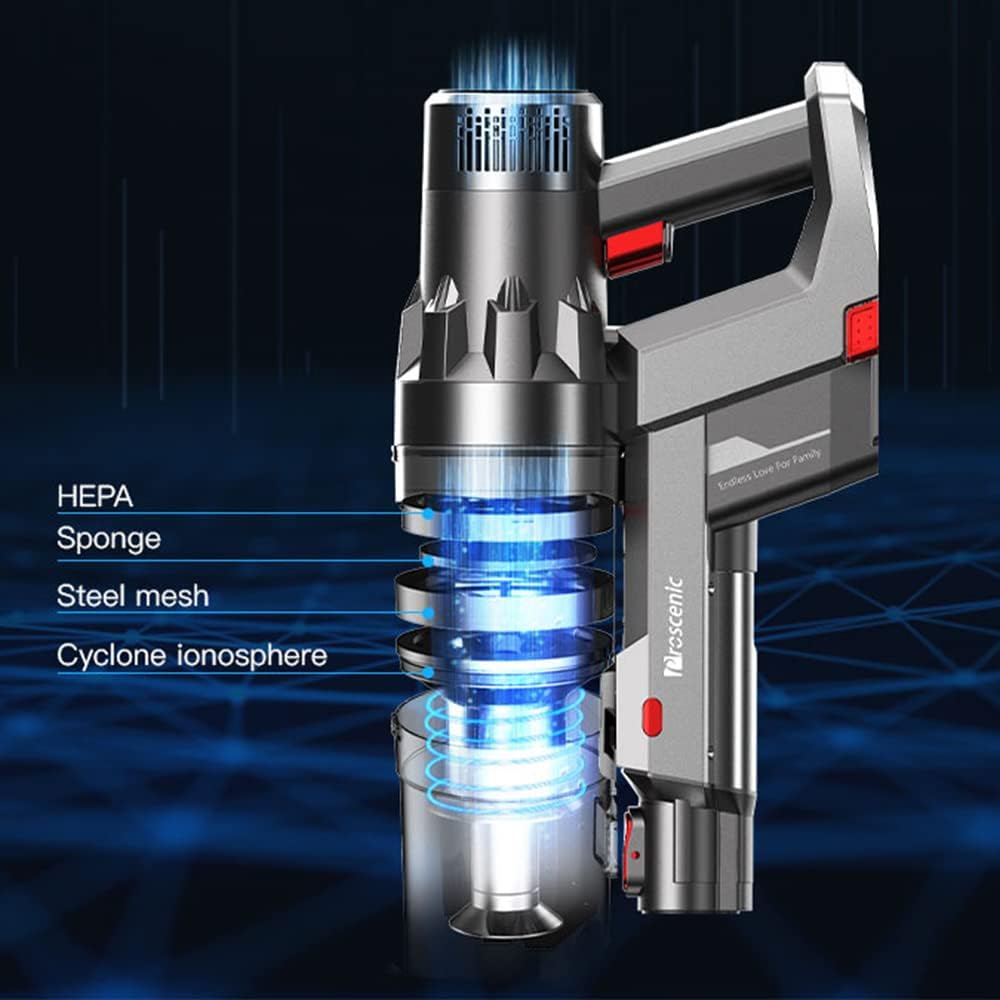
Image: Diagram illustrating the Proscenic P11's advanced multi-stage filtration system, including HEPA, sponge, steel mesh, and cyclone ionosphere components.
- Twist and pull to remove the filter assembly from the dustbin.
- Separate the HEPA filter, sponge filter, and steel mesh filter.
- Tap the steel mesh filter to remove dust.
- Rinse the sponge filter and HEPA filter under running water. Ensure they are completely dry before reassembling (allow 24-48 hours for air drying).
- Reassemble the filters and place them back into the dustbin.
6.3 Cleaning the Brush Head
Periodically check the motorized brush head for tangled hair or debris. Use scissors or a cleaning tool to remove any obstructions from the brush roll.

Image: Close-up of the Proscenic P11's brush head, highlighting its design to prevent hair tangling during operation.
6.4 Battery Care
The P11 features a removable Lithium-ion battery. For optimal battery life, avoid fully discharging the battery frequently and store the vacuum in a cool, dry place.

Image: Illustration of the Proscenic P11's removable battery, allowing for easy replacement or external charging.
7. Troubleshooting
If you encounter issues with your Proscenic P11, refer to the following table for common problems and solutions. The LED touch screen may display error codes to assist in diagnosis.
| Problem | Possible Cause | Solution |
|---|---|---|
| Vacuum does not turn on | Battery is depleted or not properly installed. | Charge the battery. Ensure the battery is securely clicked into place. |
| Low suction power | Dustbin is full, filters are clogged, or brush roll is obstructed. | Empty the dustbin. Clean all filters. Remove any debris from the brush roll. |
| Brush roll not spinning | Obstruction in the brush roll or brush head. | Turn off the vacuum and remove any tangled hair or debris from the brush roll. |
| Vacuum stops unexpectedly | Overheating due to clogged filters or prolonged use. Battery low. | Allow the vacuum to cool down. Clean filters. Charge the battery. Check touch screen for error codes. |
| Error code displayed | Internal malfunction or specific issue detected by the system. | Refer to the specific error code in the full manual (if available) or contact customer support. |
8. Specifications
| Feature | Specification |
|---|---|
| Brand | proscenic |
| Model Name | P11 |
| Power | 460 Watts |
| Suction Power | Up to 30,000 Pa |
| Battery Life (Max) | 53 Minutes |
| Battery Type | Lithium-ion |
| Charging Time | Approx. 2.5 Hours |
| Filter Type | Cloth (HEPA, Sponge, Steel Mesh, Cyclone Ionosphere) |
| Weight | 1.8 Kilograms |
| Voltage | 120 Volt |
| Control Type | Touchpad Control |
| Connectivity | Bluetooth (for potential app features) |
| Dimensions (L x W x H) | 37.2 x 17.9 x 74.8 cm |
| Recommended Surface | Hard Floor and Carpet |
9. Warranty and Support
Proscenic offers reliable customer service. If you encounter any problems with your vacuum cleaner, please do not hesitate to contact us.
For warranty information, please refer to the warranty card included in your product packaging or visit the official Proscenic website. Keep your purchase receipt as proof of purchase for warranty claims.
For further assistance, please contact Proscenic customer support through their official channels.