
Product Overview
The Wuloo Solar Wireless Driveway Alarm System is designed to enhance home security by providing alerts for motion detection and doorbell presses. This system includes a multifunctional receiver, solar-powered motion sensors, and a wireless doorbell. It operates without Wi-Fi or an app, relying on reliable wireless technology for communication between components.

Figure 1: Main components of the Wuloo Solar Wireless Driveway Alarm System, including two solar-powered motion sensors, one wireless doorbell, and one indoor receiver unit.
Setup and Installation
Follow these steps to set up and install your Wuloo Solar Wireless Driveway Alarm System.
1. Charging the Sensors and Doorbell
The solar sensors and doorbell unit contain rechargeable batteries. Before initial use, ensure they are adequately charged. The solar panel on the sensors will charge them during daylight hours. For the doorbell, it is recommended to fully charge it via the provided cable before installation, as it may only have approximately 20% charge upon delivery.
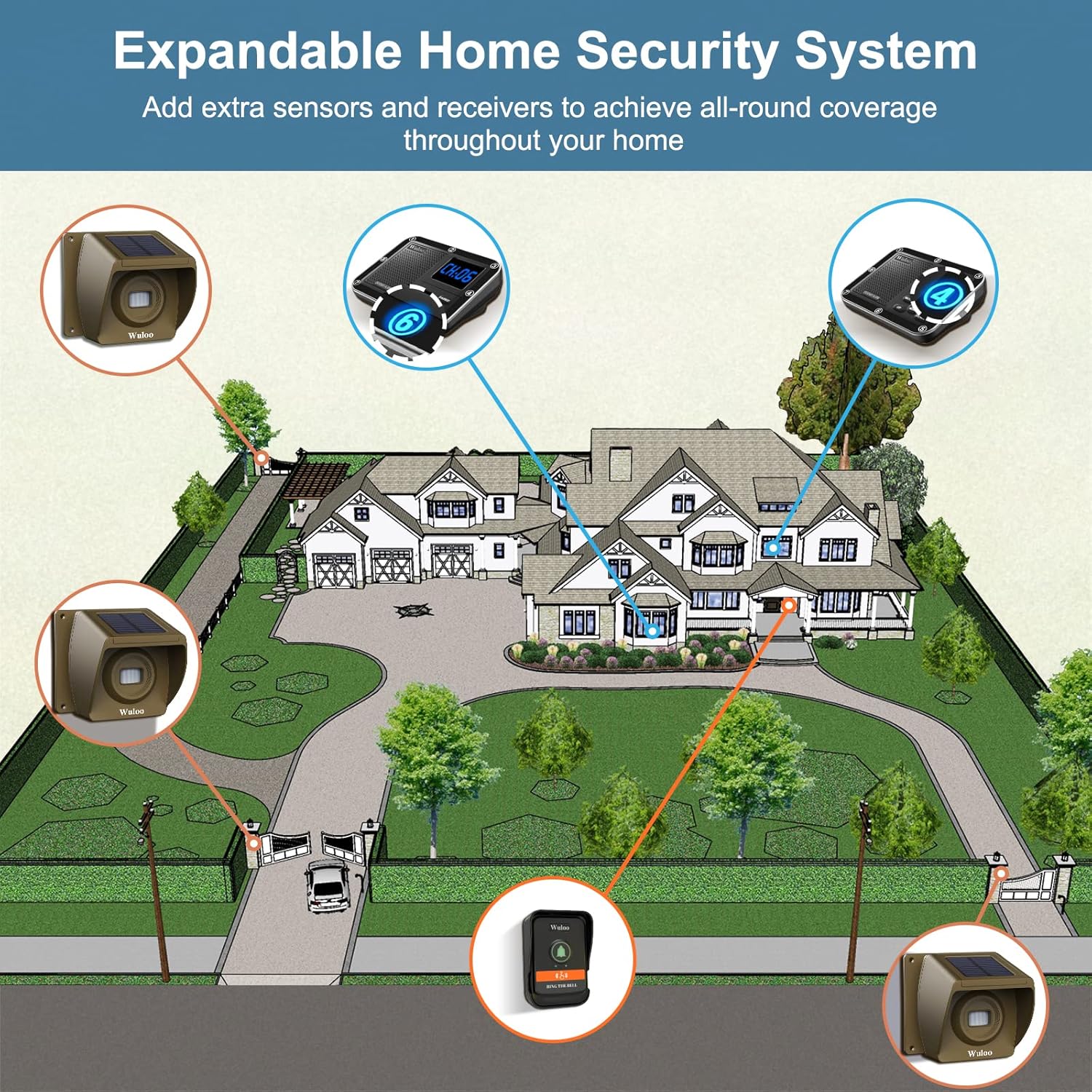
Figure 2: A solar-powered motion sensor positioned to receive sunlight for battery charging.
2. Connecting the Receiver to Power
The receiver can be powered by connecting it to an AC power outlet using the provided adapter. Alternatively, it can operate with the installation of 3 AA batteries (not included) for backup or portable use. Ensure batteries are removed if the unit is plugged into AC power to prevent damage.
3. Pairing and Channel Setting
The system components are typically pre-paired. If re-pairing is necessary or if adding new units, refer to the detailed manual for specific pairing instructions. Each sensor and doorbell can be assigned a unique channel (0-8) to allow the receiver to play different chimes for each unit.

Figure 3: Detailed view of the sensor's internal components, including the battery and channel setting switch, and the receiver's control buttons and screen.
4. Sensor and Doorbell Placement
Install the wireless outdoor motion sensors and doorbell button in desired locations. Sensors should be placed where they can detect movement within a 30-foot detection zone, such as driveways, pathways, or entry points. The system is weatherproof and functions effectively in various conditions.

Figure 4: An illustration demonstrating the effective signal range of the system, with a sensor detecting motion and transmitting to the receiver inside a house.

Figure 5: Examples of sensor and doorbell placement for home security, illustrating detection zones for visitors, vehicles, and potential intruders.

Figure 6: An overhead view demonstrating how additional sensors and receivers can be integrated to expand the system's coverage across a property.

Figure 7: A visual guide detailing the installation process, from connecting power to mounting sensors and the doorbell.
Operating Instructions
Receiver Functions
The multifunctional receiver offers several features:
- Chimes and Tones: Select from 36 available chimes and tones.
- Volume Control: Adjust the volume with 8 levels.
- Mute Mode: Silence the receiver by pressing the MUTE button. Press and hold to enter mute mode.
- Clock and Alarm: The receiver functions as a clock and can be set as an alarm.
- Pairing: Use the PAIR button to set chimes for different channels or enter pairing mode.
- Menu Navigation: Use UP/DOWN buttons to navigate menus and adjust settings. Press and hold MENU for 3 seconds to open/close the receiver.

Figure 8: Overview of the receiver's display and control buttons, highlighting its various functions.
Adjusting Sensor Sensitivity
The motion sensors have 4 sensitivity levels: Hi, Mid 1, Mid 2, and Low. Higher sensitivity allows the sensor to detect smaller movements or objects at greater distances. Adjust the sensitivity based on your environment to minimize false alarms from small animals or distant objects.
- Low: 0-15 feet detection range.
- Mid 2: 0-20 feet detection range.
- Mid 1: 0-26 feet detection range.
- Hi (Highest Sensitivity): 0-33 feet detection range.

Figure 9: Visual representation of the sensor's adjustable sensitivity levels and their effective detection distances for various objects.
Maintenance
Proper maintenance ensures the longevity and optimal performance of your Wuloo Driveway Alarm System.
- Battery Life: The solar sensors can operate for up to 24 months after being fully charged. The doorbell unit can work for 2-6 months after a full charge. Monitor the low power indicator on the doorbell (flash red) and ensure sensors receive adequate sunlight for continuous charging.
- Weather Resistance: The sensors and doorbell are designed to be weatherproof. However, regularly inspect them for any debris or obstructions that might affect their performance, especially after severe weather conditions.
- Cleaning: Use a soft, damp cloth to clean the exterior of all components. Do not use harsh chemicals or abrasive cleaners.

Figure 10: A close-up of the weatherproof solar sensor, demonstrating its ability to withstand rain.
Troubleshooting
If you encounter issues with your Wuloo Driveway Alarm System, consider the following common solutions:
- No Alert from Sensor/Doorbell:
- Ensure the sensor/doorbell battery is charged.
- Verify the receiver is powered on and not in mute mode.
- Check if the sensor/doorbell is properly paired with the receiver.
- Confirm the sensor is placed within the effective detection range (up to 1800 feet from receiver).
- Adjust sensor sensitivity if small objects are not being detected.
- False Alarms:
- Lower the sensor sensitivity level.
- Adjust the sensor's angle or placement to avoid detecting unwanted movement (e.g., swaying branches, small animals).
- Short Detection Range:
- Ensure there are no significant obstructions (thick walls, large metal objects) between the sensor/doorbell and the receiver.
- Relocate components to improve line of sight.
- Check battery levels of all units.
- Receiver Not Responding:
- Verify the power connection or check the AA batteries if used.
- Try resetting the receiver by unplugging it for a few seconds.
For more detailed troubleshooting, please refer to the included Quick Start Guide and the comprehensive User Manual (PDF) provided with your product. You can also find the User Manual online via the provided link: Wuloo Driveway Alarm User Manual PDF.
Specifications
| Feature | Detail |
|---|---|
| Brand | Wuloo |
| Model Number | Driveway Alarm 1T2T1 |
| Color | 4 units set |
| Power Source | Solar, Battery Powered |
| Item Weight | 1100 Grams (2.43 pounds) |
| Maximum Wireless Range | 1800 Feet (line of sight) |
| Mounting Type | Wall Mount |
| Battery Type | Rechargeable Lithium Polymer (included for sensors/doorbell) |
| Sensor Battery Life | Up to 24 months (fully charged) |
| Doorbell Battery Life | 2-6 months (fully charged) |
| Product Dimensions | 12.8 x 5.71 x 3.94 inches |
| Installation Method | Screw-In |
| Included Components | 1 Receiver, 2 Sensors, 1 Doorbell, Batteries, Quick Start Guide, Detailed Manual, Cable, Adapter, Screws, Anchors |
Warranty and Support
Wuloo provides a 2-year warranty for quality issues with this product. Additionally, lifetime service is offered for any issues you may encounter. For support, please refer to the contact information provided in your product packaging or visit the official Wuloo store on Amazon: Wuloo Amazon Store.


