Introduction
Thank you for choosing the Huepar 5-in-1 Electronic Wall Scanner, Model SFO1. This device is designed to accurately detect studs (wood and metal), metal pipes, and live AC wires behind walls, floors, and ceilings. This manual provides essential information for the safe and effective operation, maintenance, and troubleshooting of your wall scanner. Please read it thoroughly before use and keep it for future reference.
Product Overview
The Huepar SFO1 wall scanner is equipped with an intelligent sensor chip, enabling high-precision detection of various materials. It features a large, backlit LCD display and an audible alert system for clear and efficient object localization.
Key Features:
- High Precision Detection: Accurately locates metal, wood, pipes, and live AC wires.
- Five Scan Modes: Includes three stud scan depths (1/2 inch, 1 inch, 1 1/2 inch), a metal scan mode, and an AC wire scan mode.
- Backlit LCD Display: Provides clear readings even in low-light conditions.
- Audible Alert: Assists in precisely identifying object locations.
- AC Wire Warning: Automatically alerts to live AC wires in all scan modes for enhanced safety.
Components:
Familiarize yourself with the main components of your Huepar SFO1 wall scanner:
- Power Button: Turns the device on and off.
- Scan Button: Initiates the scanning process.
- Mode Button: Cycles through the different detection modes.
- LCD Display: Shows scan results, mode indicators, and battery status.
- Battery Compartment: Holds the 9V battery.

This detailed diagram identifies all key physical components and explains the different icons and indicators displayed on the LCD screen, crucial for understanding device operation.
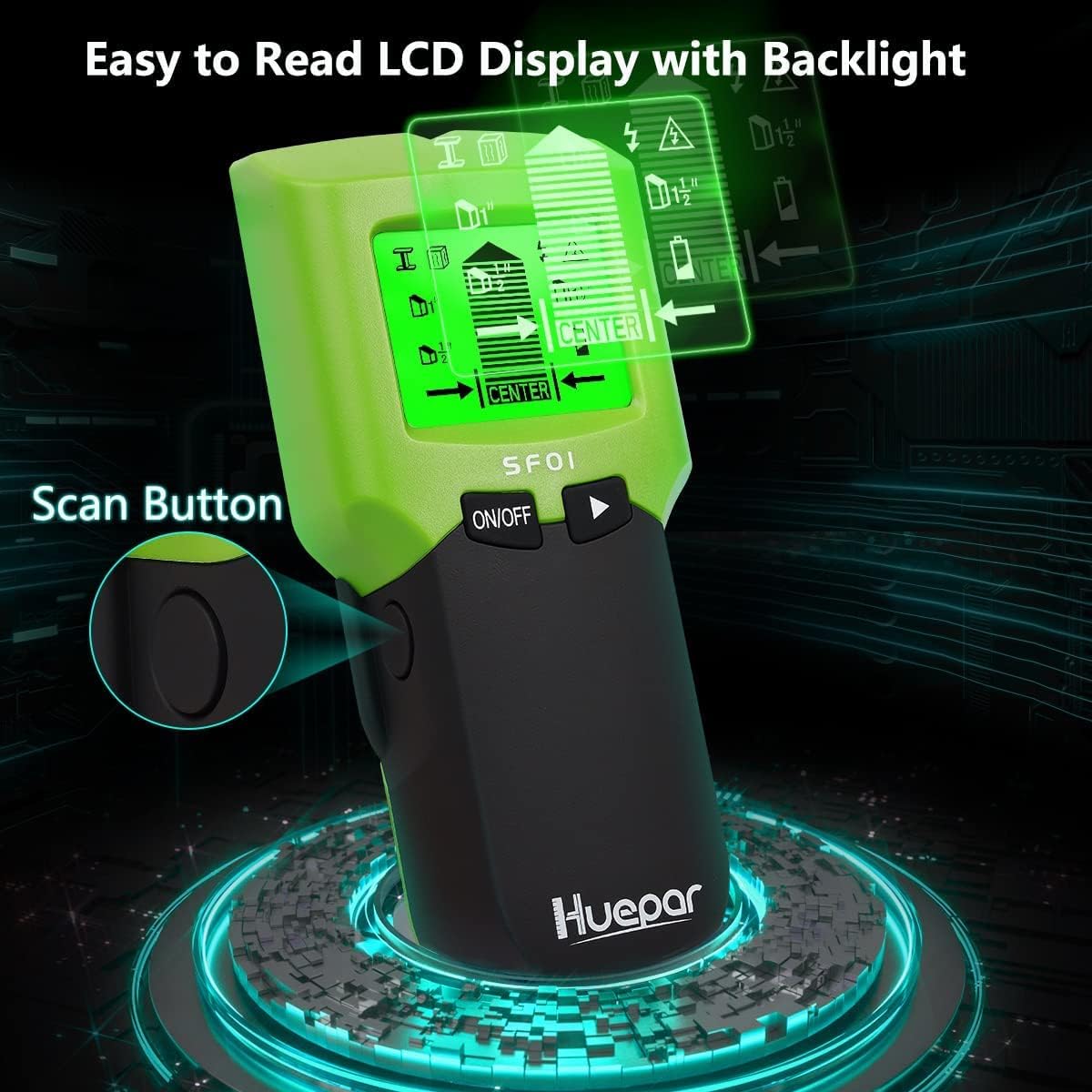
This image highlights the device's backlit LCD screen, which ensures clear readability of detection results even in low-light conditions, improving user experience.
Setup
Battery Installation:
- Locate the battery compartment on the back of the device.
- Slide open the battery compartment cover.
- Insert one 9V battery, ensuring correct polarity (+/-).
- Close the battery compartment cover securely.
A low battery indicator will appear on the LCD display when the battery needs replacement.
Operating Instructions
General Operation:
- Press the Power Button to turn on the device.
- Press the Mode Button to select the desired scanning mode.
- Place the scanner flat against the wall surface.
- Press and hold the Scan Button. Wait for the calibration to complete (usually a few seconds).
- Slowly slide the scanner horizontally across the surface.
- Observe the LCD display and listen for audible alerts to identify objects.
Scan Modes:
The Huepar SFO1 offers five distinct scanning modes for various detection needs:

This diagram provides a clear overview of all five scanning modes, detailing their respective detection depths for different materials like studs, AC wires, and metal.
- Stud Scan (1/2 inch / 13mm): Detects wood and metal studs up to 1/2 inch (13mm) deep.
- Stud Scan (1 inch / 25mm): Detects wood and metal studs up to 1 inch (25mm) deep.
- Stud Scan (1 1/2 inch / 38mm): Detects wood and metal studs up to 1 1/2 inches (38mm) deep.
- Metal Scan (up to 2 1/2 inches / 60mm): Detects ferrous and non-ferrous metals.
- AC Scan (up to 2 inches / 51mm): Detects live unshielded AC wires.

This image shows the different depth capabilities of the stud scan modes, indicating how the device can detect objects at varying distances behind the wall surface.
Interpreting Results:
The LCD display will show indicators for detected objects, including the center and edges of studs or metal. An audible beep will also sound when an object is detected. For AC wires, a specific warning icon will appear.

This image illustrates the 'easy to use' feature, showing how the audio alarm guides the user to precisely locate both the center and edges of a stud, enhancing accuracy.

This image emphasizes the device's crucial safety feature: the ability to efficiently detect live AC wires, helping users avoid potential electrical damage during drilling or renovation.

This image illustrates the versatile detection capabilities of the Huepar wall scanner, highlighting its ability to locate various hidden objects within walls.
Safety Information
Always prioritize safety when working with tools and around electrical systems. Failure to follow these safety guidelines may result in electric shock, fire, or serious injury.
- AC Wire Warning: The device detects live AC wires. Always exercise extreme caution when AC wire detection is indicated. Turn off power to the area at the circuit breaker before drilling or cutting into walls.
- Verify Readings: Always scan the same area multiple times from different directions to confirm readings.
- Environmental Factors: Performance may be affected by moisture, wall texture, or other environmental factors.
- Not a Substitute for Professional Advice: This device is an aid and should not be used as a substitute for professional judgment or safety procedures.
- Keep Dry: Do not expose the device to water or excessive moisture.
- Children: Keep out of reach of children.
Maintenance
Proper maintenance ensures the longevity and accuracy of your wall scanner.
- Cleaning: Wipe the device with a soft, damp cloth. Do not use abrasive cleaners or solvents.
- Storage: Store the device in a dry, dust-free environment when not in use. Remove the battery if storing for extended periods to prevent leakage.
- Battery Replacement: Replace the 9V battery when the low battery indicator appears on the display.
Troubleshooting
If you encounter issues with your Huepar SFO1 wall scanner, refer to the following common problems and solutions:
| Problem | Possible Cause | Solution |
|---|---|---|
| Device does not turn on. | Dead or incorrectly installed battery. | Replace the 9V battery, ensuring correct polarity. |
| Inaccurate readings. | Improper calibration, wall material interference, or moisture. | Recalibrate by pressing and holding the scan button while the device is flat against the wall. Ensure the wall is dry. Scan multiple times. |
| No detection in AC Scan mode. | Wires are shielded or not live. | Ensure the wires are live and unshielded. Test in a known live area if possible. |
| Display is dim or flickering. | Low battery. | Replace the 9V battery. |
Specifications
- Brand: Huepar
- Model: SFO1
- Color: Green
- Item Weight: 140 Grams
- Battery Type: 9V Battery
- Mounting Type: Wall Mount (referring to its application)
- Stud Scan Depth: 1/2 inch (13mm), 1 inch (25mm), 1 1/2 inch (38mm)
- Metal Scan Depth: Up to 2 1/2 inches (60mm)
- AC Scan Depth: Up to 2 inches (51mm)
Warranty and Support
Specific warranty information and customer support contact details are not provided within this manual. For warranty claims, technical assistance, or further inquiries, please refer to the product packaging, the official Huepar website, or contact the retailer from whom you purchased the product.


