
JBL JBLT130NCTWSBAM
JBL Tune 130NC TWS True Wireless In-Ear Noise Cancelling Headphones
User Manual
Introduction
Welcome to the user manual for your JBL Tune 130NC TWS True Wireless In-Ear Noise Cancelling Headphones. These headphones are designed to provide exceptional audio quality and comfort for everyday use, sports, and exercise. Featuring JBL Pure Bass Sound, Active Noise Cancelling, Smart Ambient technology, and clear call capabilities, they offer a versatile listening experience. This manual will guide you through the setup, operation, maintenance, and troubleshooting of your new headphones.
Package Contents
Upon unboxing your JBL Tune 130NC TWS headphones, please ensure all components are present:
- JBL Tune 130NC TWS Wireless Earbuds (Left and Right)
- Wireless Charging Case
- Multiple sizes of Eartips (Small, Medium, Large)

Image: The JBL Tune 130NC TWS earbuds shown with their open charging case, displaying the sleek black design and charging indicators.
Setup
1. Charging the Headphones and Case
Before first use, fully charge your JBL Tune 130NC TWS headphones and their charging case. Place the earbuds into the charging case. Connect the charging case to a power source using a compatible USB-C cable (not included). The LED indicators on the case will show the charging status. A full charge provides up to 40 hours of combined battery life (10 hours from earbuds + 30 hours from case), or 8 hours from earbuds + 24 hours from case with Noise Cancelling engaged. A quick 10-minute Speed Charge can provide 2 hours of playtime.
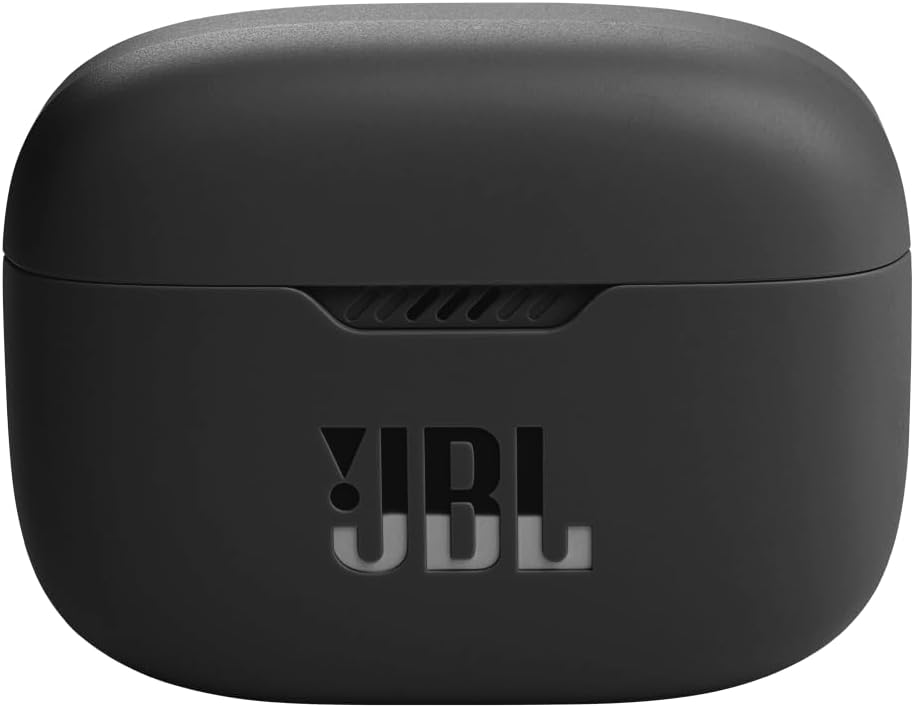
Image: The closed charging case for the JBL Tune 130NC TWS headphones, indicating its compact and portable design.
2. Bluetooth Pairing
- Ensure the earbuds are in the charging case and the case lid is open.
- On your device (smartphone, tablet, laptop), enable Bluetooth.
- Select "JBL Tune 130NC TWS" from the list of available Bluetooth devices.
- Once connected, a confirmation sound will play, and the earbuds will be ready for use.
3. Optimal Fit and Comfort
For the best audio experience and noise cancellation, a proper fit is crucial. Experiment with the different sizes of eartips provided to find the pair that creates a secure seal in your ear canal. Gently insert the earbuds and twist them slightly to ensure a snug and comfortable fit.

Image: A diagram illustrating the correct "In-Ear" placement for headphones, emphasizing a secure fit within the ear canal.
4. JBL Headphones App
Enhance your listening experience by downloading the JBL Headphones App. This app allows you to personalize sound settings, customize touch controls, manage noise cancellation modes, and access additional features like the "find-my-buds" function.
Operating Instructions
1. Touch Controls
The JBL Tune 130NC TWS features intuitive touch controls on each earbud. Functions can be customized via the JBL Headphones App. Default controls typically include:
- Single Tap: Play/Pause music, Answer/End call.
- Double Tap: Skip forward, Decline call.
- Triple Tap: Skip backward.
- Long Press: Activate Active Noise Cancelling (ANC), Smart Ambient, or TalkThru modes; Activate voice assistant.

Image: A top-down view of the JBL Tune 130NC TWS earbuds, highlighting their compact design and touch-sensitive surfaces.
2. Active Noise Cancelling (ANC) and Smart Ambient
Control your audio environment with these modes:
- Active Noise Cancelling (ANC): Minimizes external audio distractions, allowing you to focus on your music or calls.
- Smart Ambient (Ambient Aware): Allows you to hear your surroundings, enhancing safety when outdoors.
- TalkThru: Lowers music volume and amplifies voices, enabling quick conversations without removing your earbuds.

Image: A woman wearing the JBL Tune 130NC TWS earbuds, smiling and looking upwards, demonstrating their use in an outdoor setting.
3. Making and Receiving Calls
The headphones are equipped with 4 microphones for clear, hands-free stereo calls. Simply tap the earbud to answer or end a call, or double-tap to decline a call.
4. Water Resistance
The JBL Tune 130NC TWS earbuds feature an IPX4 water resistance rating, making them suitable for workouts and light rain. They are sweatproof and can withstand splashes from any direction. Note: The charging case is not water resistant.
Maintenance
1. Cleaning
Regular cleaning helps maintain sound quality and hygiene:
- Gently wipe the earbuds and charging case with a soft, dry, lint-free cloth.
- Remove eartips and clean them with mild soap and water, then dry thoroughly before reattaching.
- Use a dry cotton swab to carefully clean the mesh and charging contacts on the earbuds and inside the case.
- Avoid using abrasive cleaners, alcohol, or solvents.
2. Storage
When not in use, store the earbuds in their charging case to protect them and keep them charged. Store the case in a cool, dry place away from extreme temperatures.
3. Battery Care
To prolong battery life, avoid fully discharging the battery frequently. Charge the device regularly, even if not in constant use.
Troubleshooting
If you encounter issues with your JBL Tune 130NC TWS headphones, refer to the following common solutions:
- No Sound/Low Volume:
- Ensure earbuds are charged.
- Check device volume and earbud volume.
- Verify Bluetooth connection.
- Clean earbud mesh for any obstructions.
- Earbuds Not Pairing:
- Ensure earbuds are in pairing mode (open case).
- Turn Bluetooth off and on again on your device.
- Forget the device in your Bluetooth settings and re-pair.
- Try resetting the earbuds (refer to the full user guide for specific reset instructions).
- Poor Call Quality:
- Ensure microphones are not obstructed.
- Check for strong Bluetooth signal.
- Avoid noisy environments if possible.
- "Find My Buds" Feature: If you misplace an earbud, use the JBL Headphones App to activate the "find-my-buds" feature, which will emit a loud pitch from the misplaced earbud.
For more detailed troubleshooting, please consult the official JBL support website or the comprehensive user manual available for download.
Specifications
| Feature | Detail |
|---|---|
| Model Name | JBL Tune 130NC TWS |
| Noise Control | Active Noise Cancellation |
| Connectivity Technology | Wireless (Bluetooth 5.2) |
| Audio Driver Size | 10 Millimeters |
| Frequency Range | 20 Hz - 20,000 Hz |
| Battery Life (Earbuds) | Up to 10 hours |
| Battery Life (Total with Case) | Up to 40 hours (ANC off) / 32 hours (ANC on) |
| Charging Time | 2 Hours (full charge) |
| Water Resistance Level | IPX4 (Earbuds only) |
| Number of Microphones | 4 |
| Control Method | Touch |
| Item Weight | 52 Grams (total) |
| Product Dimensions | 1.06 x 0.79 x 0.79 inches |
Warranty and Support
Warranty Information
JBL products are covered by a limited warranty. For specific details regarding the warranty period and terms for your JBL Tune 130NC TWS headphones, please refer to the warranty card included in your product packaging or visit the official JBL website.
Customer Support
For further assistance, technical support, or service inquiries, please visit the official JBL support page or contact their customer service. You can often find FAQs, downloadable manuals, and contact information on their website:
Additional resources:
Related Documents - JBLT130NCTWSBAM
 |
JBL Tune 130NC True Wireless In-Ear Earbuds with Active Noise Cancellation Discover the JBL Tune 130NC True Wireless In-Ear Earbuds, featuring up to 40dB Active Noise Cancellation for immersive sound. Enjoy 40 hours of combined playtime, crystal-clear calls with 4 microphones, and personalized audio via the JBL Headphones App. These IPX4 water-resistant and sweatproof earbuds deliver powerful JBL Pure Bass Sound and offer quick charging, making them ideal for daily use and workouts. |
 |
JBL TUNE 750BTNC Wireless Noise Cancelling Headphones Manual Comprehensive user manual for the JBL TUNE 750BTNC wireless over-ear headphones. This guide covers setup, Bluetooth pairing, wired listening, multi-point connection, charging, LED indicators, button commands, and detailed technical specifications for optimal product use. |
 |
How to Factory Reset and Clean JBL True Wireless Stereo Earbuds Learn how to perform a factory reset on your JBL True Wireless Stereo earbuds and troubleshoot charging issues by cleaning the contact points. Includes instructions for various JBL models. |
 |
JBL TUNE 230NC TWS True Wireless Noise Cancelling Earbuds Discover the JBL Tune 230NC TWS true wireless earbuds, offering exceptional JBL Pure Bass Sound, 40 hours of battery life, and active noise cancellation. Enjoy all-day comfort, IPX4 water resistance, and crystal-clear calls with 4 microphones. Personalize your experience with the JBL Headphones App. |
 |
How to Factory Reset JBL True Wireless Stereo Earbuds A step-by-step guide on how to perform a factory reset on JBL True Wireless Stereo earbuds. Includes instructions for general reset and specific steps for JBL Tune Flex, along with a list of compatible models. |
 |
JBL CLUB ONE Headphones Quick Start Guide A quick start guide for the JBL CLUB ONE wireless, over-ear headphones, detailing setup, app integration, button commands, and technical specifications. |