1. Introduction
Thank you for purchasing the QZT Q61 Ultra-Thin Voice Recorder. This compact and versatile device is designed for high-quality audio recording in various environments. Please read this manual carefully to understand its features and ensure proper operation.
2. Product Features
- Ultra-Thin Design: Measuring 4cm x 3cm x 0.4cm and weighing only 9.7g, this recorder is highly portable and discreet.
- One-Touch Recording: Simple slide switch for instant recording.
- Voice-Activated Recording (VOR): Automatically starts and stops recording when sound is detected, with 7 adjustable sensitivity levels.
- 16GB Internal Storage: Stores up to 1138 hours of audio recordings.
- Long Battery Life: Up to 30 hours of continuous recording on a single 1-hour charge.
- High-Quality Audio: Built-in omnidirectional microphone with DSP noise-canceling technology, supporting up to 384kbps recording quality (7 options).
- 360° Sound Detection: Captures sound from all directions within a 60m range.
- Multi-Device Compatibility: Supports Android, Windows, and Mac for plug-and-play file transfer.
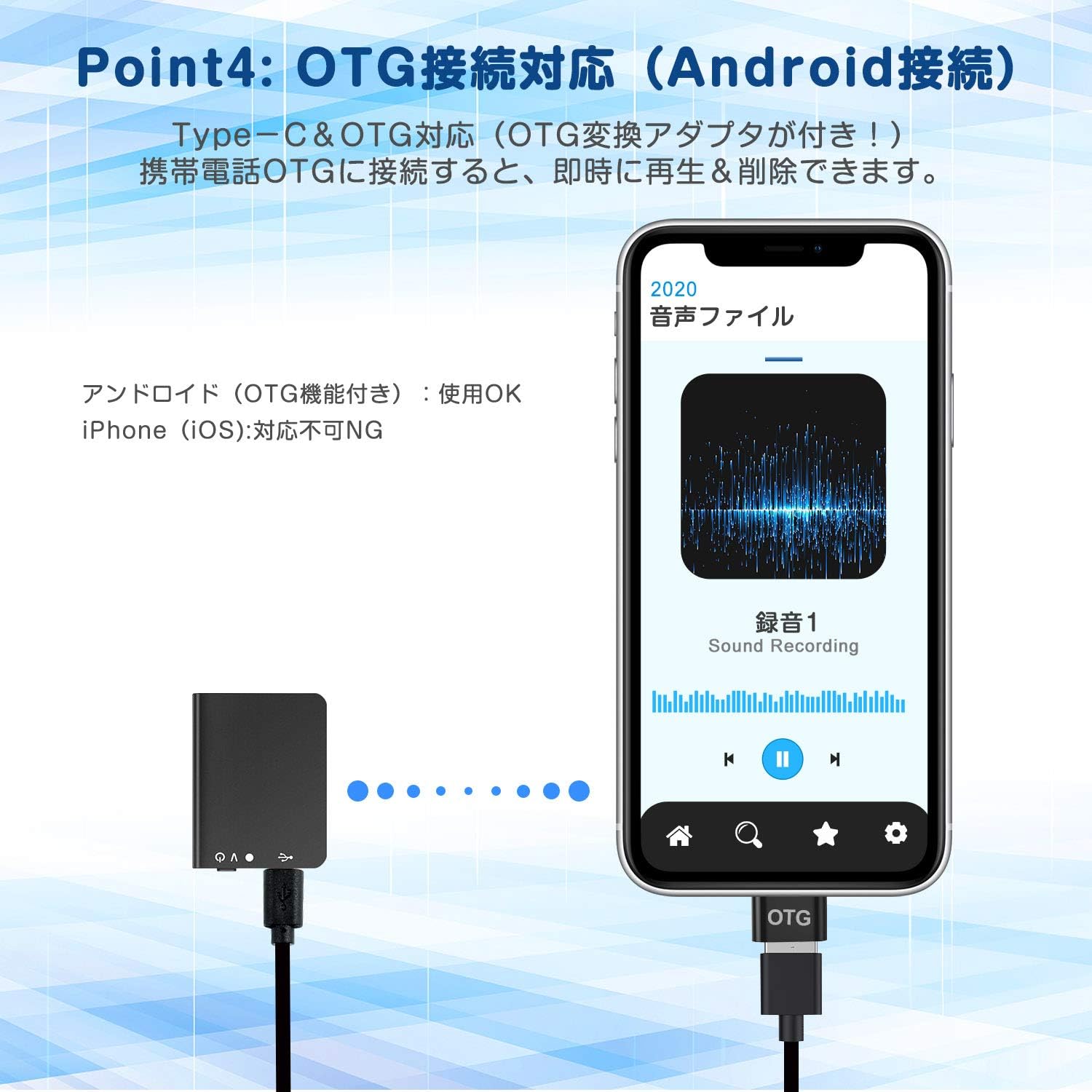
- OTG Support: Direct playback and deletion of files on Android smartphones (OTG adapter included).
- Durable Construction: Made with military-grade ultra-hard aluminum for shock resistance.
- Discreet Operation: No recording start sound, and the indicator light can be turned off during recording.
3. Package Contents
- QZT Q61 Voice Recorder
- USB Charging/Data Cable
- OTG Adapter (for Android)
- User Manual
4. Product Overview
Familiarize yourself with the device's components and controls.


5. Setup
5.1 Charging the Device
Before first use, fully charge the recorder. Connect the device to a computer's USB port or a USB wall adapter (not included) using the provided USB cable. The indicator light will show charging status and turn off when fully charged (approximately 1 hour).
5.2 Setting the Time
To ensure accurate timestamps on your recordings, connect the recorder to a computer. The device will automatically synchronize its time with the computer's system time. For advanced settings, refer to the PC application section.
6. Operating Instructions
6.1 Power On/Off
- Power On: Slide the ON/OFF switch to the 'ON' position. The indicator light will briefly flash.
- Power Off: Slide the ON/OFF switch to the 'OFF' position. The device will save any active recording and power down.
6.2 One-Touch Continuous Recording
To start continuous recording, simply slide the ON/OFF switch to the 'ON' position. The device will begin recording immediately. To stop and save the recording, slide the switch back to the 'OFF' position.
6.3 Voice-Activated Recording (VOR) Mode
The QZT Q61 supports voice-activated recording to save memory and avoid silent periods. This mode can be enabled and configured via the PC application. Once enabled, the recorder will automatically start recording when sound is detected and pause when silence occurs. The sensitivity can be adjusted in 7 levels.
6.4 Discreet Recording
The device is designed for discreet operation. It does not produce a sound when recording starts, and the recording indicator light can be turned off through the PC application settings.
7. Connecting to Devices
7.1 Connecting to a Computer (Windows/Mac)
Connect the recorder to your computer using the provided USB cable. The device will appear as a removable disk. You can then drag and drop audio files to your computer for playback, backup, or deletion. The PC application (if available for download) allows for advanced settings configuration.

7.2 Connecting to an Android Smartphone (OTG)
Use the included OTG adapter to connect the recorder directly to an Android smartphone. This allows you to play, transfer, and delete recording files directly from your phone without needing a computer. Note: Direct OTG connection is not supported for iPhones (iOS devices).
8. Advanced Features
8.1 Recording Quality Settings
The QZT Q61 offers 7 different recording quality settings, up to 384kbps. Higher quality settings result in larger file sizes and consume more memory. These settings can be adjusted via the PC application.
8.2 360° Sound Capture
The omnidirectional microphone allows for comprehensive sound capture from all directions, making it suitable for various recording scenarios.

8.3 Use Cases
The QZT Q61 is versatile and can be used in many situations:
- Meetings and Lectures
- Interviews and Business Negotiations
- Language Learning
- Musical Performances
- Voice Memos
- Personal Security and Evidence Gathering

9. Maintenance
- Keep the device dry and away from extreme temperatures.
- Avoid dropping or subjecting the device to strong impacts.
- Clean the device with a soft, dry cloth. Do not use liquid cleaners.
- Regularly back up your recordings to a computer to prevent data loss.
10. Troubleshooting
| Problem | Possible Cause | Solution |
|---|---|---|
| Device does not power on. | Battery is depleted. | Charge the device for at least 1 hour. |
| Cannot record. | Memory is full. | Transfer files to a computer and delete them from the device. |
| Poor recording quality. | Low recording quality setting; excessive background noise. | Adjust recording quality via PC application; ensure recording in a quiet environment. |
| Device not recognized by computer. | Faulty USB cable; driver issue. | Try a different USB cable or USB port. Restart computer. |
| OTG connection not working with Android. | Phone does not support OTG; faulty OTG adapter. | Ensure your Android phone supports OTG. Try a different OTG adapter. |
11. Specifications
| Feature | Detail |
|---|---|
| Model Number | Q61 |
| Memory Storage Capacity | 16 GB |
| Recording Format | WAV |
| Max Recording Quality | 384 kbps (7 options) |
| Continuous Use Time | Up to 30 Hours |
| Charging Time | Approx. 1 Hour |
| Product Dimensions (H x W x D) | 40mm x 30mm x 4mm |
| Item Weight | 9 Grams |
| Microphone Form Factor | Built-in Omnidirectional |
| Hardware Interface | USB Micro B |
| Headphone Jack | 3.5 mm (for playback, if supported by device) |
| Compatible Devices | Android, Windows, Mac |
| Battery Type | 1 Lithium Ion Battery (included) |
12. Warranty and Support
The QZT Q61 Voice Recorder comes with a one-year warranty. In the event of a malfunction, we offer a free replacement or refund. If you encounter any issues or have questions, please do not hesitate to contact our customer support for assistance.
For support, please refer to the contact information provided with your purchase or visit the official QZT website.


