Introduction
This manual provides essential instructions for the safe and efficient use of your Airbot Iroom 2.0 handheld portable vacuum cleaner. Please read this manual thoroughly before operating the appliance and retain it for future reference.
The Airbot Iroom 2.0 is engineered for versatile cleaning, featuring a lightweight and portable design. It is suitable for various surfaces and applications, including sofas, mattresses, curtains, keyboards, cupboards, and car interiors. Its dual-speed functionality allows for both quick cleaning and deeper dirt removal.
What's in the Box
Carefully unpack all components and check against the list below. If any items are missing or damaged, contact customer support.
- Vacuum handheld unit
- Embedded battery
- Dust cup (washable, re-usable)
- Stainless steel filter (washable, re-usable)
- Cone HEPA Filter (washable, re-usable)
- Wind pipe
- Slim fluffy floor brush (washable, re-usable)
- Soft brush
- Crevice nozzle
- Charging Adapter
- Adapter power cord (U.K. 3-pin)
- User manual

Image: Included accessories for the Airbot Iroom 2.0 vacuum cleaner.
Important Safety Information
Always follow basic safety precautions when using electrical appliances to reduce the risk of fire, electric shock, or injury.
- Do not use outdoors or on wet surfaces.
- Do not allow to be used as a toy. Close attention is necessary when used by or near children.
- Use only as described in this manual. Use only manufacturer’s recommended attachments.
- Do not use with damaged cord or plug. If appliance is not working as it should, has been dropped, damaged, left outdoors, or dropped into water, return it to a service center.
- Do not pull or carry by cord, use cord as a handle, close a door on cord, or pull cord around sharp edges or corners. Do not run appliance over cord. Keep cord away from heated surfaces.
- Do not unplug by pulling on cord. To unplug, grasp the plug, not the cord.
- Do not handle plug or appliance with wet hands.
- Do not put any object into openings. Do not use with any opening blocked; keep free of dust, lint, hair, and anything that may reduce airflow.
- Keep hair, loose clothing, fingers, and all parts of body away from openings and moving parts.
- Do not pick up anything that is burning or smoking, such as cigarettes, matches, or hot ashes.
- Do not pick up flammable or combustible liquids, such as gasoline, or use in areas where they may be present.
- Do not pick up toxic material (e.g., chlorine bleach, ammonia, drain cleaner).
- Do not use without dust cup and filters in place.
- Turn off all controls before unplugging.
- Use extra care when cleaning on stairs.
- Do not charge the unit outdoors.
- Use only the charger specified by the manufacturer.
Setup and Assembly
Follow these steps to assemble your Airbot Iroom 2.0 vacuum cleaner:
- Attach the Wind Pipe: Insert the wind pipe into the main handheld unit until it clicks securely into place.
- Attach the Floor Brush: Connect the slim fluffy floor brush to the other end of the wind pipe, ensuring it is firmly attached.
- Install Battery: Ensure the embedded battery is correctly seated within the handheld unit.
- Charging: Before first use, fully charge the vacuum cleaner. Connect the charging adapter to the handheld unit and plug the adapter power cord into a suitable wall outlet. The charging indicator will show the charging status. A full charge typically takes approximately 4 hours.
- Attaching Accessories: For specific cleaning tasks, detach the wind pipe and floor brush, then attach the soft brush or crevice nozzle directly to the handheld unit as needed.

Image: Assembled Airbot Iroom 2.0 vacuum cleaner.
Note: An optional vacuum stand is available for purchase separately for convenient storage and charging.
Operating Instructions
Your Airbot Iroom 2.0 vacuum cleaner offers dual-speed operation for various cleaning needs.
- Power On/Off: Press the power button on the handheld unit to turn the vacuum cleaner on or off.
- Select Speed Mode: The vacuum features two operating modes:
- Low Speed (Quick Clean): Ideal for light debris and energy-saving cleaning with minimum noise. Provides a runtime of approximately 20-35 minutes.
- High Speed (Deep Clean): Provides maximum suction power (up to 19,000Pa) for thorough cleaning of stubborn dirt. Offers a runtime of approximately 10-15 minutes.
- Using Attachments:
- Slim Fluffy Floor Brush: Use for general floor cleaning, suitable for both hard floors and carpets.
- Soft Brush: Ideal for delicate surfaces, upholstery, and keyboards.
- Crevice Nozzle: Perfect for reaching tight spaces, corners, and car interiors.
- Cleaning: Guide the vacuum cleaner over the desired surfaces. For optimal performance, move the vacuum slowly to allow sufficient time for suction.
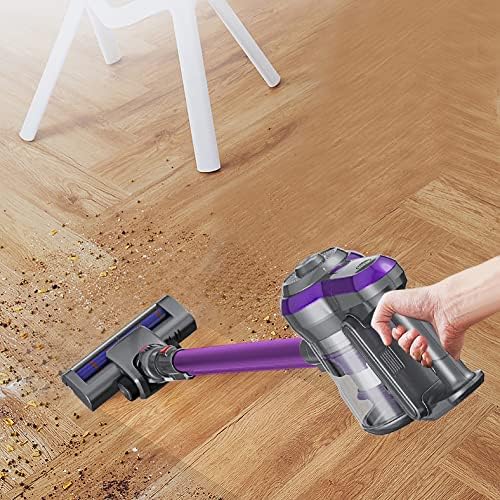
Image: Airbot Iroom 2.0 in use on a hard floor.
Maintenance and Care
Regular maintenance ensures optimal performance and extends the lifespan of your vacuum cleaner.
- Emptying the Dust Cup:
- When the dust cup is full, or suction power decreases, empty it.
- Detach the dust cup from the handheld unit.
- Open the dust cup and dispose of the collected debris.
- Cleaning Filters:
- The stainless steel filter and cone HEPA filter are washable and reusable.
- Remove the filters from the dust cup.
- Rinse them under running water until clean. Do not use detergents.
- Allow filters to air dry completely for at least 24 hours before reassembling. Do not use the vacuum with wet filters.
- Cleaning the Slim Fluffy Floor Brush:
- Periodically check the floor brush for tangled hair or debris.
- Remove any obstructions to maintain effective cleaning. The brush roller can be removed for easier cleaning if necessary.
- General Cleaning: Wipe the exterior of the vacuum cleaner with a soft, damp cloth. Do not use harsh chemicals or abrasive cleaners.
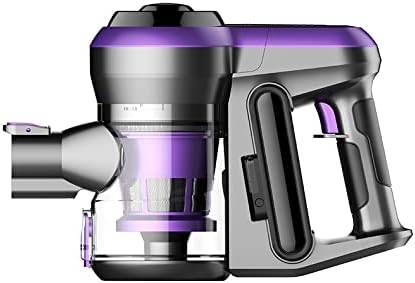
Image: Handheld unit showing the dust cup and filter components.
Troubleshooting
If you encounter issues with your Airbot Iroom 2.0, refer to the following common problems and solutions:
| Problem | Possible Cause | Solution |
|---|---|---|
| Vacuum does not turn on | Battery is not charged Power button not pressed correctly | Charge the battery fully Ensure the power button is pressed firmly |
| Low suction power | Dust cup is full Filters are clogged Blockage in the nozzle or pipe Battery charge is low | Empty the dust cup Clean and dry the filters Check for and remove any blockages Recharge the battery |
| Battery not charging | Charger not properly connected Faulty power outlet Damaged charger or battery | Ensure charger is securely plugged into vacuum and wall outlet Try a different power outlet Contact customer support for assistance |
| Brush roll not spinning | Hair or debris tangled in brush roll Brush roll assembly not correctly installed | Remove any obstructions from the brush roll Ensure the brush roll is properly seated in the floor brush head |
Specifications
- Handheld Weight: ~1.0 KG (1.9 Kilograms assembled)
- Dust Cup Capacity: 0.5 Liters
- Power: 150W
- Battery Capacity: Li-ion 2200 mAh
- Voltage: 110-240V AC, 50/60Hz (Charging Adapter) / 22 Volts (Operating)
- Max Suction Power: 19,000Pa
- Runtime: Low speed (20-35 min); High speed (10-15 min)
- Charge Time: Approximately 4 hours
- Sound Level: 50-60db
- Filter Type: HEPA Filter (washable, re-usable)
- Form Factor: Stick / Handheld
- Special Features: Lightweight, Portable, Cordless
- Surface Recommendation: Upholstery, Hard Floor
Warranty Information
Airbot warranty covers major electronic components and motors. Please note the following exclusions:
- Any damages caused by human mistake or misuse.
- Scratch, dent, dirt marks, or other mechanical damages.
- Battery degradation due to normal wear and tear.
- Consumable parts such as the fluffy brush, HEPA filter, roller wheels, and dust cup, which are subject to wear and tear.
For specific warranty periods and terms, please refer to your purchase documentation or contact Airbot customer support.
Customer Support
If you require further assistance, have questions about your Airbot Iroom 2.0, or need to claim warranty service, please contact Airbot customer support through the retailer where you purchased the product or visit the official Airbot website for contact information.
When contacting support, please have your product model (Iroom 2.0) and purchase details readily available.


