
1. Introduction
Thank you for choosing the Simfer Built-in Oven and Ceramic Hob. This manual provides essential information for the safe and efficient installation, operation, and maintenance of your appliance. Please read these instructions carefully before use and keep them for future reference.
2. Safety Instructions
Your safety and the safety of others are paramount. Please observe the following safety precautions:
- Electrical Safety: Ensure the appliance is correctly earthed and connected to a suitable power supply. Do not use adapters or extension cords.
- Installation: Installation must be carried out by a qualified technician in accordance with local regulations.
- Children and Vulnerable Persons: This appliance can be used by children aged 8 years and above and persons with reduced physical, sensory or mental capabilities or lack of experience and knowledge if they have been given supervision or instruction concerning use of the appliance in a safe way and understand the hazards involved. Children shall not play with the appliance. Cleaning and user maintenance shall not be made by children without supervision.
- Hot Surfaces: The oven and hob surfaces become hot during operation. Use oven mitts and avoid direct contact.
- Flammable Materials: Keep flammable materials away from the appliance.
- Cleaning: Always disconnect the appliance from the power supply before cleaning.
- Maintenance: Do not attempt to repair the appliance yourself. Contact authorized service personnel for repairs.
3. Product Overview
Your Simfer appliance combines a 60-liter built-in oven with a 4-zone ceramic hob, offering versatile cooking options.
Oven Features:
- Capacity: 60 Liters
- Functions: 9 cooking functions including Light, Top Heat, Bottom Heat, Top/Bottom Heat, Grill, Grill with Circulation, Top/Bottom Heat with Convection, Hot Air, and Circulation Air.
- Control: Programmable timer with touch control.
- Door: Double-glazed oven door for improved insulation and safety. Easily removable inner glass for cleaning.
- Interior: Interior lighting for clear visibility. Telescopic rail for easy access to dishes.
- Cleaning: Steam cleaning function for effortless maintenance.
- Efficiency: Energy efficiency class A.

Figure 3.1: Overview of the Simfer Built-in Oven and Ceramic Hob.

Figure 3.2: Oven display highlighting 8 heating functions, interior lighting, and circulation fan.

Figure 3.3: Illustration of the oven's double glazing and the mechanism for easily removing the inner door glass for cleaning.

Figure 3.4: View of the oven interior showing the telescopic rail for trays and the steam cleaning function.
Ceramic Hob Features:
- Zones: 4 radiant cooking zones.
- Power: Two 1.2 kW zones (14 cm diameter) and two 1.8 kW zones (18 cm diameter).
- Control: Touch control with 9 heat settings.
- Safety: Residual heat indicator for each zone. Child lock function.
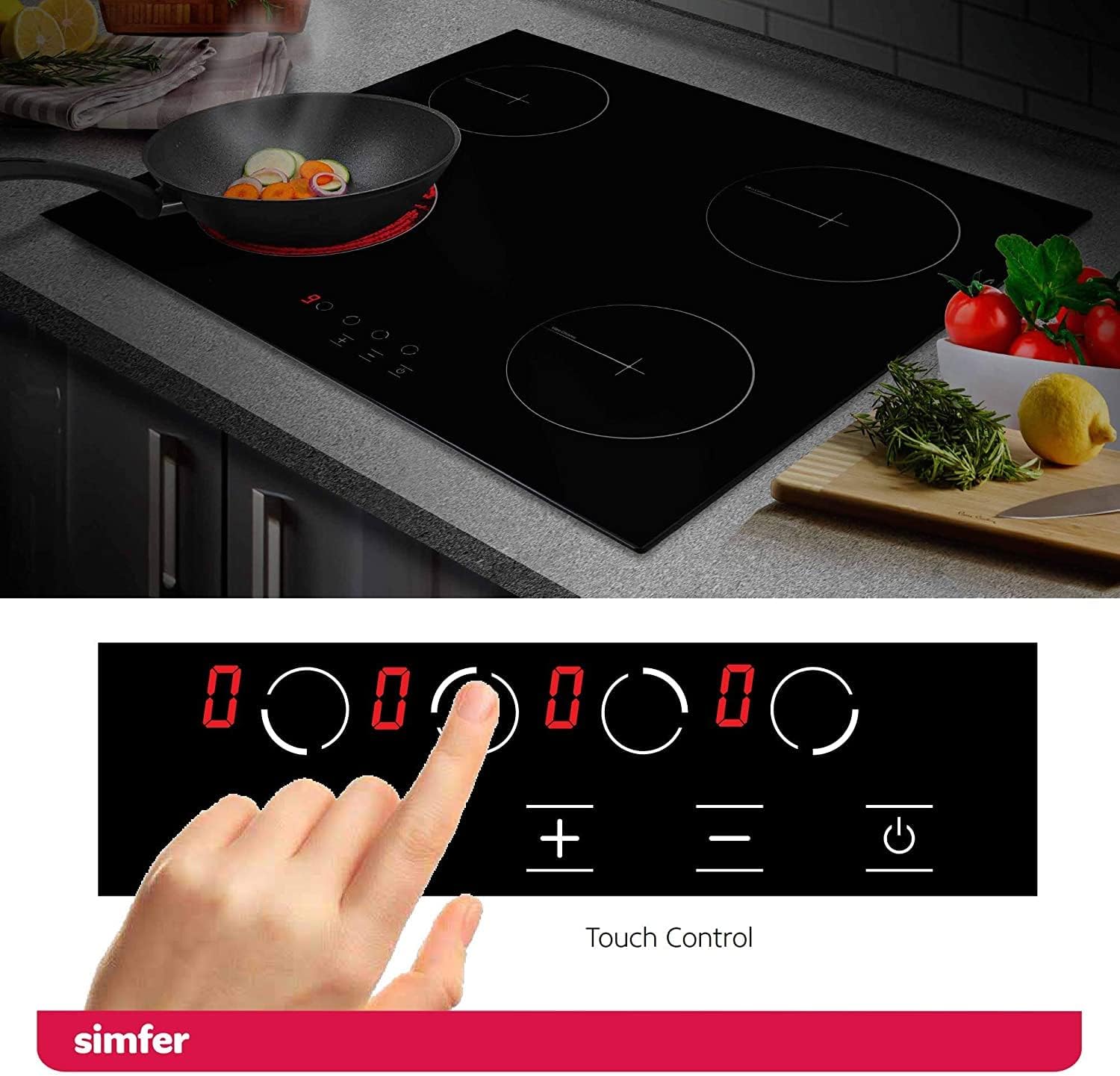
Figure 3.5: Ceramic hob surface with integrated touch controls for heat settings.

Figure 3.6: Detailed view of the ceramic hob cooking zones, indicating their diameters and power ratings, along with the 9 heat settings on the touch control panel.
4. Installation and Setup
Proper installation is crucial for the safe and efficient operation of your appliance. It is strongly recommended that installation be performed by a qualified professional.
4.1. Unpacking
Carefully unpack the appliance and check for any damage. Report any damage to your retailer immediately. Keep packaging materials away from children.
4.2. Placement
Ensure the installation area is well-ventilated and meets the required clearances from walls and other appliances. The appliance is designed for built-in installation.
4.3. Electrical Connection
The appliance must be connected to the mains electricity supply by a qualified electrician. Ensure the voltage and frequency ratings on the appliance's rating plate match your household supply. The appliance must be correctly earthed.
4.4. Dimensions
Refer to the diagrams below for precise installation dimensions for both the oven and the ceramic hob.

Figure 4.1: Oven installation dimensions (in mm) and included accessories (baking tray, deep tray, grill rack).

Figure 4.2: Ceramic hob product and cutout dimensions (in mm) for installation.
5. Operating the Oven
Familiarize yourself with the oven controls and functions before first use.
5.1. First Use
Before cooking food, heat the empty oven for approximately 30 minutes at 200°C to burn off any manufacturing residues. Ensure the kitchen is well-ventilated during this process.
5.2. Function Selection
Use the function selector knob to choose one of the 9 available cooking functions:
- Light: Illuminates the oven interior.
- Top Heat: Heat from the upper element.
- Bottom Heat: Heat from the lower element.
- Top/Bottom Heat: Conventional cooking with heat from both elements.
- Grill: For grilling and browning.
- Grill with Circulation: Combines grill with fan for even browning.
- Top/Bottom Heat with Convection: Conventional heat with fan assistance for even cooking.
- Hot Air (True Fan): Heat from a circular element around the fan for multi-level cooking.
- Circulation Air: Fan only, for defrosting or cooling.

Figure 5.1: Illustration of the convection fan distributing heat evenly within the oven.
5.3. Temperature Setting
Turn the temperature control knob to select the desired cooking temperature.
5.4. Timer Functions
The oven features a programmable timer with touch control. Consult the detailed instructions in the full manual for setting cooking duration, delayed start, and alarm functions.
5.5. Using the Telescopic Rail
The telescopic rail allows you to pull out hot dishes safely and easily for checking or basting without reaching deep into the oven.

Figure 5.2: The telescopic rail extending from the oven, allowing easy access to the baking tray.
6. Operating the Ceramic Hob
The ceramic hob provides fast and efficient heating with precise touch controls.
6.1. Powering On/Off
Press the power symbol on the touch control panel to switch the hob on or off.
6.2. Selecting a Cooking Zone
Select the desired cooking zone by touching its corresponding control. The display will show '0'.
6.3. Adjusting Heat Settings
Use the '+' and '-' symbols to adjust the heat level from 1 to 9. Level 9 is the highest heat setting.

Figure 6.1: Close-up of the ceramic hob's touch control panel, showing the 9 heat settings.
6.4. Residual Heat Indicator
After switching off a cooking zone, an 'H' will appear on the display if the zone is still hot. Do not touch the surface while 'H' is displayed.
6.5. Child Lock
To activate the child lock, press and hold the designated lock symbol on the control panel. This prevents accidental operation. Repeat the process to deactivate.

Figure 6.2: The child lock indicator on the ceramic hob's touch control panel.
7. Cleaning and Maintenance
Regular cleaning and maintenance will ensure the longevity and optimal performance of your appliance.
7.1. Oven Cleaning
- Steam Cleaning: Pour a small amount of water into the oven cavity and select the steam cleaning function. The steam will loosen food residues, making them easier to wipe away.
- Removable Door Glass: The inner glass panel of the oven door can be easily removed for thorough cleaning. Refer to the full manual for detailed instructions on removal and reinstallation.
- General Cleaning: For stubborn stains, use a non-abrasive oven cleaner. Always follow the cleaner manufacturer's instructions.

Figure 7.1: A hand wiping the interior of the oven after using the steam cleaning function.
7.2. Ceramic Hob Cleaning
- Daily Cleaning: Wipe the hob surface with a damp cloth and mild detergent after each use, once it has cooled down.
- Stubborn Stains: Use a specialized ceramic hob cleaner and a scraper for burnt-on food. Avoid abrasive sponges or harsh chemicals.

Figure 7.2: A hand cleaning the ceramic hob surface with a soft cloth, demonstrating easy cleaning.
8. Troubleshooting
Before contacting customer service, please refer to the following common issues and their solutions:
| Problem | Possible Cause | Solution |
|---|---|---|
| Oven not heating | No power supply; incorrect function/temperature setting; door not closed properly. | Check power connection and circuit breaker; verify function and temperature settings; ensure oven door is fully closed. |
| Hob not turning on | No power supply; child lock activated. | Check power connection; deactivate child lock. |
| Uneven cooking in oven | Incorrect rack position; overloaded oven; fan not working. | Use recommended rack positions; avoid overcrowding; check for fan operation. |
| Hob displays 'H' constantly | Residual heat is still present. | This is normal. Wait for the zone to cool down. |
If the problem persists after attempting these solutions, please contact Simfer customer service.
9. Technical Specifications
| Feature | Specification |
|---|---|
| Model Numbers | Oven: SMF-BO 6813 / Hob: SMF-BIH 5114 |
| Oven Capacity | 60 Liters |
| Oven Functions | 9 (Light, Top Heat, Bottom Heat, Top/Bottom Heat, Grill, Grill with Circulation, Top/Bottom Heat with Convection, Hot Air, Circulation Air) |
| Energy Efficiency Class | A |
| Hob Type | Glass Ceramic, Radiant |
| Number of Hob Zones | 4 |
| Hob Zone Power | 2 x 1.2 kW (14 cm), 2 x 1.8 kW (18 cm) |
| Control Type | Touch Control |
| Product Dimensions (Oven) | 68 x 66 x 81 cm (H x W x D) |
| Product Dimensions (Hob) | 520 x 590 mm (W x D) |
| Cutout Dimensions (Hob) | 560 x 490 mm (W x D) |
| Weight | 38 kg |
| Material | Aluminium, Glass Ceramic |
| GTIN / UPC | 730691706188 |
10. Warranty and Support
Your Simfer appliance comes with a manufacturer's warranty. Please refer to the warranty card included with your product for specific terms and conditions. For technical support, spare parts, or service requests, please contact Simfer customer service or your authorized dealer.
Contact Information: Please visit the official Simfer website or refer to your purchase documentation for the most up-to-date contact details.


