
SIMJAR QF04F
Contents
SIMJAR Key Finder with Thinner Receivers & Advanced Fabric Remote User Manual
Model: QF04F
1. Introduction
Thank you for choosing the SIMJAR Key Finder. This device is designed to help you quickly locate lost items such as keys, remote controls, wallets, and more. It operates using Radio Frequency (RF) technology, providing a reliable way to find your belongings within a specified range without the need for a smartphone or app.

Figure 1.1: SIMJAR Key Finder system overview, showing the transmitter and several receivers.
2. Package Contents
Please check the package for the following items:
- 1 x RF Transmitter (Remote Control)
- 6 x Receivers (Color-coded)
- 6 x CR2032 Lithium Metal Batteries (Pre-installed or separate)
- 6 x Key Rings
- 6 x Double-sided Adhesive Tapes
- 1 x User Manual (This document)
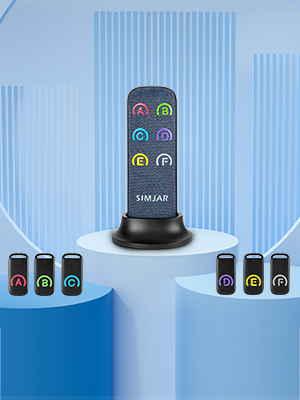
Figure 2.1: All components included in the SIMJAR Key Finder package.
3. Setup
3.1 Battery Installation (for Receivers)
Each receiver requires one CR2032 battery. If batteries are not pre-installed or need replacement, follow these steps:
- Locate the small notch on the side of the receiver.
- Gently pry open the receiver casing using a small tool or your fingernail.
- Insert the CR2032 battery with the positive (+) side facing upwards.
- Align the two halves of the receiver and press firmly until it clicks shut.
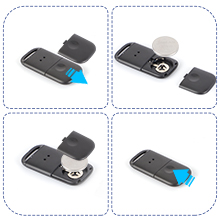
Figure 3.1: Illustrated steps for installing or replacing the battery in a receiver.
3.2 Attaching Receivers to Items
You can attach the receivers to your items using either the provided key rings or double-sided adhesive tapes.
- Using Key Rings: Attach a key ring through the loop on the receiver. Then, attach the key ring to your keys, pet collar, or any item with a suitable attachment point.
- Using Adhesive Tapes: Peel off one side of the double-sided adhesive tape and firmly press it onto the back of the receiver. Then, peel off the other side and attach the receiver to a flat, clean surface on your item (e.g., remote control, wallet, glasses case).

Figure 3.2: Examples of attaching receivers using key rings and adhesive tape to various items.
4. Operating Instructions
4.1 Locating Lost Items
Each receiver is color-coded (A, B, C, D, E, F) to correspond with a button on the transmitter. To find an item:
- Identify which color-coded receiver is attached to the item you wish to find.
- Press the corresponding color-coded button on the RF transmitter.
- The receiver will emit an 80dB+ beep and flash, guiding you to the lost item.

Figure 4.1: The transmitter remote with its color-coded buttons and a customizable label area for item assignment.
Video 4.1: Official demonstration of how to use the SIMJAR Key Finder to locate items by pressing the corresponding button on the transmitter.
4.2 Using the Built-in Flashlight
The RF transmitter features a built-in LED flashlight on its back, useful for locating items in dark environments.
- Locate the flashlight button on the side of the transmitter.
- Press the button to turn the flashlight on.
- Press the button again to turn the flashlight off.

Figure 4.2: The transmitter's built-in flashlight feature, useful for dark conditions.
5. Maintenance
5.1 Battery Replacement
The receivers use CR2032 batteries, which typically last for approximately 9 months. When the beep becomes faint or the receiver stops responding, it's time to replace the battery. Refer to Section 3.1 for detailed battery installation instructions.
The transmitter also uses batteries (usually AAA or similar, check compartment for specifics) which should be replaced when its range decreases or the flashlight dims.
6. Troubleshooting
- Receiver not beeping or flashing:
- Check if the receiver's battery is correctly installed and has sufficient power. Replace if necessary.
- Ensure the transmitter's batteries are not depleted.
- Verify you are pressing the correct color-coded button for the receiver.
- Ensure the receiver is within the operating range (up to 131 feet in open space).
- Weak signal or reduced range:
- Replace batteries in both the transmitter and receiver.
- Walls, furniture, and other obstacles can significantly reduce the effective range. Try moving closer to the general area of the lost item.
- Avoid placing receivers directly on or under large metal objects, which can interfere with the RF signal.
- Flashlight not working:
- Check the transmitter's batteries and replace if needed.
7. Specifications
| Brand | SIMJAR |
| Model Number | QF04F |
| Connectivity Technology | RF (Radio Frequency) |
| Working Range | Up to 131 feet (40 meters) in open space |
| Audible Noise | 80 dB+ |
| Receiver Battery Type | CR2032 Lithium Metal (6 required) |
| Receiver Battery Life | Approximately 9 months (average) |
| Receiver Dimensions | Approx. 4.7"L x 1.57"W x 0.24"Th (Thinnest receiver) |
| Material | Acrylonitrile Butadiene Styrene (ABS) |
| Control Method | Remote |

Figure 7.1: Visual representation of the receiver's slim design.
8. Warranty and Support
For warranty information and customer support, please refer to the product packaging or contact SIMJAR directly through their official website or the retailer where the product was purchased. Specific warranty details are not provided in this manual.
Documents and downloads
Ask a question about this manual
Ask about setup, troubleshooting, compatibility, parts, safety, or missing instructions. Manuals+ will review the question and use this page’s manual context to help answer it.