
1. Introduction and Overview
This manual provides essential instructions for the safe and effective use of your Nikon AF-S NIKKOR 500mm f/5.6E PF ED VR Super-Telephoto Lens. Please read this manual thoroughly before using the lens to ensure proper operation and to maximize its performance.
Key Features:
- F-Mount Lens/FX Format: Designed for Nikon F-mount cameras, compatible with FX and DX formats.
- Aperture Range: Features an aperture range of f/5.6 to f/32 for versatile depth of field control.
- Advanced Optical Design: Incorporates one Phase Fresnel (PF) element and three Extra-Low Dispersion (ED) elements to reduce chromatic aberrations and achieve high sharpness.
- Compact and Lightweight: The Phase Fresnel element contributes to a significantly smaller and lighter design compared to traditional 500mm lenses.
- Vibration Reduction (VR): Optical image stabilization system for sharper images when shooting handheld, especially in low light.
- Durable Construction: Features advanced weather sealing and a nonstick fluorine coating on the front element for protection against dust, dirt, and moisture.
- Internal Focus: Maintains the overall lens length during focusing, enhancing handling and balance.
2. Package Contents
Verify that all the following items are included in your package:
- AF-S NIKKOR 500mm f/5.6E PF ED VR Lens
- Front Lens Cap
- Rear Lens Cap
- Lens Hood
- Lens Case (may vary by region)
- Instruction Manual (this document)
3. Setup
3.1 Attaching the Lens
- Ensure the camera is turned off.
- Remove the body cap from the camera and the rear lens cap from the lens.
- Align the mounting mark on the lens with the mounting mark on the camera body.
- Rotate the lens counter-clockwise until it clicks into place. Do not force the lens.
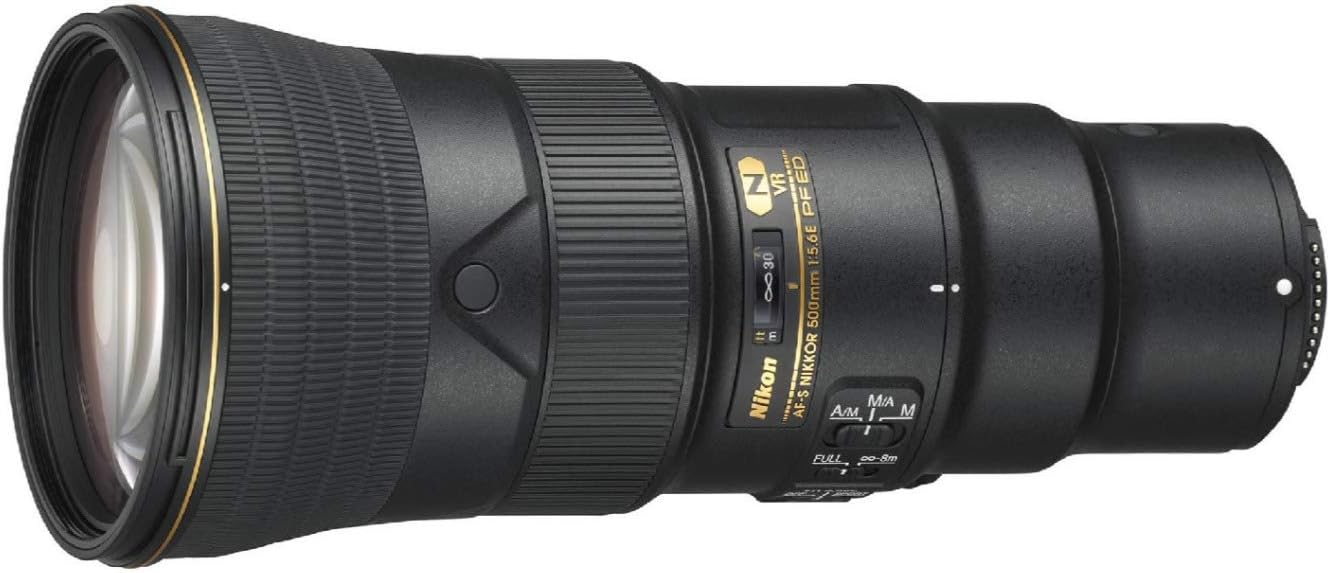
Figure 3.1: Rear view of the Nikon AF-S NIKKOR 500mm f/5.6E PF ED VR lens, illustrating the lens mount for attachment to a camera body.
3.2 Removing the Lens
- Turn off the camera.
- While pressing the lens release button on the camera body, rotate the lens clockwise until it detaches.
- Attach the front and rear lens caps to protect the lens elements.
3.3 Attaching the Lens Hood
The lens hood helps to block stray light that can cause flare and ghosting. Align the lens hood with the mounting marks on the front of the lens and rotate until it locks into place. For storage, the hood can be reversed and mounted on the lens.
4. Operating Instructions
4.1 Focus Mode Switch
The lens features a focus mode switch with the following settings:
- A/M (Autofocus with Manual override): Allows manual focus adjustment after autofocus has been achieved.
- M/A (Manual priority autofocus): Similar to A/M, but manual override is more sensitive.
- M (Manual Focus): Focus is adjusted manually by rotating the focus ring.

Figure 4.1: Side view of the Nikon AF-S NIKKOR 500mm f/5.6E PF ED VR lens, highlighting the focus mode switch (A/M, M/A, M) and other control buttons.
4.2 Focus Limit Switch
This switch limits the autofocus range to improve focusing speed when shooting subjects at a known distance.
- FULL: Uses the full focus range (from minimum focusing distance to infinity).
- ∞ - 8m: Limits the focus range to subjects 8 meters (26.2 feet) or further. Useful for distant subjects like wildlife or sports.
4.3 Vibration Reduction (VR) Switch
The VR system reduces blur caused by camera shake. Select the appropriate mode based on your shooting conditions.
- OFF: Turns off Vibration Reduction. Use when the camera is mounted on a tripod or when using very fast shutter speeds.
- NORMAL: Recommended for general shooting, compensating for a wide range of camera movements.
- SPORT: Ideal for tracking fast-moving subjects, such as in sports photography. It provides a stable viewfinder image and allows for continuous shooting.
4.4 Memory Recall Buttons
These buttons allow you to instantly recall a pre-focused distance. Refer to your camera's manual for specific instructions on how to set and use this feature.

Figure 4.2: Overview of the Nikon AF-S NIKKOR 500mm f/5.6E PF ED VR lens barrel, indicating the location of the focus limit switch, VR switch, and memory recall buttons.
5. Maintenance
5.1 Cleaning the Lens
- Dust: Use a blower brush to remove dust from the lens surfaces.
- Smudges/Fingerprints: Gently wipe with a clean, soft cotton cloth or lens tissue, slightly dampened with lens cleaning fluid. Wipe from the center outwards in a circular motion.
- Fluorine Coating: The front element features a fluorine coating, which repels water, dust, and dirt, making it easier to clean.
- Never use organic solvents such as paint thinner or benzene to clean the lens.
5.2 Storage
- When not in use, attach the front and rear lens caps.
- Store the lens in a cool, dry place, away from direct sunlight and extreme temperatures.
- Avoid storing the lens with mothballs or camphor, as these can damage lens elements.
5.3 Weather Sealing
This lens features advanced weather sealing to protect against dust and moisture. While it offers enhanced durability, it is not waterproof. Avoid exposing the lens to heavy rain or submerging it in water.
6. Troubleshooting
If you encounter issues with your lens, refer to the following common problems and solutions:
| Problem | Possible Cause | Solution |
|---|---|---|
| Lens does not focus automatically. | Focus mode switch set to 'M'. Camera focus mode not set to AF. Poor lighting conditions or low contrast subject. | Set lens focus mode switch to 'A/M' or 'M/A'. Set camera to an autofocus mode. Use manual focus or try focusing on a higher contrast area. |
| Images are blurry despite using VR. | VR switch set to 'OFF'. Shutter speed too slow for conditions. Excessive camera movement. | Set VR switch to 'NORMAL' or 'SPORT'. Increase shutter speed or use a tripod. Ensure stable shooting posture. |
| Lens not recognized by camera. | Lens not properly attached. Dirty electrical contacts. | Re-attach the lens, ensuring it clicks into place. Clean the lens and camera electrical contacts with a clean, dry cloth. |
If the problem persists after trying these solutions, please contact Nikon customer support or an authorized service center.
7. Specifications
| Brand | Nikon |
| Model Name | AF-S NIKKOR 500mm f/5.6E PF ED VR (Model 20082) |
| Focal Length | 500 mm (Fixed) |
| Lens Type | Super-Telephoto Prime |
| Compatible Mountings | Nikon F-Mount |
| Maximum Aperture | f/5.6 |
| Minimum Aperture | f/32 |
| Lens Elements/Groups | (Information not explicitly provided, but includes 1 PF and 3 ED elements) |
| Special Elements | 1 Phase Fresnel (PF), 3 Extra-Low Dispersion (ED) |
| Focus Type | Auto Focus (with Manual override) |
| Image Stabilization | Optical (Vibration Reduction - VR) |
| Filter Size | 95 mm |
| Lens Coating | Fluorine Coating (front element) |
| Water Resistance Level | Water Resistant (Weather Sealed) |
| Item Weight | 4.8 Pounds (approx. 2.18 kg) |
| UPC | 656942439196 |
8. Warranty and Support
8.1 Warranty Information
This product comes with a 90 days limited warranty. For detailed terms and conditions, please refer to the warranty card included with your product or visit the official Nikon website. The warranty covers manufacturing defects and workmanship under normal use.
Note: This specific product is listed as "Renewed" and is subject to the Amazon Renewed Guarantee, which typically offers a replacement or refund if not satisfied with the purchase. The 90-day limited warranty mentioned refers to the renewed product's specific warranty.
8.2 Customer Support
For technical assistance, service, or inquiries regarding your Nikon AF-S NIKKOR 500mm f/5.6E PF ED VR lens, please contact Nikon customer support through their official website or the contact information provided in your product documentation.
You can find additional resources, FAQs, and software updates on the official Nikon support pages.


