
FLIPSKY 75100
FLIPSKY 75100 FOC 75V 100A Single ESC User Manual
Model: 75100 | Brand: FLIPSKY
1. Product Overview
The FLIPSKY 75100 FOC 75V 100A Single ESC (Electronic Speed Controller) is a high-performance controller designed for various electric vehicles, including electric skateboards, scooters, electric bicycles, robots, and DIY off-road vehicles. It is based on the VESC platform, offering advanced control capabilities and robust performance.

Figure 1: FLIPSKY 75100 FOC Single ESC with various connection wires.
2. Safety Information
- Voltage Range: Do not exceed the specified voltage range of 14-84V (4-20S). Exceeding this range may cause the ESC to burn out.
- Wiring: Always connect according to the provided wiring diagram. Pay special attention to 3.3V and 5V connections to avoid short-circuits. When using any throttle handle under ADC control, ensure the positive power supply is connected to 3.3V, not 5V.
- Firmware Compatibility: Ensure firmware versions are consistent when connecting the controller. Inconsistent versions may cause issues or damage.
- Phase Filter Function: For firmware versions 5.3 or newer (VESC_TOOL 3.01), the phase filter function must be turned off (set to "false" in VESC_TOOL). Failure to do so will result in ESC damage. Do not restore default parameters when using the wizard interface.
- Physical Handling: The ESC seat is delicate; handle with care to prevent it from falling off.
- Connections: Ensure battery and motor ports are welded firmly for stable operation and safety.
3. Package Contents
Verify that all items are present in your package:
- 1x FLIPSKY 75100 FOC Single ESC
- 1x USB Cable
- 1x Hall Sensor Adapter (6-pins)
- 1x User Manual (this document)

Figure 2: Contents of the FLIPSKY 75100 FOC Single ESC package.
4. Specifications
| Feature | Specification |
|---|---|
| Voltage Range | 14-84V (4-20S) |
| Continuous Current | 100A |
| Peak Current | 150A |
| Firmware Version (Factory) | 5.02 (upgradeable) |
| Control Interfaces | USB, CAN, UART |
| BEC | 5V@1A |
| Modes | FOC (sinusoidal) |
| Supported Sensors | ABI, HALL, AS5047, AS5048A |
| Input Set Support | PPM, ADC, NRF, UART |
| Wire Size | 12AWG |
| Dimensions (LxWxH) | 85mm x 50.7mm x 33.8mm |
| Programmable | Yes |
| Regenerative Capacity | Yes |

Figure 3: Dimensions of the FLIPSKY 75100 FOC Single ESC.
5. Setup and Installation
5.1 Wiring Diagram
Refer to the following diagram for proper wiring connections. Ensure all connections are secure and correctly polarized.

Figure 4: Detailed wiring diagram for the FLIPSKY 75100 FOC Single ESC.
5.2 VESC Tool Configuration
The ESC is part of the Benjamin ESC series and requires configuration using the VESC TOOL software. The factory firmware version is 5.02. If you require a different version, download it from the VESC tool software (Firmware section) and select the corresponding version. Using incorrect firmware versions can lead to parameter inconsistencies and potential damage to the ESC.
Important Note: For firmware versions 5.3 or newer (VESC_TOOL 3.01), the phase filter function must be disabled by setting it to "false" in VESC_TOOL. Failure to do so will result in ESC damage. Avoid restoring default parameters when using the wizard interface, as this may re-enable the phase filter.
For detailed visual guidance on installation and VESC tool setup, please refer to the official product videos:
Video 1: Demonstration of DIY electric scooter build with FSESC 75100 and motor 6384 BH, including installation and VESC tool setup.
6. Operating Instructions
Once the ESC is correctly installed and configured using VESC Tool, it is ready for operation. The ESC supports various control modes, including FOC (Field-Oriented Control) for smooth and efficient motor operation.
Ensure your battery pack is within the specified voltage range (14-84V) before operation. The continuous current rating is 100A, with a peak current of 150A.

Figure 5: The FLIPSKY 75100 FOC Single ESC integrated into an electric scooter.
The VESC Tool allows for detailed parameter adjustments to optimize performance for your specific motor and application. This includes setting current limits, voltage cutoffs, and RPM limits.
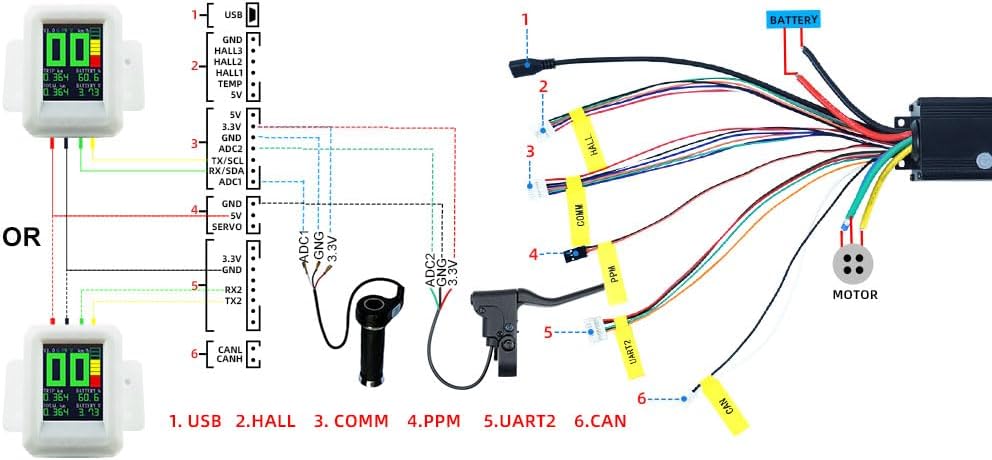
Figure 6: Screenshot of the VESC Tool software interface, showing various configuration tabs.
7. Maintenance
- Regular Inspection: Periodically inspect all wiring and connections for signs of wear, damage, or loose contacts.
- Cleanliness: Keep the ESC free from dust, dirt, and moisture. The aluminum casing aids in heat dissipation, but excessive debris can hinder performance.
- Firmware Updates: Check the official FLIPSKY website or VESC Tool for the latest firmware updates to ensure optimal performance and access to new features. Always follow update instructions carefully.
- Temperature Monitoring: While the ESC has overheat protection, monitoring its temperature during heavy use can help prevent thermal throttling or damage.
8. Troubleshooting
| Problem | Possible Cause | Solution |
|---|---|---|
| ESC not powering on/no response | Incorrect wiring, insufficient battery voltage, damaged ESC. | Verify all wiring connections against the diagram. Check battery voltage. If issues persist, contact support. |
| Motor not spinning or erratic behavior | Incorrect VESC Tool configuration, sensor issues, motor phase wire issues. | Re-run motor detection in VESC Tool. Check Hall sensor connections. Ensure motor phase wires are securely connected. |
| ESC overheating | Excessive current draw, poor ventilation, prolonged high load. | Reduce current limits in VESC Tool. Ensure adequate airflow around the ESC. Avoid continuous high-power operation. |
| Firmware inconsistency warning in VESC Tool | Mismatch between ESC firmware and VESC Tool version. | Update or downgrade ESC firmware to match the VESC Tool version. Follow official guidelines carefully. |
| ESC damage after firmware update | Phase filter function not disabled (firmware 5.3+). | Ensure phase filter is set to "false" in VESC Tool before updating to or using firmware 5.3 or newer. This is a critical step. |
9. Warranty and Support
The FLIPSKY 75100 FOC Single ESC comes with a 2-month warranty from the manufacturer. For technical support, troubleshooting assistance, or warranty claims, please contact FLIPSKY customer service directly. Refer to the contact information provided in your product packaging or on the official FLIPSKY website.
Additional resources and community support can often be found on online forums dedicated to VESC-based ESCs and electric vehicle DIY projects.
Related documents75100


Ask a question about this manual
Ask about setup, troubleshooting, compatibility, parts, safety, or missing instructions. Manuals+ will review the question and use this page’s manual context to help answer it.