
Introduction
Thank you for purchasing the NewRixing NR-101 Wireless Speaker. This compact and versatile speaker offers multiple connectivity options including Bluetooth, USB flash drive, memory card (TF card), and AUX input. It also features a built-in microphone for hands-free calling. Please read this manual carefully to ensure proper use and optimal performance of your device.

Image: NewRixing NR-101 Wireless Speakers in multiple colors. This image displays the compact design and color variety of the speaker.
Package Contents
- NewRixing NR-101 Wireless Speaker
- USB Charging Cable
- User Manual
- (May include an AUX cable depending on package version)
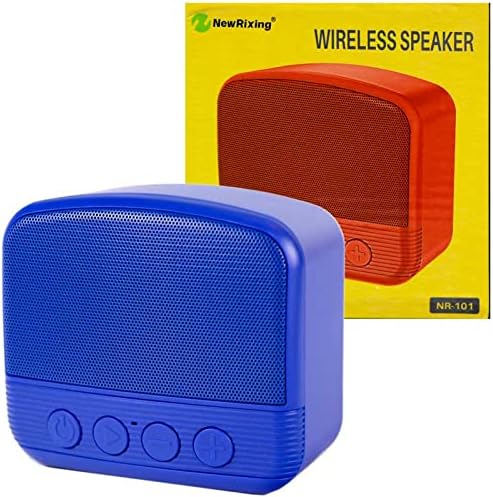
Image: NewRixing NR-101 Speaker and Packaging. This image shows the speaker alongside its retail box, indicating typical package contents.
Product Overview
Front Panel Controls
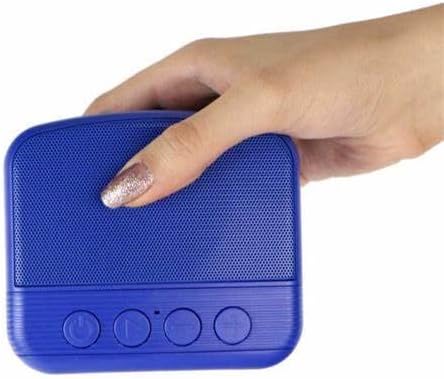
Image: Front view of NewRixing NR-101 with controls. This image highlights the speaker's front panel, displaying the power button, play/pause button, and volume/track control buttons.
- Power Button: Press and hold to turn on/off. Short press to switch modes (Bluetooth, TF Card, USB, AUX).
- Play/Pause Button: Short press to play or pause music. In Bluetooth mode, short press to answer/end calls. Long press to reject calls.
- Previous Track / Volume Down Button: Short press for previous track. Long press to decrease volume.
- Next Track / Volume Up Button: Short press for next track. Long press to increase volume.
Rear Panel Ports

Image: Rear view of NewRixing NR-101 with ports. This image shows the back of the speaker, detailing the various input ports for charging, USB, TF card, and AUX connectivity.
- AUX Input: For connecting external audio devices via a 3.5mm audio cable.
- USB Port: For connecting USB flash drives to play music.
- TF Card Slot: For inserting a Micro SD (TF) card to play music.
- Micro USB Charging Port: For charging the speaker using the provided USB cable.
- LED Indicator: Indicates charging status and Bluetooth pairing status.
Setup
Charging the Speaker
- Connect the Micro USB end of the charging cable to the speaker's Micro USB charging port.
- Connect the USB-A end of the charging cable to a USB power adapter (5V/1A recommended) or a computer's USB port.
- The LED indicator will illuminate during charging and turn off when fully charged.
- For first use, ensure the speaker is fully charged.
Powering On/Off
- To Power On: Press and hold the Power button (⏻) for approximately 3 seconds until you hear an audible prompt.
- To Power Off: Press and hold the Power button (⏻) for approximately 3 seconds until you hear an audible prompt.
Operating Instructions
Bluetooth Mode
- Turn on the speaker. It will automatically enter Bluetooth pairing mode, indicated by a flashing LED light and an audible prompt.
- Enable Bluetooth on your smartphone, tablet, or other Bluetooth-enabled device.
- Search for "NR-101" in the list of available Bluetooth devices.
- Select "NR-101" to connect. Once connected, the LED indicator will stop flashing and you will hear a confirmation sound.
- You can now play audio from your device through the speaker.
Note: The speaker will automatically attempt to reconnect to the last paired device when powered on.
USB Flash Drive / TF Card Mode
- Insert a USB flash drive or a TF (Micro SD) card into the corresponding port on the speaker.
- The speaker will automatically detect the storage device and switch to USB or TF card mode, beginning playback of audio files.
- If it does not switch automatically, short press the Power button (⏻) to cycle through modes until you reach the desired mode.
AUX Input Mode
- Connect one end of a 3.5mm audio cable (not included) to the AUX input port on the speaker.
- Connect the other end of the audio cable to the audio output jack of your external device (e.g., MP3 player, computer).
- The speaker will automatically switch to AUX mode, or you may need to short press the Power button (⏻) to select AUX mode.
- Control playback and volume from your connected device.
Hands-Free Calling
- When a call comes in while in Bluetooth mode, the music will pause.
- To Answer: Short press the Play/Pause button (⏸).
- To End: Short press the Play/Pause button (⏸) during a call.
- To Reject: Long press the Play/Pause button (⏸) when a call comes in.
Maintenance
- Cleaning: Use a soft, dry cloth to clean the speaker. Do not use abrasive cleaners, alcohol, or other chemical solvents, as these may damage the surface.
- Storage: Store the speaker in a cool, dry place away from direct sunlight and extreme temperatures.
- Water Resistance: This speaker is not waterproof. Avoid exposure to water or excessive moisture.
- Battery Care: To prolong battery life, charge the speaker regularly, even if not in frequent use. Avoid fully discharging the battery for extended periods.
Troubleshooting
| Problem | Possible Cause | Solution |
|---|---|---|
| Speaker does not turn on. | Low battery. | Charge the speaker fully. |
| No sound. | Volume too low; Incorrect mode; Device not connected. | Increase speaker and device volume. Ensure correct mode (Bluetooth, AUX, USB, TF). Reconnect device. |
| Cannot pair via Bluetooth. | Speaker not in pairing mode; Device Bluetooth off; Too far from speaker. | Ensure speaker is in pairing mode (flashing LED). Turn on Bluetooth on your device. Move device closer to speaker (within 10m). Forget "NR-101" on your device and try pairing again. |
| Music playback from USB/TF card not working. | Unsupported file format; Corrupted files; Incorrectly inserted card/drive. | Ensure audio files are in supported formats (e.g., MP3). Check if the USB drive/TF card is inserted correctly. Try another USB drive/TF card. |
Specifications
| Model Name | NR-101 |
| Brand Name | NewRixing (Generic) |
| Connectivity Technology | USB, Wireless (Bluetooth) |
| Wireless Communication Technology | Bluetooth |
| Audio Output Mode | Surround |
| Mounting Type | Tabletop |
| Material | Mixed Materials |
| Special Features | Bluetooth, Wireless, Microphone for Calling |
| Compatible Devices | Laptop, Smartphone, Tablet |
| Subwoofer Diameter | 5 Inches |
| Surround Sound Channel Configuration | 1 |
| Package Dimensions | 11.4 x 11.2 x 6.6 cm |
| Item Weight | 330 g |
Warranty and Support
This product is covered by a standard manufacturer's warranty. Please refer to the packaging or contact your retailer for specific warranty terms and conditions.
For technical support or customer service inquiries, please contact the seller or refer to the contact information provided with your purchase.