
1. Overview
The UMIDIGI Bison X10 PRO is a rugged smartphone designed for durability and performance in challenging environments. It features an IP69K rating for water and dust resistance, military-standard MIL-STD-810G compliance for extreme temperatures and drops, and runs on Android 11. Key functionalities include NFC for Google Pay, a 6.53-inch FHD screen, and a large 6150mAh battery. This manual provides essential information for setting up, operating, and maintaining your device.
2. Package Contents
Verify that all items are present in your product packaging:
- UMIDIGI Bison X10 PRO Smartphone
- USB Type-C Cable
- SIM Tray Ejector Tool
- User Manual
- (Additional accessories such as a screen protector, phone case, or headset may be included depending on the specific package.)
3. Device Layout
Familiarize yourself with the physical components and ports of your UMIDIGI Bison X10 PRO.

Figure 3.1: Rear view of the UMIDIGI Bison X10 PRO, highlighting the camera module, volume controls, power button with integrated fingerprint scanner, customizable buttons, SIM card slot, and speaker.
- Camera Module: Located on the upper rear, housing the main, ultra-wide, and macro cameras, along with the infrared thermometer sensor and LED flash.
- Volume Buttons: On the left side, for adjusting audio levels.
- Power Button / Fingerprint Scanner: On the right side, used to power on/off the device and for fingerprint authentication.
- Customizable Button 1 (PTT/SOS): On the left side, programmable for Push-to-Talk (PTT) or SOS functions.
- Customizable Button 2 (Underwater Camera): On the right side, programmable for quick access to the underwater camera mode.
- SIM Slot: Located on the left side, for inserting SIM cards.
- Speaker: Located at the bottom rear of the device.
- USB Type-C Port: Located at the bottom, for charging and data transfer.
- 3.5mm Headphone Jack: Located at the top.
4. Setup
4.1. SIM Card and MicroSD Card Installation
To install your SIM card(s) and/or MicroSD card:
- Locate the SIM card tray on the left side of the device.
- Insert the SIM tray ejector tool into the small hole next to the tray and press firmly until the tray pops out.
- Carefully pull out the SIM tray.
- Place your Nano-SIM card(s) and/or MicroSD card into the designated slots on the tray. Ensure the gold contacts are facing down.
- Gently push the tray back into the slot until it is flush with the device.
4.2. Initial Power On
To power on your device for the first time:
- Press and hold the Power Button on the right side of the phone until the UMIDIGI logo appears on the screen.
- Follow the on-screen instructions to complete the initial setup, including language selection, Wi-Fi connection, and Google account setup.
5. Operating Instructions
5.1. Basic Operations
- Power On/Off: Press and hold the Power Button. Select "Power off" or "Restart" from the options.
- Screen Lock/Unlock: Press the Power Button briefly to lock or unlock the screen. Use your configured fingerprint, PIN, pattern, or password to unlock.
- Volume Adjustment: Use the Volume Up and Volume Down buttons on the left side.
- Navigation: Utilize the on-screen navigation gestures or buttons (Back, Home, Recent Apps) as per Android 11 interface.
5.2. Camera Features
The Bison X10 PRO is equipped with a versatile camera system:
- 20MP Main Camera: For high-resolution photos.
- 8MP Ultra-wide Angle Camera: Captures broader scenes.
- 5MP Macro Camera: For detailed close-up shots.
- 8MP Selfie Camera: For front-facing photos and video calls.
Figure 5.1: Detail of the camera module on the UMIDIGI Bison X10 PRO.
Figure 5.2: Example of a wide-angle photograph captured with the device's ultra-wide camera.
Figure 5.3: Example of a macro photograph, demonstrating the camera's ability to capture fine details.

Figure 5.4: Example of a selfie taken with the front-facing camera.
5.3. Special Features
- Rugged Design: The device is built to withstand harsh conditions, featuring IP68 & IP69K ratings for water and dust resistance, and MIL-STD-810G compliance for drops and extreme temperatures. It can endure submersion in 1.5 meters of water for 30 minutes and drops from 1.8 meters.
- NFC (Near Field Communication) & Google Pay: Enables contactless payments and quick data exchange with compatible devices.
- Customizable Buttons: Two programmable buttons for quick access to specific functions.
- Button 1 (PTT/SOS): Can be configured for Push-to-Talk communication or as an emergency SOS button.
- Button 2 (Underwater Camera): Dedicated for activating the underwater camera mode.
- Wireless FM Radio: Enjoy FM radio without needing a headset or data connection.
- Precise Bosch Altimeter & Barometer: Integrated sensors provide accurate altitude and atmospheric pressure readings, useful for outdoor activities.
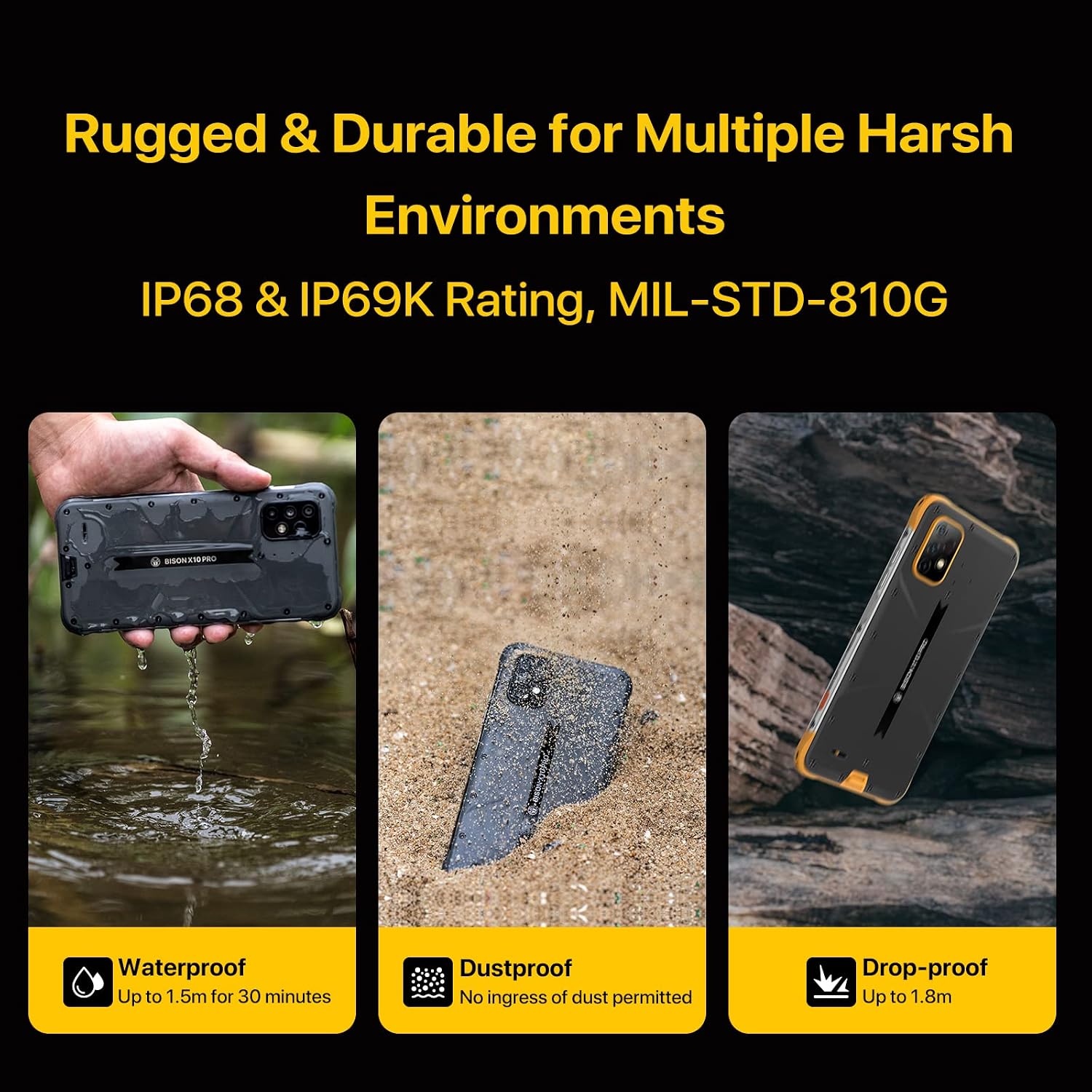
Figure 5.5: Visual representation of the smartphone's rugged features, including water, dust, and drop resistance.
Video 5.1: Demonstration of the UMIDIGI Bison X10 PRO's rugged performance, showcasing its durability against water and drops.
Video 5.2: A durability test demonstrating the phone's resistance to impact, addressing concerns about breakage.
Video 5.3: A test showing the smartphone's functionality in extreme cold temperatures, specifically at -25 degrees Celsius.

Figure 5.6: The smartphone demonstrating NFC functionality for Google Pay transactions.

Figure 5.7: The device's wireless FM radio feature in use, showing the interface and a user enjoying music outdoors.
6. Maintenance
To ensure the longevity and optimal performance of your UMIDIGI Bison X10 PRO, follow these maintenance guidelines:
- Cleaning: Wipe the device with a soft, damp cloth. Avoid harsh chemicals or abrasive materials. For waterproof features, ensure all port covers are securely closed before exposure to water.
- Temperature: Avoid exposing the device to extreme temperatures outside its operating range (as specified in the specifications).
- Charging: Use only the provided USB Type-C cable and a compatible charger.
- Software Updates: Regularly check for and install software updates to ensure the latest features and security patches.
7. Troubleshooting
If you encounter issues with your device, refer to the following common solutions:
| Problem | Solution |
|---|---|
| Device does not power on. | Ensure the battery is charged. Connect the device to a charger for at least 10 minutes, then try powering on again. |
| Poor network signal or no service. | Check if the SIM card is correctly inserted. Verify that your carrier supports the device's network bands. Try restarting the phone. If issues persist, contact your carrier or UMIDIGI support. |
| Touchscreen is unresponsive. | Restart the device by holding the Power Button. If the issue continues, perform a factory reset (data will be erased). |
| Battery drains quickly. | Close unused apps, reduce screen brightness, disable unnecessary features like GPS or Wi-Fi when not in use. Check battery usage in settings to identify power-consuming apps. |
8. Specifications
Detailed technical specifications for the UMIDIGI Bison X10 PRO:
| Feature | Detail |
|---|---|
| Brand | UMIDIGI |
| Model Name | Bison X10 PRO |
| Operating System | Android 11.0 |
| RAM Memory Installed Size | 4 GB |
| Memory Storage Capacity | 128 GB |
| Screen Size | 6.53 inches |
| Resolution | 1920 x 1080 (FHD) |
| Refresh Rate | 60 Hz |
| Wireless Carrier | Unlocked for All Carriers |
| Cellular Technology | 4G (Dual SIM 4G LTE support) |
| Color | Yellow |
| SIM Card Slot Count | Dual SIM |
| Connector Type | USB Type C |
| Biometric Security Feature | Face Recognition, Fingerprint Scanner |
| Water Resistance Level | Waterproof (IP68 & IP69K) |
| Headphones Jack | 3.5 mm |
| Additional Features | Rugged Body, Wireless FM Radio, Customized Water Camera Mode, Barometer, Enhanced Antennas & Navigation System, Gloves Mode |
| Flash Memory Supported Size Maximum | 128 GB (MicroSD) |
| Material Features | Rugged and Durable |
| Camera Description | Front, Rear (20MP Main, 8MP Ultra-wide, 5MP Macro) |
| Shooting Modes | Underwater |
| Battery Capacity | 6150 mAh |
| Battery Average Life | 2 days |
| Phone Talk Time | 24 Hours |
| Item Dimensions | 6.68 x 3.23 x 0.51 inches |
| Connectivity Technology | NFC |
| Wireless Network Technology | CDMA, GSM, LTE |
| Video Capture Resolution | 1080p |
| GPS Geotagging Functionality | True |
| UPC | 610625572266 |
| ASIN | B09J2MHVGK |
9. Warranty and Support
The UMIDIGI Bison X10 PRO comes with a 1-year warranty from the manufacturer.
For technical support, warranty claims, or if you experience compatibility issues with your cellular carrier, please contact UMIDIGI customer service. You can typically find contact information on the UMIDIGI official website or through your purchase platform.
If you encounter any connection problems with your carrier, please send a message to the seller via Amazon, and assistance will be provided within 24 hours.


