
Atomi Smart B09J1GR75N
Contents
Atomi Smart WiFi Tower Heater Instruction Manual
Model: B09J1GR75N
Product Overview
The Atomi Smart WiFi Tower Heater is a 25-inch, 1500W electric heater designed for medium indoor room coverage. It features wide-angle oscillation, multiple heating modes, and advanced safety features. This heater can be controlled via the Atomi Smart app, Amazon Alexa, or Google Assistant, offering convenient and efficient heating for your home or office.

Figure 1: Atomi Smart WiFi Tower Heater with app control interface.
Important Safety Information
Please read all safety warnings and instructions before using this appliance to avoid injury or damage. Keep this manual for future reference.
- Electronic Tip-Over Safety Switch: The heater is equipped with an electronic tip-over safety switch that automatically turns off the unit if it is accidentally knocked over. A phone notification will be sent to your device if this occurs.
- Automatic Overheat Protection: The heater will automatically shut off if it detects an internal temperature that could cause overheating.
- Cool-Touch Housing: The exterior housing is designed to remain cool to the touch during operation, reducing the risk of burns.
- Self-Regulating Heating Element: Ensures stable and safe heating performance.
- Always place the heater on a firm, level surface.
- Do not cover the heater or block its air inlets/outlets.
- Keep flammable materials at least 3 feet (0.9 meters) away from the heater.

Figure 2: The heater's tip-over safety feature automatically shuts off the unit and sends a notification.
Setup and Installation
- Unpack the Heater: Carefully remove the heater from its packaging. Retain packaging for storage or future transport.
- Placement: Place the heater on a stable, flat surface. Ensure there is at least 3 feet (0.9 meters) of clear space around the heater to allow for proper airflow and prevent fire hazards.
- Power Connection: Plug the heater directly into a 110V AC wall outlet. Do not use extension cords or power strips.
- Download Atomi Smart App: Download the free Atomi Smart app from the App Store (iOS) or Google Play Store (Android).
- Connect to Wi-Fi:
- Open the Atomi Smart app and create an account or log in.
- Follow the in-app instructions to add a new device. The app will guide you through connecting the heater to your 2.4GHz Wi-Fi network.
- Ensure your phone is connected to a 2.4GHz Wi-Fi network during the setup process.
- Voice Assistant Integration (Optional):
- Once connected to the Atomi Smart app, you can link your account with Amazon Alexa or Google Assistant through their respective apps.
- Search for the "Atomi Smart" skill/action and enable it.
- Follow the prompts to discover your new heater and assign it a name for voice commands (e.g., "Living Room Heater").
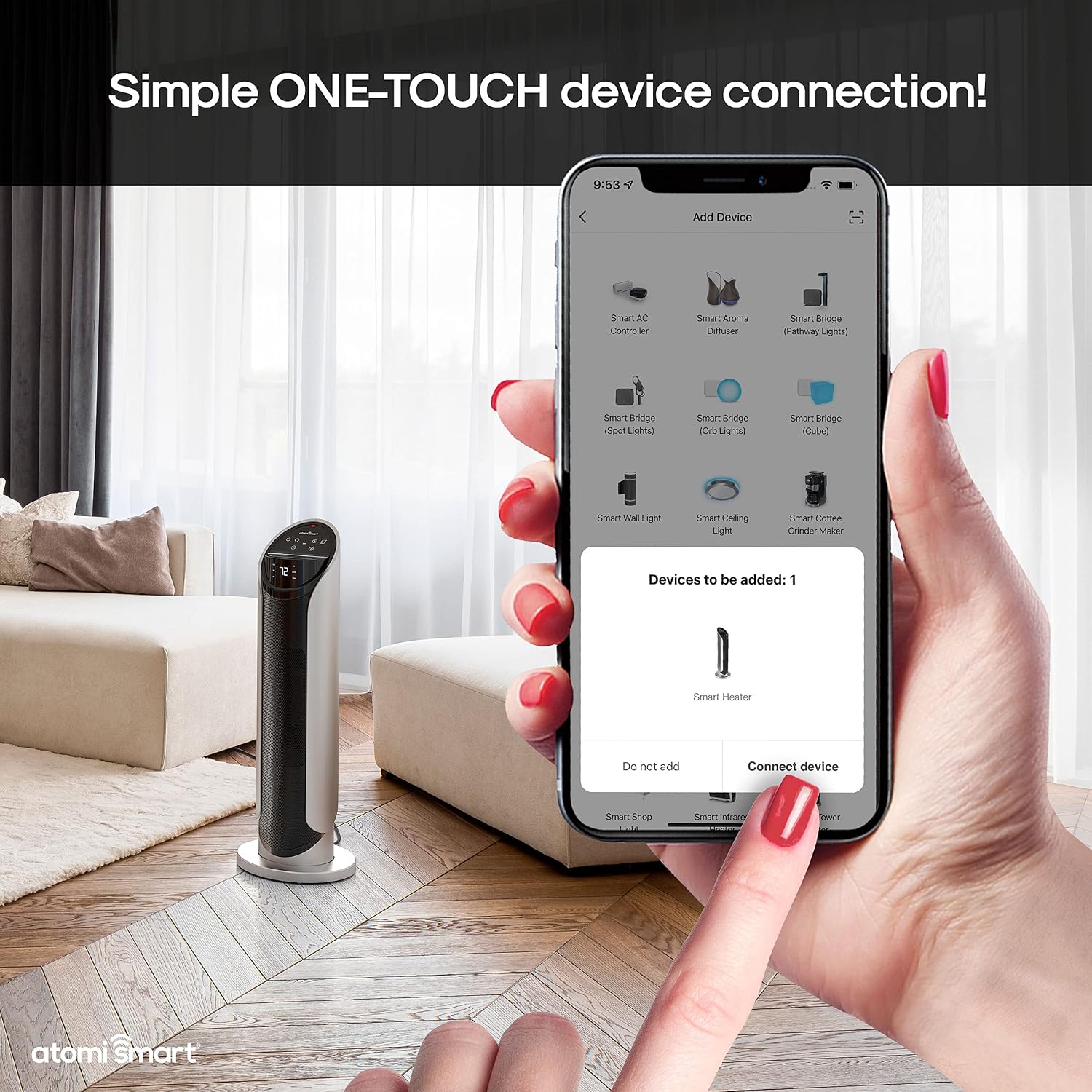
Figure 3: Simple one-touch device connection via the Atomi Smart app.
Operating Instructions
Control Panel Operation
The heater can be operated directly using the touchscreen digital control panel located on top of the unit.
- Power Button (⏻): Press to turn the heater ON or OFF. When turning off, the heater will perform a short countdown before fully shutting down.
- Mode Button (M): Cycle through heating modes: High, Low, and ECO.
- High: Provides maximum heat output (1500W).
- Low: Provides reduced heat output.
- ECO: Energy-efficient mode that automatically adjusts heat and power settings to maintain the desired temperature.
- Temperature Adjustment (+ / -): Adjust the desired thermostat temperature. The display shows the set temperature.
- Oscillation Button (⟳): Press to activate or deactivate the 45° wide-angle oscillation feature, distributing heat more evenly.
- Timer Button (◷): Set a countdown timer for automatic shut-off (e.g., 1-12 hours).

Figure 4: The heater's digital control panel allows for direct operation.
Atomi Smart App Control
Control your heater remotely using the Atomi Smart app on your smartphone or tablet.
- Power ON/OFF: Toggle the heater's power status.
- Adjust Temperature: Use the slider or +/- buttons to set the desired temperature.
- Change Mode: Select High, Low, or ECO heating modes.
- Set Schedules: Create daily or weekly schedules for the heater to turn on/off automatically.
- Oscillation Control: Turn the oscillation feature on or off.
- Countdown Timer: Set a countdown for automatic shut-off.
- Device Renaming: Customize the name of your heater within the app for easy identification.

Figure 5: Detailed view of the Atomi Smart app interface for heater control.
Voice Control
Integrate your Atomi Smart WiFi Tower Heater with Amazon Alexa or Google Assistant for hands-free control.
- Example Commands (Amazon Alexa):
- "Alexa, turn on [Heater Name]."
- "Alexa, set [Heater Name] to 72 degrees."
- "Alexa, turn off [Heater Name]."
- Example Commands (Google Assistant):
- "Hey Google, turn on [Heater Name]."
- "Hey Google, set [Heater Name] to High."
- "Hey Google, turn off [Heater Name]."

Figure 6: The heater is compatible with Amazon Alexa and Google Assistant for voice control.
Video 1: Official product video demonstrating the features and operation of the Atomi Smart Tower Heater, including app and voice control, safety features, and oscillation.
Maintenance and Care
Regular maintenance ensures optimal performance and longevity of your Atomi Smart WiFi Tower Heater.
- Cleaning:
- Always unplug the heater and allow it to cool completely before cleaning.
- Wipe the exterior surfaces with a soft, damp cloth. Do not use abrasive cleaners or solvents.
- Do not immerse the heater in water or allow water to drip into the interior.
- Dust Filter: The heater includes a removable dust filter to help maintain air quality and unit efficiency.
- Regularly check and clean the dust filter.
- To remove, locate the filter cover (usually at the back or bottom of the unit), open it, and slide out the filter.
- Clean the filter with a vacuum cleaner or rinse it under warm water. Ensure the filter is completely dry before reinserting.
- Storage: When not in use, store the heater in a cool, dry place, preferably in its original packaging, to protect it from dust and damage.
Troubleshooting
If you experience issues with your Atomi Smart WiFi Tower Heater, refer to the following common problems and solutions:
| Problem | Possible Cause | Solution |
|---|---|---|
| Heater does not turn on. | Not plugged in; power outlet not working; tip-over switch activated; overheat protection activated. | Ensure the heater is securely plugged into a working 110V outlet. Check if the heater was tipped over and is now upright. Allow the unit to cool down if it overheated. |
| No heat output. | Incorrect mode selected; thermostat set too low. | Ensure the heater is in High or Low mode, not just Fan mode (if applicable). Increase the thermostat setting above the current room temperature. |
| Wi-Fi connection issues. | Incorrect Wi-Fi band (5GHz); weak signal; incorrect password; router issues. | Ensure your router is broadcasting a 2.4GHz Wi-Fi signal. Move the heater closer to the router. Re-enter Wi-Fi password in the app. Restart your router. |
| Voice control not working. | Incorrect device name; skill/action not enabled; internet connectivity issues. | Verify the device name in the Atomi Smart app and your voice assistant app. Ensure the Atomi Smart skill/action is enabled and linked. Check your internet connection. |
| Heater makes unusual noises. | Dust/debris in fan; internal component issue. | Unplug and clean the dust filter. If noise persists, contact customer support. |
If the problem persists after attempting these solutions, please contact Atomi Smart customer service for further assistance.
Product Specifications
- Brand: Atomi Smart
- Model: B09J1GR75N
- Power: 1500W
- Voltage: 110 Volts
- Heating Technology: Ceramic
- Heating Coverage: Up to 216 sq.ft.
- Oscillation: 45° Wide-Angle
- Control: Atomi Smart App, Touchscreen Panel, Amazon Alexa, Google Assistant
- Safety Features: Electronic Tip-Over Switch, Automatic Overheat Protection, Cool-Touch Housing, Self-Regulating Heating Element
- Dimensions: 8.4"D x 7.9"W x 25.7"H
- Weight: 8.35 pounds
- Color: Black
- UPC: 841856116985
Warranty and Support
Atomi Smart provides a 5-year limited warranty on all its smart products. This warranty covers defects in materials and workmanship under normal use. For warranty claims or technical support, please contact Atomi Smart customer service.
Customer Service: For assistance, please visit the Atomi Smart website or refer to the contact information provided in your product packaging. Our professional service team is ready to provide 100% satisfaction service with a 24-hour quick response.
For more information, visit the official Atomi Smart Store.
Ask a question about this manual
Ask about setup, troubleshooting, compatibility, parts, safety, or missing instructions. Manuals+ will review the question and use this page’s manual context to help answer it.