Introduction
This manual provides comprehensive instructions for the setup, operation, and maintenance of your Playseat® Trophy sim racing cockpit. Designed for both children and adults, the Playseat® Trophy offers a versatile and immersive racing experience, suitable for casual fun, training, or competitive Esport events. Its robust construction and highly adjustable design ensure comfort and compatibility with a wide range of racing peripherals.
Setup and Assembly
The Playseat® Trophy is engineered for quick and easy assembly. Follow these steps to set up your racing cockpit.
Unboxing and Component Identification
Carefully unpack all components from the box. Verify that all parts listed in the packing list are present before beginning assembly.

Image: The Playseat® Trophy frame, showcasing its lightweight yet durable structure before full assembly. This image highlights the main components of the cockpit.
Assembly Instructions
The assembly process is straightforward. Refer to the included graphical instructions for detailed steps. Ensure all connections are secure before use.
Peripheral Installation and Compatibility
The Playseat® Trophy is designed for broad compatibility with most steering wheel and pedal sets on the market, including popular brands like Logitech, Thrustmaster, and Fanatec. It is also recommended for Direct Drive wheels such as Fanatec DD, Simucube, Simsteering, Feel VR, and Bodnar, and supports Trueforce Direct Drive.
Mount your steering wheel and pedal set to the designated plates. Ensure all mounting screws are tightened to prevent movement during use.

Image: The Playseat® Trophy cockpit with a Fanatec steering wheel and pedal set installed, demonstrating the compatibility and mounting points for high-performance racing peripherals.
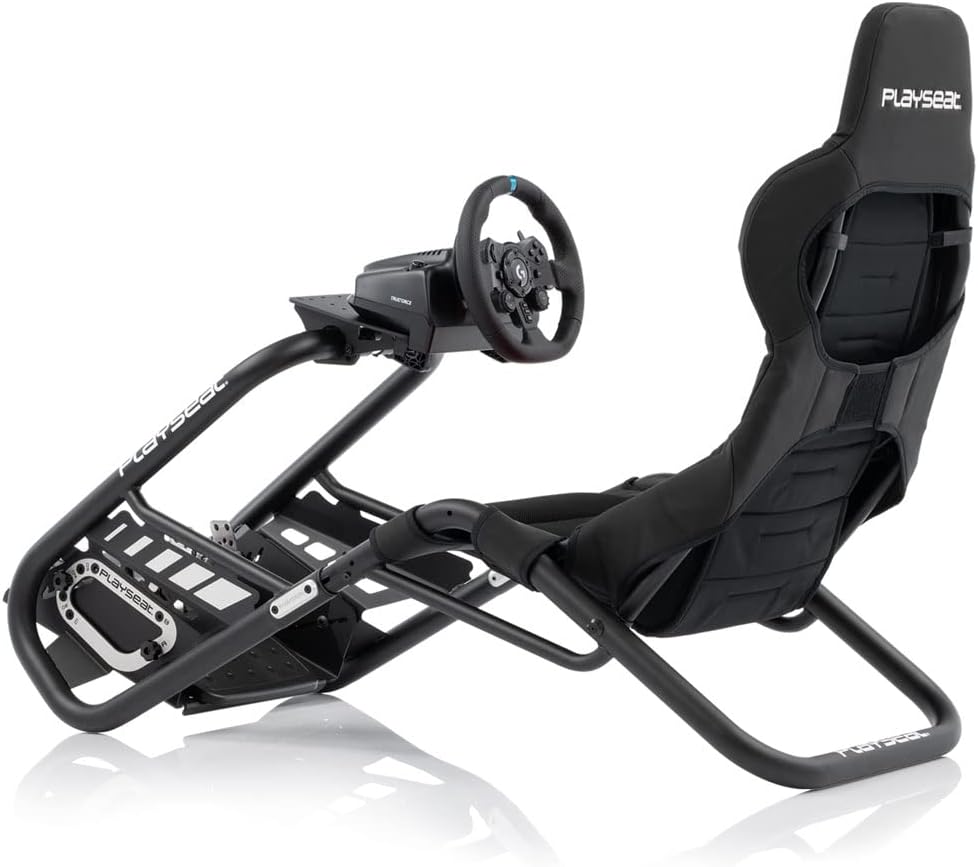
Image: The Playseat® Trophy cockpit with a Logitech steering wheel and pedal set, illustrating the ease of integration for various popular racing hardware brands.
Console and PC Compatibility
The Playseat® Trophy is compatible with a wide range of gaming platforms, including Xbox 360, Xbox One, Xbox Series S, Xbox Series X, PlayStation 3, PlayStation 4, PlayStation 5, Wii, Wii U, Switch, PC, and Mac (Steam).
Operating the Playseat® Trophy
Once assembled, the Playseat® Trophy offers extensive adjustability to optimize your racing position for maximum comfort and performance.
Adjustments for Optimal Racing Position
- Seat Height: Adjust the seat's vertical position to align with your eye level relative to the screen.
- Backrest: Recline or straighten the backrest to find a comfortable and supportive angle.
- Seat Hardness: The unique ActiFit material adapts to your body, providing a bucket seat feeling while maintaining comfort.
- Pedal Plate: Adjust the distance and angle of the pedal plate to ensure comfortable and precise pedal control.
- Steering Wheelbase: Modify the position of the steering wheel mount for optimal reach and ergonomic control.
These adjustments allow users of all sizes to achieve a realistic and comfortable racing posture, enhancing the immersive experience.

Image: A user demonstrating the comfortable and ergonomic seating position achievable with the Playseat® Trophy, highlighting its adaptability for various body types.

Image: A user actively engaged in a sim racing session, showcasing the immersive experience provided by the Playseat® Trophy cockpit and its integrated peripherals.
Maintenance
To ensure the longevity and optimal performance of your Playseat® Trophy, regular maintenance is recommended.
- Cleaning: The seat cover is made of breathable Playseat ActiFit material. For general cleaning, wipe with a damp cloth. For deeper cleaning, consult the fabric care instructions provided with the product. Avoid harsh chemicals.
- Frame Inspection: Periodically inspect the frame for any signs of wear or damage. The construction uses durable materials, but regular checks ensure continued stability.
- Tightening Fasteners: Over time, screws and bolts may loosen due to vibrations from force feedback wheels or general use. Periodically check and tighten all fasteners, especially those connecting the wheel and pedal plates, to maintain rigidity and prevent unwanted noises.
- Storage: While the Playseat® Trophy does not fold for compact storage, its relatively light weight (15 kg) allows for easier repositioning if space is a concern. Store in a dry environment away from direct sunlight.
Troubleshooting
This section addresses common issues you might encounter with your Playseat® Trophy.
Loose Connections or Squeaking Noises
If you notice any wobbling, instability, or squeaking noises during use, it is likely due to loose fasteners.
- Solution: Systematically check all bolts and screws throughout the frame, especially at connection points for the seat, wheel mount, and pedal plate. Tighten them firmly using the appropriate tools.
Missing or Damaged Parts Upon Arrival
In rare cases, components might be missing or damaged during shipping.
- Solution: Immediately contact Playseat® customer support or your retailer with your purchase details and a description of the missing/damaged parts. Do not attempt to assemble the product with incomplete components.
Difficulty Achieving Desired Driving Position
While the Playseat® Trophy offers extensive adjustability, some users might find it challenging to find their ideal setup.
- Solution: Experiment with all available adjustments (seat height, backrest angle, pedal distance/angle, steering wheelbase position). Make small incremental changes and test them. Ensure your peripherals are mounted correctly and securely.
Specifications
| Model Number | RAP.00304 |
| Product Dimensions | 140 x 57.99 x 100 cm |
| Product Weight | 15 kg |
| Manufacturer | PLAYSEAT |
| Country of Origin | China |
| Language | English |
| Release Date | November 9, 2022 |
Warranty and Support
Specific warranty details for the Playseat® Trophy are not provided in this manual. For information regarding warranty coverage, terms, and conditions, please refer to the documentation included with your product packaging or visit the official Playseat® website.
For technical support, spare parts, or further assistance, please contact Playseat® customer service through their official website or the contact information provided in your product's original documentation.
Note on Videos: No official product video URLs were provided in the source data for embedding in this manual. Please refer to the manufacturer's official channels for any available video content.