1. Introduction
This user manual provides comprehensive instructions for the KAHLES K525i 5-25x56 DLR CCW SKMR4 Riflescope. Please read this manual thoroughly before using your riflescope to ensure proper operation, maximize performance, and maintain product longevity. The K525i is designed for precision shooting, offering exceptional optical clarity and robust mechanical performance.

Figure 1: KAHLES K525i 5-25x56 DLR CCW SKMR4 Riflescope. This image displays the overall design of the riflescope, highlighting its robust construction and key adjustment turrets.
2. Safety Information
Always prioritize safety when handling firearms and optics. Adhere to all local and national firearm safety regulations. This riflescope is an optical instrument and should be handled with care.
- Never look directly at the sun or other intense light sources through the riflescope, as this can cause permanent eye damage.
- Ensure the firearm is unloaded and safe before mounting or adjusting the riflescope.
- Keep the riflescope away from children.
- Avoid dropping or subjecting the riflescope to severe impacts, which can damage internal components.
- Do not attempt to disassemble the riflescope. This will void the warranty and may cause damage.
3. Components Overview
The KAHLES K525i riflescope consists of several key components, each serving a specific function:
- Objective Lens: The front lens that gathers light.
- Main Tube: The central body of the riflescope.
- Elevation Turret: Adjusts the vertical point of impact. Features 100 clicks per rotation for precise adjustments.
- Windage Turret: Adjusts the horizontal point of impact. Available in optional left or right TWIST GUARD configurations.
- Parallax Adjustment: Located on the side, this adjusts for parallax error at various distances. Includes a parallax spinner for quick adjustments.
- Magnification Ring: Adjusts the magnification from 5x to 25x. Features an extralong throw lever for rapid changes.
- Diopter Adjustment Ring: Located on the eyepiece, used to focus the reticle for the user's eye.
- Eyepiece: The rear lens through which the user views the image.
- SKMR4 Reticle: Precise illuminated reticle located in the 1st focal plane.
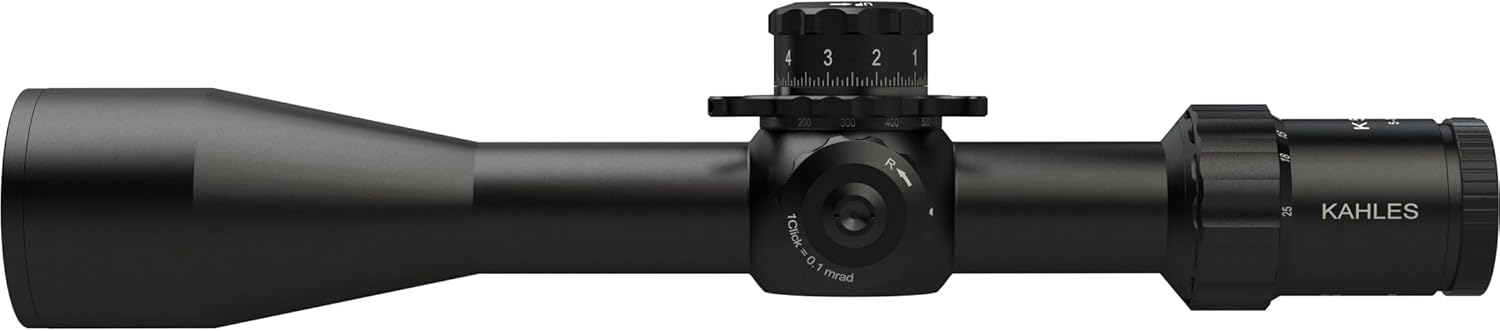
Figure 2: Side view of the KAHLES K525i Riflescope. This image highlights the main tube, objective lens, and the side parallax adjustment knob.

Figure 3: Close-up view of the KAHLES K525i turrets. This image shows the detailed markings and design of the elevation and windage turrets, including the large lettering for easy reading.
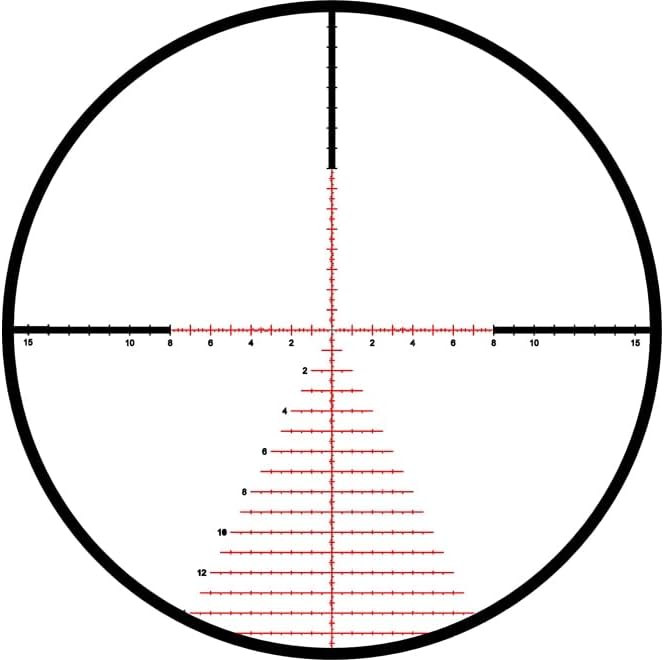
Figure 4: Illustration of the SKMR4 Reticle. This image displays the precise markings and design of the SKMR4 reticle, which is located in the first focal plane.
4. Setup
4.1 Mounting the Riflescope
The KAHLES K525i is designed for mounting on a Picatinny rail. Proper mounting is crucial for accuracy and repeatable performance.
- Ensure the firearm is unloaded and pointed in a safe direction.
- Select appropriate scope rings that match the main tube diameter of the K525i.
- Securely attach the bottom halves of the scope rings to the Picatinny rail, ensuring proper eye relief.
- Place the riflescope into the bottom halves of the rings.
- Attach the top halves of the rings, tightening screws evenly and incrementally to the manufacturer's recommended torque specifications. Do not overtighten.
- Ensure the reticle is level before final tightening. A reticle leveling tool is recommended.
4.2 Diopter Adjustment
This adjustment focuses the reticle for your individual eyesight, ensuring the reticle appears sharp and clear.
- Point the riflescope at a plain, bright background (e.g., a clear sky or a blank wall).
- Look through the riflescope and quickly glance away.
- While quickly glancing back, adjust the diopter ring until the reticle appears perfectly sharp. Avoid staring through the scope for too long during this process, as your eye may compensate for blurriness.
4.3 Parallax Adjustment
Parallax is the apparent shift in the reticle's position relative to the target when the eye moves. The K525i features a side parallax adjustment to eliminate this error at various distances.
- Set the riflescope's magnification to your desired setting.
- Aim at a target at a known distance.
- Adjust the parallax knob until the target image appears sharpest and the reticle shows no apparent movement relative to the target when you slightly move your head up and down or side to side.
- The parallax knob has distance markings, which can serve as a guide, but fine-tuning is often required. The parallax spinner allows for quick adjustments.
5. Operating Instructions
5.1 Magnification Adjustment
The K525i offers a variable magnification range from 5x to 25x. Rotate the magnification ring to select the desired power. The extralong throw lever facilitates quick and smooth magnification changes.
5.2 Windage and Elevation Adjustments
The K525i features precise turrets for windage and elevation adjustments, with 100 clicks per rotation for reliable repeat accuracy and clearly defined clicks. Each click represents a specific change in point of impact (e.g., 0.1 MIL or 1/4 MOA, depending on the specific model configuration).
- Elevation Turret: Rotate the top turret to adjust for bullet drop. Turning the turret clockwise typically moves the point of impact down, and counter-clockwise moves it up. Refer to the turret markings for specific values.
- Windage Turret: Rotate the side turret to adjust for wind drift. The K525i offers optional left or right TWIST GUARD windage. Turning the turret clockwise typically moves the point of impact right, and counter-clockwise moves it left.
- The extra-large turret lettering ensures easy and fast reading of your adjustments.
5.3 Reticle Illumination
The SKMR4 reticle is illuminated for use in low-light conditions. The illumination control is typically integrated into the parallax knob or a separate control. Rotate the illumination control to turn the reticle on/off and adjust brightness levels. Start with the lowest setting and increase as needed to avoid glare.
6. Maintenance
Proper care and maintenance will ensure the longevity and performance of your KAHLES K525i riflescope.
6.1 Cleaning
- Lenses: Use a soft brush or compressed air to remove dust and loose particles. For smudges or fingerprints, use a clean microfiber cloth specifically designed for optics and a small amount of lens cleaning solution. Wipe gently in a circular motion from the center outwards.
- Body: Wipe the riflescope body with a soft, damp cloth. Avoid using harsh chemicals or abrasive materials.
- Ensure all caps are in place when not in use to protect the lenses.
6.2 Storage
- Store the riflescope in a cool, dry place, away from direct sunlight and extreme temperatures.
- If storing for extended periods, remove any batteries from the illumination system to prevent corrosion.
- Use the provided protective covers for the objective and eyepiece lenses.
7. Troubleshooting
This section addresses common issues you might encounter with your KAHLES K525i riflescope.
| Problem | Possible Cause | Solution |
|---|---|---|
| Blurred image/reticle | Improper diopter or parallax adjustment. | Re-adjust diopter for reticle sharpness (Section 4.2). Re-adjust parallax for target sharpness (Section 4.3). |
| Reticle illumination not working | Battery depleted or incorrectly inserted. Illumination turned off. | Check and replace battery if necessary. Ensure battery is inserted with correct polarity. Turn on illumination and adjust brightness. |
| Point of impact shift | Loose mounting rings or base. Impact damage. | Check all mounting screws and ensure they are torqued to specifications. If problem persists after re-mounting, contact KAHLES support. |
| Turrets not clicking crisply | Debris or internal issue. | Ensure turrets are clean. If issue persists, do not force, contact KAHLES support. |
8. Specifications
Detailed technical specifications for the KAHLES K525i 5-25x56 DLR CCW SKMR4 Riflescope:
| Feature | Specification |
|---|---|
| Model Name | K525i |
| Magnification | 5-25x |
| Objective Lens Diameter | 56 mm |
| Reticle Type | SKMR4 (1st Focal Plane) |
| Eye Relief | 3.74 Inches |
| Weight | 4 Pounds (approx. 1.81 kg) |
| Material | Metal |
| Color | Black |
| Mounting Type | Picatinny Mount |
| Turret Clicks | 100 clicks per rotation |
| Windage Adjustment | Optional left or right TWIST GUARD |
| UPC | 708026106781 |
| Part Number | 10678 |
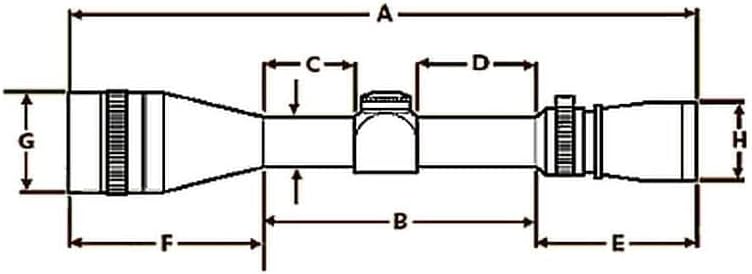
Figure 5: Dimensional diagram of the KAHLES K525i Riflescope. This diagram illustrates the key measurements (A, B, C, D, E, F, G, H) of the riflescope, useful for mounting and fitment.
9. Warranty and Support
KAHLES products are known for their high quality and reliability. For specific warranty terms and conditions, please refer to the official KAHLES website or the warranty card included with your product. Keep your proof of purchase for warranty claims.
9.1 Customer Support
If you encounter any issues not covered in this manual or require technical assistance, please contact KAHLES customer support through their official website or authorized dealer. Provide your product model (K525i) and serial number when contacting support for faster service.
For more information, visit the official KAHLES website: www.kahles.at