
1. Introduction
This user manual provides comprehensive instructions for the PowMr 5500W 48V Hybrid Solar Inverter, model POW-HVM5.5K-48V-P. This advanced device integrates the functions of a pure sine wave inverter, an 80A MPPT solar charge controller, and a battery charger, offering an uninterruptible power supply solution for various applications, including home and office environments. It is designed to power a wide range of appliances, from lighting and fans to refrigerators and air conditioners, and supports parallel operation for increased power capacity.
Please read this manual thoroughly before installation and operation to ensure safe and efficient use of the inverter.
2. Safety Instructions
Adhering to these safety guidelines is crucial for preventing personal injury and damage to the inverter or connected equipment.
- Installation Location: Do not mount the inverter on flammable building materials. Ensure adequate ventilation around the unit.
- Read Manual: Before using this inverter, read all instructions and warnings on the device itself and familiarize yourself with the batteries and all corresponding sections of this user manual.
- Qualified Personnel: All wiring and electrical connections must be performed by qualified personnel to ensure compliance with local electrical codes and safety standards.
- Do Not Disassemble: Do not attempt to disassemble or repair the device. Unauthorized modifications can lead to electric shock, fire, or damage to the unit, and will void the warranty.
- AC Power Disconnection: Always ensure the AC power source is disconnected before attempting to firmly connect or disconnect any wiring to the device.
- Correct Polarity: Connect AC cables with correct polarity. If the Live (L) and Neutral (N) wires are connected inversely, a short circuit may occur, especially during parallel operation of this inverter.
- Battery Safety: Be familiar with battery safety procedures, including proper handling, ventilation, and protection against short circuits.
3. Product Overview
3.1 Key Features
- Pure sine wave inverter output.
- Integrated 80A MPPT solar charge controller.
- Multifunction device combining inverter, solar charger, and battery charger.
- Supports parallel operation for up to 9 units, achieving a maximum output power of 45 KW/45 KVA.
- Configurable LCD settings for battery charging current, AC/solar charging priority, and acceptable input voltage range.
- Comprehensive protection features: overload, over-temperature, and short-circuit protection.
- Intelligent battery charger design for optimized battery performance.
- Cold start function for reliable operation in various conditions.
- Compatible with 48V lead-acid (flooded, AGM) and lithium batteries, or can operate without batteries.
- Compatible with utility grid or generator power input.
- Automatic restart during AC recovery.
3.2 Product Components and Interfaces

Image: Front and side view of the PowMr 5500W Hybrid Solar Inverter, highlighting the LCD display, function buttons, and various input/output ports.

Image: Detailed view of the inverter's front panel, showing the LCD screen and control buttons.

Image: Detailed view of the inverter's side panel, showing ventilation grilles and connection ports.

Image: Diagram illustrating the operation and display panel, including the LCD, LED indicators (AC/INV, CHARGE, FAULT), and function keys (ESC, UP, DOWN, ENTER, POWER).
The inverter features a clear LCD display for monitoring system status and configuring settings. Key components and interfaces include:
| No. | Component | Description |
|---|---|---|
| 1 | LCD Display | Shows system status and configuration options. |
| 2 | Status Indicator | Green LED for AC/INV status (Solid: Utility power, Flashing: Battery/PV power). |
| 3 | Charging Indicator | Green LED for charging status (Solid: Battery fully charged, Flashing: Battery charging). |
| 4 | Fault Indicator | Red LED for fault conditions (Solid: Fault occurs, Flashing: Warning condition). |
| 5 | Function Buttons | Buttons for navigation and setting adjustments (ESC, UP, DOWN, ENTER). |
| 6 | Power On/Off Switch | Main power control for the unit. |
| 7 | AC Input | Connection for utility grid or generator AC power. |
| 8 | AC Output | Connection for household appliances. |
| 9 | PV Input | Connection for solar panel array. |
| 10 | Battery Input | Connection for 48V battery bank. |
| 11 | Circuit Breaker | Overcurrent protection for the unit. |
| 12 | RS232 Communication Port | For communication with external devices. |
| 13 | Dry Contact (Optional) | For external control or signaling. |
| 14 | USB Communication Port (Optional) | For data logging or firmware updates. |
| 15 | Grounding Terminal | For safety grounding connection. |
| 16 | Parallel Communication Port | Used for connecting multiple inverters in parallel (only for parallel model). |
4. Setup and Installation
Proper installation is critical for the safe and efficient operation of your PowMr Hybrid Solar Inverter. Ensure all safety instructions are followed.
4.1 Mounting the Inverter
- Choose a suitable location that is dry, well-ventilated, and away from flammable materials.
- Ensure the mounting surface can support the inverter's weight (approximately 11 kg).
- Allow sufficient clearance around the inverter for proper airflow and heat dissipation.
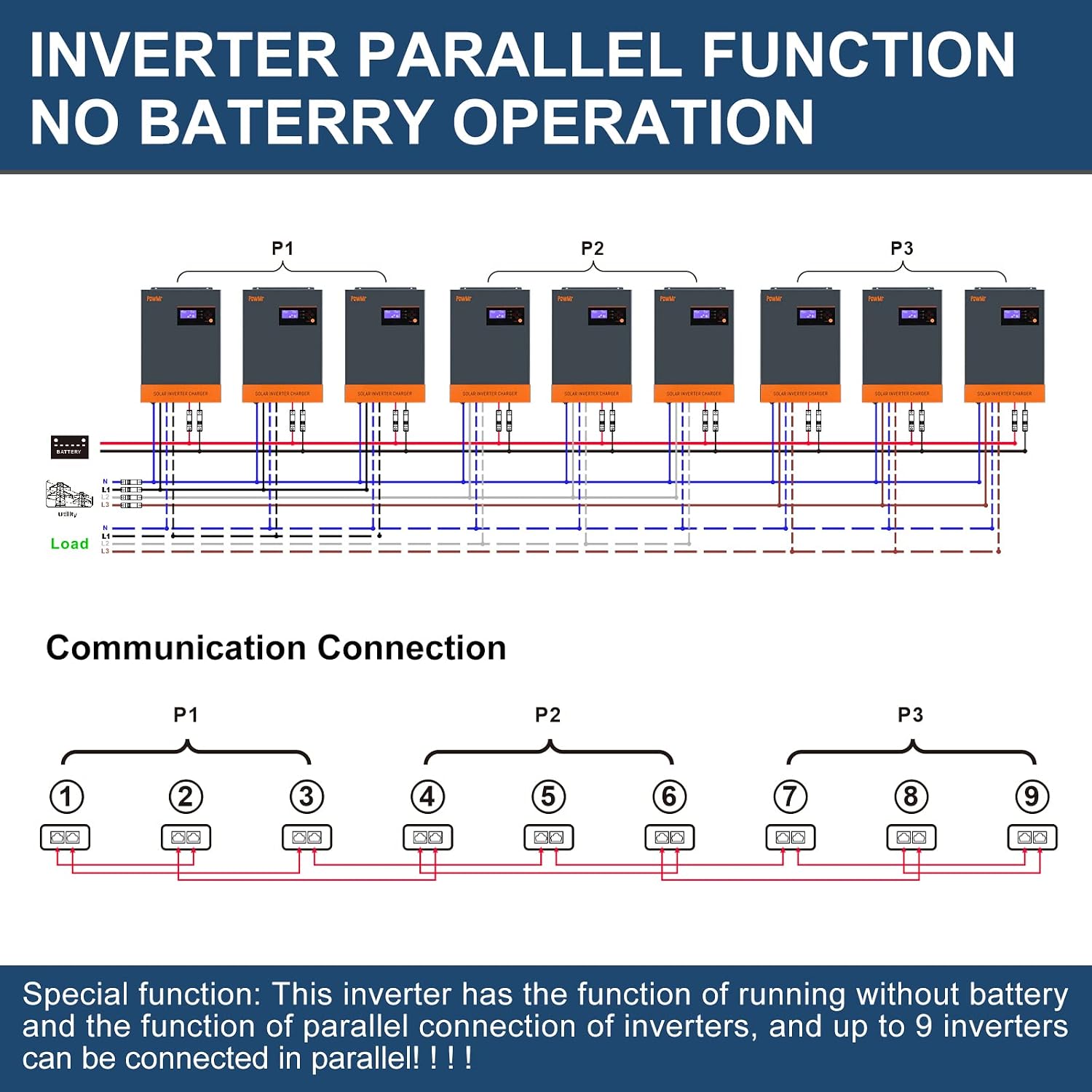
Image: Inverter dimensions (17.6in height, 11.6in width, 4.0in depth) and compatible 48V battery types: AGM, GEL, Flooded, and Lithium.
4.2 Electrical Connections
All electrical connections must be performed by a qualified electrician.
- Battery Connection: Connect the 48V battery bank to the Battery Input terminals. Ensure correct polarity (positive to positive, negative to negative). The inverter supports lead-acid (flooded, AGM, GEL) and lithium batteries.
- PV Array Connection: Connect your solar panel array to the PV Input terminals. Ensure the PV array's open circuit voltage (VOC) does not exceed 500V DC and the power does not exceed 5500W.
- AC Input Connection: Connect the utility grid or generator AC power to the AC Input terminals.
- AC Output Connection: Connect your household appliances or load center to the AC Output terminals.
- Grounding: Connect the grounding terminal to a reliable earth ground.

Image: System diagram illustrating the connections of solar modules, generator, utility grid, 48V battery (lead-acid or lithium), and home appliances to the PowMr Solar Inverter Charger.
4.3 Parallel Operation Setup (Optional)
The PowMr 5500W Hybrid Solar Inverter supports parallel operation, allowing up to nine units to work together for increased power output.
- For parallel connection, use the dedicated Parallel Communication Ports (16) on each inverter.
- Do not connect the power distribution cable between inverters that are in different phases, as this can damage the units.
- Refer to the separate parallel installation manual for detailed instructions on multi-unit setup.

Image: Diagram illustrating the parallel connection of multiple inverters (P1, P2, P3) for single-phase and three-phase load distribution, along with communication connections.

Image: Detailed diagram showing the communication connections for parallel operation, indicating how units P1, P2, and P3 are linked.
5. Operating Instructions
Once the inverter is properly installed and connected, you can begin operation.
5.1 Powering On/Off
- To power on, ensure all connections are secure, then press the Power On/Off Switch (6). The LCD display will illuminate.
- To power off, press the Power On/Off Switch (6) again. Disconnect AC input and battery if the system is to be completely shut down.
5.2 LCD Display and Settings
The LCD display provides real-time system information and allows for configuration of various parameters using the function buttons (5).
- Use the UP and DOWN buttons to navigate through the display menus.
- Press ENTER to select an option or confirm a setting.
- Press ESC to exit a menu or return to the previous screen.
- Configurable settings include battery charging current, AC/solar charging priority, and acceptable input voltage range for different applications (e.g., home appliances or personal computers).
5.3 Working Modes
The inverter supports four distinct working modes to optimize power usage based on your preferences and available sources.

Image: Visual representation of the four operational modes: Solar Charging, Electricity Utility Priority, Solar Priority, and Hybrid Charging, demonstrating how the inverter manages power flow from solar, utility, and battery sources.
- Solar Charging: Prioritizes solar power for charging batteries and powering loads.
- Electricity Utility Priority: Prioritizes utility grid power for loads, using solar and battery as backup.
- Solar Priority: Prioritizes solar power for loads, using utility and battery as backup.
- Hybrid Charging: Combines solar and utility power for charging and load support.
6. Maintenance
Regular maintenance helps ensure the longevity and optimal performance of your PowMr Hybrid Solar Inverter.
- Cleaning: Keep the inverter clean and free from dust and debris. Use a dry, soft cloth for cleaning. Do not use liquid cleaners.
- Ventilation: Ensure that the ventilation openings are not blocked to prevent overheating.
- Connection Checks: Periodically inspect all electrical connections (battery, PV, AC input/output) to ensure they are tight and free from corrosion.
- Battery Inspection: If using lead-acid batteries, check electrolyte levels and terminal conditions as per battery manufacturer guidelines.
- Environmental Conditions: Ensure the operating environment remains within the specified temperature and humidity ranges.
7. Troubleshooting
The PowMr inverter is equipped with intelligent protection systems to safeguard against various issues.

Image: Overview of the 15 intelligent protection modes, including charge low/high temperature, discharge low/high temperature, overcurrent, undervoltage, short-circuit, solar panel reverse connection, battery overvoltage, over temperature, and overload protection.
If the Fault Indicator (4) illuminates or the inverter behaves unexpectedly, refer to the following common issues and their solutions:
| Problem | Possible Cause | Solution |
|---|---|---|
| Inverter not turning on | No battery connection, low battery voltage, or power switch off. | Check battery connections, ensure battery voltage is within operating range, and turn on the power switch. |
| Overload warning/fault | Connected load exceeds inverter's capacity. | Reduce the connected load. Check total wattage of appliances. |
| Over-temperature fault | Inverter is overheating due to poor ventilation or high ambient temperature. | Ensure adequate ventilation, clear any obstructions from vents, and reduce ambient temperature if possible. |
| Short-circuit fault | Short circuit detected at AC output. | Disconnect all loads and check wiring for short circuits. Reconnect loads one by one to identify the faulty appliance. |
| Battery not charging | PV input issue, AC input issue, or battery fault. | Check PV array connections and voltage. Verify AC input is present. Inspect battery health and connections. |
| Parallel operation issues | Incorrect communication wiring or phase mismatch. | Refer to the parallel installation manual. Ensure communication cables are correctly connected and phases are matched. |
For persistent issues or faults not listed, please contact PowMr customer support.
8. Specifications
| Parameter | Value |
|---|---|
| Brand | PowMr |
| Model Number | POW-HVM5.5K-48V-P |
| Rated Power | 5500 Watts (5.5 KW) |
| Input Voltage (DC) | 48 Volts |
| Output Voltage (AC) | 220V / 230V AC (Pure Sine Wave) |
| Frequency | 50Hz / 60Hz (Adjustable) |
| MPPT Solar Charge Controller | 80 Amps |
| Max. PV Array Open Circuit Voltage | 500V DC |
| Max. PV Array Power | 5500 Watts |
| Max. Charging Current (AC + Solar) | 80 Amps |
| Supported Battery Types | 48V Lead-Acid (Flooded, AGM, GEL), Lithium, or No Battery Operation |
| Parallel Capability | Up to 9 units (Max 45 KW / 45 KVA) |
| Weight | 11 Kilograms |
| Efficiency | A+ |
| Source of Power | Solar Power |
9. Warranty and Support
For information regarding warranty coverage, technical support, or service inquiries for your PowMr Hybrid Solar Inverter, please contact PowMr customer service directly.
Please have your model number (POW-HVM5.5K-48V-P) and purchase details ready when contacting support.