
1. Product Overview
The Tefal X-Pert 3.60 Cordless Stick Vacuum Cleaner is designed for quick and efficient cleaning of various surfaces. Its lightweight and versatile design allows for easy transition between stick and handheld modes, providing convenience for everyday cleaning tasks. The integrated lithium battery offers extended runtime for comprehensive cleaning.
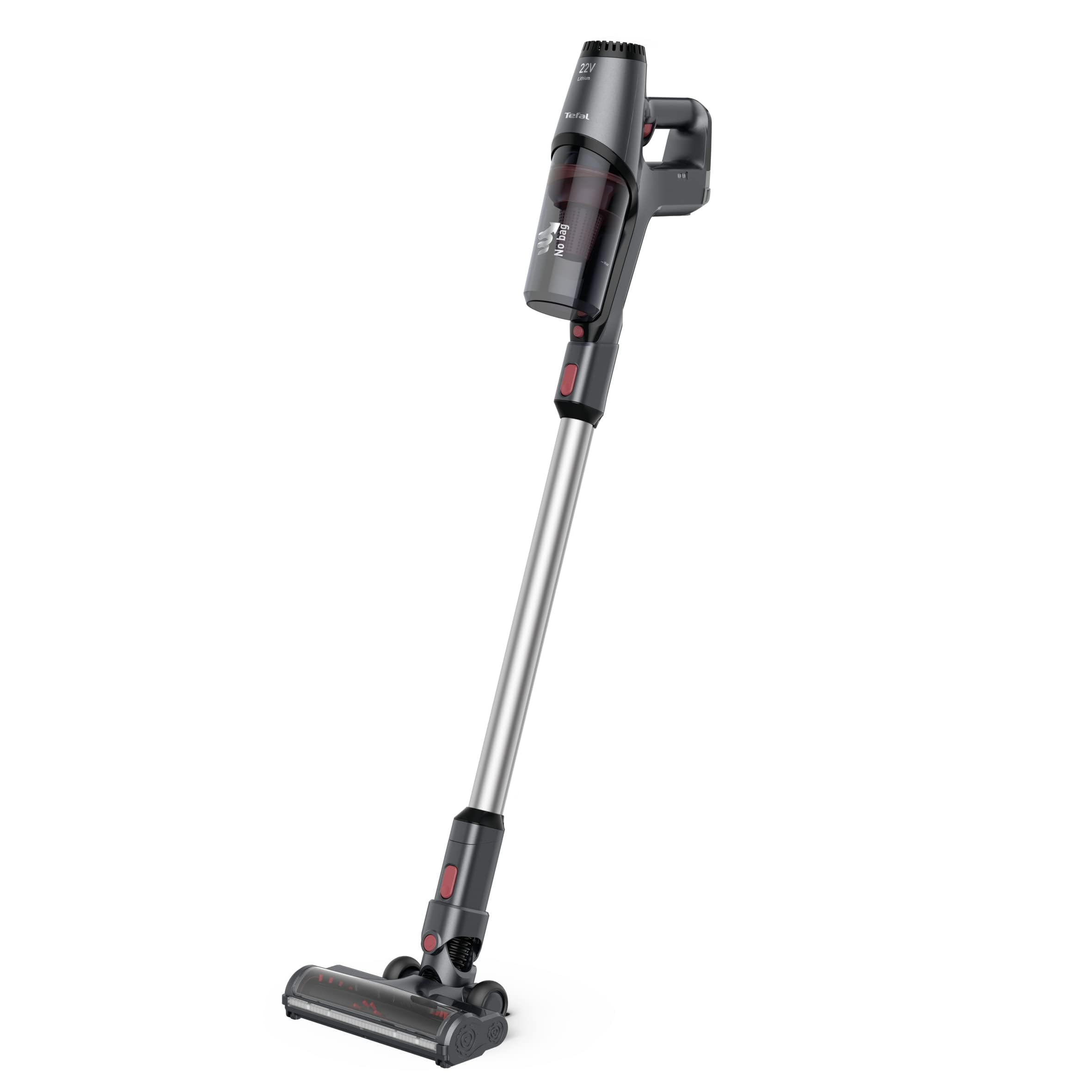
Figure 1: Tefal X-Pert 3.60 Cordless Stick Vacuum Cleaner with included accessories.
2. What's in the Box
Your Tefal X-Pert 3.60 package includes the following components:
- Main Motor Unit (Handheld Vacuum)
- Extension Tube
- Motorized Brush Head with LED lights
- Narrow Crevice Tool
- Easy Brush (2-in-1 brush tool)
- Wall Mount Base
- Charger
- Lithium-Ion Battery (integrated or separate, depending on model variant)

Figure 2: Detailed view of the box contents, highlighting the main unit, narrow crevice tool, easy brush, and wall mount base.
3. Setup and Assembly
Follow these steps to assemble your vacuum cleaner:
- Attach the Extension Tube: Insert the extension tube into the main motor unit until it clicks securely into place.
- Attach the Motorized Brush Head: Connect the motorized brush head to the other end of the extension tube, ensuring it locks firmly.
- Charging the Battery: Before first use, fully charge the vacuum cleaner. Connect the charger to the charging port on the main motor unit or the wall mount base, then plug it into a power outlet. The charging indicator will show the battery status.
- Wall Mount Installation (Optional): Choose a suitable location for the wall mount. Secure it to the wall using appropriate screws and anchors (not included). This provides convenient storage and charging.
4. Operating Instructions
4.1 Power On/Off and Mode Selection
- To turn the vacuum cleaner on or off, press the power button located on the main motor unit.
- The vacuum cleaner features 2 power levels. Press the mode selection button to cycle through the available suction modes (e.g., Eco, Max).
4.2 Floor Cleaning
For cleaning floors, attach the extension tube and the motorized brush head. The LED lights on the brush head illuminate dust particles, ensuring thorough cleaning on all floor types.

Figure 3: Vacuum cleaner in action, demonstrating the LED lights on the brush head for enhanced visibility.
4.3 Handheld Use and Accessories
Detach the extension tube and brush head to use the main motor unit as a handheld vacuum. Attach the appropriate accessory for specific cleaning tasks:
- Narrow Crevice Tool: Ideal for reaching tight spaces, corners, and edges.
- Easy Brush: Use for upholstery, curtains, and delicate surfaces. It combines a brush and a nozzle for versatile cleaning.
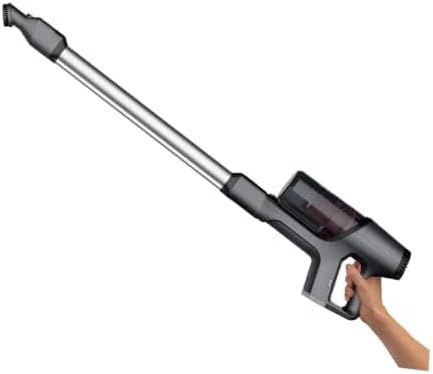
Figure 4: Using the vacuum in handheld mode with the extension tube for elevated cleaning.
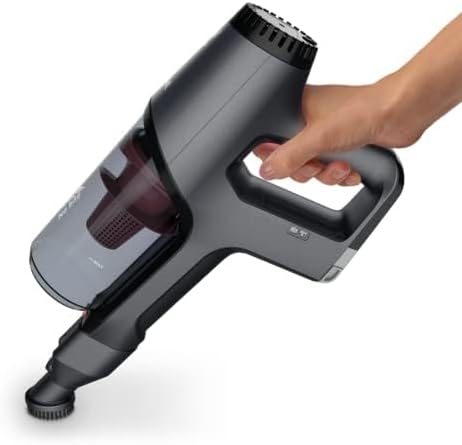
Figure 5: The main motor unit used as a compact handheld vacuum.
5. Maintenance
Regular maintenance ensures optimal performance and extends the life of your vacuum cleaner.
5.1 Emptying the Dustbin
- Ensure the vacuum cleaner is turned off and disconnected from the charger.
- Locate the dustbin release button, usually near the handle. Press it to detach the dustbin from the main motor unit.
- Open the dustbin lid and empty the contents into a waste bin.
- Close the dustbin lid and reattach the dustbin to the main motor unit until it clicks securely.
5.2 Cleaning the Filters
The foam filter should be cleaned regularly to maintain suction power. The product features a HEPA filtration system.
- Remove the dustbin as described above.
- Carefully remove the foam filter and any other filter components from the dustbin.
- Tap the filters gently to remove loose dust. For a more thorough clean, rinse the foam filter under cold running water.
- Allow all filter components to air dry completely for at least 24 hours before reassembling. Do not use a dryer or direct heat.
- Reassemble the filters and dustbin once completely dry.
5.3 Cleaning the Motorized Brush Head
- Turn off the vacuum cleaner.
- If hair or debris is tangled around the brush roll, use scissors to carefully cut and remove it.
- Wipe the exterior of the brush head with a damp cloth.
6. Troubleshooting
If you encounter issues with your vacuum cleaner, refer to the following common problems and solutions:
| Problem | Possible Cause | Solution |
|---|---|---|
| Vacuum cleaner does not turn on. | Battery is not charged or not properly inserted. | Ensure the battery is fully charged and correctly seated in the unit. |
| Reduced suction power. | Dustbin is full, filters are clogged, or there is a blockage. | Empty the dustbin. Clean or replace the filters. Check the brush head, extension tube, and nozzles for blockages. |
| Brush head not rotating. | Hair or debris tangled in the brush roll, or a blockage. | Turn off the vacuum and remove any obstructions from the brush roll. |
| Short operating time. | Battery not fully charged, or operating in Max power mode. | Ensure the battery is fully charged. Use Eco mode for longer runtime. Battery life naturally decreases over time. |
7. Specifications
Key technical specifications for the Tefal X-Pert 3.60 Cordless Stick Vacuum Cleaner:
| Feature | Detail |
|---|---|
| Brand | Tefal |
| Model Name | TY6983TR |
| Key Feature | Cordless |
| Filter Type | Foam |
| Surface Recommendation | All floors |
| Power Source | Battery Powered |
| Color | Grey |
| Portable | Yes |
| Number of Power Levels | 2 |
| Indoor/Outdoor Use | Indoor |
| Item Weight | 3.85 Kilogram |
| Controller Type | Push Button |
| Control Method | Touch |
| Form Factor | Stick |
| Country of Origin | France |
| Battery Description | Lithium Ion |
| Runtime | 45 minutes |
8. Warranty and Support
For detailed warranty information, please refer to the warranty card included with your product packaging. In case of technical issues or for customer support, please contact Tefal customer service through their official website or the contact information provided in your product documentation.


