
1. Introduction
Thank you for choosing the BOMGE 12-Channel Professional Audio Mixer. This manual provides essential information for the safe and efficient operation of your new audio mixer. Please read this manual thoroughly before use and retain it for future reference.
This professional audio mixer is designed for a wide range of applications, from home studios to live sound environments, offering versatile connectivity, digital effects, and robust performance.
2. Safety Information
- Power Supply: Use only the specified power adapter. Ensure the voltage matches the requirements of your region.
- Water and Moisture: Do not expose the unit to rain, moisture, or excessive humidity. Avoid placing liquid-filled objects on the mixer.
- Ventilation: Ensure adequate ventilation around the unit. Do not block ventilation openings.
- Heat Sources: Keep the unit away from heat sources such as radiators, heat registers, stoves, or other heat-producing appliances.
- Cleaning: Clean only with a dry cloth. Disconnect power before cleaning.
- Servicing: Do not attempt to service this unit yourself. Refer all servicing to qualified service personnel.
- Grounding: Ensure proper grounding to prevent electric shock.
3. Product Overview and Features
The BOMGE 12-Channel Professional Audio Mixer integrates advanced features for comprehensive audio control and processing.

Image 3.1: Front view of the BOMGE 12-Channel Professional Audio Mixer.
- BOMGE PRO DSP 3.0: Features an upgraded DSP system with 24 integrated effects, including reverbs, choruses, and delays, for enhanced audio processing.
- USB Soundcard and Audio Interface: Allows direct recording and connection to MAC or PC, providing universal digital audio file compatibility for studio or personal use.
- Wireless Bluetooth Streaming: Equipped with Bluetooth for wireless audio input, offering a range of approximately 15 feet.
- 48V Phantom Power: Provides a reliable power source for both condenser and dynamic microphones.
- Anti-Feedback Function: Includes a built-in anti-feedback button to suppress microphone whistle while preserving original audio quality.
- 7-Band Stereo Graphic Equalizer: Integrated equalizer for precise adjustment of audio intensity and frequency, ensuring balanced sound.

Image 3.2: Comparison highlighting the new design features, including 24 DSP chips and a 7-band equalizer.
4. Setup
Follow these steps to set up your BOMGE 12-Channel Audio Mixer:
- Unpacking: Carefully remove the mixer from its packaging. Inspect for any signs of damage.
- Placement: Place the mixer on a stable, flat surface, ensuring adequate ventilation around the unit.
- Power Connection: Connect the provided power adapter to the mixer's power input and then to a suitable electrical outlet. Do not power on the unit yet.
- Input Connections:
- Microphones: Connect XLR microphones to the XLR inputs (Channels 1-12).
- Line-Level Devices: Connect instruments or other line-level devices to the 1/4-inch TRS/TS inputs.
- Stereo Inputs: Use the stereo line inputs for devices like keyboards or media players.

Image 4.1: Detail of the 12 input channels, featuring 2-in-1 design for XLR and 1/4-inch connections.
- Output Connections:
- Main Outputs: Connect your main speakers or power amplifier to the MAIN OUTPUTS (L/R) using 1/4-inch TRS cables.
- Headphones: Connect headphones to the 1/4-inch HEADPHONE jack.
- Power On: Once all connections are secure, switch on the mixer's power button.
5. Operating Instructions
5.1 Basic Operation
- Gain Control: Adjust the GAIN knob for each input channel to set the input level. Aim for a strong signal without clipping (indicated by the PEAK LED).
- Equalization (EQ): Use the HIGH, MID, and LOW knobs on each channel to adjust the tonal characteristics of the input signal.
- Channel Faders: Use the individual channel faders to control the volume of each input in the main mix.
- Main Faders: Adjust the MAIN L/R faders to control the overall output volume.
5.2 Bluetooth Connectivity
To stream audio wirelessly via Bluetooth:
- Activate Bluetooth mode on the mixer (refer to the display for mode selection).
- Enable Bluetooth on your mobile device (smartphone, tablet, etc.).
- Search for available devices and select "BOMGE Mixer" (or similar name) to pair.
- Once paired, audio from your device will stream through the mixer.

Image 5.1: Illustration of Bluetooth wireless streaming from a mobile device to the mixer.
5.3 USB/PC Connection
The mixer can connect to a computer for recording or playback:
- Connect the mixer to your computer using a USB cable.
- Your computer should recognize the mixer as an audio interface. Select it as the input/output device in your operating system's sound settings or your Digital Audio Workstation (DAW) software.
- You can now record audio from the mixer to your computer or play audio from your computer through the mixer.
5.4 DSP Effects
The mixer features 24 integrated DSP effects:
- Use the FX/DSP section controls to browse and select desired effects (e.g., Reverb, Chorus, Delay).
- Adjust the PARAMETER knob to fine-tune the selected effect.
- Use the FX SEND knob on each channel to send a portion of that channel's signal to the effects processor.
- Adjust the FX RETURN fader to control the overall volume of the effects in the main mix.

Image 5.2: Display of the 24 integrated DSP effects available on the mixer.
5.5 Phantom Power (+48V)
Phantom power is required for condenser microphones:
- Ensure all microphones are connected before activating phantom power.
- Press the +48V PHANTOM POWER button. An indicator light will illuminate.
- Caution: Do not connect or disconnect microphones while phantom power is active to prevent damage to equipment.

Image 5.3: Visual representation of the 48V Phantom Power feature.
5.6 7-Band Stereo Graphic Equalizer
The built-in graphic equalizer allows for precise frequency adjustments:
- Locate the 7-band graphic equalizer section on the mixer.
- Adjust the faders for each frequency band (e.g., 63Hz, 160Hz, 400Hz, 1kHz, 2.5kHz, 6.3kHz, 16kHz) to boost or cut specific frequencies in the main mix.
- Use this to tailor the overall sound to your environment or preference.
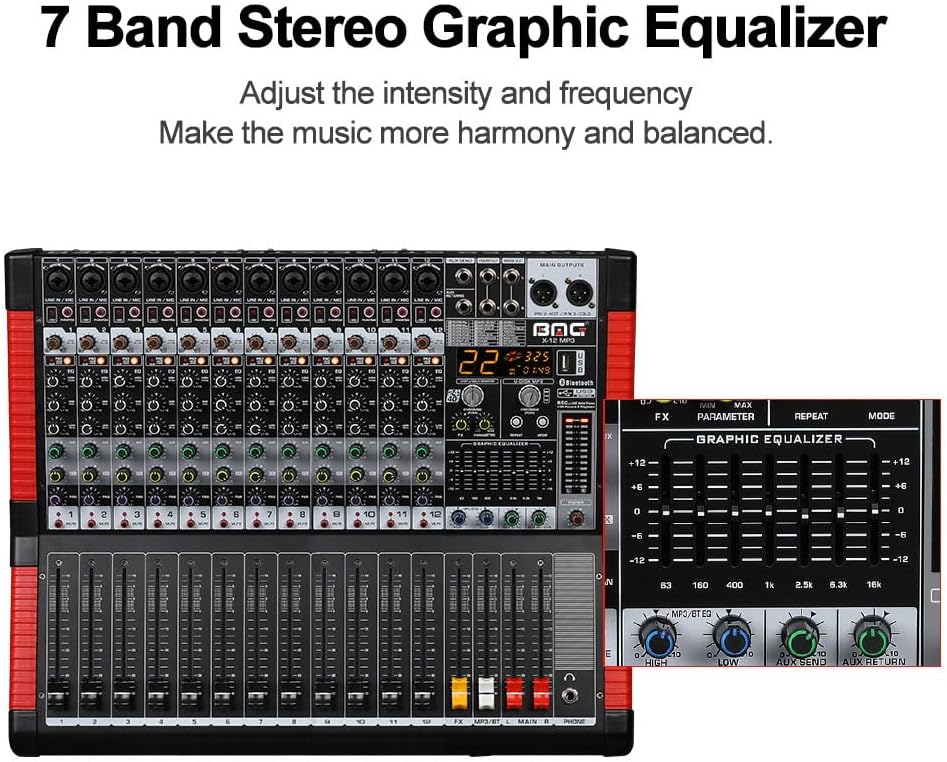
Image 5.4: Close-up of the 7-band stereo graphic equalizer controls.
6. Maintenance
- Cleaning: Use a soft, dry cloth to clean the mixer's surface. Avoid abrasive cleaners or solvents.
- Storage: When not in use, store the mixer in a cool, dry place, away from direct sunlight and extreme temperatures.
- Dust Protection: Consider using a dust cover to protect the controls and faders from dust accumulation.
7. Troubleshooting
- No Sound Output:
- Check all power connections and ensure the mixer is turned on.
- Verify that main output faders and individual channel faders are raised.
- Ensure speakers/amplifiers are powered on and connected correctly.
- Check input source connections and gain levels.
- Distorted Sound:
- Reduce input GAIN levels if the PEAK LED is frequently illuminating.
- Lower channel faders or main faders if the output is clipping.
- Check cables for damage.
- Hum or Noise:
- Ensure all equipment is properly grounded.
- Check for faulty cables or connections.
- Keep audio cables away from power cables.
- Bluetooth Connection Issues:
- Ensure the mixer is in Bluetooth mode and discoverable.
- Check that your device's Bluetooth is enabled and within range (approx. 15 ft).
- Try unpairing and re-pairing the device.
- Microphone Whistle (Feedback):
- Press the Anti-Feedback button on the mixer.
- Adjust microphone position relative to speakers.
- Reduce microphone gain or specific EQ frequencies causing feedback.
8. Specifications

Image 8.1: Front, side, and rear views with key dimensions of the 12-channel mixer.
| Feature | Specification |
|---|---|
| Brand | BOMGE |
| Model Number | 12 channel |
| Number of Channels | 12 |
| Connectivity Technology | Bluetooth, USB |
| Output Connector Type | TRS |
| Power Source | Corded Electric |
| Item Weight | 17.21 pounds (approx. 7.8 kg) |
| Package Dimensions | 22.4 x 22.2 x 6.8 inches (approx. 56.9 x 56.4 x 17.3 cm) |
9. Warranty and Support
For warranty information and technical support, please refer to the documentation included with your purchase or contact BOMGE customer service through their official channels. Keep your proof of purchase for any warranty claims.


