
1. Overview
This manual provides detailed instructions for the CASIO Wave Ceptor LWA-M160L-8A2JF Ladies' Radio Solar Watch. This timepiece combines the convenience of solar power with the accuracy of radio-controlled timekeeping, ensuring precise time display wherever you are within the reception range.
Key features include Multi-Band 6 radio wave reception, Tough Solar charging, 5 ATM water resistance, World Time, and various daily functions.

Front view of the CASIO Wave Ceptor LWA-M160L-8A2JF watch, featuring a silver-tone case, white dial with gold-tone hour markers and hands, a digital display at 6 o'clock, and a battery indicator at 9 o'clock. The watch is fitted with a taupe leather strap.
2. Initial Setup
2.1 Initial Charging (Tough Solar)
Your watch is equipped with a solar charging system. Before initial use, or if the watch has been stored in darkness, ensure it is fully charged. Expose the watch face to light for several hours. Even faint light can generate power, but direct sunlight or strong fluorescent light will charge it more efficiently.
- Place the watch where the dial is exposed to light.
- Avoid placing the watch in extremely hot conditions during charging.
- A full charge from a completely discharged state can take approximately 8 hours in direct sunlight.

This image details the Tough Solar (solar charging system) technology. It shows how the watch converts light from sources like sunlight and fluorescent lamps into power using a small solar panel and stores it in a large-capacity secondary battery, ensuring stable operation of various functions.
2.2 Setting Your Home City and Time Zone
The watch's radio reception and time display are based on your selected Home City. Refer to the detailed instruction manual (available online from CASIO) for specific button operations to set your Home City. This setting determines which standard time signal the watch attempts to receive.
2.3 Radio Wave Reception
The watch automatically receives time calibration signals up to 6 times a day (5 times for China signals) to maintain accurate time. Manual reception is also possible.
- Automatic Reception: Occurs typically overnight. Ensure the watch is placed near a window or in an area with good signal reception.
- Manual Reception: Consult the full user manual for instructions on initiating manual radio wave reception.
- If radio wave reception is not possible, the watch operates with normal quartz accuracy (average monthly difference of ±30 seconds).

This image illustrates the Multi-Band 6 radio wave reception capabilities of the watch, covering standard time signals from Japan (2 stations), North America, Europe, and China. It highlights the geographical reach for automatic time correction.
3. Operating the Watch
3.1 Basic Timekeeping
The watch displays time both analogically (hands) and digitally. The digital display at the 6 o'clock position can be switched to show date, seconds, time, or day of the week.
- 12/24 Hour Format: The digital display can be switched between 12-hour and 24-hour formats.
- Full Auto Calendar: The calendar automatically adjusts for month lengths and leap years until the year 2099.
3.2 World Time
The World Time function allows you to view the current time in 48 cities (31 time zones) around the globe, including UTC (Coordinated Universal Time). Daylight Saving Time (DST) settings can also be configured.
3.3 Alarm and Hourly Time Signal
Set a daily alarm to sound at a specific time. The watch also features an hourly time signal that beeps every hour on the hour.
3.4 Stopwatch
The stopwatch measures elapsed time in 1/100-second increments, with a maximum measurement capacity of 60 minutes.
3.5 Timer
The countdown timer can be set in 1-minute units, up to a maximum of 60 minutes, and measures in 1-second units.
3.6 LED Light
Press the light button to illuminate the digital display. The LED light includes an afterglow feature, keeping the display lit for a short period after the button is released.
3.7 Operation Tone ON/OFF
The watch allows you to enable or disable the button operation tone.
4. Maintenance
4.1 Charging Guidelines
To ensure continuous operation, regularly expose the watch to light. Avoid prolonged storage in dark places, as this can deplete the battery. The battery level indicator at the 9 o'clock position shows the current charge status.
- Power Saving Function: When left in darkness for a certain period, the watch automatically enters a power-saving state to conserve energy.
- Battery Life: From a full charge, the watch can operate for approximately 8 months with normal use without further light exposure, or approximately 22 months in power-saving mode.
4.2 Water Resistance
This watch features 5 ATM (50 meters) water resistance. This means it is suitable for everyday use and can withstand splashes, rain, and brief immersion in water. However, it is not suitable for swimming, diving, or showering with hot water.
- Do not operate buttons while the watch is wet or submerged.
- After exposure to saltwater, rinse the watch with fresh water and wipe it dry.
4.3 Cleaning
Wipe the watch and band with a soft, dry cloth to remove dirt and moisture. For leather bands, avoid excessive moisture and harsh chemicals.
5. Troubleshooting
- Time is incorrect or not adjusting:
Ensure the watch is sufficiently charged by exposing it to bright light. Verify that your Home City setting is correct. Try performing a manual radio wave reception in an area with good signal strength (e.g., near a window, away from electronic interference). - Digital display is blank or showing low battery indicator:
The watch may be in a low power state or power-saving mode. Expose the watch to bright light for an extended period to charge it. - Hands are not aligned with the digital time:
This may require a hand home position correction. Refer to the full CASIO user manual for your specific model for instructions on how to perform this adjustment. - Watch stops operating:
Ensure the watch is fully charged. If the issue persists after adequate charging, contact CASIO customer support.
6. Specifications
| Feature | Description |
|---|---|
| Model Number | LWA-M160L-8A2JF |
| Brand | CASIO |
| Power Source | Tough Solar (Solar Charging System) |
| Battery Type | 1 Lithium Ion Battery (included) |
| Water Resistance | 5 ATM (50 meters) |
| Radio Reception | Multi-Band 6 (Japan 2 stations, China, USA, UK, Germany). Automatic reception up to 6 times/day (China: 5 times/day). Manual reception. |
| World Time | 48 cities (31 time zones, daylight saving time), UTC display. |
| Stopwatch | 1/100 second, 60-minute counter. |
| Timer | 1-minute unit, settable up to 60 minutes, 1-second measurement. |
| Alarm | Daily Alarm (1 set) and Hourly Time Signal. |
| Calendar | Full Auto Calendar (pre-programmed until 2099). |
| Light | LED Light (with afterglow). |
| Other Functions | Battery Level Indicator, Power Saving Function, Operation Tone ON/OFF, 12/24 Hour Format, LCD Display Switching (Date, Seconds, Time, Day of week). |
| Battery Life (without solar recharge) | Approx. 8 months (normal use), Approx. 22 months (power saving mode). |
| Dimensions | 11.6 x 9.7 x 7.9 cm (Package Size) |
| Weight | 160 g (Package Weight) |
| Department | Ladies |
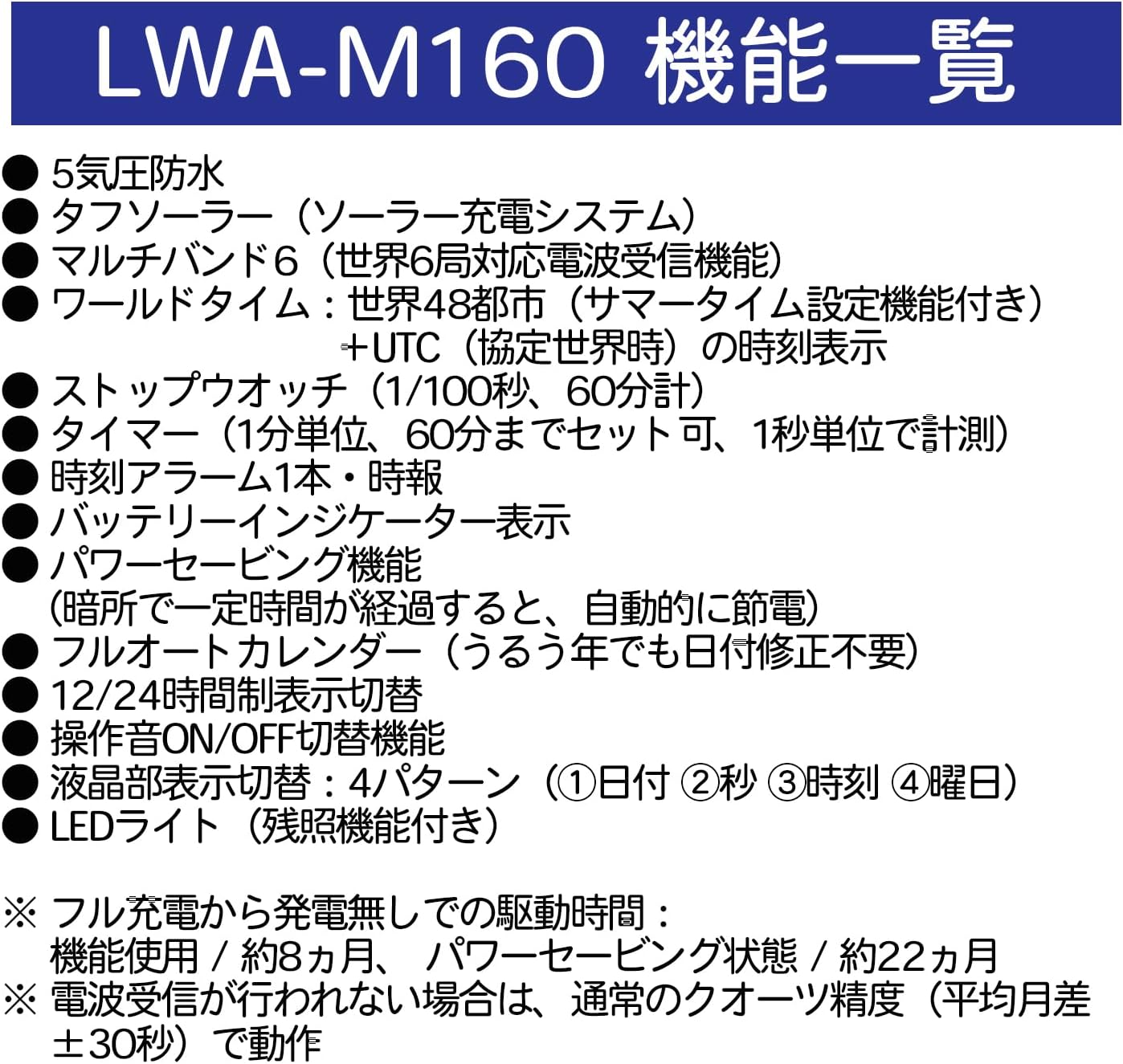
This image presents a comprehensive list of the LWA-M160 series functions, including 5 ATM water resistance, Tough Solar, Multi-Band 6, World Time, Stopwatch, Timer, Daily Alarm, Battery Indicator, Power Saving, Full Auto Calendar, 12/24 Hour Format, Operation Tone ON/OFF, LCD Display Switching (4 patterns), and LED Light.
7. Warranty and Support
Your CASIO Wave Ceptor watch is covered by a manufacturer's warranty. Please refer to the warranty card included with your product for specific terms, conditions, and duration.
For technical support, repairs, or further inquiries, please contact CASIO customer service in your region. Contact information can typically be found on the CASIO official website or in the documentation provided with your watch.
When contacting support, please have your watch model number (LWA-M160L-8A2JF) and purchase details readily available.


