
1. Introduction
This manual provides detailed instructions for the installation, operation, and maintenance of your ANRAN 8-Channel 1080P Wired Home Security Camera System. This system is designed to provide reliable 24/7 surveillance for your home or business, featuring high-definition video, motion detection, and remote access capabilities.

Figure 1.1: ANRAN 8-Channel 1080P Wired Home Security Camera System components.
2. What's Included
Please verify that all items listed below are present in your package:
- 1 x 8CH Security DVR (with pre-installed 1TB Hard Drive)
- 4 x 1080P Security Cameras
- 1 x Power Adapter for DVR
- 1 x Power Adapter for Cameras
- 1 x 1-to-4 Power Adapter Cable
- 4 x BNC Video Cables
- 4 x 3M Adhesive Tape

Figure 2.1: Contents of the ANRAN Security Camera System package.
3. Product Features
- 1080P HD Video: Capture clear and detailed footage with 1920x1080 resolution.
- 1TB Hard Drive: Pre-installed for 24/7 continuous recording and ample storage.
- Expandable 8CH DVR: Supports up to 8 cameras, allowing you to add four more cameras to the included four.
- IP65 Weatherproof Cameras: Suitable for both indoor and outdoor installation, designed to withstand various weather conditions.
- Night Vision: Equipped with 18 IR-LEDs for clear black and white video in low-light conditions.
- Customizable Motion Detection: Define specific zones to reduce false alarms and focus on critical areas.
- Remote Viewing: Access live and recorded video from anywhere via the ARCCTV mobile application.

Figure 3.1: Versatile camera placement and weather resistance.
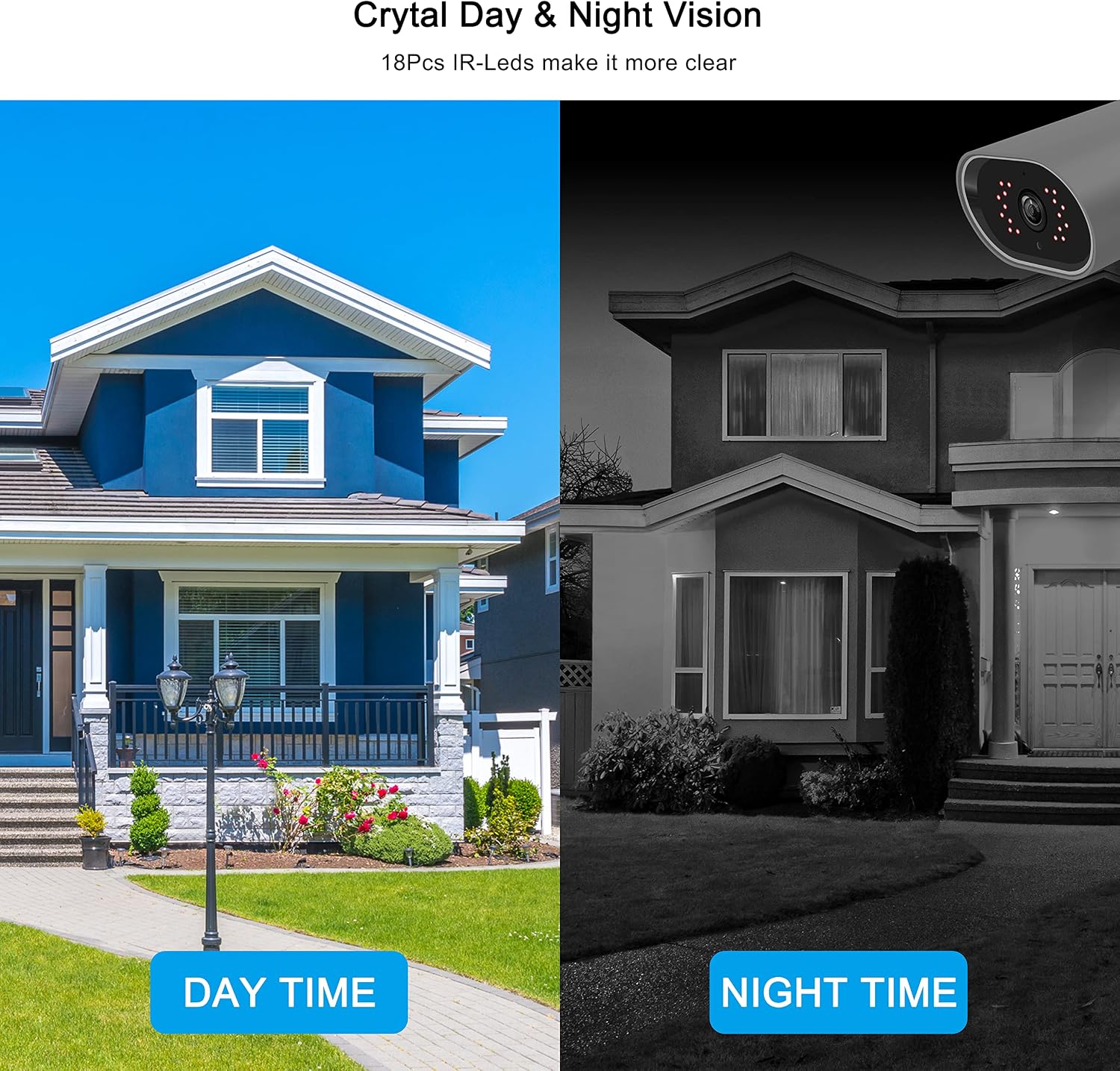
Figure 3.2: Crystal clear day and night vision.
4. Setup Guide
The ANRAN security system is designed for easy plug-and-play installation.
- Connect Cameras to DVR: Use the provided BNC cables to connect each camera to the corresponding BNC port on the back of the DVR.
- Connect DVR to Monitor: Connect the DVR to your monitor using the HDMI cable included in the package. Alternatively, you can use a VGA cable if your monitor supports it.
- Power On: Connect the power adapters to the DVR and cameras, then plug them into a power outlet. The system will power on automatically.
- Initial Setup: Follow the on-screen prompts to complete the initial setup, including setting up a password and configuring basic settings.
- Network Connection (Optional for Remote Viewing): Connect the DVR to your router using an Ethernet cable for remote access.
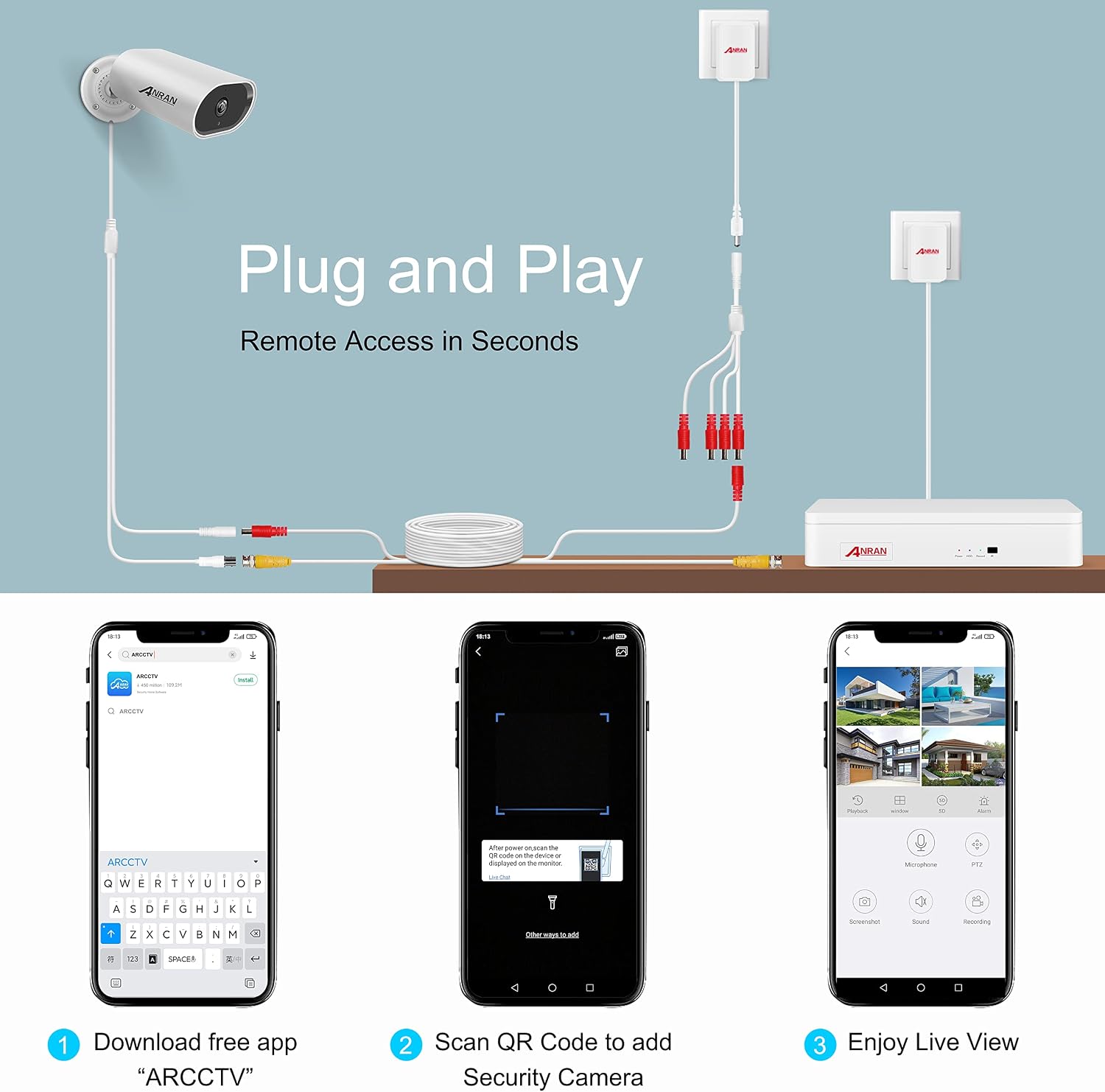
Figure 4.1: System connection diagram for quick setup.
5. Operating the System
5.1 Remote Viewing via ARCCTV App
To view your cameras remotely, download the free ARCCTV app on your smartphone or tablet. After connecting your DVR to the internet:
- Download the ARCCTV app from your device's app store.
- Register an account and log in.
- Scan the QR code on your DVR or manually add the device ID to link your system.
- Enjoy live view and playback from anywhere in the world.
5.2 Motion Detection
The system features customizable motion detection zones. You can define specific areas within the camera's view to trigger alerts, minimizing false notifications from irrelevant movements.
- Access motion detection settings through the DVR's menu or the ARCCTV app.
- Draw or select areas where you want motion to be detected.
- Configure alert notifications (e.g., push notifications to your phone).

Figure 5.1: Instant alerts for detected motion.
5.3 Video Playback
With the pre-installed 1TB hard drive, the system records 24/7. You can easily playback recorded footage:
- On the DVR directly: Use the DVR's interface to select dates and times for playback.
- Via the ARCCTV app: Search for specific days, hours, or minutes to review recorded events.

Figure 5.2: Continuous recording and remote video playback.
5.4 Official Product Video
Video 5.1: Official ANRAN B3 Wired Home Security Camera System overview. This video demonstrates the system's features and capabilities, including its wired connection, high-definition video, and robust design.
6. Maintenance
To ensure optimal performance and longevity of your ANRAN security system, consider the following maintenance tips:
- Clean Lenses: Periodically wipe camera lenses with a soft, damp cloth to remove dust and dirt that may obscure the view.
- Check Cables: Ensure all BNC and power cables are securely connected and free from damage.
- DVR Ventilation: Keep the DVR in a well-ventilated area to prevent overheating. Avoid placing objects on top of the DVR that could block airflow.
- Software Updates: Check the ANRAN website or ARCCTV app for any available firmware or software updates to ensure your system has the latest features and security enhancements.
7. Troubleshooting
If you encounter issues with your ANRAN security system, refer to the following common troubleshooting steps:
- No Video Signal:
- Check all cable connections (BNC, HDMI/VGA, power) to ensure they are secure.
- Verify that the camera and DVR are receiving power.
- Ensure the correct input source is selected on your monitor.
- If the DVR frequently loses signal or overheats, ensure adequate ventilation and consider contacting support.
- No Remote Access:
- Confirm the DVR is connected to the internet via Ethernet cable.
- Check your router's internet connection.
- Ensure the ARCCTV app is updated to the latest version.
- Verify that the device is correctly added to your ARCCTV account.
- Motion Detection Not Working:
- Review motion detection settings in the DVR menu or app to ensure zones are correctly configured and sensitivity is appropriate.
- Check for any obstructions in the camera's field of view.
- Poor Image Quality:
- Clean the camera lens.
- Ensure the camera is properly focused (if adjustable).
- Check for strong light sources directly facing the camera, especially at night.
8. Specifications
Detailed technical specifications for the ANRAN 8-Channel 1080P Wired Home Security Camera System:
| Feature | Specification |
|---|---|
| Brand | ANRAN |
| Model Number | K04A2796 |
| Connectivity Technology | Wired |
| Video Capture Resolution | 1080p, 1920p |
| Number of Channels | 8 |
| Memory Storage Capacity | 1 TB (pre-installed) |
| Color | White |
| Power Source | Corded Electric |
| Item Dimensions (L x W x H) | 14 x 5 x 8 inches |
| Item Weight | 7.87 pounds |
| Operating System | Proprietary (ARCCTV app compatible) |
| Compatible Devices | Personal Computers, Cameras |
| Signal Format | Analog |
| Low Light Technology | Night Vision |
| Frame Rate | 30 fps |
| Recording Mode | Motion Detection, Continuous |
| Optical Sensor Technology | CMOS |
| Lens Type | Fixed |
| Video Input | BNC |
| Date First Available | October 7, 2021 |

Figure 8.1: DVR and Camera component overview.
9. Warranty and Support
ANRAN offers professional lifetime technical support for this product. If you have any questions, issues, or require assistance with your security camera system, please do not hesitate to contact ANRAN customer support. Refer to the contact information provided in your product packaging or on the official ANRAN website.


